
Slack App Manifest Example: YAML and JSON That Worked, Tested
A Slack app manifest we used to create a working app on 1 October 2026, in YAML and JSON, plus the validation errors from broken versions and real output from apps.manifest.validate, export, create and update.
A Slack app manifest is a YAML or JSON file that describes an app: its name, bot user, scopes, slash commands, events and settings. Paste it at api.slack.com/apps > Create New App > From a manifest, or send it to apps.manifest.create, and Slack builds the app from it. The manifest below created a working app on 1 October 2026: we installed it, used its bot token, ran its slash command over Socket Mode and opened modals with it.
The manifest, in YAML
display_information:
  name: api-lab-1001
  description: Throwaway test app for API tests, deleted after use
features:
  bot_user:
    display_name: api-lab
    always_online: false
  slash_commands:
    - command: /lab-modal
      description: Open a test modal
      should_escape: false
oauth_config:
  redirect_urls:
    - http://localhost:8765/callback
  scopes:
    bot:
      - chat:write
      - chat:write.public
      - channels:history
      - channels:read
      - channels:join
      - commands
      - incoming-webhook
    user:
      - chat:write
settings:
  interactivity:
    is_enabled: true
  org_deploy_enabled: false
  socket_mode_enabled: true
  token_rotation_enabled: false
The same manifest in JSON
{
  "display_information": {
    "name": "api-lab-1001",
    "description": "Throwaway test app for API tests, deleted after use"
  },
  "features": {
    "bot_user": {
      "display_name": "api-lab",
      "always_online": false
    },
    "slash_commands": [
      {
        "command": "/lab-modal",
        "description": "Open a test modal",
        "should_escape": false
      }
    ]
  },
  "oauth_config": {
    "redirect_urls": [
      "http://localhost:8765/callback"
    ],
    "scopes": {
      "bot": [
        "chat:write",
        "chat:write.public",
        "channels:history",
        "channels:read",
        "channels:join",
        "commands",
        "incoming-webhook"
      ],
      "user": [
        "chat:write"
      ]
    }
  },
  "settings": {
    "interactivity": {
      "is_enabled": true
    },
    "org_deploy_enabled": false,
    "socket_mode_enabled": true,
    "token_rotation_enabled": false
  }
}
What each part did in our app:
- •
bot_usergives the app a bot and anxoxb-token. Slash commands and bot scopes fail validation without it. - •
slash_commandswith nourlworks becausesocket_mode_enabledis true. Slack sends the command over the WebSocket instead. - •
interactivity.is_enabledwith norequest_urlis also allowed with Socket Mode. Our modals and their submissions arrived that way; see the expired_trigger_id test. - •
redirect_urlslists where OAuth may send the user back.http://localhostis allowed; our redirect URL test covers what else is. - •
scopes.userasks for a user token as well. The bot scopes are what most apps need.
The Socket Mode connection needs an app-level token with connections:write. A manifest cannot create it. Generate it under Basic Information > App-Level Tokens after the app exists.
Creating it in the web UI
The dialog has a JSON and a YAML tab. We pasted the JSON; clicking YAML translated it, and the YAML above is Slack's own translation. The editor checks the manifest as you type and disables Next while errors remain. With bot_user removed and a scope that does not exist, it showed:
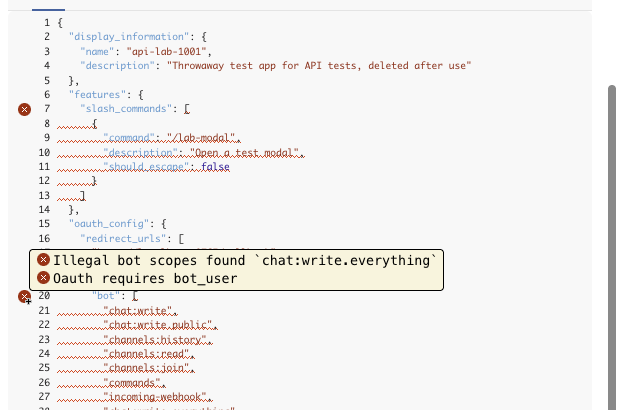
The dialog also said "We can't translate a manifest with errors", and the YAML tab stayed disabled. With the working manifest, Next led to a review step:
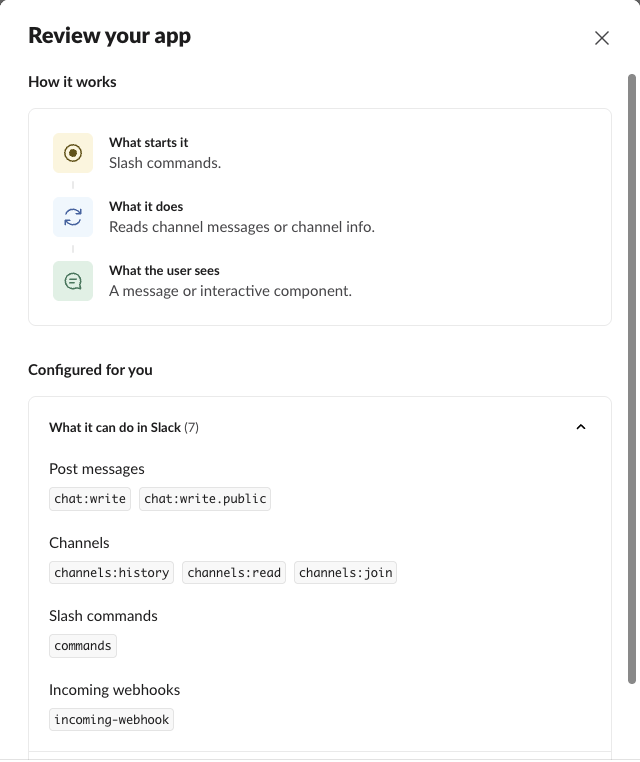
It listed the 7 bot scopes and left out the user scope, which was still in the app afterwards. Create made the app without installing it. We installed it in a separate step.
Never appear "away" on Slack again
Cloud-based. No downloads. Works 24/7 even when your laptop is off.
Validation errors we got
apps.manifest.validate returns the same checks as the editor, with a JSON pointer to each problem. For the broken manifest in the screenshot:
{
  "ok": false,
  "error": "invalid_manifest",
  "errors": [
    {
      "code": "illegal_bot_scopes",
      "message": "Illegal bot scopes found `chat:write.everything`",
      "pointer": "/oauth_config/scopes/bot"
    },
    {
      "code": "requires_bot_user",
      "message": "Oauth requires bot_user",
      "pointer": "/oauth_config/scopes/bot",
      "related_component": "bot_user"
    },
    {
      "code": "requires_bot_user",
      "message": "Slash Commands requires bot_user",
      "pointer": "/features/slash_commands",
      "related_component": "bot_user"
    }
  ]
}
Other changes to the working manifest, one at a time:
| Change | code | message |
|---|---|---|
Settings key socket_mode instead of socket_mode_enabled | failed_constraint | invalid additional property: socket_mode |
No display_information.name | missing_field | missing required field: name |
| App name of 36 characters | failed_constraint | must be less than 36 characters |
Command lab-modal without the slash | failed_constraint | input must match regex pattern: ^\/ |
| Socket Mode off, no URLs | four errors | Interactivty requires a Request URL; Slash Commands require URLs; and two more |
Redirect URL myapp://oauth/callback | invalid_redirect_urls | Invalid redirect URLs myapp://oauth/callback |
The same, with "pkce_enabled": true | none | ok: true |
The YAML text sent as manifest | none listed | invalid_manifest with no errors array |
The last row matters if you script it: the API takes JSON only. Convert YAML first, for example with json.dumps(yaml.safe_load(text)) in Python. Note the spelling in the Socket Mode case; Slack's own message says "Interactivty requires a Request URL".
The manifest API
The apps.manifest.* methods need an app configuration token, not a bot or user token. A bot token got this from apps.manifest.export:
{
  "ok": false,
  "error": "missing_scope",
  "needed": "app_configurations:read",
  "provided": "chat:write,chat:write.public,channels:join,commands,channels:history,channels:read,incoming-webhook"
}
Generate a configuration token at the bottom of api.slack.com/apps, under "Your App Configuration Tokens", for one workspace. It came with a refresh token and expired after 12 hours: tooling.tokens.rotate with the refresh token returned a new pair, with exp 43,200 seconds after iat.
apps.manifest.export returned the live manifest of our app. Slack had added three settings we never wrote, pkce_enabled: false, app_level_token_rotation_enabled: false and is_mcp_enabled: false:
{
  "ok": true,
  "manifest": {
    "display_information": {
      "name": "api-lab-1001",
      "description": "Throwaway test app for API tests, deleted after use"
    },
    "features": {
      "bot_user": {
        "display_name": "api-lab",
        "always_online": false
      },
      "slash_commands": [
        {
          "command": "/lab-modal",
          "description": "Open a test modal",
          "should_escape": false
        }
      ]
    },
    "oauth_config": {
      "redirect_urls": [
        "http://localhost:8765/callback"
      ],
      "scopes": {
        "user": [
          "chat:write"
        ],
        "bot": [
          "chat:write",
          "chat:write.public",
          "channels:history",
          "channels:read",
          "channels:join",
          "commands",
          "incoming-webhook"
        ]
      },
      "pkce_enabled": false
    },
    "settings": {
      "event_subscriptions": {
        "bot_events": [
          "message.channels"
        ]
      },
      "interactivity": {
        "is_enabled": true
      },
      "org_deploy_enabled": false,
      "socket_mode_enabled": true,
      "token_rotation_enabled": false,
      "app_level_token_rotation_enabled": false,
      "is_mcp_enabled": false
    }
  }
}
apps.manifest.update replaces the whole manifest; send every section, not only the change. Adding a message.channels bot event returned:
{
  "ok": true,
  "app_id": "A0C5PB7LM9T",
  "permissions_updated": false
}
The event started arriving over Socket Mode without a reinstall, because the app already had channels:history. apps.manifest.create made our second app in one call and returned its credentials, which we replace here:
{
  "ok": true,
  "app_id": "A0C6P5BLCSU",
  "credentials": {
    "client_id": "11256386461409.12227181692912",
    "client_secret": "...",
    "verification_token": "...",
    "signing_secret": "..."
  },
  "oauth_authorize_url": "https://slack.com/oauth/v2/authorize?client_id=11256386461409.12227181692912&scope=chat:write&user_scope=chat:write",
  "team_id": "T0B7JBCDKC1",
  "team_domain": "slack-0yr1948"
}
FAQ
Can I delete an app with the API?
Yes. apps.manifest.delete with the configuration token and the app_id returned {"ok": true} for our second test app, and an export of the same app_id afterwards returned app_not_found. In the UI it is Basic Information > Delete App.
Is manifest.json the same as manifest.yaml?
Yes, the same fields in two formats. The web dialog converts between them; the API reads JSON only.
Stop Jiggling Your Mouse.
Join hundreds of remote workers who never worry about their Slack status. Set it up once, stay green forever.
Related Articles
Slack OAuth Redirect URL on localhost: What Slack Accepts, Tested
We added localhost, 127.0.0.1, https, custom-scheme and tunnel redirect URLs to a Slack app on 1 October 2026, then ran the OAuth flow against a local server. What was accepted, how Slack matches the URL, and the PKCE rules.
Slack chat.delete API: Who Can Delete What, Tested
chat.delete removes a message by channel and ts. We deleted bot messages, a person's messages, a thread parent and an already deleted message with bot and user tokens, and list every response, including cant_delete_message and the tombstone a thread parent leaves.
Slack expired_trigger_id: How Long a trigger_id Lasts, Measured
We opened a Slack modal with views.open after delays from 0 to 5 seconds, 28 times, on 1 October 2026. The success rate per delay, the exact errors, and the Bolt code that avoids expired_trigger_id.