
Slack thread_ts: Reply in a Thread With the API, Tested
To reply in a Slack thread, pass the parent message's ts as thread_ts. We tested it with a bot token, a webhook and Socket Mode events on 1 October 2026, including the values that silently post to the channel instead.
To reply in a Slack thread from code, post with chat.postMessage and set thread_ts to the parent message's ts. Add reply_broadcast: true to also show the reply in the channel. Every message has its own ts; thread_ts is the ts of the thread's first message, and every reply carries it. We ran the calls below on 1 October 2026 in a test workspace with a throwaway bot app. Sending a first message from Python is covered in send a Slack message from Python, and editing one in Slack chat.update, tested; this page is only about threads.
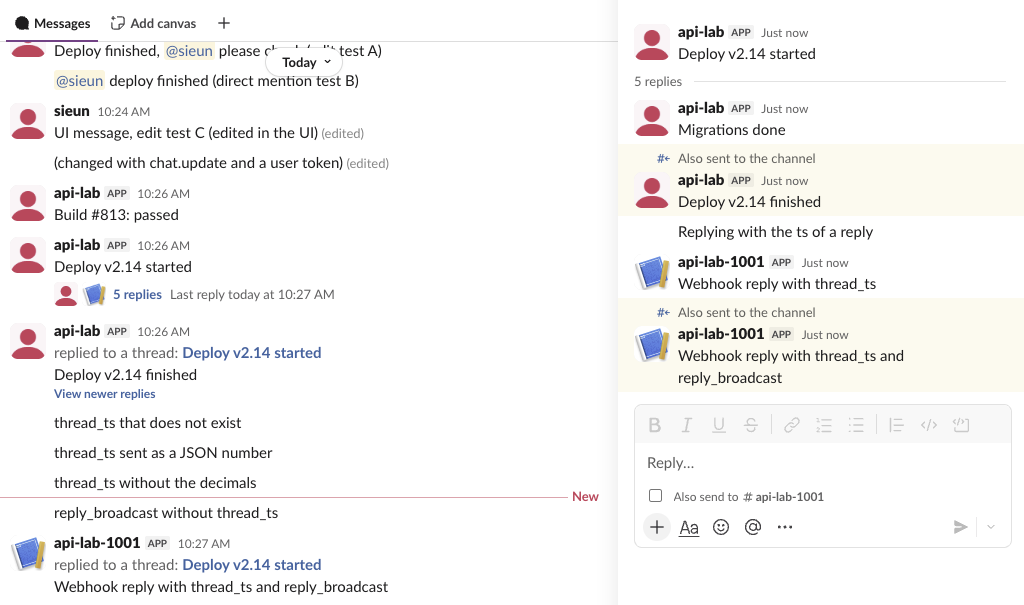
ts and thread_ts in a real thread
import os
from slack_sdk import WebClient

client = WebClient(token=os.environ["SLACK_BOT_TOKEN"])
channel = os.environ["CHANNEL"]

parent = client.chat_postMessage(channel=channel, text="Release 3.2 checklist")
root = parent["ts"]
client.chat_postMessage(channel=channel, thread_ts=root, text="Changelog posted")
client.chat_postMessage(channel=channel, thread_ts=root, text="Release 3.2 is live",
                        reply_broadcast=True)

thread = client.conversations_replies(channel=channel, ts=root)
for m in thread["messages"]:
    print(m["ts"], m.get("thread_ts"), m.get("subtype", "-"), m["text"])
Output:
1790818409.508079 1790818409.508079 - Release 3.2 checklist
1790818409.838849 1790818409.508079 - Changelog posted
1790818410.252409 1790818409.508079 thread_broadcast Release 3.2 is live
The first column is each message's own ts. The second is thread_ts, the same for all three. The parent's ts and thread_ts are equal once it has replies, which is how you tell a thread parent from a reply: on a reply they differ. A broadcast reply has the subtype thread_broadcast and shows in the channel as "replied to a thread".
Values that do not start a thread
chat.postMessage does not reject a bad thread_ts. Each call below returned ok: true and posted a plain message in the channel, with no thread_ts in the response:
thread_ts we sent | Result |
|---|---|
The parent's ts as a string | reply in the thread |
The ts of a reply in that thread | reply in the same thread; Slack set thread_ts to the parent |
A ts that does not exist | ok, posted to the channel |
The parent's ts as a JSON number, not a string | ok, posted to the channel |
Only the part before the dot, 1790818006 | ok, posted to the channel |
reply_broadcast: true with no thread_ts | ok, posted to the channel |
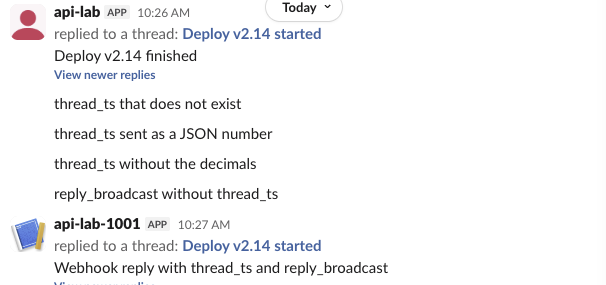
So if your "reply" shows up as a new message, check that thread_ts is the exact ts string, all six decimals included. Parsing it as a float in your own code is the easy way to lose it. To check from code, read message.thread_ts in the response: it is missing when the post did not thread.
Getting thread_ts from an event
A bot that answers in threads gets the ts from the incoming event. This is the message event our Socket Mode app received for a reply inside a thread:
{
  "type": "message",
  "user": "U0B7L4YK420",
  "ts": "1790818399.158919",
  "thread_ts": "1790818006.406079",
  "parent_user_id": "U0C5UH0S0E6",
  "text": "Reply from a person, to see the event",
  "channel": "C0C5UGC0Q4A",
  "event_ts": "1790818399.158919",
  "channel_type": "channel"
}
A top-level message has no thread_ts. So the rule is: reply to event["thread_ts"] if it exists, otherwise to event["ts"]. This Bolt app does that, and it is the version we ran:
import os
from slack_bolt import App
from slack_bolt.adapter.socket_mode import SocketModeHandler

app = App(token=os.environ["SLACK_BOT_TOKEN"])

@app.event("message")
def reply_in_thread(event, client):
    if event.get("bot_id"):          # skip messages from apps, including our own
        return
    root = event.get("thread_ts") or event["ts"]
    client.chat_postMessage(channel=event["channel"], thread_ts=root,
                            text=f"Got it. thread_ts={root}")

SocketModeHandler(app, os.environ["SLACK_APP_TOKEN"]).start()
The app needs the message.channels bot event, channels:history and chat:write. We typed a question in the channel, then a follow-up inside the thread. Both answers went to the same thread:
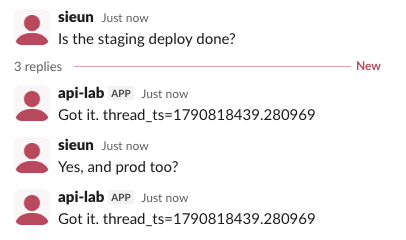
Skip messages with bot_id, or the bot answers itself in a loop. That check also skips people's messages posted through an app with a user token: in our test those events carried a bot_id too.
Never appear "away" on Slack again
Cloud-based. No downloads. Works 24/7 even when your laptop is off.
Webhooks thread too
An incoming webhook accepts thread_ts in the JSON body:
curl -X POST -H 'Content-type: application/json' \
  --data '{"text":"Nightly backup finished","thread_ts":"1790818006.406079"}' \
  https://hooks.slack.com/services/T.../B.../XXXX
The response is the plain text ok, and the message arrived in the thread. reply_broadcast: true worked through the webhook as well. A webhook returns no ts, so you cannot start a thread from one and reply later; post the parent with chat.postMessage to get its ts. Setting a webhook up is in how to create a Slack webhook.
Reading a thread back
- •
conversations.replieswith the parent'stsreturned the parent and every reply, oldest first. - • With a reply's
ts, it returned only that one reply, not the thread. - • Sent as a JSON body, it failed with
invalid_argumentsand[ERROR] missing required field: channel. It wants form-encoded or query parameters;slack_sdksends them that way for you.
The parent's reply_count, latest_reply and reply_users fields tell you if a thread has new replies without fetching all of them.
FAQ
Can a scheduled message be a thread reply?
Yes. The chat.scheduleMessage page shows a scheduled reply with thread_ts landing in its thread.
Does reply_broadcast notify the channel?
The reply shows in the channel as "replied to a thread" with a link to the parent, and in the thread pane with "Also sent to the channel" above it. Both are the same message, with one ts.
Stop Jiggling Your Mouse.
Join hundreds of remote workers who never worry about their Slack status. Set it up once, stay green forever.
Related Articles
Slack OAuth Redirect URL on localhost: What Slack Accepts, Tested
We added localhost, 127.0.0.1, https, custom-scheme and tunnel redirect URLs to a Slack app on 1 October 2026, then ran the OAuth flow against a local server. What was accepted, how Slack matches the URL, and the PKCE rules.
Slack App Manifest Example: YAML and JSON That Worked, Tested
A Slack app manifest we used to create a working app on 1 October 2026, in YAML and JSON, plus the validation errors from broken versions and real output from apps.manifest.validate, export, create and update.
Slack chat.delete API: Who Can Delete What, Tested
chat.delete removes a message by channel and ts. We deleted bot messages, a person's messages, a thread parent and an already deleted message with bot and user tokens, and list every response, including cant_delete_message and the tombstone a thread parent leaves.