
Slack expired_trigger_id: How Long a trigger_id Lasts, Measured
We opened a Slack modal with views.open after delays from 0 to 5 seconds, 28 times, on 1 October 2026. The success rate per delay, the exact errors, and the Bolt code that avoids expired_trigger_id.
expired_trigger_id means your app called views.open too long after the user's click or slash command. Slack's docs give a trigger_id 3 seconds. In our test, every call made within 2.8 seconds of receiving the payload worked, every call after 4 seconds failed, and the 3 to 3.5 second range was a coin toss. Call views.open before any slow work: acknowledge, open the modal, then do the rest. We measured this on 1 October 2026 with a Socket Mode app and a /lab-modal slash command in a test workspace.
How long a trigger_id lasted
The handler acknowledged at once, slept for the delay we typed after the command, then called views.open. Delay is measured from the moment our app received the payload, so the time Slack spent delivering it comes on top.
| Delay before views.open | Tries | Modal opened |
|---|---|---|
| 0 to 2.8 s | 10 | 10 |
| 3.0 s | 4 | 1 |
| 3.2 s | 1 | 0 |
| 3.5 s | 4 | 2 |
| 4.0 s | 4 | 0 |
| 4.5 s | 3 | 0 |
| 5.0 s | 1 | 0 |
The failed calls returned this, with nothing else in the body:
{
  "ok": false,
  "error": "expired_trigger_id"
}
The 3.5 s successes show the clock starts somewhere on Slack's side, not when you receive the request. Do not budget for 3 seconds. Budget for under 2.
Code that opens the modal in time
This is the Bolt for Python app we ran, cut down to the parts that matter. It uses Socket Mode, so it needs no public URL:
import os
from slack_bolt import App
from slack_bolt.adapter.socket_mode import SocketModeHandler

app = App(token=os.environ["SLACK_BOT_TOKEN"])

@app.command("/lab-modal")
def open_modal(ack, body, client):
    ack()                                   # answer Slack first
    client.views_open(                      # then open the modal, before slow work
        trigger_id=body["trigger_id"],
        view={
            "type": "modal",
            "callback_id": "deploy_form",
            "title": {"type": "plain_text", "text": "Deploy request"},
            "submit": {"type": "plain_text", "text": "Submit"},
            "close": {"type": "plain_text", "text": "Cancel"},
            "blocks": [{
                "type": "input", "block_id": "service",
                "label": {"type": "plain_text", "text": "Service"},
                "element": {"type": "plain_text_input", "action_id": "value"},
            }],
        },
    )

@app.view("deploy_form")
def on_submit(ack, body, view):
    ack()
    service = view["state"]["values"]["service"]["value"]["value"]
    print("deploy requested for", service)

SocketModeHandler(app, os.environ["SLACK_APP_TOKEN"]).start()
The app has a bot token with commands, an app-level token with connections:write for Socket Mode, and the /lab-modal command in its settings. If the modal needs data from a slow API, open it with a loading message first and fill it in with views.update. That call takes the view's id, not the trigger_id. We ran this version, with a 10-second sleep standing in for the slow work, and the update went through:
@app.command("/lab-modal")
def open_modal(ack, body, client):
    ack()
    opened = client.views_open(trigger_id=body["trigger_id"], view=view("Loading services..."))
    time.sleep(10)                                   # slow work goes here
    updated = client.views_update(view_id=opened["view"]["id"], hash=opened["view"]["hash"],
                                  view=view("*3 services* ready to deploy"))
    print(updated["ok"], updated["view"]["id"] == opened["view"]["id"])
Output: True True. Here view() is a helper that returns a modal with one section block. Passing hash makes Slack refuse the update if the user changed the view in the meantime.
Never appear "away" on Slack again
Cloud-based. No downloads. Works 24/7 even when your laptop is off.
Other errors around trigger_id
| What we did | Result |
|---|---|
Called views.open twice with the same trigger_id, 0.3 s apart | first opened, second exchanged_trigger_id |
Waited 4 s before ack() | Slack showed "failed because the app did not respond", and views.open then got expired_trigger_id |
| Modal title of 30 characters | invalid_arguments, see below |
A trigger_id is single use. A late ack() is the other common cause: the user sees this in the channel, and the trigger is gone by the time your code reaches views.open:

A view that breaks Block Kit rules fails with invalid_arguments, not invalid_blocks. The detail is in response_metadata:
{
  "ok": false,
  "error": "invalid_arguments",
  "response_metadata": {
    "messages": [
      "[ERROR] failed to match all allowed schemas [json-pointer:/view]",
      "[ERROR] failed to match all allowed schemas [json-pointer:/view/title]",
      "[ERROR] must be less than 25 characters [json-pointer:/view/title/text]"
    ]
  }
}
Modal titles allow 24 characters. Limits for message blocks are on the invalid_blocks page.
What the submission payload looks like
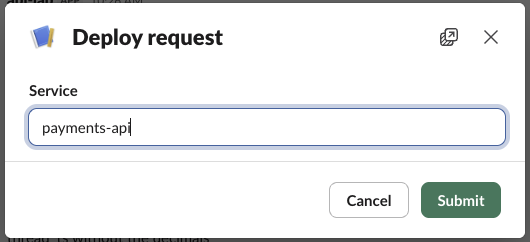
When we typed "payments-api" and clicked Submit, the app received a view_submission. Trimmed to the fields you use:
{
  "type": "view_submission",
  "user": {
    "id": "U0B7L4YK420",
    "username": "sieun"
  },
  "api_app_id": "A0C5PB7LM9T",
  "trigger_id": "12202451584772.11256386461409.1fe3b55bea7295b90fbb60da7cc16d24",
  "view": {
    "id": "V0C5UJ851S6",
    "callback_id": "deploy_form",
    "private_metadata": "",
    "state": {
      "values": {
        "service": {
          "value": {
            "type": "plain_text_input",
            "value": "payments-api"
          }
        }
      }
    },
    "root_view_id": "V0C5UJ851S6",
    "previous_view_id": null
  }
}
The value sits at view.state.values[block_id][action_id].value. The payload brings a new trigger_id, which you can use to open another modal right away. private_metadata comes back empty unless you set it in views.open; it is the place to carry a channel ID or record ID from the command to the submission.
FAQ
Does Socket Mode give me more time than HTTP?
No. Socket Mode delivered our payloads with the same limit; the delay table above was measured over Socket Mode.
Why does views.open work locally but fail in production?
Usually because something runs before it: a database call, a cold start, or ack() after the slow work. In our test, a handler that waited 4 seconds before calling ack() got the "did not respond" message and expired_trigger_id.
Stop Jiggling Your Mouse.
Join hundreds of remote workers who never worry about their Slack status. Set it up once, stay green forever.
Related Articles
Slack OAuth Redirect URL on localhost: What Slack Accepts, Tested
We added localhost, 127.0.0.1, https, custom-scheme and tunnel redirect URLs to a Slack app on 1 October 2026, then ran the OAuth flow against a local server. What was accepted, how Slack matches the URL, and the PKCE rules.
Slack App Manifest Example: YAML and JSON That Worked, Tested
A Slack app manifest we used to create a working app on 1 October 2026, in YAML and JSON, plus the validation errors from broken versions and real output from apps.manifest.validate, export, create and update.
Slack chat.delete API: Who Can Delete What, Tested
chat.delete removes a message by channel and ts. We deleted bot messages, a person's messages, a thread parent and an already deleted message with bot and user tokens, and list every response, including cant_delete_message and the tombstone a thread parent leaves.