
Slack invalid_blocks: Every Block Kit Limit We Hit, With the Error
We sent Block Kit messages just under and just over each limit through chat.postMessage and an incoming webhook on 1 October 2026. The last value that worked, the first that failed, and the exact error text for each.
invalid_blocks means Slack rejected your blocks array because one block broke a Block Kit rule, and nothing was posted. The Web API tells you which rule and where, in response_metadata.messages. An incoming webhook returns only the words invalid_blocks with HTTP 400. We sent each case below on 1 October 2026 through chat.postMessage with a bot token and through an incoming webhook, in a test workspace. Both paths enforced the same limits.
Reading the error
From chat.postMessage with 51 section blocks:
{
  "ok": false,
  "error": "invalid_blocks",
  "errors": [
    "no more than 50 items allowed [json-pointer:/blocks]"
  ],
  "response_metadata": {
    "messages": [
      "[ERROR] no more than 50 items allowed [json-pointer:/blocks]"
    ]
  }
}
The json-pointer is the path to the bad part: /blocks/0/text/text means the text field inside the text object of the first block. Slack numbers blocks from 0. slack_sdk raises SlackApiError; print the messages to see them:
import os
from slack_sdk import WebClient
from slack_sdk.errors import SlackApiError

client = WebClient(token=os.environ["SLACK_BOT_TOKEN"])
blocks = [{"type": "header", "text": {"type": "plain_text", "text": "h" * 151}}]
try:
    client.chat_postMessage(channel=os.environ["CHANNEL"], text="Deploy report", blocks=blocks)
except SlackApiError as e:
    print(e.response["error"])
    for line in e.response["response_metadata"]["messages"]:
        print(line)
Output:
invalid_blocks
[ERROR] failed to match all allowed schemas [json-pointer:/blocks/0/text]
[ERROR] must be less than 151 characters [json-pointer:/blocks/0/text/text]
The webhook gives you none of this. When a webhook says invalid_blocks, send the same blocks once through chat.postMessage or paste them into Block Kit Builder to find the field.
The limits we measured
| Rule | Last value that worked | First that failed | Error message |
|---|---|---|---|
| Blocks per message | 50 | 51 | no more than 50 items allowed [json-pointer:/blocks] |
Section text | 3,000 characters | 3,001 | must be less than 3001 characters |
Header text | 150 characters | 151 | must be less than 151 characters |
| Button label | 75 characters | 76 | must be less than 76 characters |
| Elements in one actions block | 25 | 26 | no more than 25 items allowed |
| Elements in a context block | 10 | 11 | no more than 10 items allowed |
Section fields | 10 | 11 | no more than 10 items allowed [json-pointer:/blocks/0/fields] |
Fifty sections of 3,000 characters each, 150,000 characters in one message, posted without an error. We found no separate total for blocks up to that size. The 40,000-character figure people quote is for the top-level text, and long text behaves differently: our chat.update test found chat.postMessage splits it into messages of 4,000 characters.
Structure errors
| What we sent | Error message |
|---|---|
"type": "paragraph" | unsupported type: paragraph [json-pointer:/blocks/0/type] |
A section with no text and no fields | must define either text or fields (Slack wraps text and fields in backticks) |
A section with text: "" | must be more than 0 characters |
A header with mrkdwn text | must be a valid enum value [json-pointer:/blocks/0/text/type] |
Two buttons with the same action_id | action_id "same" already exists [json-pointer:/blocks/0/elements/1/action_id], with action_id in backticks |
| An image block whose URL returns 404 | downloading image failed [json-pointer:/blocks/0/image_url] |
blocks as a string that is not JSON | invalid_blocks_format, not invalid_blocks |
A button without an action_id posted fine. Slack fills one in. The duplicate check runs within the message, so give each button its own action_id when you build them in a loop. Headers take only plain_text.
The image error comes from Slack fetching the URL when you post; our test URL returned 404. Use a URL Slack can download without a login.
Never appear "away" on Slack again
Cloud-based. No downloads. Works 24/7 even when your laptop is off.
Fixing it in Block Kit Builder
Builder runs the same checks before you send. Our 152-character header showed this:
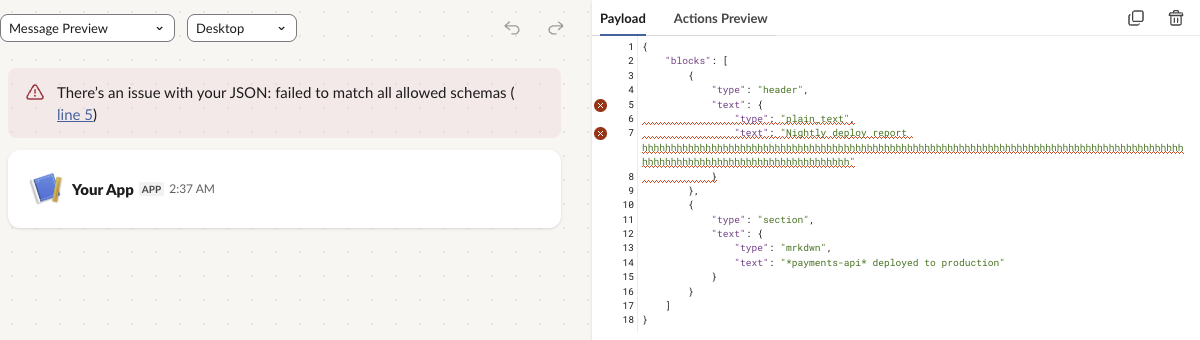
The banner only says "failed to match all allowed schemas". The red markers next to lines 5 and 7 point at the header's text, and the preview drops the broken block. The API's error text named the limit; Builder did not.
Text and blocks together
Always send text next to blocks. In our run, chat.postMessage with blocks and no text posted without a warning and copied the section text into text. Slack's docs say notifications use text, so write it yourself instead of relying on the copy. Formatting rules inside mrkdwn text are on the Block Kit markdown page, and chart blocks, which have their own limits, are on Block Kit charts.
FAQ
Why does my webhook return invalid_blocks when the same JSON works in Builder?
Check the shape of the body first. We sent the wrong shapes through a webhook: a bare [...] array returned no_text, and {"blocks": {"blocks": [...]}} returned invalid_blocks_format. The body must be {"blocks": [...]} at the top level, which is the shape Builder's payload tab shows. If the shape is right, a 400 invalid_blocks is one of the limits in the tables above.
What is the limit for a section block's text?
3,000 characters. 3,001 failed in our test, through the API and the webhook.
Stop Jiggling Your Mouse.
Join hundreds of remote workers who never worry about their Slack status. Set it up once, stay green forever.
Related Articles
Slack OAuth Redirect URL on localhost: What Slack Accepts, Tested
We added localhost, 127.0.0.1, https, custom-scheme and tunnel redirect URLs to a Slack app on 1 October 2026, then ran the OAuth flow against a local server. What was accepted, how Slack matches the URL, and the PKCE rules.
Slack App Manifest Example: YAML and JSON That Worked, Tested
A Slack app manifest we used to create a working app on 1 October 2026, in YAML and JSON, plus the validation errors from broken versions and real output from apps.manifest.validate, export, create and update.
Slack chat.delete API: Who Can Delete What, Tested
chat.delete removes a message by channel and ts. We deleted bot messages, a person's messages, a thread parent and an already deleted message with bot and user tokens, and list every response, including cant_delete_message and the tombstone a thread parent leaves.