
Slack Button Style: Primary, Danger, URL Buttons and Their Limits
A Slack Block Kit button has three looks: no style, primary (green) and danger (red). We posted every kind, clicked each one, logged the block_actions payloads and recorded the errors for colors, disabled buttons and long labels.
A Slack Block Kit button has three styles: no style at all (white with a grey border), "primary" (green) and "danger" (red). Nothing else is accepted, not "success", not a hex color and not even "default". We tested this on 4 October 2026 with a throwaway app in a free-plan workspace: we posted five buttons with chat.postMessage, clicked each one in Slack's web app with a Socket Mode listener running, and then sent the invalid versions to collect the exact errors.
The three styles, rendered
This is the message we posted. The JSON for the first three buttons differs only in style:
{
  "type": "actions",
  "block_id": "styles",
  "elements": [
    {"type": "button", "action_id": "b_default", "text": {"type": "plain_text", "text": "Default"}, "value": "default"},
    {"type": "button", "action_id": "b_primary", "style": "primary", "text": {"type": "plain_text", "text": "Primary"}, "value": "primary"},
    {"type": "button", "action_id": "b_danger", "style": "danger", "text": {"type": "plain_text", "text": "Danger"}, "value": "danger"},
    {"type": "button", "action_id": "b_url", "text": {"type": "plain_text", "text": "Open docs (URL)"}, "url": "https://slack.green/en/tools/slack-block-kit-checker"}
  ]
}
A URL button looks like an unstyled button. There is no link icon, so put the destination in the label if it matters. The fifth button is a danger button with a confirm dialog, shown further down.
Errors for colors, disabled buttons and long labels
Each row is one chat.postMessage call with a single button. All of these failed with invalid_blocks, and the errors array named the field:
| What we sent | Error text |
|---|---|
"style": "success", "green", "#22c55e" or "default" | must be a valid enum value [json-pointer:/blocks/0/elements/0/style] |
"disabled": true | invalid additional property: disabled |
| Button text of 76 characters | must be less than 76 characters |
text of type mrkdwn | must be a valid enum value on text/type |
url of 3,001 characters | must be less than 3001 characters |
url without a scheme (slack.green/en) | invalid url |
value of 2,001 characters | must be less than 2001 characters |
action_id of 256 characters | must be less than 256 characters |
The limits that passed were 75 characters of text, a 3,000-character URL, a 2,000-character value and a 255-character action_id. http://, mailto: and slack:// URLs were all accepted. There is no disabled state; to stop a second click, replace the button with chat.update after the first one. You can paste a block into our Block Kit checker to catch these before you post, and our invalid_blocks guide covers the rest of the error family.
What a click sends
Every click sent a block_actions payload to our app about half a second later (0.48 to 0.53 s for the three styled buttons). The actions entry for the Primary button:
{
  "action_id": "b_primary",
  "block_id": "styles",
  "text": {"type": "plain_text", "text": "Primary", "emoji": true},
  "value": "primary",
  "style": "primary",
  "type": "button",
  "action_ts": "1791097976.855079"
}
The unstyled button sent the same shape without a style key. The URL button opened the page in a new tab and still sent a block_actions payload, in 0.35 s. That payload had no url and no value, only the action_id, block_id and text. So a URL button still needs an app that acknowledges it, or the warning below appears. The rest of the payload, including response_url and trigger_id, is on our interactivity payload page.
Never appear "away" on Slack again
Cloud-based. No downloads. Works 24/7 even when your laptop is off.
Confirm dialogs
Add a confirm object and Slack asks before it sends anything:
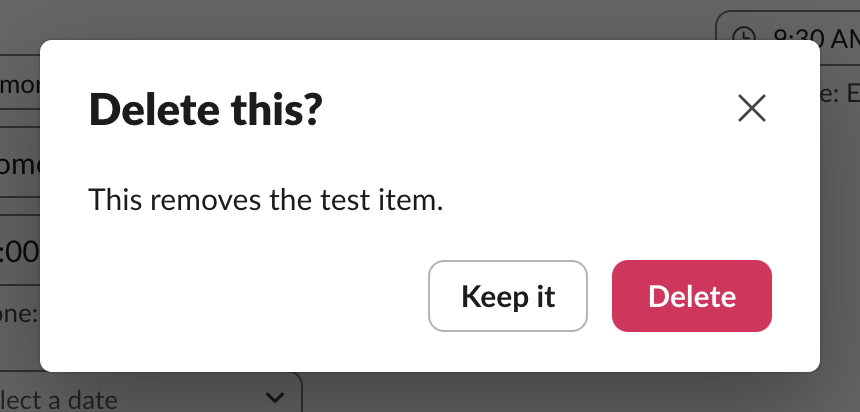
When we clicked Keep it, the app received nothing. When we clicked Delete, the payload arrived with the whole confirm object copied into the action, next to value and style. The dialog's own button follows confirm.style: we set "danger", and Delete turned red.
What the user sees if your app does not answer in 3 seconds
We told our Socket Mode listener to receive the click and not acknowledge it, then clicked Primary and took screenshots:
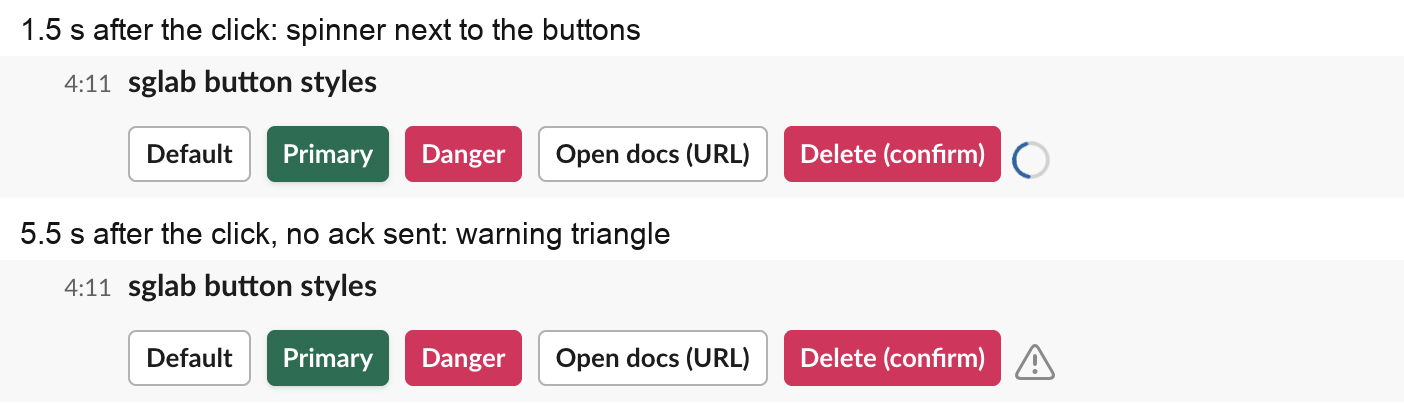
The warning is a bare triangle with no tooltip and no text, so users have no idea what failed. It disappeared on the next click that the app did acknowledge. Acknowledge first, then do the slow work and update the message with response_url or chat.update.
FAQ
Can I make a Slack button blue, grey or another color?
No. The only colors are the ones the three styles give you: white with a grey border, green and red. Every other value for style, including hex colors, failed with must be a valid enum value.
How do I make a link button in Slack?
Give a button a url. Slack opens it in the browser when clicked and still sends your app a block_actions event, which you should acknowledge. If you want a plain link instead, use mrkdwn <https://example.com|label> in a section block; see our Block Kit markdown test.
Stop Jiggling Your Mouse.
Join hundreds of remote workers who never worry about their Slack status. Set it up once, stay green forever.
Related Articles
Slack App Shortcuts: Where Global and Message Shortcuts Appear, Tested
Slack apps can add two kinds of shortcut: global ones in the composer's shortcut list and message ones in a message's menu. We added one of each, found where Slack puts them, logged both payloads and recorded what users see when the app does not answer.
Slack Datepicker, Timepicker and Datetimepicker: Payloads and Time Zones
We posted Slack's datepicker, timepicker and datetimepicker in a message and a modal, picked values and logged every payload. The datetimepicker returns a Unix timestamp; the timepicker returns a bare HH:mm with no zone unless you set one.
Slack API Tester: api.test and auth.test, With Real Responses
To test a Slack API connection, call api.test for the network and auth.test for the token. We ran both with no token, a bot token, a user token, an app-level token and a revoked token, and found that api.test echoes your token back.