
Slack Attachment Color: good, warning, danger and Hex Values, Tested
The color field of a Slack message attachment draws the bar on the left. We posted good, warning, danger, hex with and without #, a color name and an attachment holding blocks on 13 November 2026, and recorded what Slack stored and showed.
The color field of a Slack message attachment sets the vertical bar on its left. It takes good (green, stored as 2eb886), warning (orange, daa038), danger (red, a30200) or any hex value. Block Kit blocks have no color field, so the bar is only available through attachments, and you can put blocks inside an attachment to get both. We posted eight attachments with a bot token in a test workspace on 13 November 2026.
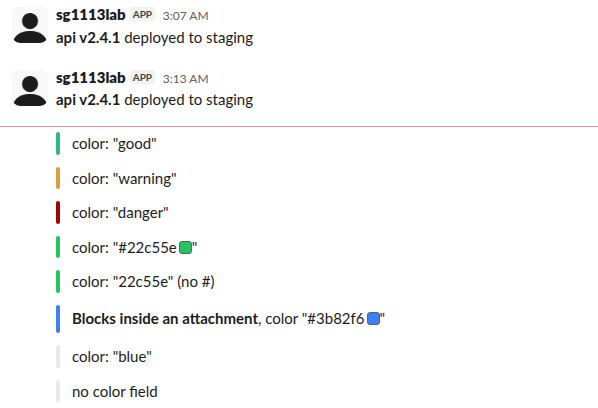
What Slack did with each value
color sent | chat.postMessage | Stored color | Bar shown |
|---|---|---|---|
"good" | ok | 2eb886 | green |
"warning" | ok | daa038 | orange |
"danger" | ok | a30200 | dark red |
"#22c55e" | ok | 22c55e | green |
"22c55e" (no #) | ok | 22c55e | green |
"#3b82f6", attachment holding blocks | ok | #3b82f6 | blue |
"blue" | ok, no warning | none | grey |
no color | ok | none | grey |
A color name such as blue is not an error. Slack accepted the message, dropped the field without a warning, and drew the default grey bar. Check your values if every bar comes out grey. The # is optional for a plain attachment. Slack also showed a small color swatch next to each hex code written in the message text, which is unrelated to the bar.
The payload
curl -sS -H "Authorization: Bearer $SLACK_BOT_TOKEN" \
  -d channel=C0123456789 \
  -d text="Deploy failed: api v2.4.1" \
  --data-urlencode 'attachments=[{"color":"danger","fallback":"Deploy failed: api v2.4.1","text":"*api* v2.4.1 failed on staging. <https://example.com/builds/2041|Build log>"}]' \
  https://slack.com/api/chat.postMessage
Put the main message in top-level text as well. Slack uses it for notifications and screen readers. Our fallback text test shows what each notification displays.
Blocks inside an attachment
To get a color bar on a Block Kit layout, put the blocks array inside the attachment:
{
  "channel": "C0123456789",
  "text": "Build 2041 passed",
  "attachments": [{
    "color": "#3b82f6",
    "blocks": [
      { "type": "section",
        "text": { "type": "mrkdwn", "text": "*Blocks inside an attachment*, color \"#3b82f6\"" } }
    ]
  }]
}
That is the sixth row in the screenshot: the section kept its bold text and got the blue bar. Slack calls attachments "secondary" content and suggests blocks for new apps, but it has not removed them; all eight of our posts worked.
Never appear "away" on Slack again
Cloud-based. No downloads. Works 24/7 even when your laptop is off.
Color bars in incoming webhooks
An incoming webhook accepts the same attachments array: our webhook post with "color": "danger" returned ok and was stored as a30200, the same as through the API. Webhooks from a Slack app ignore username, icon_emoji and channel in the payload, but not attachments. The difference between the two routes is in our webhook vs bot token test.
Color in the message text itself
Slack cannot color text. There is no mrkdwn or Block Kit option for a red word, and the bar is the closest thing. Our page on Slack text color covers the workarounds people use, such as colored emoji and code spans.
FAQ
Can I change the bar color after posting?
Yes. We posted a warning bar and called chat.update with a good one; the stored color changed from daa038 to 2eb886. A CI bot can post an orange bar for "running" and update it to green or red, which is the pattern in our chat.update guide.
Why is my attachment color not showing?
Either the value is not good, warning, danger or hex, so Slack dropped it, or the color is on a block. A block with a color field is refused with invalid_blocks and invalid additional property: color [json-pointer:/blocks/0].
Stop Jiggling Your Mouse.
Join hundreds of remote workers who never worry about their Slack status. Set it up once, stay green forever.
Related Articles
Slack private_metadata: Pass Data to a Modal (Tested Limit)
private_metadata is a hidden string on a modal view that Slack hands back in view_submission. We tested it on 18 November 2026: a JSON blob came back unchanged, and the limit is 3,000 characters, counted as characters, not bytes.
Slack Overflow Menu in Block Kit: Limits, Payload and Confirm, Tested
A Block Kit overflow menu takes 1 to 5 options, plain_text labels up to 75 characters and values up to 150. We posted each limit, clicked options in Slack and recorded the block_actions payload, the url option and the confirm dialog on 13 November 2026.
Slack Progress Bar: Block Kit, Emoji and chat.update, Tested
Block Kit has no progress bar element, so a Slack progress bar is text you redraw with chat.update. We drew one three ways on 9 November 2026, timed every update, and pushed chat.update until Slack answered ratelimited.