
Slack private_metadata: Pass Data to a Modal (Tested Limit)
private_metadata is a hidden string on a modal view that Slack hands back in view_submission. We tested it on 18 November 2026: a JSON blob came back unchanged, and the limit is 3,000 characters, counted as characters, not bytes.
private_metadata is a string field on a Slack modal view that users never see. You set it in views.open, views.update or views.push, and Slack sends it back unchanged in the view_submission payload, so it is where a modal keeps hidden data such as the channel it was opened from. Store JSON in it with json.dumps. In our test on 18 November 2026 the limit was 3,000 characters: 3,001 made views.open fail with invalid_arguments and "must be less than 3001 characters". Slack counted characters, not bytes, so 3,000 emoji (12,000 bytes) still passed.
The test setup
We made a throwaway Slack app in a test workspace with one slash command, /sg1118, and pointed its Request URL at a small Python server (standard library only) on our own machine, reached through a Cloudflare quick tunnel. Typing /sg1118 open in a channel made the server call views.open with this view:
def modal(meta):
    return {
        "type": "modal",
        "callback_id": "ticket",
        "title": {"type": "plain_text", "text": "Ticket"},
        "submit": {"type": "plain_text", "text": "Create"},
        "close": {"type": "plain_text", "text": "Cancel"},
        "private_metadata": meta,
        "blocks": [{
            "type": "input", "block_id": "summary",
            "label": {"type": "plain_text", "text": "Summary"},
            "element": {"type": "plain_text_input", "action_id": "v"},
        }],
    }

# slash command handler: the form fields Slack posted are in f
meta = json.dumps({
    "channel_id": f["channel_id"],
    "thread_ts": None,
    "ticket": {"source": "slash", "priority": "P2"},
})
r = api("views.open", {"trigger_id": f["trigger_id"], "view": modal(meta)})
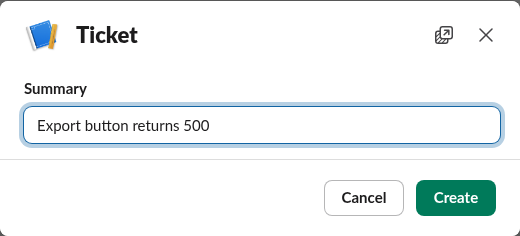
views.open answered ok in 93 ms, and the modal appeared in the web app. The user sees only the title, the field and the buttons; the metadata is not shown anywhere.
Reading it back in view_submission
We typed a summary and clicked Create. Slack posted a view_submission payload to the same server, and our handler logged this:
{
  "kind": "view_submission",
  "private_metadata": "{\"channel_id\": \"C0CJT39N2UC\", \"thread_ts\": null, \"ticket\": {\"source\": \"slash\", \"priority\": \"P2\"}}",
  "values": {"summary": {"v": {"type": "plain_text_input", "value": "Export button returns 500"}}},
  "user": "U0CDVBA6TMZ"
}
The string came back exactly as we sent it, still JSON-encoded, next to the user's input in state.values. The handler needs one json.loads to use it:
# interactivity handler: Slack posted payload=<json>
p = json.loads(f["payload"])
if p["type"] == "view_submission":
    ctx = json.loads(p["view"]["private_metadata"])
    summary = p["view"]["state"]["values"]["summary"]["v"]["value"]
    # ctx["channel_id"] is the channel the command was typed in
This is the common reason to use it: a modal's view_submission payload has no channel field, so if the modal was opened from a slash command or a message button, the handler would not know where to post the result unless you stored that in private_metadata.
Never appear "away" on Slack again
Cloud-based. No downloads. Works 24/7 even when your laptop is off.
The size limit: 3,000 characters
We then made the slash command take a length and a character, and fill private_metadata with that many copies before calling views.open. Each row is one real views.open call from one typed command:
private_metadata | Characters | UTF-8 bytes | views.open |
|---|---|---|---|
3,000 × x | 3,000 | 3,000 | ok, modal opened |
3,001 × x | 3,001 | 3,001 | invalid_arguments |
3,000 × é | 3,000 | 6,000 | ok |
3,001 × é | 3,001 | 6,002 | invalid_arguments |
| 3,000 × 😀 | 3,000 | 12,000 | ok |
| 3,001 × 😀 | 3,001 | 12,004 | invalid_arguments |
Every failure answered the same way, and our server echoed it back into the channel:

{
  "ok": false,
  "error": "invalid_arguments",
  "response_metadata": {
    "messages": [
      "[ERROR] failed to match all allowed schemas [json-pointer:/view]",
      "[ERROR] must be less than 3001 characters [json-pointer:/view/private_metadata]"
    ]
  }
}
The emoji rows settle how Slack counts. 😀 is one character but two UTF-16 units and four UTF-8 bytes, and 3,000 of them passed, so the limit counts characters (code points). In Python, check it with len(meta) before the call; in JavaScript, [...meta].length, because meta.length counts UTF-16 units and would refuse 1,501 emoji that Slack accepts.
What to do when 3,000 is not enough
Keep IDs in private_metadata, not whole records. In our test, a JSON object with a channel ID, a null thread and two small fields took 97 characters. If you need more, save the data in your own store under a short key and put only that key in the metadata. The field is plain text in the payload that Slack sends to your app, so do not treat it as a secret store either.
Updating the modal later with views.update sends a full view object, so include private_metadata in that view too; our views.update page covers that call. For the fields users do see, our page on the Block Kit input block shows how their values arrive in state.values.
We deleted the test app after the run.
Stop Jiggling Your Mouse.
Join hundreds of remote workers who never worry about their Slack status. Set it up once, stay green forever.
Related Articles
Slack App Configuration Token: Generate, Rotate and Revoke
An app configuration token lets a script create Slack apps from manifests. We generated one, rotated it five times and tested it again 28 hours later.
Slack App Collaborators: Add, Remove and Transfer Ownership
Collaborators are the people who can edit a Slack app. We added and removed one on 20 November 2026 as a regular member of a test workspace, recorded who can be added and what Slack asks you to do after a removal, and wrote down the hand-over path Slack documents.
Slack Bolt Middleware: Global and Listener, Tested
Global middleware runs for every request and listener middleware for one listener. We ran both in Bolt for Python and Bolt for JavaScript on 20 November 2026 and logged what Slack did when next() was skipped: Python answered 404 and Slack sent the event again.