
Slack App Collaborators: Add, Remove and Transfer Ownership
Collaborators are the people who can edit a Slack app. We added and removed one on 20 November 2026 as a regular member of a test workspace, recorded who can be added and what Slack asks you to do after a removal, and wrote down the hand-over path Slack documents.
To add a collaborator to a Slack app, open the app from Your Apps at api.slack.com/apps, click Collaborators under Settings, type a person's name in Add a member... and pick them from the list. Slack saved the change at once in our test on 20 November 2026: no invite to send, and a "Changes saved" toast. Only members of the app's workspace appear in that list; an outside email address got "No members found". We did this as a regular member (not an admin) of a Free workspace, with an app we created for the test and deleted afterwards.
Add a collaborator, step by step
- Go to api.slack.com/apps and open the app. You only see apps you already collaborate on.
- Under Settings, click Collaborators. The page lists everyone who can manage the app. A new app lists only the person who created it.
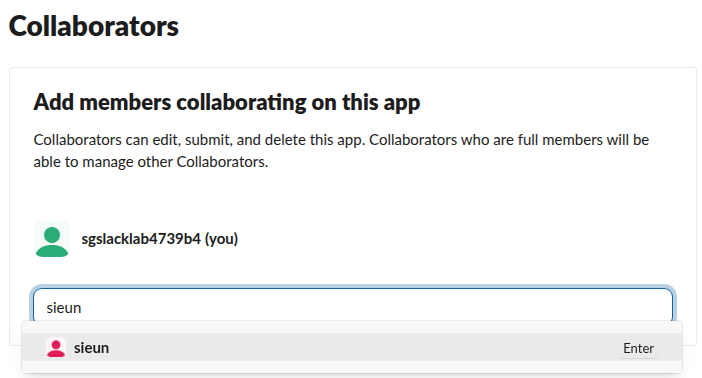
- Click Add a member... and start typing a name. Slack suggests members of the workspace:
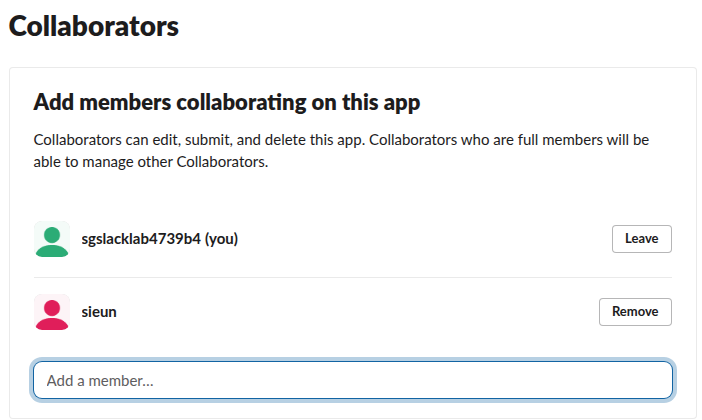
- Click the person. They join the list right away, and every row gets a button: Leave on your own row, Remove on everyone else's.
We also typed partner@example.com, an address outside the workspace. The list said "No members found", and there is no field for an email invite, so someone outside the workspace cannot be added from this page.
What a collaborator can do
The page itself states the rule: "Collaborators can edit, submit, and delete this app. Collaborators who are full members will be able to manage other Collaborators." So a collaborator has the same control as the person who made the app, including deleting it, and the list shows no special owner role. In our list the creator's row showed only "(you)" and a Leave button once a second collaborator was there. While the creator was the only collaborator, the row had no Leave button at all, so the last collaborator cannot leave an app.
"Full members" means regular members, admins and owners, as opposed to guests. Which members may create and install apps at all is a workspace setting; our page on Slack owner vs admin roles covers the roles.
Remove a collaborator, then rotate secrets
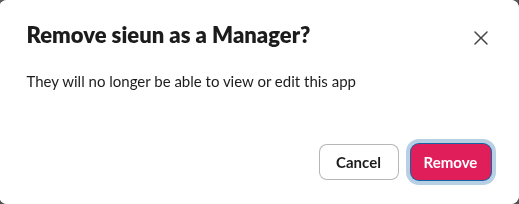
Click Remove next to the person. Slack asks for confirmation and calls them a Manager:
After we clicked Remove, the page showed a yellow warning above the list:
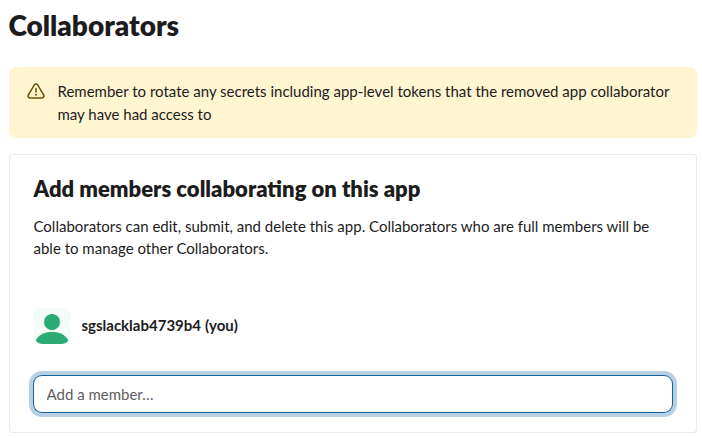
A removed collaborator could have copied the app's credentials while they had access. On Basic Information that means the Client Secret and Signing Secret (each has a Regenerate button) and any app-level xapp- tokens. Bot tokens such as xoxb- belong to the install; our Slack bot token guide says where they live and how they are replaced.
Never appear "away" on Slack again
Cloud-based. No downloads. Works 24/7 even when your laptop is off.
Transfer ownership of a Slack app
There is no Transfer button, because there is no single owner to transfer. The way to hand an app to someone else follows from the rules above:
We did not run step 3, because it would have locked our test account out of the app before we could delete it. The steps follow Slack's help article "Add internal app collaborators". For apps built with the Slack CLI, Slack's docs list slack collaborator add and slack collaborator remove commands; we did not run those either. Setting up the CLI is in our Slack CLI install guide.
What the Collaborators page calls
With the browser's network log open, the Add click sent developer.apps.owners.add with the app ID and the new person's user ID, and Remove sent developer.apps.owners.remove. Both went out with the browser session's token. We found no method for collaborators in Slack's public Web API, so a script cannot add or remove collaborators with a bot or user token; use the page or, for CLI apps, the CLI.
FAQ
Can I add someone outside my workspace as a Slack app collaborator? Not from the Collaborators page. It suggests only members of the app's workspace, and an outside email address returned "No members found" in our test.
Who can add collaborators to a Slack app? Any collaborator who is a full member of the workspace. We added one as a regular member, not an admin.
Stop Jiggling Your Mouse.
Join hundreds of remote workers who never worry about their Slack status. Set it up once, stay green forever.
Related Articles
Slack App Configuration Token: Generate, Rotate and Revoke
An app configuration token lets a script create Slack apps from manifests. We generated one, rotated it five times and tested it again 28 hours later.
Slack Bolt Middleware: Global and Listener, Tested
Global middleware runs for every request and listener middleware for one listener. We ran both in Bolt for Python and Bolt for JavaScript on 20 November 2026 and logged what Slack did when next() was skipped: Python answered 404 and Slack sent the event again.
Slack mpim: Open a Group DM With the API (Tested)
An mpim is a Slack group DM. We opened one with conversations.open and a bot token on 18 November 2026, posted to it, read conversations.info, and recorded the limit: 9 user IDs get too_many_users.