
Slack mpim: Open a Group DM With the API (Tested)
An mpim is a Slack group DM. We opened one with conversations.open and a bot token on 18 November 2026, posted to it, read conversations.info, and recorded the limit: 9 user IDs get too_many_users.
An mpim (multi-person instant message) is Slack's API name for a group DM. To open one, call conversations.open with a comma-separated users list; with a bot token that needs the mpim:write scope, and the bot joins the group itself. In our test on 18 November 2026, two user IDs gave a group DM whose is_mpim was true, whose ID started with C, and whose name was mpdm- plus the members' usernames. Nine user IDs got too_many_users.
Open the group DM
We installed a throwaway app in a test workspace with the mpim:write, mpim:read, mpim:history and chat:write bot scopes, and called:
curl -s https://slack.com/api/conversations.open \
  -H "Authorization: Bearer $SLACK_BOT_TOKEN" \
  -d users=U0CDVBA6TMZ,U0B7L4YK420
It answered in 468 ms. Trimmed:
{
  "ok": true,
  "channel": {
    "id": "C0CKHRBBK40",
    "name": "mpdm-sg1118lab--sgslacklab4739b4--sieun-1",
    "is_channel": true,
    "is_group": false,
    "is_im": false,
    "is_mpim": true,
    "is_private": true,
    "creator": "U0CJJ3D6V9B",
    "purpose": {"value": "Group messaging with: @sg1118lab @sgslacklab4739b4 @sieun"}
  }
}
Three things in it surprise people:
- The ID starts with
C, like a channel. Older group DMs often had IDs starting withG, so do not tell conversations apart by the first letter; readis_mpim. is_channelistrueandis_privateistrueas well, so code that checksis_channelfirst will treat a group DM as a channel.- The name lists every member's username, sorted A to Z in both groups we made, joined by
--, with-1at the end.
conversations.members listed three members: the two people we named and the bot. Then the bot posted with chat.postMessage to C0CKHRBBK40, and the group DM appeared in the member's sidebar with a 2 for its two other members:
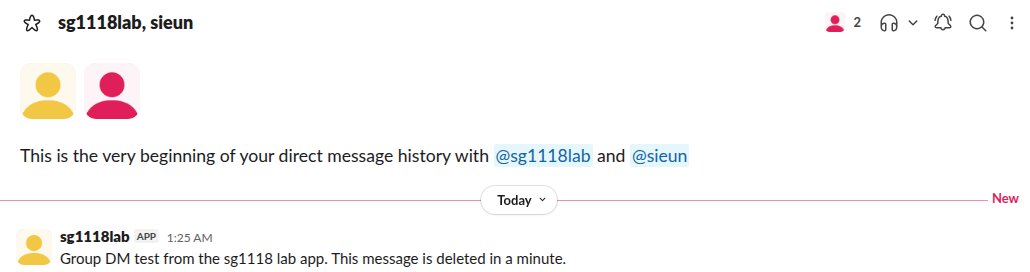
We deleted that message right after the screenshot.
Same people, same mpim
conversations.open does not make a second group DM for the same people. Every one of these calls returned the same C0CKHRBBK40:
users sent | Result |
|---|---|
| The two IDs in the other order | Same mpim |
| The two IDs plus the bot's own user ID | Same mpim |
| The two IDs repeated 9 times in total (5 and 4) | Same mpim, no too_many_users |
| Only one ID | A 1:1 DM, ID starting with D |
So the call is safe to repeat. Store the ID if you like, or open again each time you need it.
Never appear "away" on Slack again
Cloud-based. No downloads. Works 24/7 even when your laptop is off.
How many users: the too_many_users limit
Our workspace had only two people in it, so we sent made-up IDs to find where the count check sits:
users sent | Answer |
|---|---|
| 2 real IDs and 7 deactivated bot IDs (9) | too_many_users |
| 2 real IDs and 7 made-up IDs (9) | too_many_users |
| 2 real IDs and 8 made-up IDs (10) | too_many_users |
| 2 real IDs and 6 made-up IDs (8) | user_not_found |
| 1 real ID and 1 made-up ID | user_not_found |
With 8 IDs the call got past the count and failed only on the fake users, so 8 is the most it accepts, which with the bot makes a group of 9. Slack checks the count before it checks the IDs. Repeated IDs count once, as the table above shows. We did not have 8 real people to test a full group, so the 8-ID case is proven only as far as the count check. A deactivated account did not stop the call: one real ID plus one deactivated bot opened a new group DM with all three.
Leave, archive or close it
| Method on the mpim | Answer |
|---|---|
conversations.archive | method_not_supported_for_channel_type |
conversations.leave | method_not_supported_for_channel_type |
conversations.close | ok |
A group DM cannot be archived or left by the API. conversations.close closes it for the caller only, as it does for a 1:1 DM. To turn the group into a real channel instead, see converting a group DM to a channel. To read the flags of any conversation, including is_mpim, our conversations.info page lists them with real output.
We deleted the throwaway app after the run, which also made its bot user inactive.
Stop Jiggling Your Mouse.
Join hundreds of remote workers who never worry about their Slack status. Set it up once, stay green forever.
Related Articles
Slack App Configuration Token: Generate, Rotate and Revoke
An app configuration token lets a script create Slack apps from manifests. We generated one, rotated it five times and tested it again 28 hours later.
Slack App Collaborators: Add, Remove and Transfer Ownership
Collaborators are the people who can edit a Slack app. We added and removed one on 20 November 2026 as a regular member of a test workspace, recorded who can be added and what Slack asks you to do after a removal, and wrote down the hand-over path Slack documents.
Slack Bolt Middleware: Global and Listener, Tested
Global middleware runs for every request and listener middleware for one listener. We ran both in Bolt for Python and Bolt for JavaScript on 20 November 2026 and logged what Slack did when next() was skipped: Python answered 404 and Slack sent the event again.