
Slack App Configuration Token: Generate, Rotate and Revoke
An app configuration token lets a script create Slack apps from manifests. We generated one, rotated it five times and tested it again 28 hours later.
A Slack app configuration token is a short-lived token that lets a script create and edit Slack apps from a manifest. You make one at api.slack.com/apps under Your App Configuration Tokens, it lasts 12 hours, and it comes with a refresh token that gets you a new one through tooling.tokens.rotate. We generated one on 20 November 2026 as a regular member of a Free workspace, created an app with it, rotated it five times and came back 28 hours later to see what still worked.
How to generate one
- Sign in to Slack in your browser and open api.slack.com/apps.
- Under Your App Configuration Tokens, click Generate Token.
- Pick the workspace and click Generate.
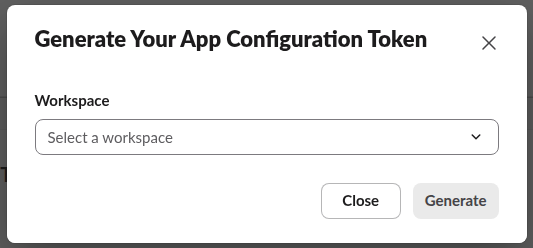
The table then shows two Copy buttons, one for the access token and one for the refresh token, and the note 'Expires in 12 hours'. You do not need to be an admin: our account was a plain member and the button worked.
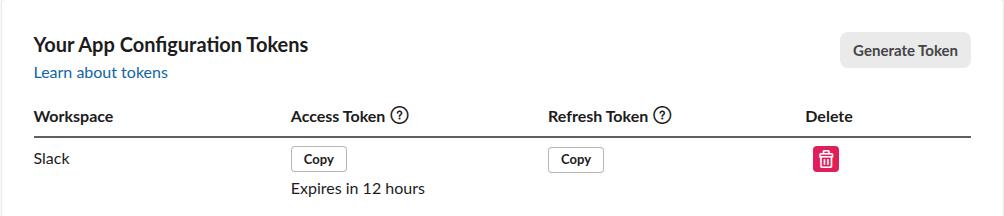
Our access token started with xoxe.xoxp-1- and was 183 characters long; the refresh token started with xoxe-1- and was 158 characters. auth.test with the access token returned the member's own user ID and an expires_in of 43,172 seconds, which is the 12 hours minus the half minute we took to copy it.
What a configuration token can and cannot do
The token carries three scopes and nothing else. We learned them from the missing_scope errors, which list what the token has:
chat.postMessage   -> missing_scope, needed: chat:write:bot
conversations.list -> missing_scope, needed: channels:read,groups:read,mpim:read,im:read
users.info         -> missing_scope, needed: users:read
provided:             identify,app_configurations:read,app_configurations:write
So it is a tool for app setup only. These calls worked with it:
| Method | Result with our config token |
|---|---|
apps.manifest.validate | ok: true for a good manifest; invalid_manifest with a pointer for a bad scope |
apps.manifest.create | ok: true, returned app_id, credentials and oauth_authorize_url |
apps.manifest.export | ok: true, returned the live manifest |
tooling.tokens.rotate | New access and refresh token (refresh token, not access token) |
A bad scope fails before anything is created. This is the exact answer to a manifest that asked for chat:write.everything:
{
  "ok": false,
  "error": "invalid_manifest",
  "errors": [
    {
      "code": "illegal_bot_scopes",
      "message": "Illegal bot scopes found `chat:write.everything`",
      "pointer": "/oauth_config/scopes/bot"
    }
  ]
}
Our Slack app manifest guide has the full manifest we used and the fields Slack adds on export. The app you create still needs its own bot token to post messages; see the Slack bot token for that part.
Rotating the token
tooling.tokens.rotate takes the refresh token, needs no Authorization header, and returns a fresh pair:
import requests

r = requests.post(
    "https://slack.com/api/tooling.tokens.rotate",
    data={"refresh_token": REFRESH_TOKEN},
    timeout=30,
).json()
print({k: r[k] for k in ("ok", "team_id", "iat", "exp")})
# {'ok': True, 'team_id': 'T0123ABCDEF', 'iat': 1795158733, 'exp': 1795201933}
ACCESS_TOKEN, REFRESH_TOKEN = r["token"], r["refresh_token"]
exp minus iat is 43,200 seconds, a full 12 hours from the moment of rotation. What we saw over five rotations:
token_revoked.refresh_token returned invalid_refresh_token.invalid_auth.A script should therefore save the new refresh token after every call and treat the old access token as gone soon after.
Never appear "away" on Slack again
Cloud-based. No downloads. Works 24/7 even when your laptop is off.
After 12 hours, and after 28 hours
We came back 28 hours later. The access token answered token_expired, and the page showed Expired in place of its Copy button. The refresh token still had its Copy button, and it still worked: one rotation returned a new token good for another 12 hours.
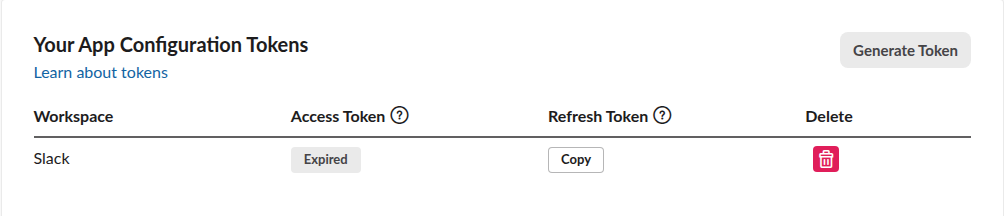
So an expired configuration token does not mean you have to generate a new one. Keep the refresh token somewhere safe, because it is the long-lived secret here.
Revoking it
The red trash icon in the token row asks for confirmation:
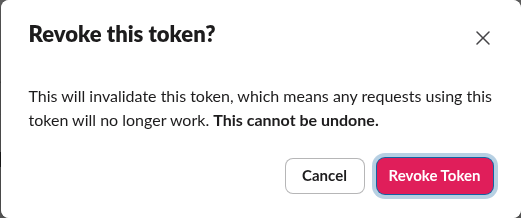
After we clicked Revoke Token, the newest access token answered token_revoked and its refresh token answered invalid_refresh_token, so both halves die together. Deleting the token does not delete apps you created with it; we removed our test app separately with apps.manifest.delete. If a token of any kind leaks into a log, the prefixes in our Slack token regex list will match it.
FAQ
Is a configuration token the same as an app-level token?
No. An app-level token (xapp-) belongs to one app and is made on that app's Basic Information page, mostly for Socket Mode. A configuration token belongs to you and one workspace, and works across apps.
Can I generate a configuration token with the API?
No endpoint we know of creates the first one; we made ours in the browser. After that, tooling.tokens.rotate keeps it going without the browser as long as you store each new refresh token.
Why does auth.test show my user and not an app?
Because the token is a user token (xoxe.xoxp-). Our auth.test returned the member's name and user ID and no bot_id.
Stop Jiggling Your Mouse.
Join hundreds of remote workers who never worry about their Slack status. Set it up once, stay green forever.
Related Articles
Slack App Collaborators: Add, Remove and Transfer Ownership
Collaborators are the people who can edit a Slack app. We added and removed one on 20 November 2026 as a regular member of a test workspace, recorded who can be added and what Slack asks you to do after a removal, and wrote down the hand-over path Slack documents.
Slack Bolt Middleware: Global and Listener, Tested
Global middleware runs for every request and listener middleware for one listener. We ran both in Bolt for Python and Bolt for JavaScript on 20 November 2026 and logged what Slack did when next() was skipped: Python answered 404 and Slack sent the event again.
Slack mpim: Open a Group DM With the API (Tested)
An mpim is a Slack group DM. We opened one with conversations.open and a bot token on 18 November 2026, posted to it, read conversations.info, and recorded the limit: 9 user IDs get too_many_users.