
Slack Overflow Menu in Block Kit: Limits, Payload and Confirm, Tested
A Block Kit overflow menu takes 1 to 5 options, plain_text labels up to 75 characters and values up to 150. We posted each limit, clicked options in Slack and recorded the block_actions payload, the url option and the confirm dialog on 13 November 2026.
A Slack overflow menu is the "..." button that opens a short list of actions. It holds 1 to 5 options; a 6th option makes chat.postMessage fail with invalid_blocks and no more than 5 items allowed. Each option needs a plain_text label of at most 75 characters and a value of at most 150. We posted every limit with a bot token, then clicked options in a test workspace on 13 November 2026 and logged the payload in a Bolt for Python app.
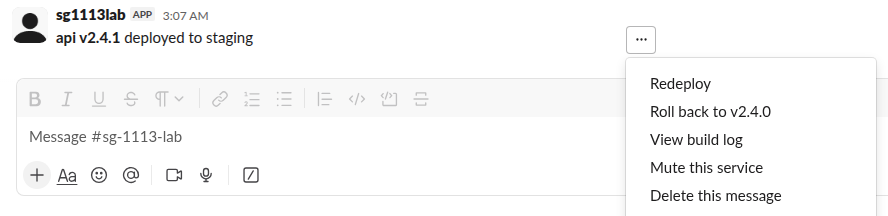
The block we used
The overflow menu goes in a section block's accessory or in an actions block. Both posted fine.
{
  "type": "section",
  "block_id": "deploy",
  "text": { "type": "mrkdwn", "text": "*api v2.4.1* deployed to staging" },
  "accessory": {
    "type": "overflow",
    "action_id": "ov_menu",
    "options": [
      { "text": { "type": "plain_text", "text": "Redeploy" }, "value": "redeploy" },
      { "text": { "type": "plain_text", "text": "Roll back to v2.4.0" }, "value": "rollback:v2.4.0" },
      { "text": { "type": "plain_text", "text": "View build log" }, "value": "log",
        "url": "https://example.com/builds/2041" },
      { "text": { "type": "plain_text", "text": "Mute this service" }, "value": "mute" },
      { "text": { "type": "plain_text", "text": "Delete this message" }, "value": "delete" }
    ]
  }
}
Limits, with Slack's exact answers
| What we posted | Result |
|---|---|
| 0 options | invalid_blocks: must provide at least 1 items [json-pointer:/blocks/0/accessory/options] |
| 1, 2 or 5 options | ok |
| 6 options | invalid_blocks: no more than 5 items allowed [json-pointer:/blocks/0/accessory/options] |
Label of type mrkdwn | invalid_blocks: failed to match all allowed schemas [json-pointer:/blocks/0/accessory/options/0/text] |
| Label of 75 characters | ok |
| Label of 76 characters | invalid_blocks: failed to match all allowed schemas (same pointer) |
value of 150 characters | ok |
value of 151 characters | invalid_blocks: must be less than 151 characters |
Option with a description field | ok |
The schema error for a long label does not name the length, so if you build labels from data, cut them to 75 characters before you post. A single option is allowed, but a menu with one choice is a button with an extra click.
The payload when someone picks an option
Clicking "Roll back to v2.4.0" sent this block_actions payload (trimmed). There is no value on the action itself; it sits under selected_option:
{
  "type": "block_actions",
  "container": { "type": "message", "message_ts": "1794539266.627729",
                 "channel_id": "C0CHB3J23PU", "is_ephemeral": false },
  "actions": [{
    "type": "overflow",
    "block_id": "deploy",
    "action_id": "ov_menu",
    "selected_option": {
      "text": { "type": "plain_text", "text": "Roll back to v2.4.0", "emoji": true },
      "value": "rollback:v2.4.0"
    },
    "action_ts": "1794539517.300363"
  }]
}
In Bolt for Python the listener reads it like this:
@app.action("ov_menu")
def on_overflow(ack, body, respond):
    ack()
    choice = body["actions"][0]["selected_option"]["value"]
    if choice.startswith("rollback:"):
        respond("Rolling back to " + choice.split(":", 1)[1], replace_original=False)
The payload also carries a response_url and a trigger_id, so the listener can reply with respond() or open a modal. Our say vs respond test shows where each reply lands.
Never appear "away" on Slack again
Cloud-based. No downloads. Works 24/7 even when your laptop is off.
Options with a url
"View build log" had a url. Clicking it opened the page in a new browser tab, and Slack still sent a block_actions payload with value: "log". The url was not in the payload. Your listener must still call ack() for url options, or the user gets the warning triangle that our Bolt error handling test shows.
Add a confirm dialog
A confirm object on the overflow element applies to every option in the menu. We added one, picked "Mute this service", and Slack showed the dialog before sending anything:
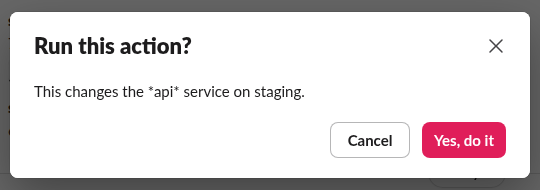
No payload arrived until we clicked "Yes, do it". The payload then had the whole confirm object inside the action. Two things to know:
- • The dialog
textwas typemrkdwn, but*api*showed with its asterisks, so write it as plain text. - •
"style": "danger"made the confirm button red.
A confirm on a single option is refused: invalid_blocks with invalid additional property: confirm [json-pointer:/blocks/0/accessory/options/0]. If only "Delete this message" needs it, move delete to a separate button with its own confirm.
To build and preview a menu before you post it, paste the block into the Block Kit Builder. For a "..." menu on a message that you post with an incoming webhook, see Slack webhook vs bot token: our incoming webhook posted the same overflow block with 200 ok, and the clicks go to the app that owns the webhook, so that app needs interactivity turned on.
FAQ
Why does my overflow menu not do anything when clicked?
Your app needs Interactivity turned on with a request URL, or Socket Mode, and a listener that calls ack(). Without an acknowledgement, Slack shows a warning triangle next to the "..." button after 3 seconds.
Stop Jiggling Your Mouse.
Join hundreds of remote workers who never worry about their Slack status. Set it up once, stay green forever.
Related Articles
Slack private_metadata: Pass Data to a Modal (Tested Limit)
private_metadata is a hidden string on a modal view that Slack hands back in view_submission. We tested it on 18 November 2026: a JSON blob came back unchanged, and the limit is 3,000 characters, counted as characters, not bytes.
Slack Attachment Color: good, warning, danger and Hex Values, Tested
The color field of a Slack message attachment draws the bar on the left. We posted good, warning, danger, hex with and without #, a color name and an attachment holding blocks on 13 November 2026, and recorded what Slack stored and showed.
Slack Progress Bar: Block Kit, Emoji and chat.update, Tested
Block Kit has no progress bar element, so a Slack progress bar is text you redraw with chat.update. We drew one three ways on 9 November 2026, timed every update, and pushed chat.update until Slack answered ratelimited.