
Slack Bolt say() vs respond() vs client: Where Each Message Lands
say() posts a normal message with the bot token. respond() posts through the response_url, ephemeral by default, works where the bot is not a member and stops after 5 calls. We ran all three from a slash command, a button and a message event in Bolt for Python on 13 November 2026.
Use say() when the bot should post a normal message in the channel the request came from. Use respond() when you are answering a slash command or a button click and want an ephemeral reply, a reply in a channel the bot has not joined, or a change to the message that holds the button. Use client.chat_postMessage() for anything else, such as another channel or a thread. We ran all three in a Bolt for Python app (slack_bolt 1.30.0, Socket Mode) in a test workspace on 13 November 2026, from a slash command, a button and a message event, and recorded where each message went.
Results
| Call | From a slash command | From a button click | From a message event |
|---|---|---|---|
say("...") | Normal message in the channel, returns ts | Normal message under the button message | Normal message in the channel |
respond("...") | Ephemeral, "Only visible to you" | Replaces the message that holds the button | ValueError: respond is unsupported here as there is no response_url |
respond(..., response_type="in_channel") | Visible to all, posted under the app's name | Not tested | Not available |
respond(..., replace_original=False) | Not needed | Ephemeral, the button message stays | Not available |
respond(delete_original=True) | Not tested | Deletes the button message | Not available |
client.chat_postMessage(...) | Works, any channel the bot is in | Works, also with thread_ts | Works |
| Channel the bot is not in | say and client: channel_not_found. respond: works | Not tested | Not available |
say() and the client call return a SlackResponse with ok, channel and ts. respond() returns a WebhookResponse with an HTTP status and a body of ok, so it never gives you a ts to edit later.
From a slash command
We sent /sg1113 all, and the handler called each method once after ack():
@app.command("/sg1113")
def cmd(ack, command, say, respond, client):
    ack()
    say("1. say() from a slash command")
    respond("2. respond() from a slash command")
    respond("3. respond(response_type='in_channel') from a slash command",
            response_type="in_channel")
    client.chat_postMessage(channel=command["channel_id"],
                            text="4. client.chat_postMessage() from a slash command")
    client.chat_postEphemeral(channel=command["channel_id"], user=command["user_id"],
                              text="5. client.chat_postEphemeral() from a slash command")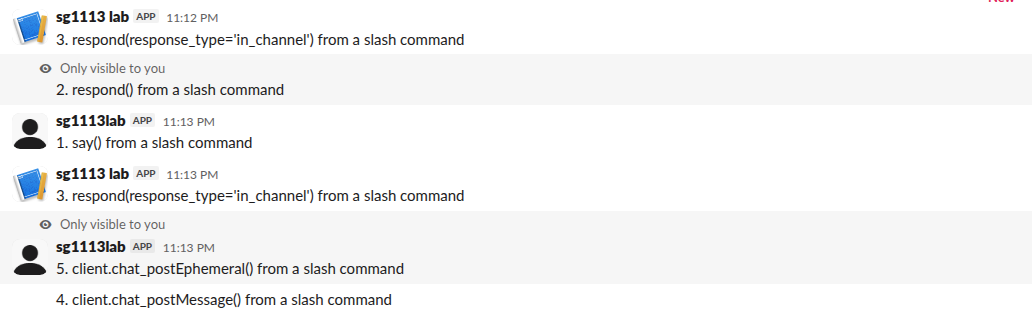
The screenshot shows two runs of the command. Look at the sender names. say() and client post as the bot user (sg1113lab, plain icon). respond(response_type="in_channel") posts under the app's name (sg1113 lab, app icon). In conversations.history that message had subtype: bot_message and a different bot_id than the bot user, and the bot token could not touch it: chat.update answered cant_update_message and chat.delete answered cant_delete_message. If you may need to edit or remove the message later, post it with say() instead.
In a channel the bot has not joined
We ran the same command in a private channel the bot was not a member of, and in the user's own DM. say(), client.chat_postMessage() and client.chat_postEphemeral() all failed with channel_not_found. Both respond() calls worked, and the in_channel one posted a visible message into the private channel and into the DM. The response_url carries its own permission to answer, so a slash command app can reply anywhere it is invoked without the bot joining.
The response_url runs out after 5 calls
We called respond() 7 times from one command. Calls 1 to 5 returned 200 ok. Calls 6 and 7 returned HTTP 404 with the body used_url, and Bolt raised no exception, so check status_code if you send many updates. A respond() 4 seconds after ack() still worked. Slack documents the URL as valid for 30 minutes; we did not test that limit.
Never appear "away" on Slack again
Cloud-based. No downloads. Works 24/7 even when your laptop is off.
From a button click
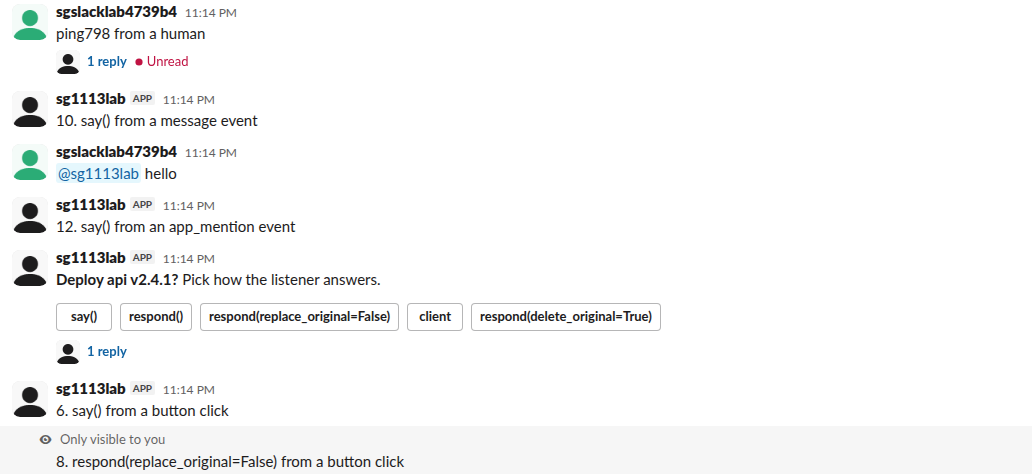
From a block_actions payload, say() posted a new message in the channel. A plain respond("...") replaced the message that held the buttons; the message kept its ts and gained an edited field, and no "(edited)" label showed in the client. respond(..., replace_original=False) posted an ephemeral reply and kept the buttons. respond(delete_original=True) removed the button message. To reply in the button message's thread, call client.chat_postMessage(channel=body["channel"]["id"], thread_ts=body["message"]["ts"], ...), which worked.
From a message event
Events have no response_url, so respond() raised ValueError: respond is unsupported here as there is no response_url. say() posted in the channel, and say(text=..., thread_ts=message["ts"]) posted in the thread of the message that triggered it. An app_mention listener behaved the same.
Which one to use
- • Answer a slash command only to the person who ran it:
respond(). - • Update or remove the message that holds a button:
respond()withreplace_originalordelete_original. - • Post something everyone sees that you may edit later:
say()orclient.chat_postMessage(), and keep thets. Our chat.update guide covers editing it. - • Post in a thread or another channel:
client.chat_postMessage()withthread_tsorchannel. The thread_ts guide explains whichtsto pass.
For ephemeral messages sent with the bot token instead of the response_url, see Slack ephemeral messages. When a listener throws before it calls ack(), Slack shows its own failure notice; our Bolt error handling test shows each case.
FAQ
Does Bolt for JavaScript behave the same?
The JavaScript say and respond take the same arguments and use the same Slack endpoints, so the Slack-side results above should match. We ran only the Python app.
Can I use respond() in a modal submission?
A view_submission payload has no response_url unless the modal has an input with response_url_enabled, so respond() raises the same ValueError there. Use client.chat_postMessage() with a channel you stored in private_metadata.
Stop Jiggling Your Mouse.
Join hundreds of remote workers who never worry about their Slack status. Set it up once, stay green forever.
Related Articles
Slack Bolt Middleware: Global and Listener, Tested
Global middleware runs for every request and listener middleware for one listener. We ran both in Bolt for Python and Bolt for JavaScript on 20 November 2026 and logged what Slack did when next() was skipped: Python answered 404 and Slack sent the event again.
Testing a Slack Bolt App with pytest: What Worked, What Did Not
Three layers that tested a Bolt for Python app on 17 November 2026: pure functions, listeners called with fakes, and signed requests through app.dispatch against a local mock Web API, plus one live check. A subclassed WebClient and the default threading both made tests fail; here is why.
Slack Bolt with Express: ExpressReceiver and customRoutes, Tested
Two ways to serve your own HTTP routes next to a Bolt JS app: ExpressReceiver with receiver.router, or customRoutes on the built-in receiver. We ran both with Bolt 5.1.0 and Express 5.3.0 on 17 November 2026, plus the body-parser mistake that makes every slash command fail.