
Slack Ephemeral Messages: Post, Replace and Delete, Tested
We sent ephemeral messages with chat.postEphemeral, in a channel and in a thread, then tried chat.update and chat.delete on them, replaced and deleted them through response_url, and checked what was left after a reload. Every response is from the real run.
An ephemeral message is a Slack message that only one person in a conversation can see. Slack marks it "Only visible to you". Apps send one with chat.postEphemeral, giving the channel and the user who should see it. You cannot edit or delete it with chat.update or chat.delete. The only way to change it is the response_url that Slack sends when that user clicks a button in it or runs your slash command. We tested each of these with a bot in our own test workspace on 1 October 2026.
Send an ephemeral message with chat.postEphemeral
The bot needs chat:write. Pass channel, user and text (or blocks):
curl -s https://slack.com/api/chat.postEphemeral \
  -H "Authorization: Bearer $SLACK_BOT_TOKEN" \
  -d channel=C0C5UGH9QPL -d user=U0B7L4YK420 \
  -d text="This ephemeral message is only visible to you."
{"ok": true, "message_ts": "1790817755.000300"}The user saw it at once. The second message below came with two buttons in blocks:

The message does not exist in the channel for anyone else, or for the API. conversations.history on that channel did not return it. The message_ts also looks different from a normal message ts: ours ended in .000300 and .000400, while the posted messages around it ended in values like .032229.
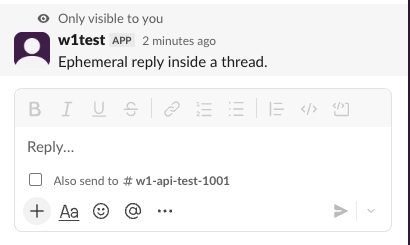
To put it in a thread, add thread_ts with the parent's ts. Slack showed our ephemeral reply only in the thread panel. The parent message in the channel showed no reply count:
Errors from chat.postEphemeral
| What we sent | Response |
|---|---|
| A user who is not a member of the channel | {"ok": false, "error": "user_not_in_channel"} |
A user ID that does not exist (U0000000000) | {"ok": false, "error": "user_not_in_channel"} |
A public channel the bot is not in, bot has chat:write.public | {"ok": true, "message_ts": "1790817770.004700"} |
So user_not_in_channel does not always mean the person left the channel. A wrong or mistyped user ID gives the same error. Check the ID first; Slack member ID shows where to copy one, and users.lookupByEmail gets it from an email address. The bot itself does not have to be in a public channel if it has chat:write.public. Without that scope, the bot needs to join first, as in not_in_channel.
Never appear "away" on Slack again
Cloud-based. No downloads. Works 24/7 even when your laptop is off.
Update or delete an ephemeral message
We called both methods on the message_ts from the first message:
{"ok": false, "error": "message_not_found"}That came back from chat.update with the bot token, chat.delete with the bot token, and chat.delete with the user's own token. Slack does not store ephemeral messages as channel messages, so these methods cannot find them.
What works is response_url. When the user clicks a button in your ephemeral message, the payload has a response_url, and the container tells you the source was ephemeral. This is the handler we ran, with Bolt for Python over Socket Mode:
OUT = open("events.jsonl", "a", buffering=1)

@app.action("w1_replace")
def replace(ack, body, respond):
    ack()
    r = respond(text="Replaced through response_url.", replace_original=True)
    OUT.write(json.dumps({"action": "replace", "status": r.status_code, "body": r.body,
        "container": body.get("container")}) + "\n")

@app.action("w1_delete")
def delete(ack, body, respond):
    ack()
    r = respond(delete_original=True)
    OUT.write(json.dumps({"action": "delete", "status": r.status_code, "body": r.body,
        "container": body.get("container")}) + "\n")
Bolt's respond() posts to the response_url. Both clicks returned HTTP 200 and {"ok":true}, with this container:
{"type": "message", "message_ts": "1790817777.000600", "channel_id": "C0C5UGH9QPL", "is_ephemeral": true}Replace it swapped the message in place, still marked "Only visible to you". Delete it removed the second message from the screen at once:

Slash command replies are ephemeral by default
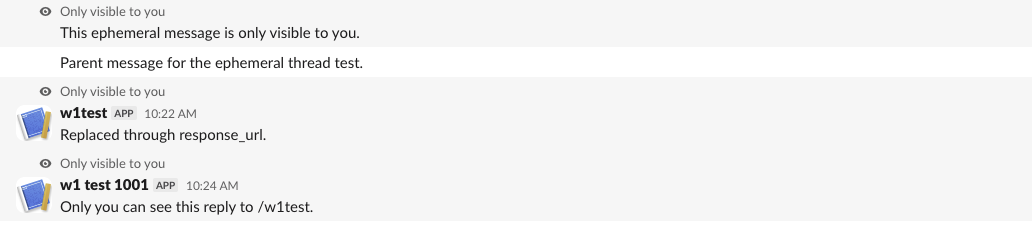
We added a /w1test command and answered it with respond("Only you can see this reply to /w1test."), with no response_type. The reply was ephemeral. The response_url answered with a plain-text body ok, not the JSON {"ok":true} that the button response_url returned. Code that parses that body as JSON will fail. The reply also showed the app's name, "w1 test 1001", where messages from chat.postEphemeral showed the bot's display name, "w1test":
To make a slash command reply visible to the whole channel, send response_type: "in_channel".
FAQ
Do ephemeral messages disappear on reload? Slack's docs say they do not persist across reloads or between devices. In our test in the Slack web app, all three of ours were still there after a reload, in a new tab, and 12 minutes later, after we had deleted the app that sent them. Do not count on them staying, and do not count on them going away.
Can other people in the channel see that I got one?
No. Nothing appears in the channel for other members, and the message is not in conversations.history.
How long is a response_url valid? Slack's docs give 30 minutes and up to 5 uses. Our replace and delete calls ran within seconds of the click, so we did not test the expiry.
Stop Jiggling Your Mouse.
Join hundreds of remote workers who never worry about their Slack status. Set it up once, stay green forever.
Related Articles
Slack OAuth Redirect URL on localhost: What Slack Accepts, Tested
We added localhost, 127.0.0.1, https, custom-scheme and tunnel redirect URLs to a Slack app on 1 October 2026, then ran the OAuth flow against a local server. What was accepted, how Slack matches the URL, and the PKCE rules.
Slack App Manifest Example: YAML and JSON That Worked, Tested
A Slack app manifest we used to create a working app on 1 October 2026, in YAML and JSON, plus the validation errors from broken versions and real output from apps.manifest.validate, export, create and update.
Slack chat.delete API: Who Can Delete What, Tested
chat.delete removes a message by channel and ts. We deleted bot messages, a person's messages, a thread parent and an already deleted message with bot and user tokens, and list every response, including cant_delete_message and the tombstone a thread parent leaves.