
Slack not_in_channel Error: Join, Invite, or chat:write.public
not_in_channel means the bot is not a member of the channel you posted or read from. Public channel: conversations.join or chat:write.public. Private channel: /invite the app. Every response here came from a real app.
Slack returns not_in_channel when your bot tries to post to or read from a channel it is not a member of. For a public channel there are two fixes: have the bot join with conversations.join (scope channels:join), or add the chat:write.public scope so it can post without joining. For a private channel, a person in the channel has to add the app, for example with /invite @YourApp. A private channel the bot is not in usually does not return not_in_channel at all; it returns channel_not_found. We reproduced every case below on 29 September 2026 with a test bot in a one-person workspace.
What we sent and what Slack answered
The bot had only chat:write. We created a public channel, a private channel and an archived channel, and did not add the bot to any of them.
| Call | Channel | Response |
|---|---|---|
chat.postMessage | public, bot not a member | not_in_channel |
chat.postMessage | public, by name #w1-lab-public | not_in_channel |
chat.postMessage | public, by name without # | not_in_channel |
chat.postMessage | private, bot not a member | channel_not_found |
chat.postMessage | archived, bot not a member | not_in_channel |
chat.postMessage | archived, bot is a member | is_archived |
conversations.history | public, bot not a member | not_in_channel |
reactions.add | public, bot not a member | not_in_channel |
Each came back as HTTP 200 with a body like this:
{"ok": false, "error": "not_in_channel"}Two rows surprise people. A channel name works as well as an ID for public channels: Slack found the channel and then refused because the bot was not in it. And the archived channel returns not_in_channel until the bot is a member; only then do you see the real reason, is_archived.
Fix 1: join the public channel with conversations.join
Add the channels:join bot scope, reinstall the app, then call:
curl -s https://slack.com/api/conversations.join \
  -H "Authorization: Bearer $SLACK_BOT_TOKEN" \
  -d channel=C0C4RQXFPAT
Our bot got {"ok": true, ...} with the channel object, a "joined #w1-lab-public" line appeared in the channel, and the next chat.postMessage returned ok: true. Joining also fixed conversations.history and reactions.add, which the next fix does not.
conversations.join works only on public channels. On our private channel it returned channel_not_found, and on the archived one is_archived.
Fix 2: post without joining, with chat:write.public
Add the chat:write.public scope and reinstall. The bot can then post to any public channel without being a member. Our first post after the reinstall went through, then the bot joined, then it posted again:

This scope covers posting only. In the same state, conversations.history and reactions.add on that channel still returned not_in_channel. It also does nothing for private channels: chat.postMessage to our private channel still returned channel_not_found.
Use it when a bot posts alerts to many public channels and never needs to read them. Otherwise, join.
Never appear "away" on Slack again
Cloud-based. No downloads. Works 24/7 even when your laptop is off.
Fix 3: invite the app to a private channel
A bot cannot add itself to a private channel. Someone in the channel types /invite @ and the app's name. Slack's picker marks the app Not in channel:

After the invite, the post that had failed with channel_not_found returned ok: true, and conversations.history worked too. When we removed the bot with conversations.kick, the next post failed with channel_not_found again.
If a person @-mentions the app in a private channel it is not in, Slack offers the same fix to that person only:
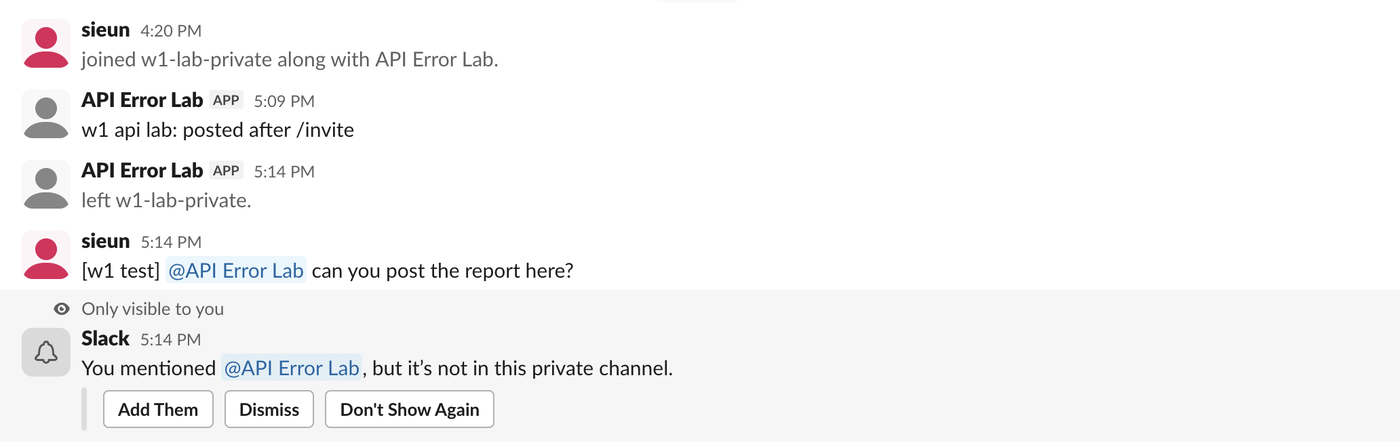
The message with the mention is still posted; the prompt is only visible to the sender.
If you still get not_in_channel
- • Check the token. If your code has two tokens, the call may use the one whose bot was never invited.
auth.testreturns theuser_idof the bot the token belongs to; that user must be in the channel's member list. - • Check the channel. A webhook URL is tied to the channel picked at install, but
chat.postMessageuses whateverchannelyou pass. Copy the ID from the channel's details, at the bottom of the About tab. - • For GitHub Actions, the invite step is the one people skip. The workflow setup is in how to send a Slack message from GitHub Actions.
The related errors each have their own page: missing_scope when the token lacks a permission, and channel_not_found when Slack cannot see the channel at all.
FAQ
Why do I get channel_not_found instead of not_in_channel on a private channel? Slack hides private channels from apps that are not members, so to the bot the channel does not exist. Invite the app and the error goes away.
Does chat:write.public need a reinstall? Yes, like any scope change. Until the app is reinstalled, the token keeps its old scopes.
Can an incoming webhook hit not_in_channel? We never saw it from one. A webhook posts only to the channel chosen when it was created, and none of our 450 test posts to a webhook returned this error. Its errors are covered in Slack webhook curl example.
Stop Jiggling Your Mouse.
Join hundreds of remote workers who never worry about their Slack status. Set it up once, stay green forever.
Related Articles
Slack Member ID: Where to Copy It, and What the U Means
A Slack member ID is the U... code that identifies a person. Copy it from their profile under the three-dot menu, or look it up with users.info and users.list. Tested in two workspaces, with the ID formats we found.
Slack API Rate Limits: What We Hit, and the 429 You Get Back
Slack answers too many calls with HTTP 429 and a Retry-After header. We burst chat.postMessage, conversations.history and an incoming webhook from an internal app and logged every response: where the 429s started, the bodies, and a retry loop that never hit one.
Slack files.upload Deprecated: The 3-Step Upload That Replaces It
files.upload now returns method_deprecated. Use files.getUploadURLExternal, POST the bytes, then files.completeUploadExternal, or files_upload_v2 in the SDK. Tested with curl and Python, including two silent failures.