
Slack Webhook curl Example, Plus Python and Node.js
Send a Slack message with one curl command: POST a JSON body with a text field to your incoming webhook URL, and Slack answers ok. Tested examples for curl, jq, Block Kit, Python with retries and Node.js, how to escape quotes and new lines, and what 400 invalid_payload and 429 mean in code.
To send a Slack message with curl, POST a JSON body with a text field to your incoming webhook URL:
curl -X POST "$SLACK_WEBHOOK_URL" \
  -H "Content-Type: application/json" \
  -d '{"text": "Deploy finished: *web* is live"}'
Slack replies with the two letters ok and posts the message in the webhook's channel. If the JSON is broken, you get HTTP 400 with invalid_payload. Keep the URL in an environment variable such as SLACK_WEBHOOK_URL: anyone who has it can post to your channel. If you do not have a URL yet, how to create a Slack webhook covers the four steps.
We ran every example on this page on 28 September against a local stand-in server that checks the JSON and answers the way Slack's docs describe (ok, or invalid_payload for bad JSON), and logged the exact bodies each one sent. The limits and error codes come from Slack's developer docs on incoming webhooks and rate limits.
We build Slack Green, which keeps a Slack dot green from our servers during the hours you set.
How a Slack webhook call works
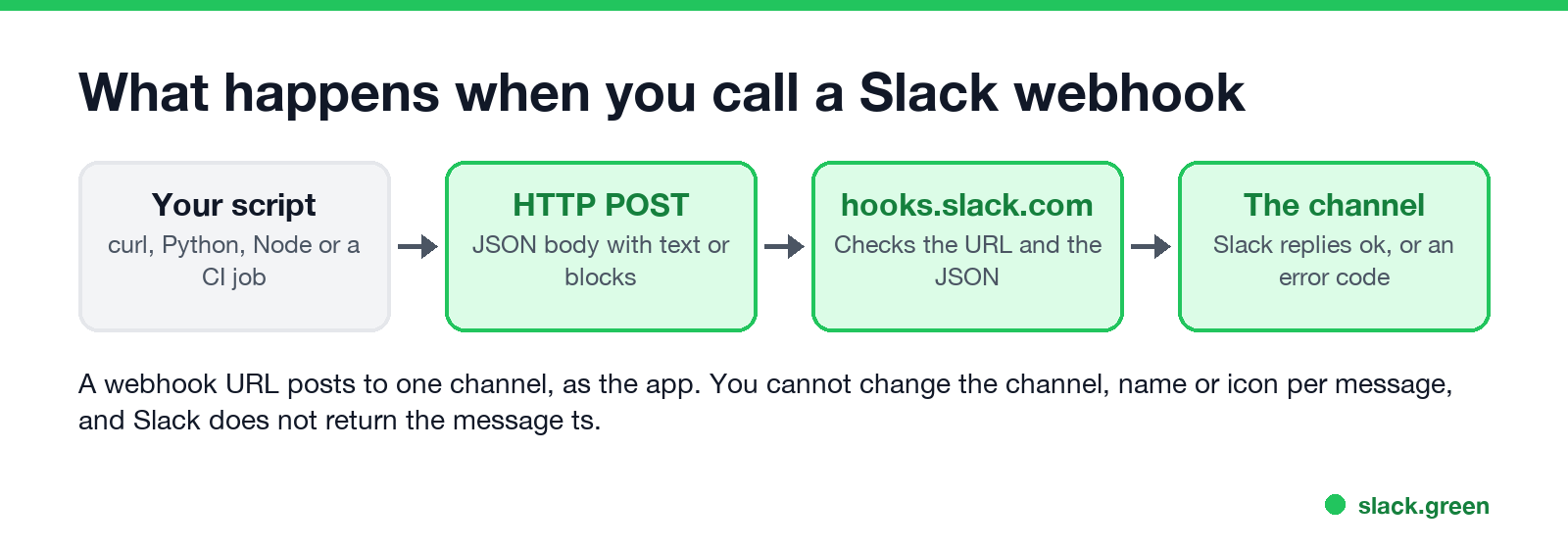
- • One URL, one channel. The webhook posts to the channel picked when the app was installed. Slack's docs say you cannot override the channel, username or icon per message; they come from the app.
- • The body is JSON. Send
Content-Type: application/jsonand at leasttext, orblocksplustextas the notification fallback. - • The answer is plain text. Success is
ok, not a JSON object, and Slack does not return the messagets, so you cannot thread replies to it without the Events API. - • About one message per second. Slack's rate limit page lists incoming webhooks at 1 per second, with short bursts allowed. Over that you get HTTP 429 with a
Retry-Afterheader.
curl examples: text, variables and Block Kit
Send a message that contains quotes or new lines. Do not paste shell variables into a JSON string by hand. Let jq build the JSON, so quotes and line breaks are escaped:
MESSAGE='Build "42" failed on main
see the log'
jq -n --arg text "$MESSAGE" '{text: $text}' |
  curl -sS -X POST "$SLACK_WEBHOOK_URL" -H "Content-Type: application/json" --data-binary @-
The body that arrived was {"text": "Build \"42\" failed on main\nsee the log"}: the quotes became \" and the line break \n, which Slack shows as a new line.
Send a formatted message with Block Kit. Put the JSON in a heredoc and send it with --data-binary, which keeps the body exactly as written:
curl -X POST "$SLACK_WEBHOOK_URL" \
  -H "Content-Type: application/json" \
  --data-binary @- <<'EOF'
{
  "text": "Deploy finished for web",
  "blocks": [
    {"type": "section", "text": {"type": "mrkdwn", "text": "*Deploy finished* for `web`\n<https://example.com/runs/42|Open the run>"}}
  ]
}
EOF
Links use <url|text> in webhook messages. The [text](url) form works only in the Slack message composer's markup mode, not in mrkdwn sent by apps and webhooks. To turn normal Markdown into Slack's format first, paste it into our free Markdown to Slack converter, and preview the result in the Slack message formatter. All the syntax is in Slack Block Kit markdown.
Slack webhook in Python
Never appear "away" on Slack again
Cloud-based. No downloads. Works 24/7 even when your laptop is off.
This uses only the standard library. It retries when Slack rate-limits you and raises an error with Slack's message for anything else:
import json
import os
import time
import urllib.error
import urllib.request

URL = os.environ["SLACK_WEBHOOK_URL"]


def send(text, retries=3):
    body = json.dumps({"text": text}).encode()
    req = urllib.request.Request(URL, data=body, headers={"Content-Type": "application/json"})
    for attempt in range(retries):
        try:
            with urllib.request.urlopen(req, timeout=10) as resp:
                return resp.read().decode()  # "ok"
        except urllib.error.HTTPError as e:
            if e.code == 429:  # rate limited: wait as long as Slack asks
                time.sleep(int(e.headers.get("Retry-After", "1")))
                continue
            raise RuntimeError(f"{e.code} {e.read().decode()}")  # e.g. 400 invalid_payload
    raise RuntimeError("still rate limited")


print(send('Nightly job done: 1,204 rows, "0" errors'))
It printed ok. json.dumps escapes the quotes in the text, so the same function works for any message.
Slack webhook in Node.js
Node 18 and newer have fetch built in, so no package is needed. Save it as send.mjs and run node send.mjs:
const url = process.env.SLACK_WEBHOOK_URL;

const res = await fetch(url, {
  method: "POST",
  headers: { "Content-Type": "application/json" },
  body: JSON.stringify({ text: "Backup finished in 42 s" }),
});
const body = await res.text(); // "ok", or an error such as "invalid_payload"
if (!res.ok) throw new Error(`${res.status} ${body}`);
console.log(body);
It printed ok on Node 26. JSON.stringify does the escaping.
Slack webhook error 400: invalid_payload and bad request
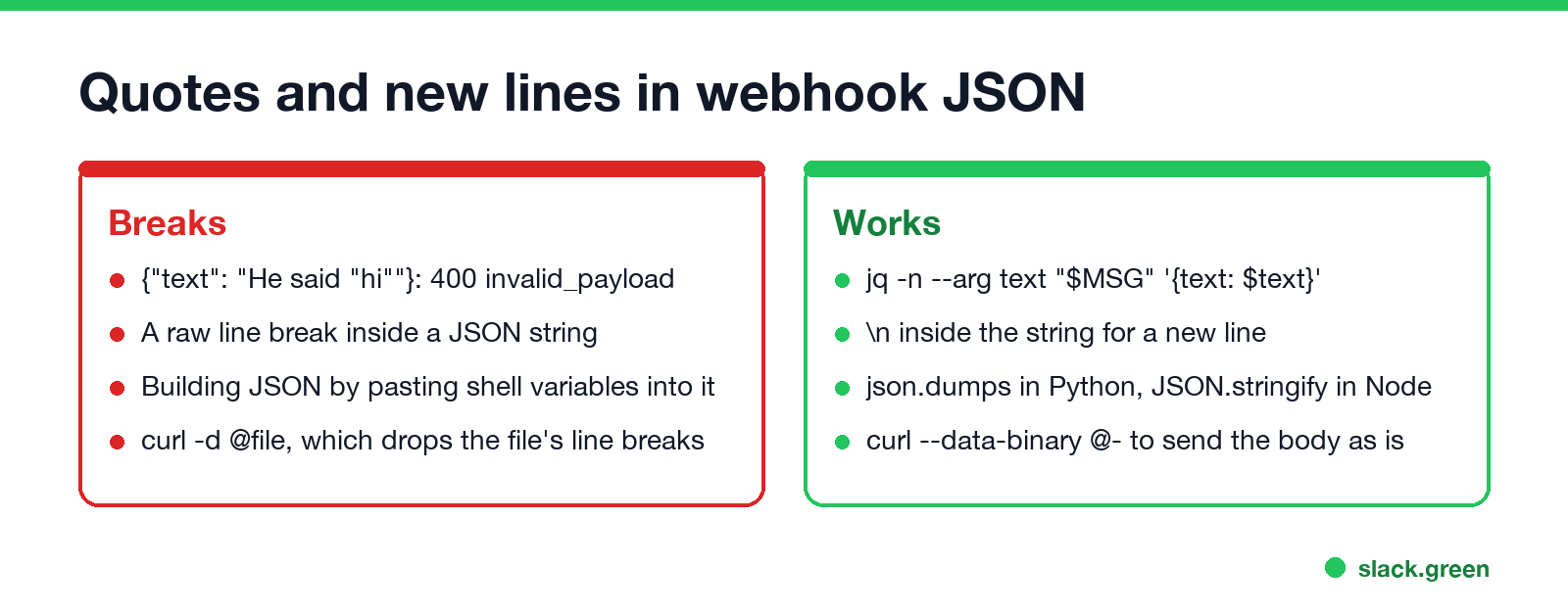
A 400 from a webhook almost always means the JSON is not valid. The classic mistake is an unescaped quote:
curl -i -X POST "$SLACK_WEBHOOK_URL" -H "Content-Type: application/json" \
  -d '{"text": "He said "hi""}'
The inner quotes end the string early, so the body {"text": "He said "hi""} is not JSON, and the answer is HTTP 400 with invalid_payload. Slack's docs say such a request "should not be retried without correction". The fixes:
jq, json.dumps or JSON.stringify instead of string pasting.\n inside the string, never a raw line break.--data-binary @file; plain -d @file drops the file's line breaks.text. Without text or blocks, Slack answers no_text.Webhook responses to handle in code
Never appear "away" on Slack again
Cloud-based. No downloads. Works 24/7 even when your laptop is off.
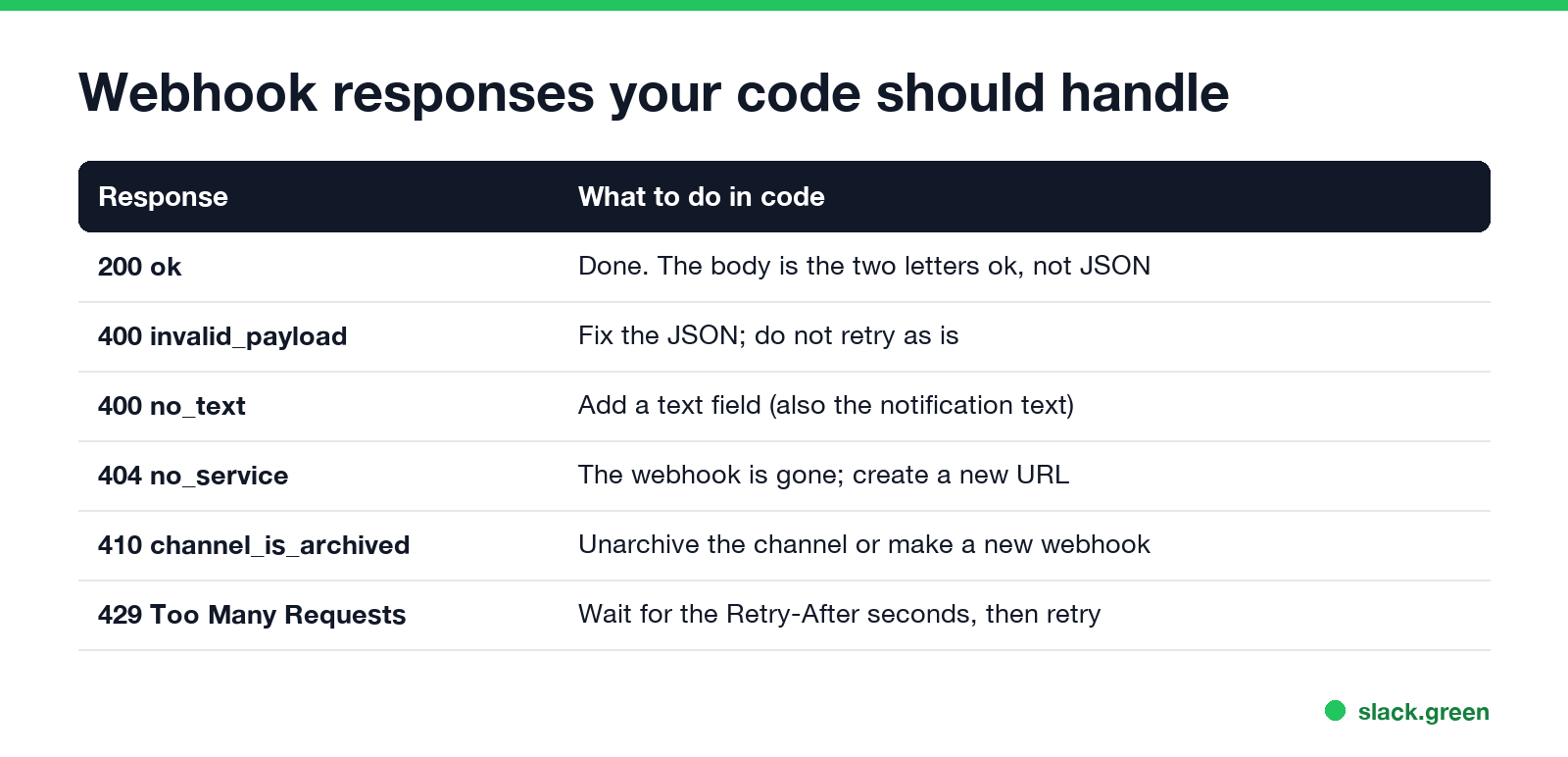
| Response | What your code should do |
|---|---|
200 ok | Done. The body is plain text |
400 invalid_payload | Fix the JSON; do not retry as is |
400 no_text | Add a text field |
403 action_prohibited | An admin blocked posting; ask them |
404 no_service | The webhook was removed or disabled; create a new URL |
410 channel_is_archived | Unarchive the channel or make a new webhook |
| 429 Too Many Requests | Wait Retry-After seconds, then send again |
The full list, with what each one means for setup, is in how to create a Slack webhook. For CI, how to send a Slack message from GitHub Actions has a ready workflow, and how to add a new line in Slack covers line breaks in API messages.
FAQ
How do I send a Slack message with curl?
curl -X POST "$SLACK_WEBHOOK_URL" -H "Content-Type: application/json" -d '{"text": "Hello"}'. Slack answers ok.
Why does my Slack webhook return 400 invalid_payload?
The body is not valid JSON, usually an unescaped quote or a raw line break. Build it with jq or a JSON library.
What does a Slack webhook return on success?
HTTP 200 with the plain-text body ok. It does not return the message ts.
Can a webhook post to a different channel?
No. Each webhook posts to the channel chosen when it was created. Make one webhook per channel, or use a bot token with chat.postMessage.
How many messages can I send to a Slack webhook?
About one per second. Short bursts are allowed; after that Slack answers 429 with Retry-After.
How do I mention someone in a webhook message?
Use their user ID: <@U0123456789>. A plain @name stays text.
Stop Jiggling Your Mouse.
Join hundreds of remote workers who never worry about their Slack status. Set it up once, stay green forever.
Related Articles
Slack Emoji for Approved, Perfect and Sounds Good
The Slack emoji for approved is ✅ :white_check_mark:. For perfect, use 💯 :100: or 🤌 :pinched_fingers:; for sounds good or sure, 👍 :+1: or 👌 :ok_hand:. Every code checked in Slack, what each one means to readers, custom LGTM and SGTM emoji, and a pinned legend for approval channels.
Tips for Working Across Time Zones: 10 Habits That Work
Working across time zones works when the team writes things down, keeps a short overlap window for live talk, says the zone with every time, and lets tools deliver messages in each person's working hours. Ten habits, a follow-the-sun handoff note, the Slack settings that help, and a script that shows your team's local times.
Slack Emoji for OOO, PTO and Days Off
The usual Slack emoji for OOO is 🌴 :palm_tree:, with ✈️ :airplane: for travel and 🗓️ :spiral_calendar_pad: for planned PTO. Enterprise's built-in Out of office status uses ⛔. Codes for vacation, upcoming PTO, sick days, holidays and outages, custom :ooo: and :pto: emoji, and statuses to copy.