
How to Add a New Line in Slack Without Sending
Press Shift+Enter to add a new line in a Slack message without sending it. To make Enter add lines instead, change Preferences, Advanced, 'When writing a message, press Enter to' to Start a new line, then send with Cmd+Enter or Ctrl+Enter. Mobile, lists, code blocks and API line breaks.
To add a new line in Slack without sending the message, press Shift+Enter. It works the same on Mac, Windows, Linux and in the browser. Press it twice for a blank line between paragraphs. If you would rather have Enter add lines, open Preferences, Advanced, and under When writing a message, press Enter to pick Start a new line. After that, Enter adds a line and Cmd+Enter (Mac) or Ctrl+Enter (Windows and Linux) sends.
On iPhone and Android the return key already adds a new line. You send with the arrow button.
We build Slack Green, which keeps your Slack status green from our servers during the hours you set. We also make a free Slack message formatter that previews line breaks, lists and code the way Slack shows them.
New line vs send in Slack, by device
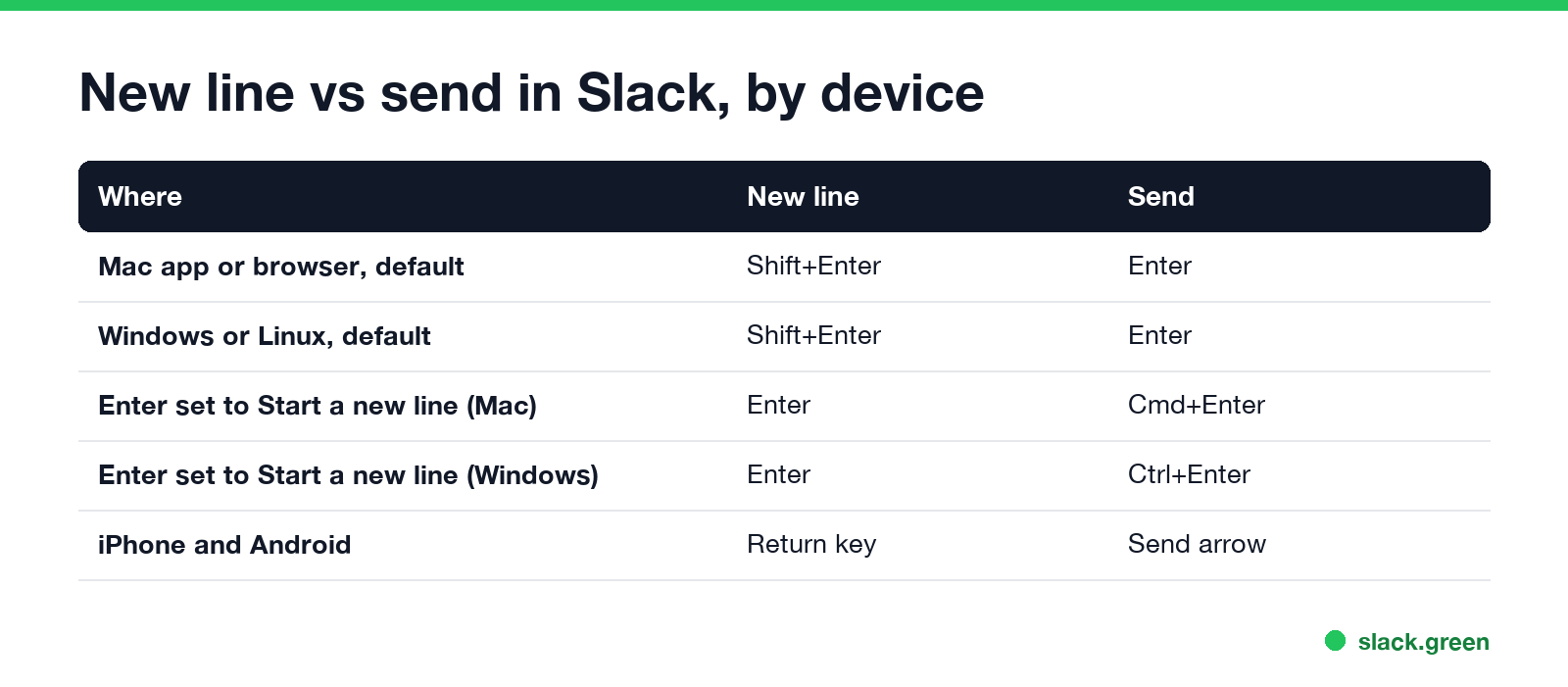
| Where you type | New line | Send |
|---|---|---|
| Mac app or browser, default setting | Shift+Enter | Enter |
| Windows or Linux, default setting | Shift+Enter | Enter |
| Enter set to Start a new line, Mac | Enter | Cmd+Enter |
| Enter set to Start a new line, Windows or Linux | Enter | Ctrl+Enter |
| iPhone and Android | Return key | Send arrow |
Shift+Enter keeps working when you switch the preference, so you do not have to relearn it. The key is called Return on some Mac keyboards; Shift+Return does the same thing.
Make Enter start a new line instead of sending
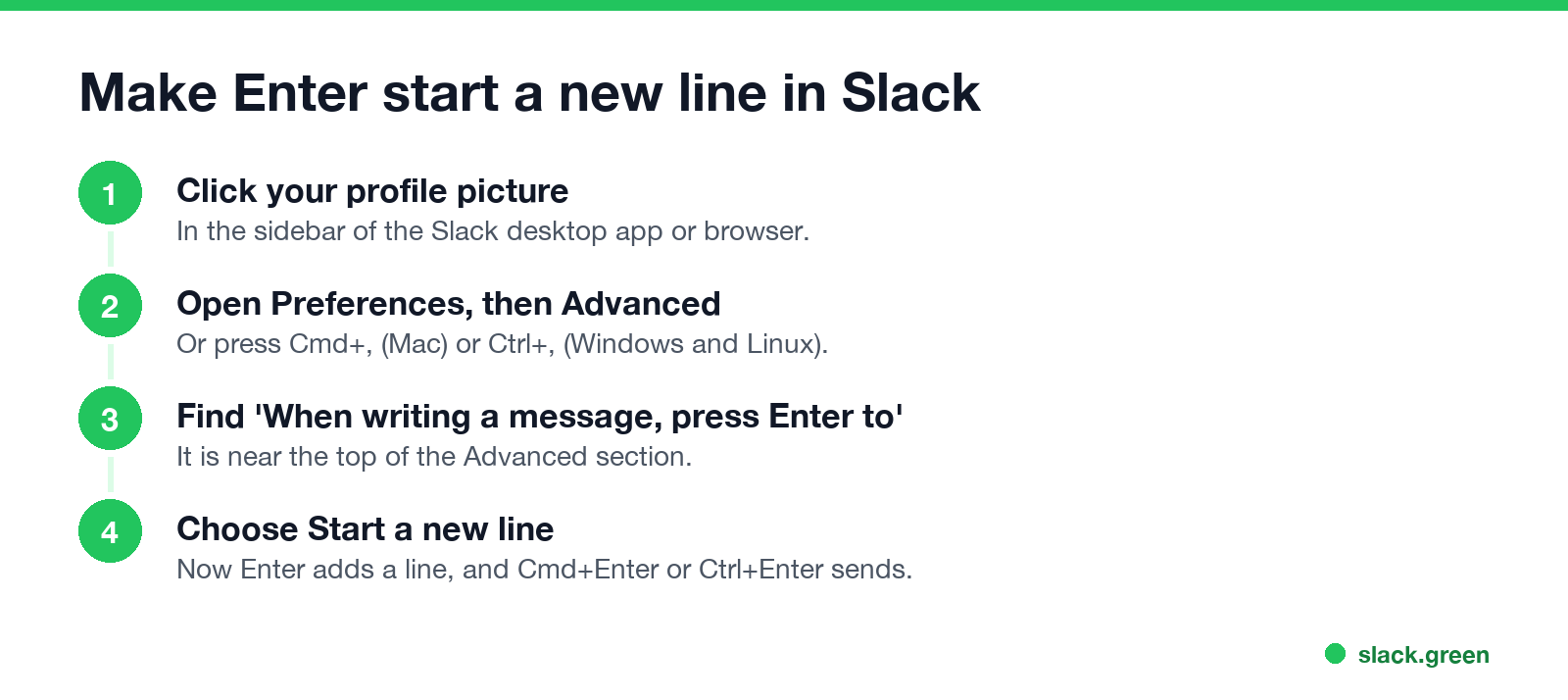
Slack's help center gives these steps:
- Click your profile picture in the sidebar.
- Select Preferences. The shortcut is Cmd+, on Mac or Ctrl+, on Windows and Linux.
- Choose Advanced.
- Under When writing a message, press Enter to, select Start a new line.
Now Enter adds a line, and Cmd+Enter or Ctrl+Enter sends. This is a per-person desktop setting. It does not change anything for your coworkers.
People who write long messages, paste logs, or keep sending half-finished messages by accident tend to like this setting. If you already sent too early, press Cmd+Z (Ctrl+Z) right away to unsend it, or press the Up arrow to edit your last message.
Line breaks in lists, quotes and code blocks
Never appear "away" on Slack again
Cloud-based. No downloads. Works 24/7 even when your laptop is off.
The keys for each format, such as Cmd+Shift+8 for a bulleted list, are in our Slack keyboard shortcuts guide.
Slack new line on iPhone and Android
In the Slack mobile apps, the return key on the keyboard adds a new line and never sends. Tap the send arrow to post the message.
Line breaks in Slack API and webhook messages
When a bot or script posts to Slack, put a line break in the text as the two-character sequence backslash n in the JSON string:
curl -X POST -H 'Content-type: application/json' \
  --data '{"text":"Deploy finished\nVersion: 2.4.1\nStatus: ok"}' \
  "$SLACK_WEBHOOK_URL"
Slack shows that as three lines. Two in a row leave a blank line. The same rule works in Block Kit mrkdwn text and in tools such as the Slack GitHub Action. To draft the message first and see the line breaks, use the Slack message formatter. If you start from GitHub markdown, the Markdown to Slack converter handles the blank lines and lists for you.
No formatting buttons under the message field? See Slack formatting toolbar missing.
FAQ
Never appear "away" on Slack again
Cloud-based. No downloads. Works 24/7 even when your laptop is off.
How do I go to the next line in Slack without sending? Press Shift+Enter. On a phone, press the return key.
How do I add a line break in a Slack message? Shift+Enter adds one line break. Press it twice for an empty line.
Why does Enter send my Slack message? That is the default. Change it in Preferences, Advanced, under When writing a message, press Enter to.
How do I send a message if Enter makes a new line? Press Cmd+Enter on Mac or Ctrl+Enter on Windows and Linux, or click the send arrow.
Can I add a new line in a Slack status? No. A status is one line of up to 100 characters. Ideas that fit are in funny Slack status ideas.
Stop Jiggling Your Mouse.
Join hundreds of remote workers who never worry about their Slack status. Set it up once, stay green forever.
Related Articles
Slack Emoji for Announcements, Updates and Reminders
The standard Slack emoji for an announcement is 📣 :mega: or 📢 :loudspeaker: at the start of the post. Use 🚨 :rotating_light: only for real emergencies, 🆕 :new: for updates, ⏰ :alarm_clock: for reminders, and ask readers to react with ✅ :white_check_mark: once they have read it. Templates and a custom emoji idea.
Slack Status for a Doctor Appointment: 24 Statuses and Emoji
A Slack status for a doctor appointment says you are out and when you are back, such as 🏥 'At an appointment, back at 2 PM.' You do not have to say what kind. 24 statuses for doctor, dentist and other appointments, the emoji codes, and how to schedule the status so it clears by itself.
Slack Status for Limited Availability: 30 Statuses to Copy
A Slack status for limited availability says you are around but slow, until when, and how to reach you if it is urgent, such as ⏳ 'Limited availability today, replies after 3 PM. Urgent: @mention me.' 30 statuses for busy days, slow replies and catching up, the emoji to use, and when to pause notifications too.