
Slack Formatting Toolbar Missing? How to Get It Back
If the Slack formatting toolbar is missing, click the formatting icon (Aa) in the message field to show it again. If there is no icon, turn off Format messages with markup in Preferences, Advanced, which hides the toolbar. Mobile steps, every toolbar button with its shortcut, and how to format without the toolbar.
If the formatting toolbar is missing in Slack, click the formatting icon, the Aa button in the message field. It shows and hides the toolbar, and it is easy to click by accident. If there is no Aa icon at all, you have turned on markup mode: open Preferences, Advanced, and under Input Options uncheck Format messages with markup. Slack hides the toolbar in that mode and applies formatting only after you send. On iPhone and Android, tap Aa to show the formatting options.
We build Slack Green, which keeps your Slack status green from our servers during the hours you set. We also make a free Slack message formatter with its own toolbar, so you can draft a formatted message and paste it into Slack.
Bring the Slack formatting toolbar back
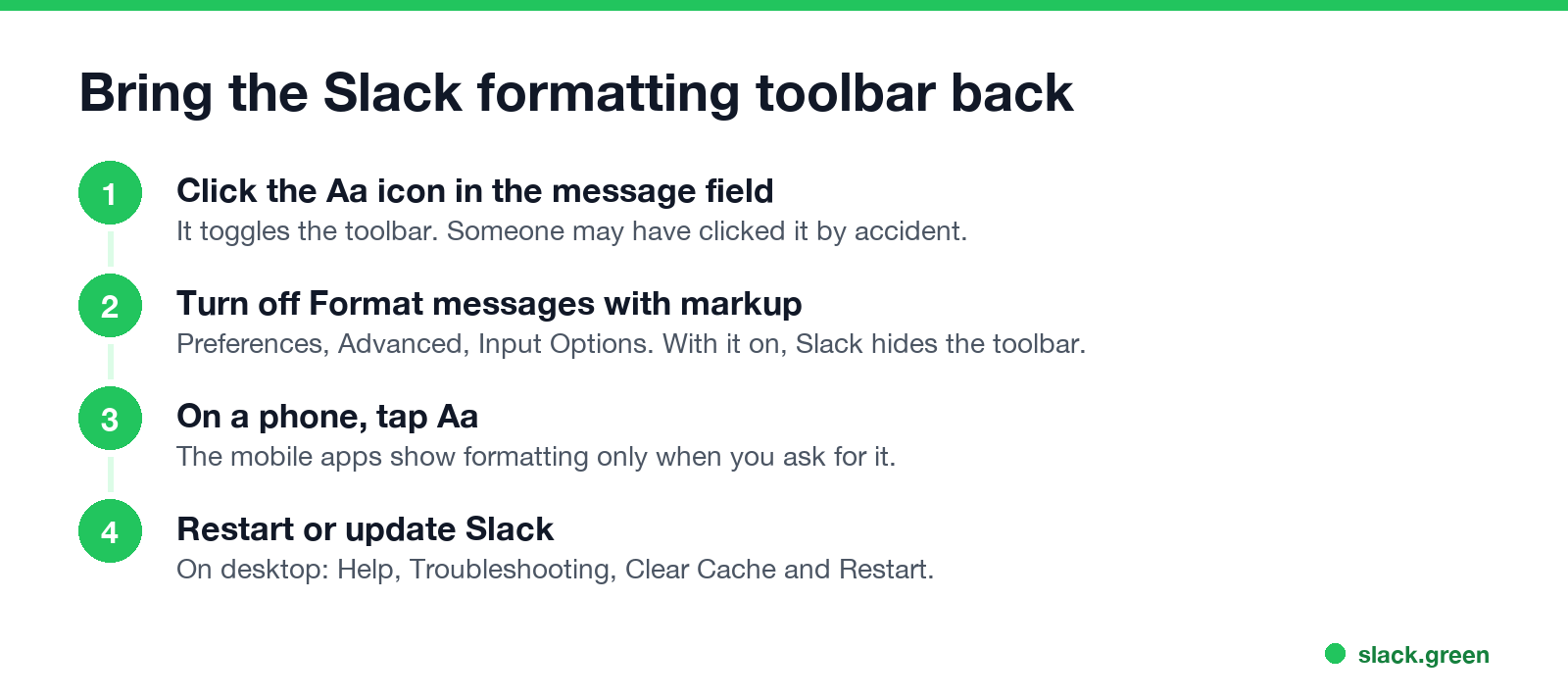
- Click the Aa icon in the message field. Slack's help center says the toolbar is visible by default, and the formatting icon hides or shows it. If someone clicked it once, the toolbar stays hidden until you click it again.
- Turn off markup mode. Click your profile picture, choose Preferences, then Advanced. Under Input Options, uncheck Format messages with markup. With that box checked, Slack hides the toolbar, formats messages only after you send them, pastes copied messages as plain text, and does not format lists automatically.
- On a phone, tap Aa. The mobile apps keep formatting out of the way until you tap it.
- Restart or update the desktop app. If the toolbar still does not show, choose Help, Troubleshooting, Clear Cache and Restart, and install any Slack update.
Why would anyone turn markup mode on? People who type formatting by hand, such as developers who like writing backticks, see the characters as they type and the formatting after sending.
Slack formatting toolbar buttons and shortcuts
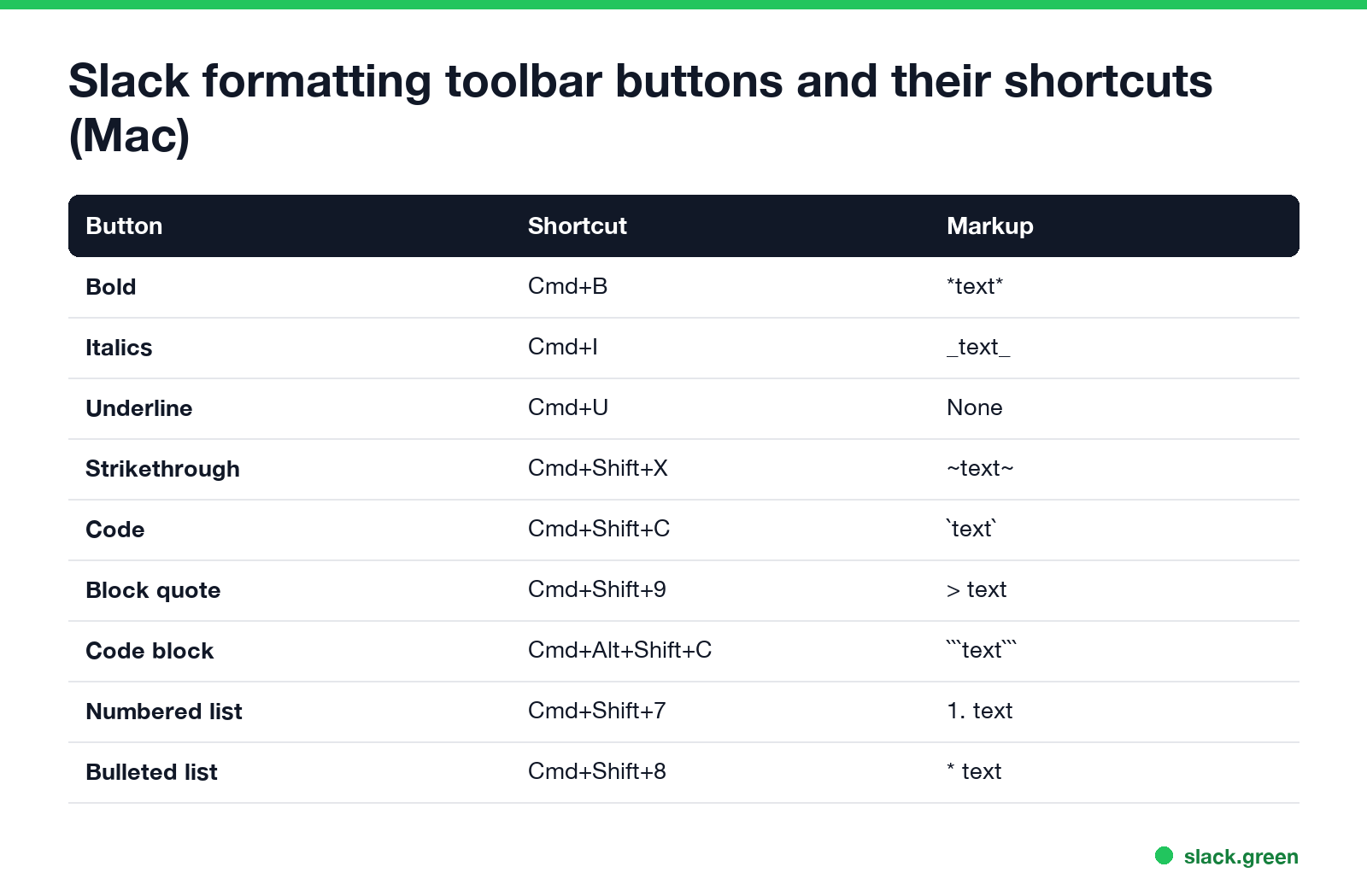
Slack's help center lists these toolbar options. The shortcuts come from Slack's keyboard shortcut list; on Windows and Linux use Ctrl in place of Cmd.
| Button | Shortcut, Mac | Typed markup |
|---|---|---|
| Bold | Cmd+B | *text* |
| Italics | Cmd+I | _text_ |
| Underline | Cmd+U | none |
| Strikethrough | Cmd+Shift+X | ~text~ |
| Code | Cmd+Shift+C | one backtick on each side |
| Block quote | Cmd+Shift+9 | > text |
| Code block | Cmd+Alt+Shift+C | three backticks on each side |
| Numbered list | Cmd+Shift+7 | 1. and a space |
| Bulleted list | Cmd+Shift+8 | an asterisk and a space |
To use the toolbar, select the text and click a button. You can stack several, such as bold and italic, on the same words. Each one has its own guide: bold, strikethrough, code blocks, bullet points and links.
Format a Slack message without the toolbar
Never appear "away" on Slack again
Cloud-based. No downloads. Works 24/7 even when your laptop is off.
The toolbar is only one way in. All of these work with it hidden:
*bold* or _italic_ turns into formatting as you type.Formatting options gone even with the toolbar
FAQ
Why did my Slack formatting toolbar disappear? The Aa icon was clicked, which hides it, or Format messages with markup is turned on in Preferences, Advanced.
How do I show the formatting toolbar in Slack? Click the Aa icon in the message field. On a phone, tap Aa.
Can I use Slack formatting without the toolbar? Yes. Use the keyboard shortcuts or typed markup such as asterisks for bold.
Does the Slack toolbar have a link button? Use Cmd+Shift+U (Ctrl+Shift+U) on selected text, or paste a copied URL over it.
Stop Jiggling Your Mouse.
Join hundreds of remote workers who never worry about their Slack status. Set it up once, stay green forever.
Related Articles
Slack Emoji for Announcements, Updates and Reminders
The standard Slack emoji for an announcement is 📣 :mega: or 📢 :loudspeaker: at the start of the post. Use 🚨 :rotating_light: only for real emergencies, 🆕 :new: for updates, ⏰ :alarm_clock: for reminders, and ask readers to react with ✅ :white_check_mark: once they have read it. Templates and a custom emoji idea.
Slack Status for a Doctor Appointment: 24 Statuses and Emoji
A Slack status for a doctor appointment says you are out and when you are back, such as 🏥 'At an appointment, back at 2 PM.' You do not have to say what kind. 24 statuses for doctor, dentist and other appointments, the emoji codes, and how to schedule the status so it clears by itself.
Slack Status for Limited Availability: 30 Statuses to Copy
A Slack status for limited availability says you are around but slow, until when, and how to reach you if it is urgent, such as ⏳ 'Limited availability today, replies after 3 PM. Urgent: @mention me.' 30 statuses for busy days, slow replies and catching up, the emoji to use, and when to pause notifications too.