
How to Bold Text in Slack (and Italic, Bold Italic)
To bold text in Slack, select it and press Cmd+B on a Mac or Ctrl+B on Windows, or type one asterisk on each side: *bold*. Italic is Cmd+I or _underscores_, and bold italic is *_both_*. Why **double asterisks** stay literal, plus mobile and bot syntax.
To bold text in Slack, select the words in the message box and press Cmd+B on a Mac or Ctrl+B on Windows and Linux, or click Bold in the formatting toolbar. You can also type one asterisk on each side of the text, *like this*, with no spaces inside. Two asterisks (**bold**) do not work in a normal Slack message: that is standard markdown, and Slack uses its own markup. For italics, press Cmd+I (Ctrl+I) or wrap the text in underscores, _like this_.
The syntax is from Slack's help article "Format your messages in Slack with markup" and the shortcuts from Slack's keyboard shortcuts page, both checked on 27 September.
Formatting a message does not keep you active. Slack switches you to away after about 10 minutes with no input in the Slack window. Slack Green keeps your status green from a server during the hours you set.
Slack text formatting cheat sheet
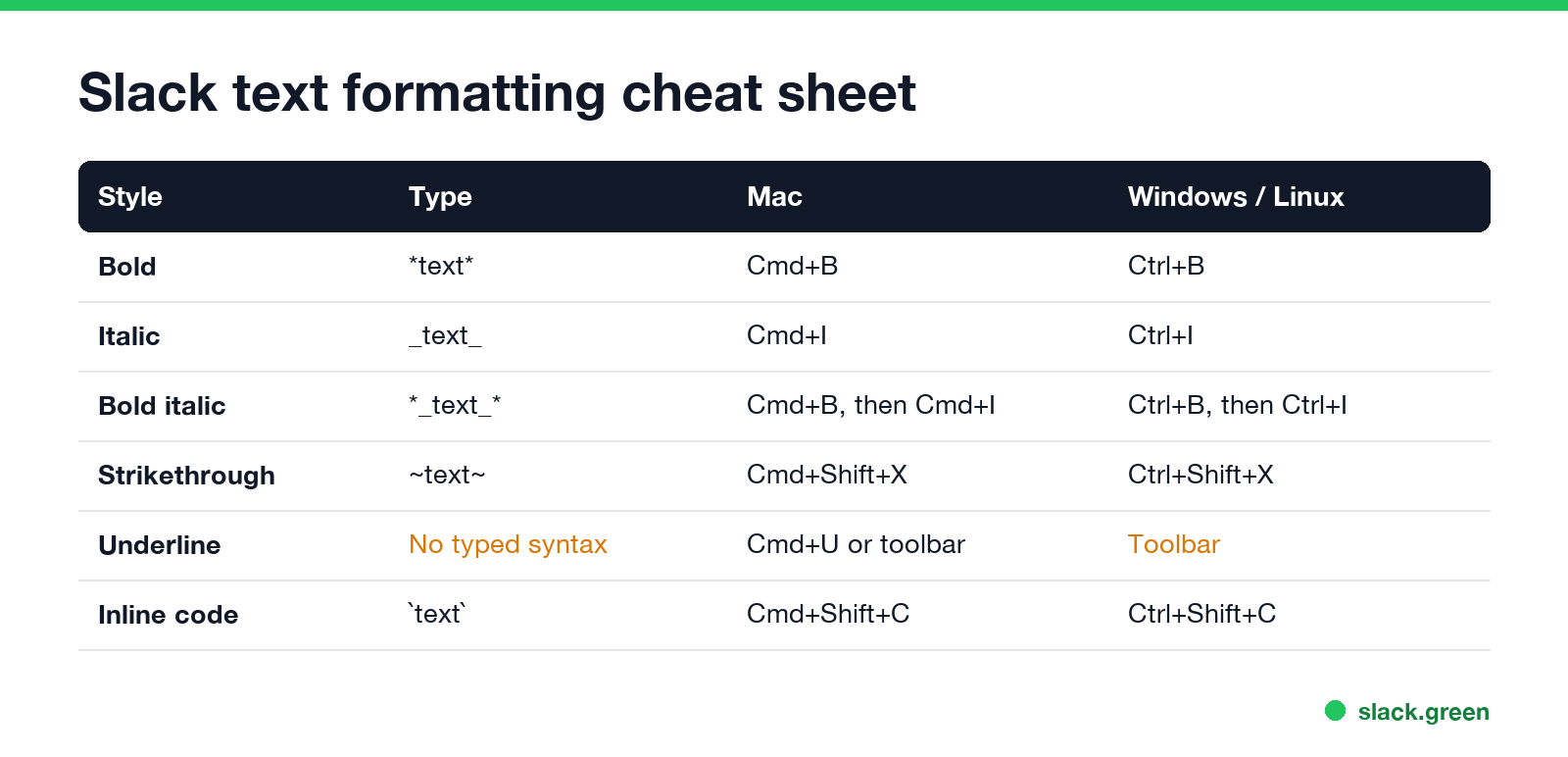
| Style | Type around the text | Mac | Windows / Linux |
|---|---|---|---|
| Bold | *text* | Cmd+B | Ctrl+B |
| Italic | _text_ | Cmd+I | Ctrl+I |
| Bold italic | *_text_* | Cmd+B, then Cmd+I | Ctrl+B, then Ctrl+I |
| Strikethrough | ~text~ | Cmd+Shift+X | Ctrl+Shift+X |
| Underline | none | Cmd+U, or the toolbar | the toolbar |
| Inline code | one backtick on each side | Cmd+Shift+C | Ctrl+Shift+C |
With the formatting toolbar on (the default), typed markers turn into formatting as you type, so you see the bold before you send. Underline is the one style with no typed marker: use Cmd+U on a Mac, or the toolbar button; see how to underline in Slack.
How to bold text in Slack
- Type your message.
- Double-click a word, or drag across the words you want in bold.
- Press Cmd+B (Mac) or Ctrl+B (Windows, Linux), or click B in the formatting toolbar.
- Press the shortcut again with the text selected to remove the bold.
To bold as you type, press Cmd+B, type the words, and press Cmd+B again to stop. Or type *, the words, and a closing *. The closing asterisk has to touch the last letter.
How to italicize and bold italic in Slack
Never appear "away" on Slack again
Cloud-based. No downloads. Works 24/7 even when your laptop is off.
For italics, select the text and press Cmd+I (Ctrl+I), or wrap it in underscores: _text_. Asterisks do not make italics in Slack; one asterisk is bold.
For bold italic, apply both: select the text and press Cmd+B and then Cmd+I, or type *_text_*. The order of the markers does not matter as long as they nest, so _*text*_ works too.
Slack bold not working? The five usual causes
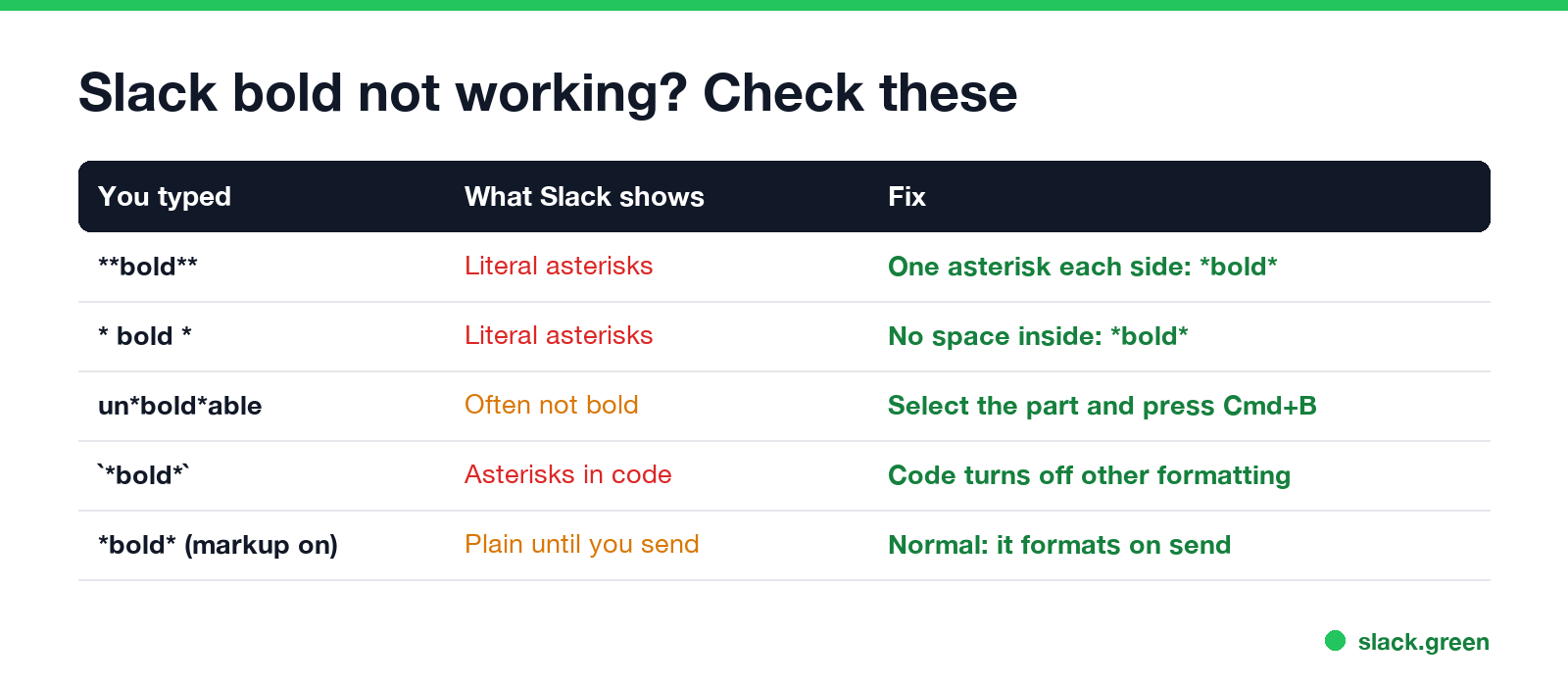
**bold** is GitHub and ChatGPT markdown. Slack shows the asterisks. Use one on each side, or paste markdown through our markdown to Slack converter first.* bold * stays literal. The asterisks must touch the first and last letters.un*bold*able, often do not format. Select the part and press Cmd+B instead.*bold* wrapped in backticks shows the asterisks.Other formatting that fails, from headings to pasted ChatGPT text, is covered in Slack markdown not working. To check a message before you post it, paste it into the Slack message formatter, which previews Slack's rules.
How to bold text in Slack on mobile
In the Slack app for iPhone and Android, type one asterisk on each side of the text, the same as on desktop: *bold*, _italic_, ~strike~. The same rules apply, so no spaces inside the markers and no double asterisks. Shortcuts like Cmd+B need a hardware keyboard, such as an iPad with a keyboard attached.
Bold text in Slack bot and API messages
Never appear "away" on Slack again
Cloud-based. No downloads. Works 24/7 even when your laptop is off.
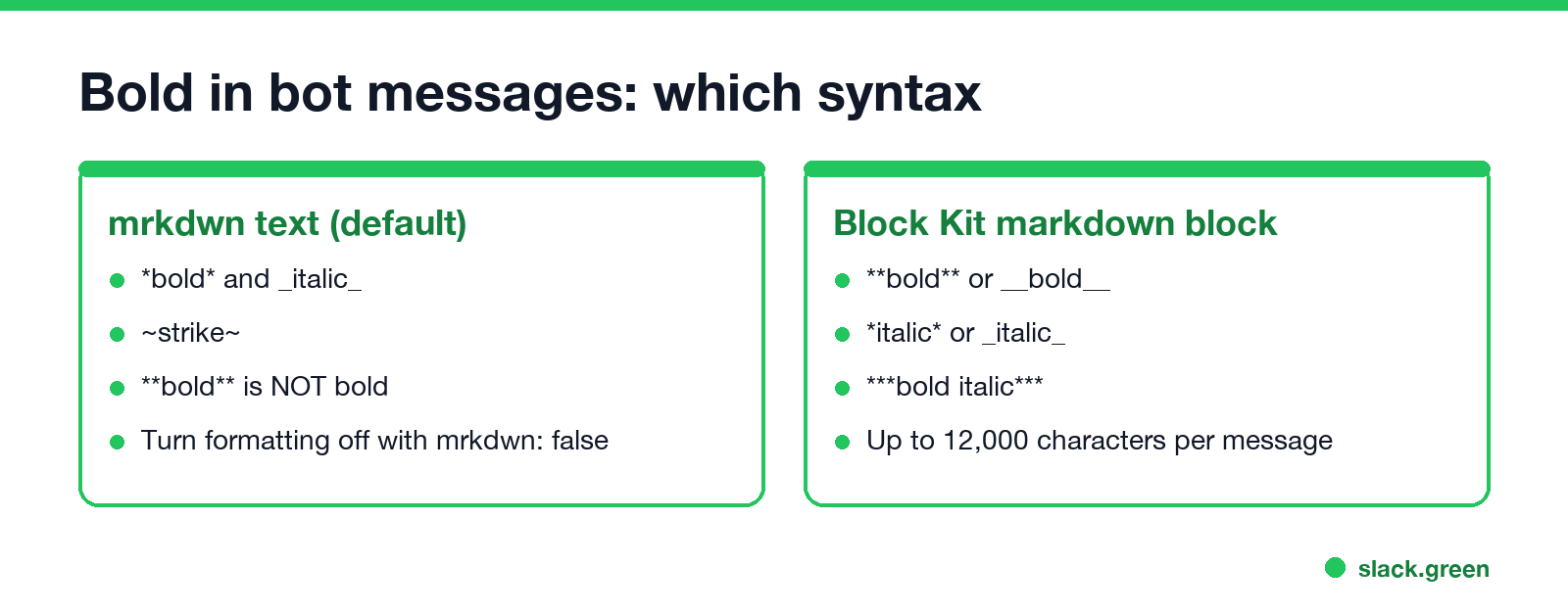
A bot's text and any Block Kit text object of type mrkdwn use Slack's markup: *bold*, _italic_, ~strike~. Slack also has a markdown block ("type": "markdown") that takes standard markdown, so **bold** and ***bold italic*** work there. This chat.postMessage body uses both:
{
  "channel": "C0123456789",
  "text": "Deploy finished",
  "blocks": [
    {"type": "section", "text": {"type": "mrkdwn", "text": "*Deploy finished* in _4 min 12 s_"}},
    {"type": "markdown", "text": "**Next:** check the _error rate_ dashboard"}
  ]
}
To send asterisks without formatting, set "mrkdwn": false on the top-level text, or use a plain_text text object in blocks. Both options are from Slack's developer docs on formatting message text.
Related formatting guides
To cross text out instead, see how to strikethrough in Slack.
FAQ
What is the shortcut for bold in Slack?
Cmd+B on a Mac, Ctrl+B on Windows and Linux.
Why does Slack show my asterisks instead of bold?
You used two asterisks, left a space inside them, or put them inside code. Use one asterisk on each side, touching the text.
How do you italicize in Slack?
Press Cmd+I (Ctrl+I), or put underscores around the text: _text_.
Does Slack use markdown for bold?
Not standard markdown. Slack messages use *bold* with one asterisk. Only the Block Kit markdown block, which apps send, reads **bold**.
Can I make text bigger or change the font in a Slack message?
No. Slack messages have no font size, color or heading options. Bold and a short line of its own are the usual way to make a heading.
Stop Jiggling Your Mouse.
Join hundreds of remote workers who never worry about their Slack status. Set it up once, stay green forever.
Related Articles
Slack Status for Limited Availability: 30 Statuses to Copy
A Slack status for limited availability says you are around but slow, until when, and how to reach you if it is urgent, such as ⏳ 'Limited availability today, replies after 3 PM. Urgent: @mention me.' 30 statuses for busy days, slow replies and catching up, the emoji to use, and when to pause notifications too.
Slack Emoji for Thank You (and You're Welcome)
The usual Slack emoji for thank you are 🙏 :pray:, 🙌 :raised_hands: and ❤️ :heart:. For you're welcome, 😊 :blush: or 🤗 :hugging_face:. What each one says, which ones read wrong, and custom :ty:, :np: and :welcome: emoji your team can add in a minute.
Slack Emoji for Condolences: What to React With, and What to Say
The right Slack emoji for condolences are ❤️ :heart:, 🙏 :pray:, 🤗 :hugging_face:, 💐 :bouquet:, 🕯️ :candle: and 🕊️ :dove_of_peace:. Avoid 👍, ✅ and 👀, which read as 'noted'. Add a few words in the thread or a DM. Short condolence messages, get-well emoji, and custom 'thinking of you' emoji.