
Slack Markdown Not Working? Why and How to Fix It
Slack markdown is not working because Slack messages do not use standard markdown. They use Slack's own markup: *bold* with one asterisk, _italic_, ~strike~, and no headings or tables. Fixes for pasted text (Cmd+Shift+F), the Format messages with markup setting, and bots.
Slack markdown usually "stops working" because Slack messages never used standard markdown. Slack has its own markup: one asterisk on each side for bold (*bold*), underscores for italics (_italic_), one tilde for strikethrough (~strike~), backticks for code, and > for a quote. Standard markdown such as **bold**, # Heading, ~~strike~~ and pipe tables shows up as the characters you typed. If your syntax is right and it still does not format, the cause is a setting or the way you pasted: press Cmd+Shift+F (Ctrl+Shift+F on Windows) after pasting to apply formatting, and check Format messages with markup in Preferences > Advanced.
The syntax and the setting are from Slack's help article "Format your messages in Slack with markup", and the shortcuts from Slack's keyboard shortcuts page, both checked on 27 September.
While you fix formatting, keep in mind that Slack sets you to away after about 10 minutes without input in the Slack window. Slack Green keeps your status green from a server during the hours you set.
Slack formatting not working: symptom, cause and fix
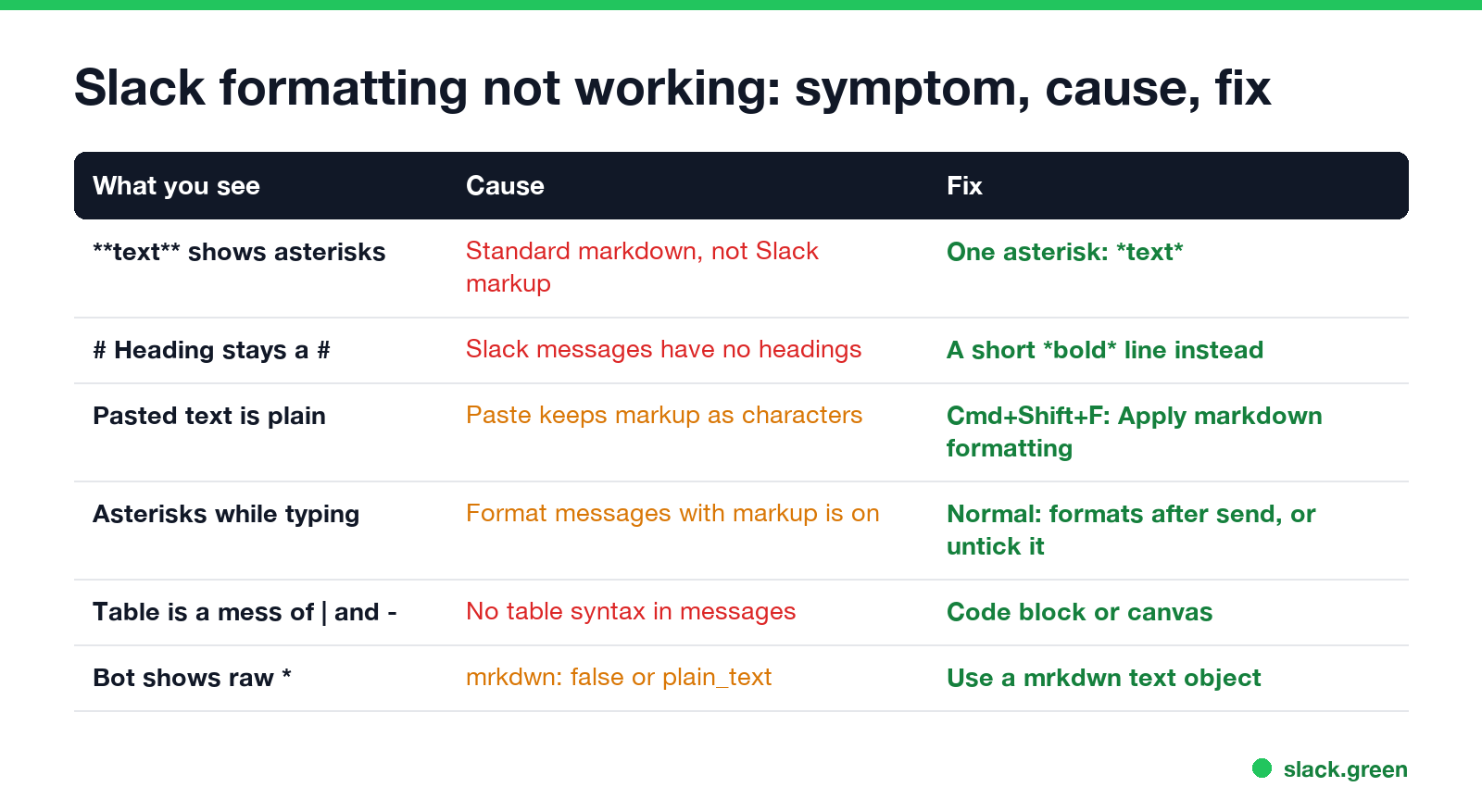
| What you see | Cause | Fix |
|---|---|---|
**text** shows asterisks | Standard markdown | One asterisk: *text* |
# Heading stays a # | Slack messages have no headings | A short bold line |
| Pasted text is not formatted | Paste keeps the markup as characters | Cmd+Shift+F after pasting |
| Asterisks while you type | Format messages with markup is on | It formats when you send |
| A table turns into pipes and dashes | No table syntax in messages | Code block or canvas |
| A bot shows raw asterisks | mrkdwn: false or plain_text | Use a mrkdwn text object |
Does Slack support markdown?
Partly. Slack's markup borrows some markdown characters and changes others. What works in a message you type:
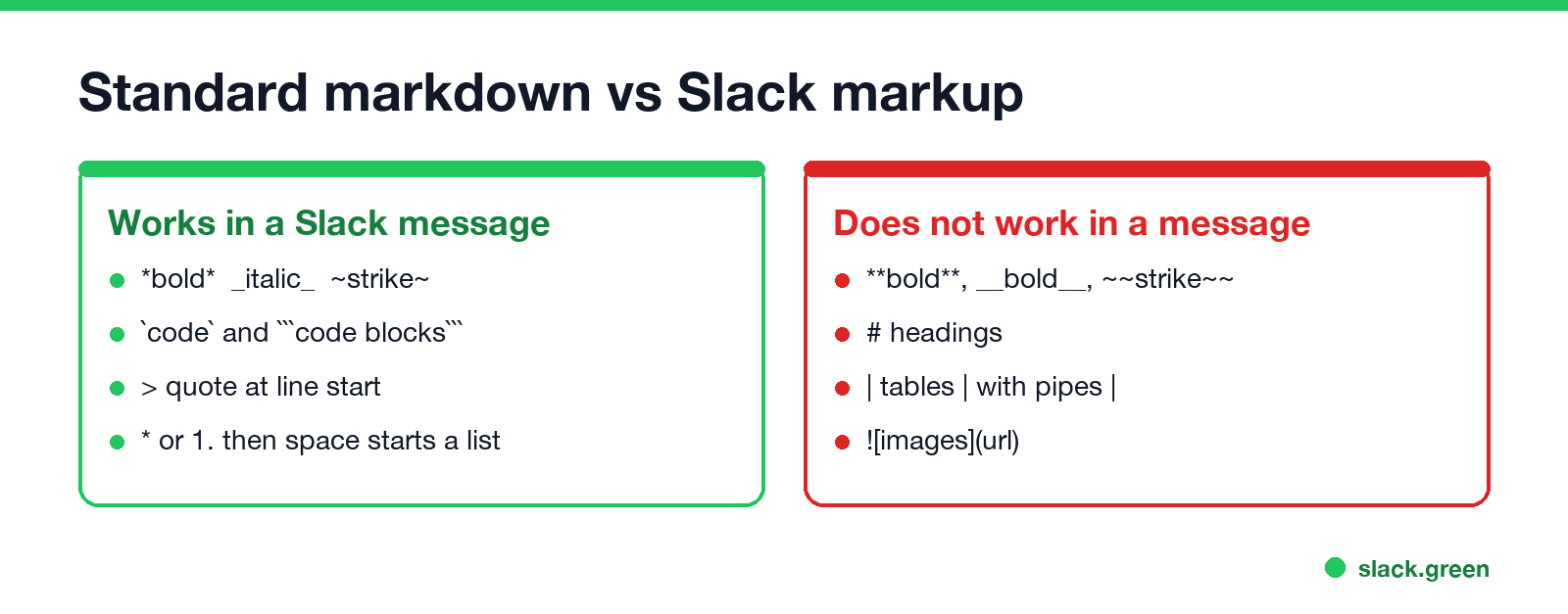
- • Bold
*text*, italic_text_, strikethrough~text~ - • Inline code with one backtick on each side, and code blocks with three
- • A quote with
>at the start of a line - • A bulleted list with
*and a space, a numbered list with1.and a space - • A link as
[text](url), which Slack's help lists for markup mode
What does not work: **bold**, __bold__, ~~strike~~, headings, tables, images and horizontal rules. Each style has its own guide: bold and italics, bullet points, quotes and tables.
Fix pasted markdown that does not format
Never appear "away" on Slack again
Cloud-based. No downloads. Works 24/7 even when your laptop is off.
When you paste text, Slack keeps markup characters as plain text. Slack's shortcut list has an action for this: Apply markdown formatting, Cmd+Shift+F on a Mac and Ctrl+Shift+F on Windows and Linux. Paste, press the shortcut, and Slack formats the pasted markup. If it goes wrong, Undo formatting is Cmd+Z (Ctrl+Z).
Text from ChatGPT, Claude, Notion or a GitHub README is written in standard markdown, with double asterisks and # headings, which Slack's markup does not read. Convert it first: paste it into our markdown to Slack converter, press Copy for Slack, and paste the result. Headings become bold lines and tables become aligned code blocks. The ChatGPT case, with a prompt that makes it write in Slack format, is in how to paste ChatGPT into Slack.
The Format messages with markup setting
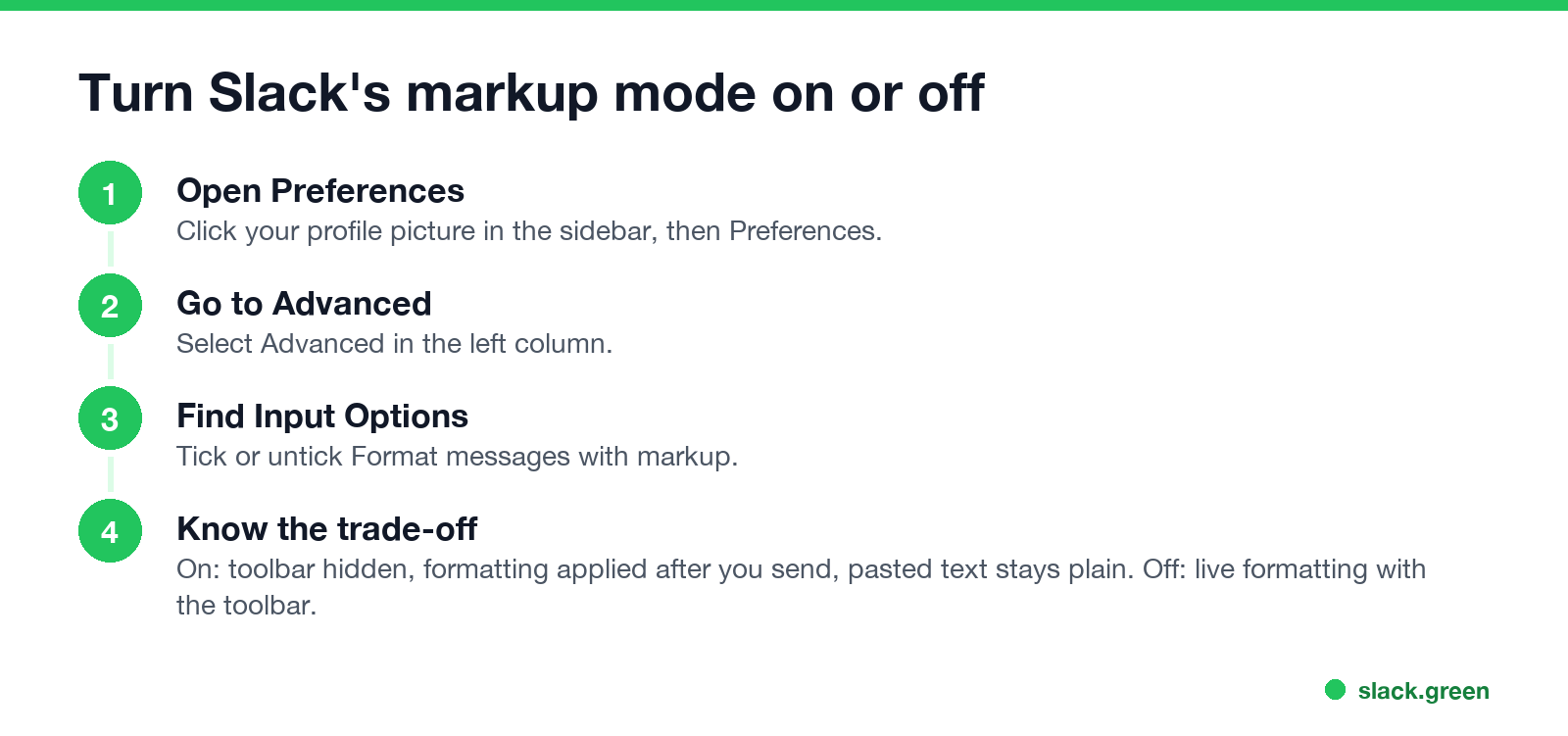
Slack has two ways to format. By default, the formatting toolbar is on and typed markers turn into formatting as you type. With Format messages with markup on, Slack's help says three things change:
To change it: click your profile picture, choose Preferences, select Advanced, and under Input Options tick or untick Format messages with markup.
How to turn off Slack formatting
To send the characters themselves, not the formatting:
Slack markdown not rendering in bot or API messages
Never appear "away" on Slack again
Cloud-based. No downloads. Works 24/7 even when your laptop is off.
Slack's developer docs list three switches that decide whether a bot's text is formatted:
text of chat.postMessage uses mrkdwn by default. "mrkdwn": false turns formatting off."type": "mrkdwn". With "type": "plain_text", asterisks stay asterisks."type": "markdown") reads standard markdown: **bold**, # headings, lists and even pipe tables. Use it for LLM output.Slack also treats &, < and > as control characters. Escape them in text you pass through, or a stray < can swallow part of the message:
def slack_escape(text: str) -> str:
"""Escape the three characters Slack treats as control characters."""
return text.replace("&", "&").replace("<", "<").replace(">", ">")
payload = {
"channel": "C0123456789",
"text": "*Build failed* for " + slack_escape("feature/a<b & c>"),
}
print(payload["text"])Before a bot sends a message, paste its text into the Slack message formatter to preview how Slack renders it.
FAQ
Why is my Slack markdown not working?
Slack uses its own markup, not standard markdown. Bold is *one asterisk*, and headings and tables do not exist in messages.
How do I apply formatting to pasted text in Slack?
Paste, then press Cmd+Shift+F on a Mac or Ctrl+Shift+F on Windows and Linux (Apply markdown formatting).
How do I turn off markdown in Slack?
Press Cmd+Z right after Slack formats your text, wrap the text in backticks, or turn on Format messages with markup in Preferences, Advanced.
Does Slack support markdown headings?
Not in messages. Use a short bold line. Canvases and the Block Kit markdown block do support headings.
Why does my Slack bot show asterisks?
The text is plain_text or the message has "mrkdwn": false. Use a mrkdwn text object, or send standard markdown in a markdown block.
Stop Jiggling Your Mouse.
Join hundreds of remote workers who never worry about their Slack status. Set it up once, stay green forever.
Related Articles
Slack Emoji for Announcements, Updates and Reminders
The standard Slack emoji for an announcement is 📣 :mega: or 📢 :loudspeaker: at the start of the post. Use 🚨 :rotating_light: only for real emergencies, 🆕 :new: for updates, ⏰ :alarm_clock: for reminders, and ask readers to react with ✅ :white_check_mark: once they have read it. Templates and a custom emoji idea.
Slack Status for a Doctor Appointment: 24 Statuses and Emoji
A Slack status for a doctor appointment says you are out and when you are back, such as 🏥 'At an appointment, back at 2 PM.' You do not have to say what kind. 24 statuses for doctor, dentist and other appointments, the emoji codes, and how to schedule the status so it clears by itself.
Slack Status for Limited Availability: 30 Statuses to Copy
A Slack status for limited availability says you are around but slow, until when, and how to reach you if it is urgent, such as ⏳ 'Limited availability today, replies after 3 PM. Urgent: @mention me.' 30 statuses for busy days, slow replies and catching up, the emoji to use, and when to pause notifications too.