
Slack Markdown Not Working? What Formats When You Type, Paste or Post
Pasted standard markdown now formats in Slack on paste, tables included. Typed ~~strike~~ and [text](url) do not, markup mode keeps stray asterisks, and bots need mrkdwn. From our 27 October tests.
Slack markdown "not working" now depends on how the text gets into the message. In our test on 27 October, standard markdown pasted into the Slack web app formatted on paste with no shortcut: **bold**, [text](url) links, # headings, lists, code fences and even a pipe table, which Slack stored as a real table. Typed markdown mostly formats as you type, with two exceptions: ~~strike~~ stays literal (use one tilde), and a typed [text](url) becomes a link only after you press Cmd+Shift+F (Ctrl+Shift+F on Windows). If nothing formats at all, Format messages with markup is on in Preferences > Advanced. If a bot's message shows asterisks, the API is reading Slack's own mrkdwn, where bold is *one asterisk*.
We typed, pasted and posted the same markdown in a test channel of our own Free workspace on 27 October 2026 (Slack web app in Chrome on macOS), and read back what Slack stored with conversations.history. On 28 September the same paste stayed literal and Slack showed a "Looks like your content contains markdown" toast, so Slack changed paste behaviour between those two tests. We did not repeat the test in the desktop app.
What formats in Slack: typed, pasted, markup mode and API
| Markdown | Typed | Pasted | Markup mode on | API text |
|---|---|---|---|---|
**bold** | Bold | Bold | Bold, a * left on each side | Literal |
*text* | Bold | Italic | Bold | Bold |
_italic_ | Italic | Italic | Italic | Italic |
~~strike~~ | Literal | Strikethrough | Literal | Literal |
[text](url) | Link after Cmd+Shift+F | Link | Link | Literal |
# Heading | Heading | Heading | Literal | Literal |
- item, 1. item | List | List | List | Literal |
> quote | Quote | Quote | Quote | Quote |
| Code fence | Code block | Code block | Code block | Code block |
| Pipe table | Literal | Table | Literal | Literal |
Typed means keys pressed in the message box, pasted means plain text pasted with Cmd+V, and API means the text field of chat.postMessage. One tilde (~strike~) gave strikethrough both typed and through the API.
Pasted markdown formats on paste now
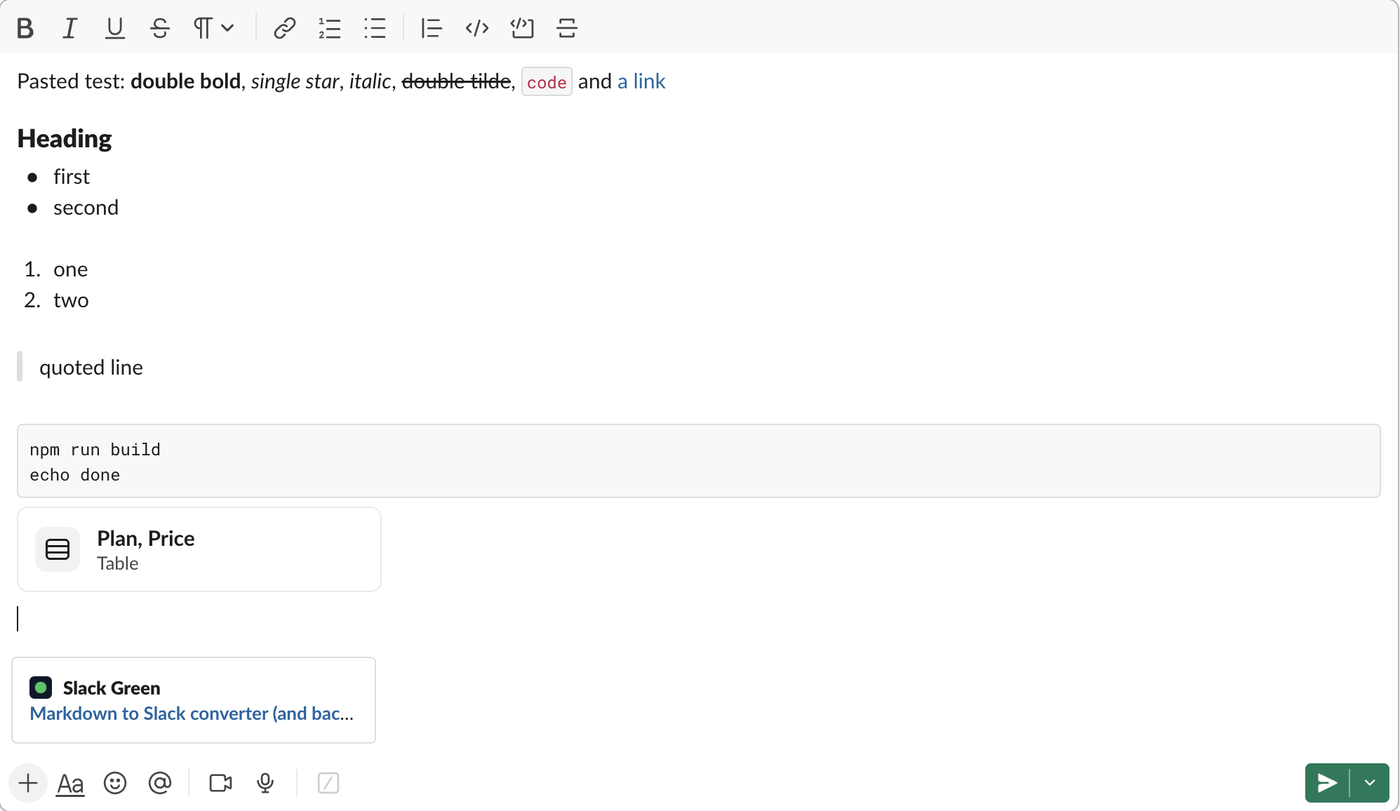
The paste is converted inside the message box, before you send. A pipe table turns into a chip named after its header row ("Plan, Price, Table"), and the sent message holds a table block with one cell per value. A typed pipe table stays as pipes and dashes, so paste a table instead of typing it. Text from ChatGPT, Claude, Notion or a GitHub README is standard markdown, so it now pastes formatted. The one surprise is *text* with single asterisks: Slack reads it as standard markdown italic on paste, while the same text typed turns bold.
There is no toast or button to press any more. The keyboard shortcuts panel (Cmd+/) no longer lists "Apply markdown formatting", and a search there for "markdown" finds nothing. Cmd+Z right after the paste removed the whole paste in our test, not only the formatting.
To paste the characters themselves, start a code block first: type three backticks so the box switches to a code block, then paste. Inside the code block the asterisks, # and pipes stayed as typed. The markdown to Slack converter still helps when you need Slack's own mrkdwn for a bot or a workflow. Copying the other way, out of Slack, is covered in how to copy a Slack thread, which shows what survives a paste into a doc.
Typed markdown: what works and the two exceptions
In the default message box, typed markers format as you type:
- •
*text*and**text**both turn bold, and_text_turns italic. - •
~text~with one tilde gives strikethrough, but~~text~~stays as typed. - • One backtick on each side gives inline code, and three backticks start a code block.
- •
>at the start of a line starts a quote. - •
-or1.at the start of a line starts a bulleted or numbered list. - •
#,##and###at the start of a line turn that line into a heading. Slack stores it as aheaderblock. - •
[text](url)stays literal until you press Cmd+Shift+F (Ctrl+Shift+F), which turned it into a link named "text" in our test.
A pipe table and --- stay as typed. Each style has its own guide: bold and italics, bullet points, quotes and tables. Superscript has no syntax in Slack at all: ^2^ and <sup>2</sup> stay as typed, and only Unicode characters such as ² and ™ show raised.
Never appear "away" on Slack again
Cloud-based. No downloads. Works 24/7 even when your laptop is off.
Formatting toolbar missing: the Format messages with markup setting
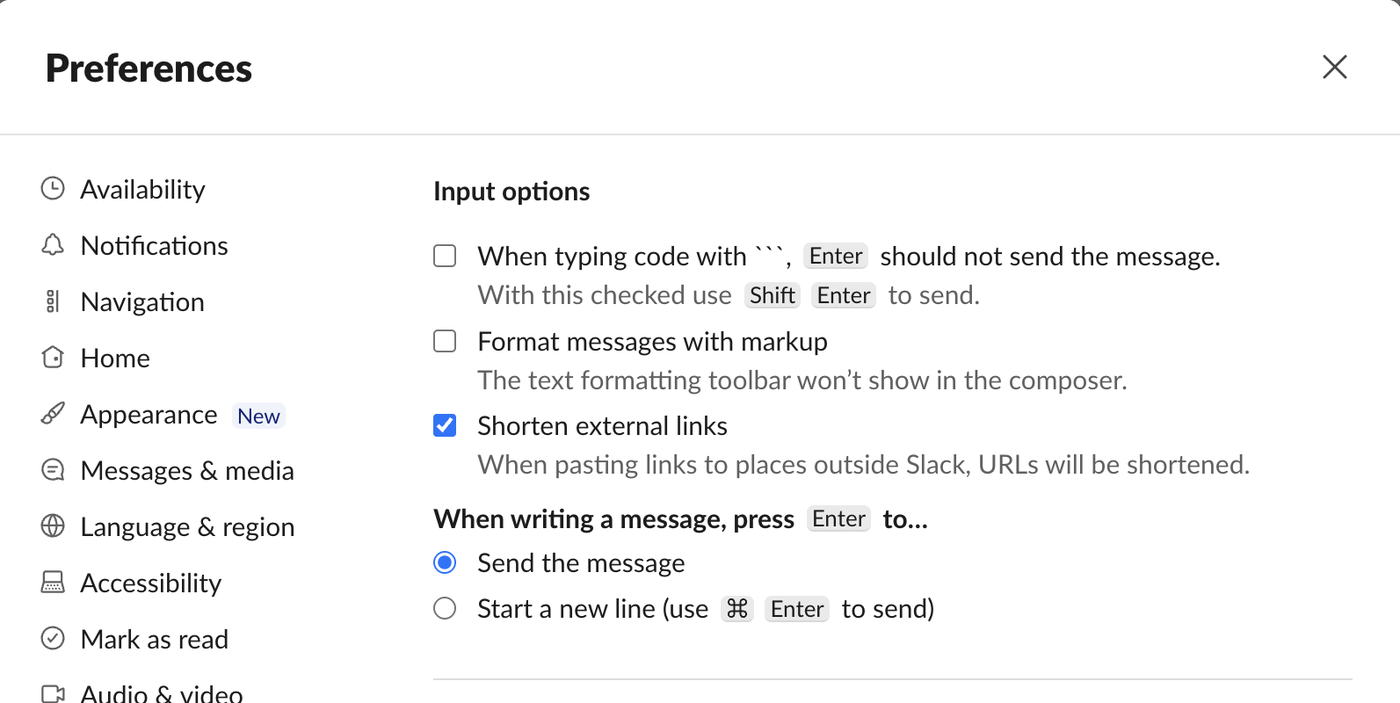
If the bold and italic buttons above the message box are gone and nothing formats while you type, Format messages with markup is on. Slack's own note under the setting says the text formatting toolbar will not show in the composer. To change it, click your profile picture, choose Preferences, select Advanced, and under Input options tick or untick Format messages with markup.
With it on, pasted markdown stays as characters in the box, and Slack formats the message when you send it. The result is not standard markdown:
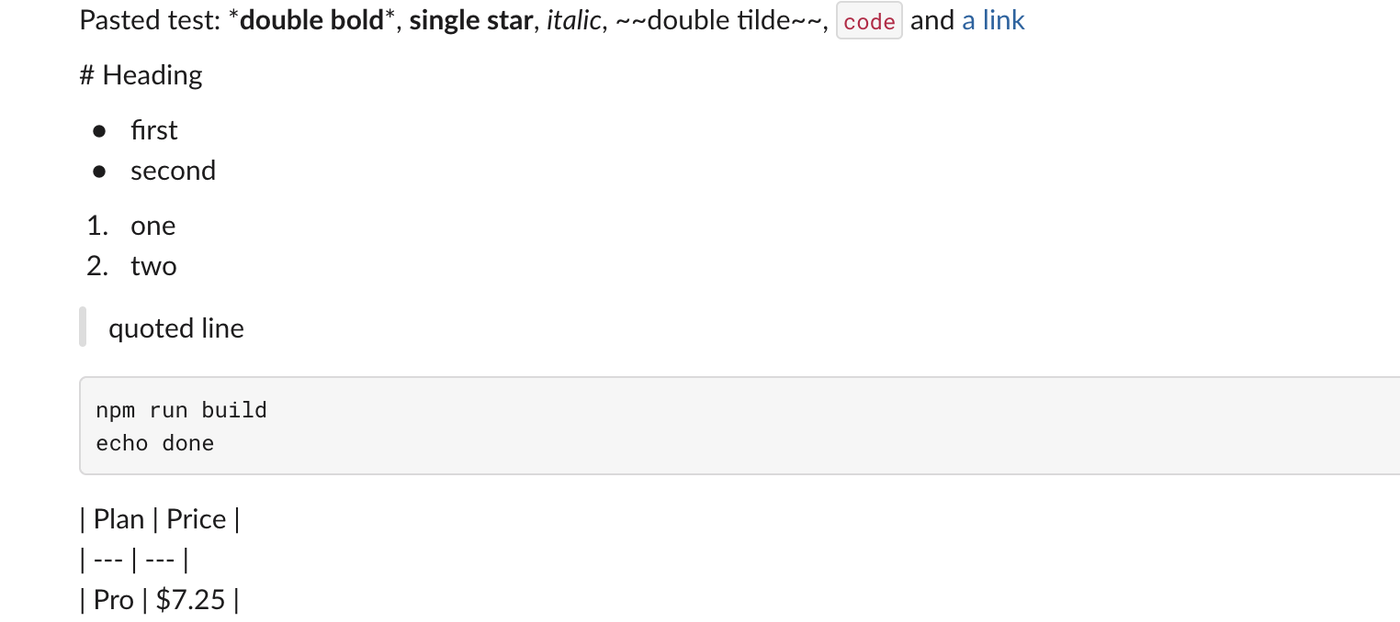
**bold** came out bold with a stray * on each side, ~~strike~~, # Heading and the table stayed literal, and lists, the quote, the code block and the [text](url) link formatted. If you want standard markdown to work, turn the setting off.
Slack markdown not rendering in bot or API messages
Slack's developer docs list three switches that decide whether a bot's text is formatted:
text of chat.postMessage uses mrkdwn by default, and "mrkdwn": false turns formatting off. We posted **double** *single* ~~two~~ ~one~ [x](https://slack.green) and # Heading through the API on 27 October. Only *single* (bold) and ~one~ (strikethrough) formatted, the URL inside [x](...) became a bare link, and - item lines stayed plain text. Write *bold* and <https://slack.green|text>."type": "mrkdwn". With "type": "plain_text", asterisks stay asterisks."type": "markdown") reads standard markdown: **bold**, [text](url) links, # headings, lists and pipe tables. Use it for LLM output.Slack also treats &, < and > as control characters. Text in angle brackets that looks like Slack syntax is parsed: we posted the log line user typed <!here> and <https://example.com|click> unescaped, and Slack stored an @here broadcast and a link named "click". Escape text you pass through:
def slack_escape(text: str) -> str:
"""Escape the three characters Slack treats as control characters."""
return text.replace("&", "&").replace("<", "<").replace(">", ">")
line = "user typed <!here> and <https://example.com|click>"
print("Log line: " + slack_escape(line))Output, and what Slack showed after we posted it:
Log line: user typed <!here> and <https://example.com|click>The escaped version arrived as plain text with no broadcast and no link. Before a bot sends a message, paste its text into the Slack to Markdown side of the Markdown to Slack converter to preview how Slack renders it. The full syntax, with JSON for section blocks, the markdown block and rich text lists, is in Slack Block Kit markdown.
FAQ
Is there still an Apply markdown formatting shortcut in Slack?
Cmd+Shift+F (Ctrl+Shift+F) still formatted a typed [text](url) link on 27 October, but the shortcuts panel no longer lists it. Pasted markdown no longer needs it, because Slack formats the paste by itself.
Why does pasted *text* show in italics instead of bold?
Slack reads pasted text as standard markdown, where single asterisks mean italic. Use **text** in the source, or type the line in Slack, where *text* turns bold.
Stop Jiggling Your Mouse.
Join hundreds of remote workers who never worry about their Slack status. Set it up once, stay green forever.
Related Articles
How to Paste ChatGPT Into Slack With Formatting (Tested)
Pasted as markdown text, a ChatGPT answer formats in Slack on its own, tables and code blocks included. Copied as formatted text, headings, tables and strikethrough break. Our 31 October paste test, with what Slack stored.
Slack Markdown File Preview: What a .md File Shows in Slack
Slack now renders an uploaded .md file: our 28 October 2026 test showed headings, bold text, checkboxes and a table in the file viewer. Mermaid blocks and HTML tags still show as text. Screenshots, the API output, and when a canvas is still the better choice.
Slack Formatting Toolbar Missing? How to Get It Back
The Slack formatting toolbar hides when you click Aa, and Slack remembers it. With Format messages with markup on, the toolbar and the Aa button both vanish. Tested fixes, the 10 buttons and their shortcuts.