
Slack Formatting Toolbar Missing? How to Get It Back
The Slack formatting toolbar hides when you click Aa, and Slack remembers it. With Format messages with markup on, the toolbar and the Aa button both vanish. Tested fixes, the 10 buttons and their shortcuts.
If the formatting toolbar is missing in Slack, click the Aa button under the message field. It shows and hides the toolbar, and Slack remembers the choice, so one stray click hides it for good. If there is no Aa button at all, Format messages with markup is turned on: open Preferences, then Advanced, and under Input options uncheck it. We tested both in the Slack web app on October 4, 2026. If you clicked Don't ask again on the "Apply formatting" prompt, that is a different setting, and Cmd+Shift+F (Ctrl+Shift+F) still applies the formatting.
The free Markdown to Slack converter has its own mrkdwn toolbar, so you can also draft a formatted message there and paste it into Slack.
The three states of the Slack composer
We switched each setting in our own workspace and looked at the message field after each change.
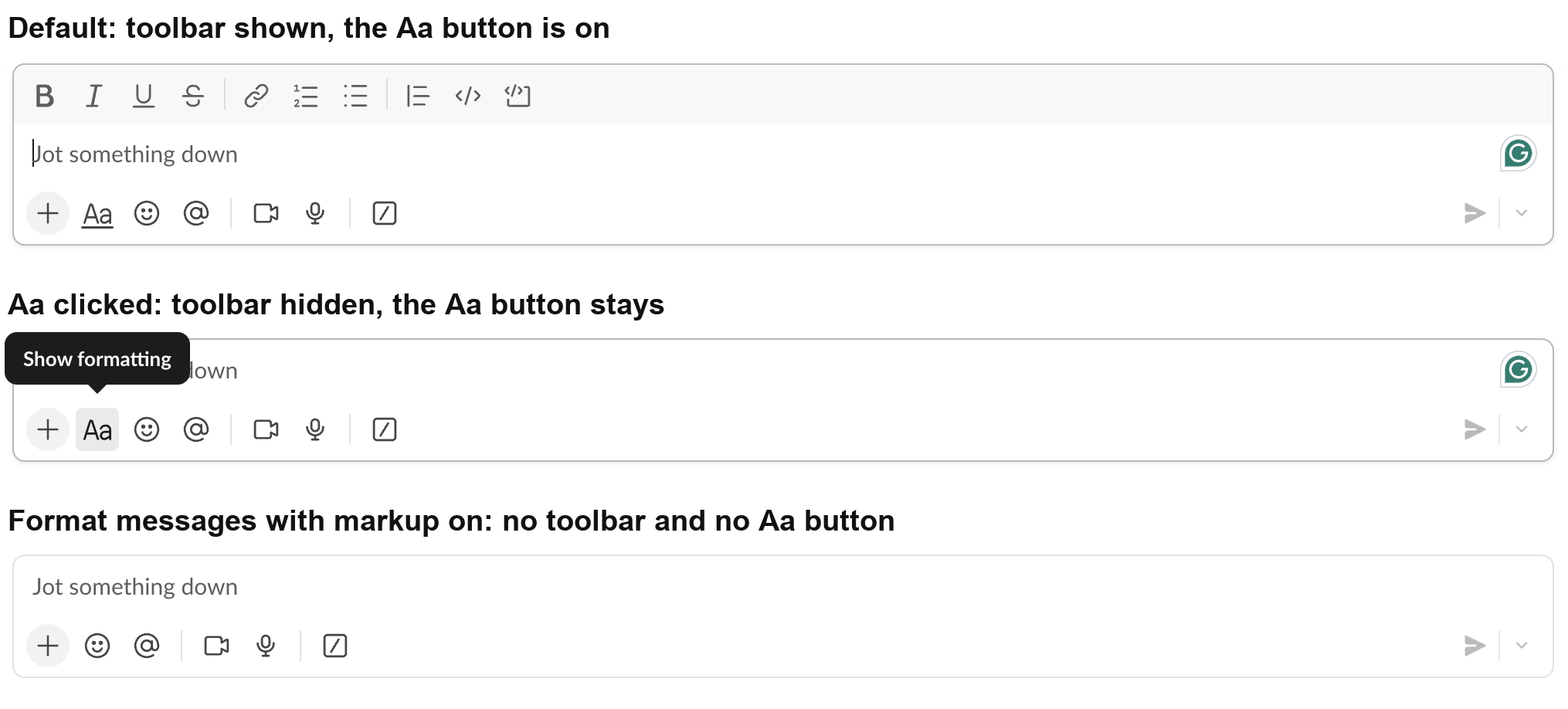
- • Default. The toolbar sits above the text field, and the Aa button below it is highlighted.
- • After clicking Aa. The toolbar disappears and the Aa button stays, with the tooltip "Show formatting". The toolbar was still hidden after we reloaded Slack, which is why it seems to vanish on its own.
- • With Format messages with markup on. The toolbar and the Aa button are both gone. Nothing in the composer tells you why.
- Click your profile picture, then Preferences.
- Open Advanced.
- Under Input options, uncheck Format messages with markup. Slack's own note under the box says "The text formatting toolbar won't show in the composer."
So the fastest check is to look for the Aa button. If you see it, click it. If you do not, go to Preferences.
Turn off Format messages with markup
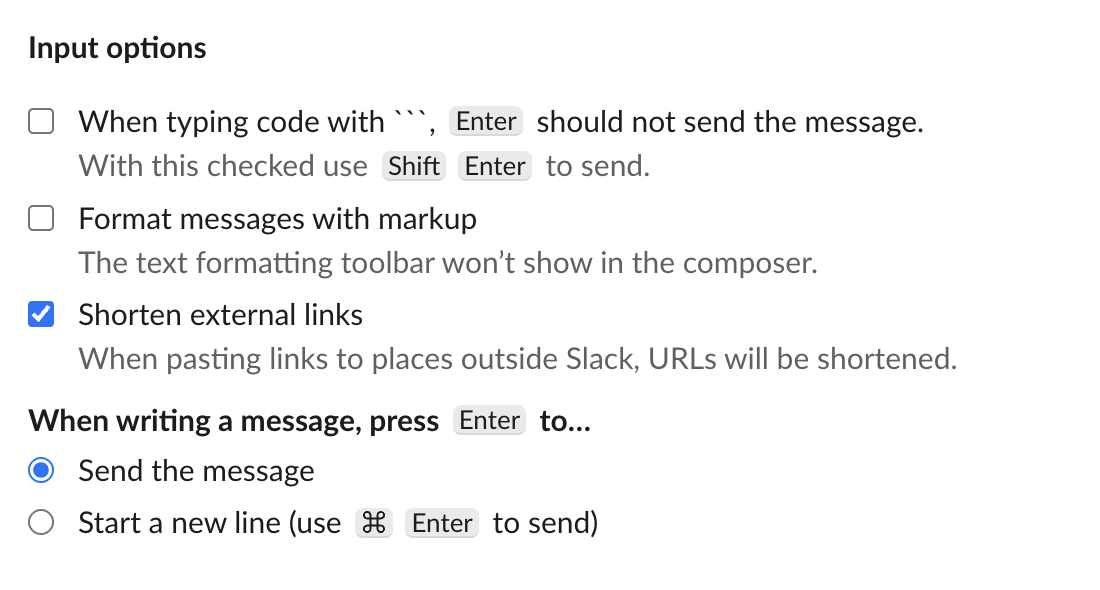
The change applies right away, with no restart. When we unchecked the box, the toolbar and the Aa button came back at once.
Why would anyone turn markup mode on? People who type formatting by hand, such as developers who like writing backticks, see the characters as they type and the formatting after sending.
If neither fix works in the desktop app, choose Help, then Troubleshooting, then Clear Cache and Restart, and install any Slack update. On iPhone and Android, tap Aa above the keyboard to show the formatting options.
What is on the Slack formatting toolbar
The toolbar we saw has 10 buttons, in this order: Bold, Italic, Underline, Strikethrough, Link, Ordered list, Bulleted list, Blockquote, Code and Code block. The shortcuts come from Slack's keyboard shortcut list; on Windows and Linux use Ctrl in place of Cmd.
| Button | Shortcut, Mac | Typed markup |
|---|---|---|
| Bold | Cmd+B | *text* |
| Italic | Cmd+I | _text_ |
| Underline | Cmd+U | none |
| Strikethrough | Cmd+Shift+X | ~text~ |
| Link | Cmd+Shift+U | paste a URL over selected text |
| Ordered list | Cmd+Shift+7 | 1. and a space |
| Bulleted list | Cmd+Shift+8 | an asterisk and a space |
| Blockquote | Cmd+Shift+9 | > text |
| Code | Cmd+Shift+C | one backtick on each side |
| Code block | Cmd+Alt+Shift+C | three backticks on each side |
Select the text and click a button. You can stack several, such as bold and italic, on the same words. Each one has its own guide: bold, strikethrough, code blocks, bullet points and links.
Never appear "away" on Slack again
Cloud-based. No downloads. Works 24/7 even when your laptop is off.
The "Apply formatting" prompt and "Don't ask again"
When you paste text that contains markdown, such as **bold** from ChatGPT or a README, Slack shows a small prompt at the bottom of the window. It is not part of the toolbar, and it follows its own rules. We read them in the Slack web client that the Slack desktop app had cached on our Mac (cached 28 October 2026), with a script that prints the prompt's code:
first paste:       Looks like your content contains markdown. | Apply formatting | Don’t ask again
later pastes:      Apply formatting? | Apply | Don’t ask again
toast duration ms: 1e4
don't ask again:   {pref:"seen_markdown_paste_toast",value:-1}
shortcut (Mac):    "You can do this any time with <span>⌘ Shift F</span>"
shortcut (other):  "You can do this any time with <span>Ctrl Shift F</span>"
shortcut hint shown: first 3 times
What that means in practice:
seen_markdown_paste_toast, not on one computer. Reinstalling Slack or using another device does not bring the prompt back. The shortcut keeps working without it.**bold** becomes bold text. Press Cmd+Z (Ctrl+Z) to undo.Format a Slack message without the toolbar
All of these work with the toolbar hidden:
*bold* or _italic_ turns into formatting as you type.The toolbar does not appear in fields that are not messages, such as the Edit topic box, and markup has no effect inside a code block. Typed markup still works in a channel topic: in our topic test *on track* showed in bold in the channel header.
FAQ
Does hiding the toolbar change how my messages look to others?
No. It only changes your own composer. Messages you send look the same, and the shortcuts and typed markup still work.
How do I undo "Don't ask again" on Slack's Apply formatting prompt?
Slack saves that choice to your account. In the client code we read, nothing else touches that preference, so we found no setting that shows the prompt again. Use the shortcut instead: select the pasted text and press Cmd+Shift+F (Ctrl+Shift+F).
Stop Jiggling Your Mouse.
Join hundreds of remote workers who never worry about their Slack status. Set it up once, stay green forever.
Related Articles
Slack Message Character Limit: 40,000 Max, 4,000 Advised
Slack keeps up to 40,000 characters in a message's text and truncates anything longer, and its developer docs advise staying under 4,000 characters. Block Kit sections stop at 3,000 characters and headers at 150. What happens with long messages, other Slack text limits, and how to split a long post.
How to Add a Hyperlink in Slack: Paste, Shortcut or Markup
To add a hyperlink in Slack, copy the URL, select the words in your message, and paste with Cmd+V or Ctrl+V. Or select the words and press Cmd+Shift+U (Ctrl+Shift+U) to add the link. Markup mode, bot and webhook syntax, mobile, and how to change or remove link text.
How to Strikethrough in Slack: Shortcut, Tildes and Mobile
To strikethrough text in Slack, select it and press Cmd+Shift+X on a Mac or Ctrl+Shift+X on Windows, or type one tilde on each side of the words. On iPhone and Android, select the text and tap Aa, then strikethrough. When to use it, and why it sometimes does not work.