
How to Make a Code Block in Slack: Backticks, Shortcut and Snippets
Type three backticks in the Slack message field, then paste or type your code and send. The shortcut is Cmd+Alt+Shift+C on Mac and Ctrl+Alt+Shift+C on Windows. Inline code, snippets with syntax highlighting, mobile steps, bot messages and fixes when a code block does not show.
To make a code block in Slack, type three backticks in the message field. Slack turns the field into a gray code block. Paste or type your code, then press Enter to send. You can also select text and press Cmd+Alt+Shift+C on a Mac or Ctrl+Alt+Shift+C on Windows and Linux, or click the Code block button in the formatting toolbar. For one command inside a sentence, wrap it in a single backtick on each side to get inline code, like npm ci.
The backtick is the key left of 1 on a US keyboard. Slack code blocks keep your spacing and line breaks and use a monospace font. They do not color the syntax. For highlighting by language, use a snippet, covered below.
We build Slack Green, which keeps your Slack status green from our servers during the hours you set. We also make free Slack formatting tools: the Markdown to Slack converter turns GitHub markdown, fenced code included, into text Slack formats correctly.
Three ways to make a code block in Slack
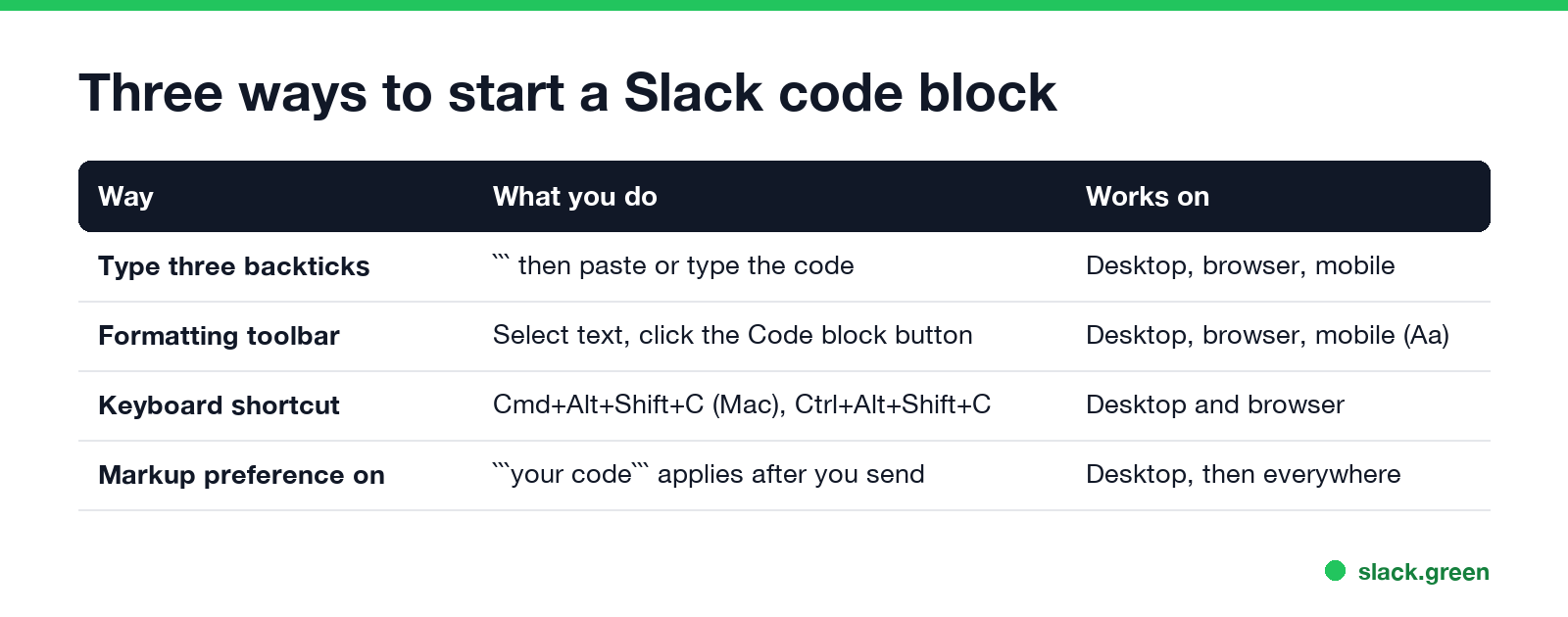
Type three backticks. Click in the message field of a channel, DM or thread and type three backticks. The field switches to a code block right away. Paste your code. Press Shift+Enter to add lines inside the block without sending (more on that in how to add a new line in Slack).
Use the formatting toolbar. Paste your code first, select it, and click the Code block button in the toolbar under the message field. Slack's help center lists Code block next to Bold, Italic, Underline, Strikethrough, Code, Block quote and the two list buttons. Click the button again to leave the block.
Use the keyboard shortcut. Select the text and press:
| Format | Mac | Windows and Linux |
|---|---|---|
| Code block | Cmd+Alt+Shift+C | Ctrl+Alt+Shift+C |
| Inline code | Cmd+Shift+C | Ctrl+Shift+C |
| New line without sending | Shift+Enter | Shift+Enter |
| Turn typed text into a snippet | Cmd+Shift+Enter | Ctrl+Shift+Enter |
These come from Slack's own shortcut list. More are in our Slack keyboard shortcuts guide.
If you turned on Format messages with markup in Preferences, Advanced, Slack hides the toolbar and applies formatting only after you send. Then you wrap the code in three backticks at both ends, like this:
```
git pull
pnpm install
pnpm test
```
Inline code vs code block vs snippet
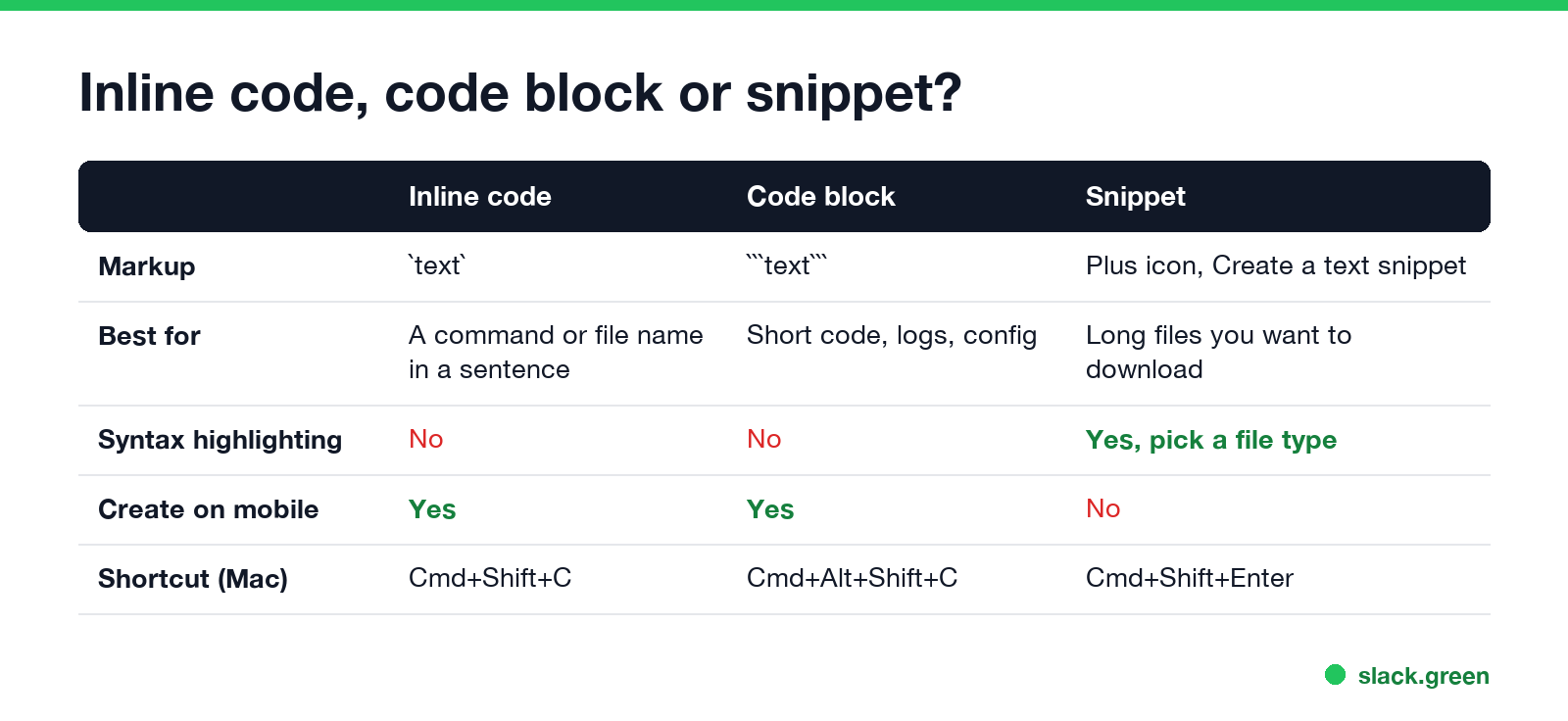
- • Inline code (one backtick on each side) is for a command, a file name or a variable inside a normal sentence, such as "run
npm cifirst". - • A code block (three backticks) is for anything with more than one line: a stack trace, a config file, a SQL query, or a terminal command you want people to copy.
- • A snippet is a file that shows up in the conversation. It has a title, syntax highlighting, a raw view, comments and a download option. It is the better choice for long files.
Can a Slack code block have syntax highlighting?
Never appear "away" on Slack again
Cloud-based. No downloads. Works 24/7 even when your laptop is off.
No. A code block in a Slack message has no language setting. If you type a language name right after the opening backticks, as you would on GitHub, Slack does not read it. The word shows up as the first line of the block:
```python
print("hello")
```
In Slack that posts a block whose first line is the word python. Remove the word, or name the language in the sentence above the block.
For colored syntax, create a snippet instead. Slack's help center gives these steps:
If you have already typed the code into the message field, press Cmd+Shift+Enter (Mac) or Ctrl+Shift+Enter (Windows and Linux) to turn it into a snippet. Snippets are on all plans, for members and guests. You cannot create snippets in Slack's mobile apps.
That also answers how to share code in Slack. Short code goes in a code block. Long files, and anything people will download, go in a snippet. Whole repositories stay in GitHub, with a link in the message.
Code blocks on iPhone and Android
The mobile apps make code blocks too, in two ways:
On a phone, long lines in a code block scroll sideways instead of wrapping. For a long log, send it from desktop as a snippet so people can open the raw file.
Slack code block not showing
Code blocks in Slack bot and API messages
Never appear "away" on Slack again
Cloud-based. No downloads. Works 24/7 even when your laptop is off.
When you post through the API, an incoming webhook, or a tool such as the Slack GitHub Action, three backticks in the text field render as a code block, because Slack reads that field as mrkdwn by default:
curl -X POST -H 'Content-type: application/json' \
  --data '{"text":"Deploy failed:\n```npm ERR! code ELIFECYCLE```"}' \
  "$SLACK_WEBHOOK_URL"
In Block Kit, put the code in a section block whose text type is mrkdwn. A plain_text object shows the backticks as they are:
{
  "blocks": [
    {
      "type": "section",
      "text": {
        "type": "mrkdwn",
        "text": "Build log:\n```error: missing semicolon at line 42```"
      }
    }
  ]
}
Escape &, < and > as &, < and > inside the code, or Slack may read them as links and mentions. To write and check mrkdwn before you post, use the Slack message formatter.
For how long a message or a code block can be before Slack cuts it, see Slack message character limit.
FAQ
What is the shortcut for a code block in Slack? Cmd+Alt+Shift+C on Mac, Ctrl+Alt+Shift+C on Windows and Linux. Select the text first.
How do I do inline code in Slack? Wrap the text in one backtick on each side, or select it and press Cmd+Shift+C (Ctrl+Shift+C).
How do I get out of a code block in Slack? Click the Code block button in the toolbar again. The next text you type is normal text.
Can I set the language of a Slack code block? No. Message code blocks have no language setting. Use a snippet and pick its file type for syntax highlighting.
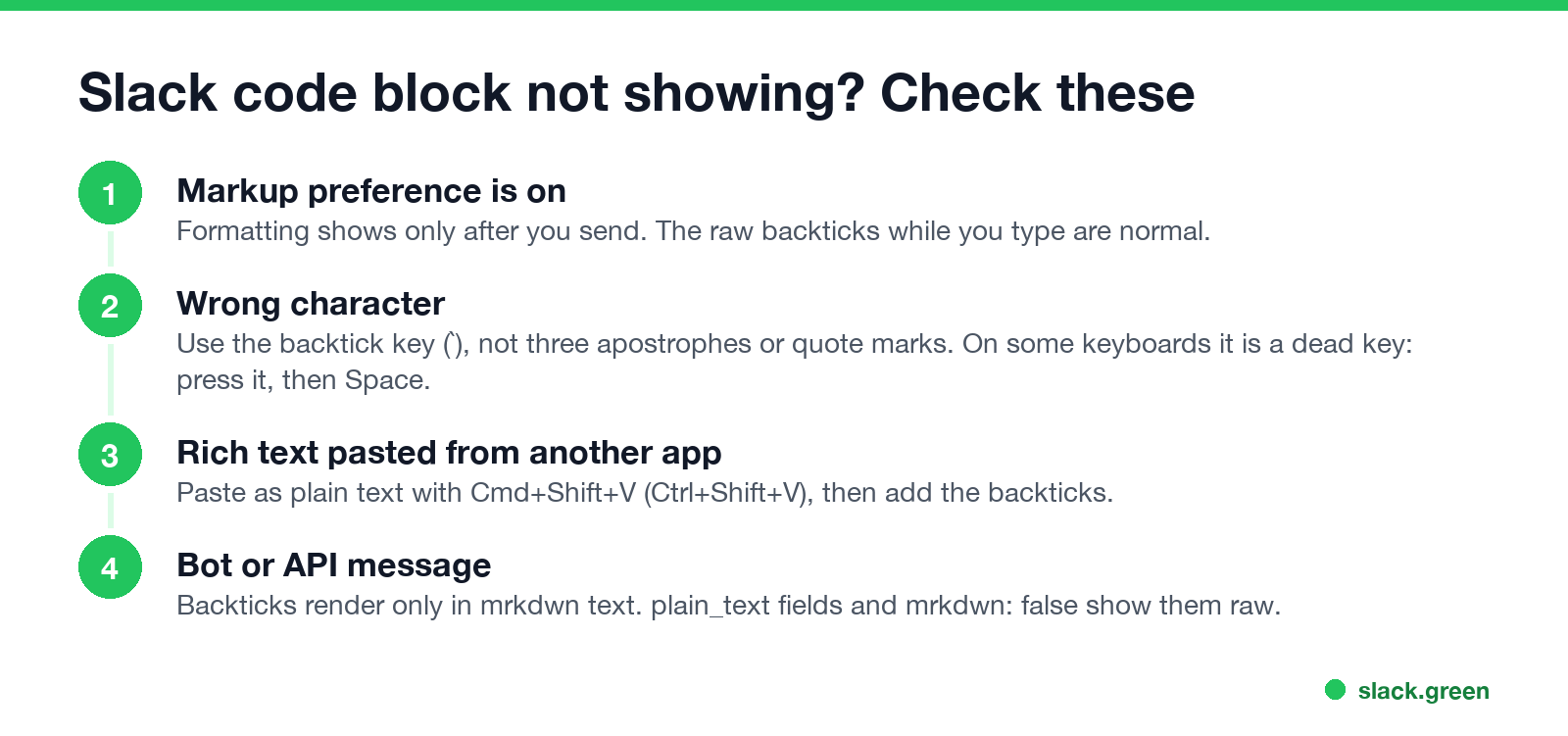
Why does Slack not format my code block? Usually the markup preference is on, so it formats after you send, the characters are not backticks, or a bot sent the text as plain_text.
More formatting tips are in Slack tips and tricks.
Stop Jiggling Your Mouse.
Join hundreds of remote workers who never worry about their Slack status. Set it up once, stay green forever.
Related Articles
Slack Status for Limited Availability: 30 Statuses to Copy
A Slack status for limited availability says you are around but slow, until when, and how to reach you if it is urgent, such as ⏳ 'Limited availability today, replies after 3 PM. Urgent: @mention me.' 30 statuses for busy days, slow replies and catching up, the emoji to use, and when to pause notifications too.
Slack Emoji for Thank You (and You're Welcome)
The usual Slack emoji for thank you are 🙏 :pray:, 🙌 :raised_hands: and ❤️ :heart:. For you're welcome, 😊 :blush: or 🤗 :hugging_face:. What each one says, which ones read wrong, and custom :ty:, :np: and :welcome: emoji your team can add in a minute.
Slack Emoji for Condolences: What to React With, and What to Say
The right Slack emoji for condolences are ❤️ :heart:, 🙏 :pray:, 🤗 :hugging_face:, 💐 :bouquet:, 🕯️ :candle: and 🕊️ :dove_of_peace:. Avoid 👍, ✅ and 👀, which read as 'noted'. Add a few words in the thread or a DM. Short condolence messages, get-well emoji, and custom 'thinking of you' emoji.