
Django Slack Bot: Bolt Adapter, Slash Command and Error Alerts, Tested
To build a Slack bot in Django, mount Bolt for Python's Django adapter on one URL and let it handle slash commands and events; for error alerts, add a logging handler that posts to an incoming webhook. We ran both on Django 6.1.3 on 8 November 2026 and checked which django-slack packages still work.
The simplest working way to run a Slack bot inside Django is Slack's own Bolt for Python with its Django adapter: create an App, wrap it in SlackRequestHandler, and route one csrf_exempt view to it. Slack sends slash commands, events and button clicks to that one URL, and Bolt checks the signature for you. For "tell me when the site errors" you do not need a bot at all: a small logging handler that posts to an incoming webhook is enough. On 8 November 2026 we ran both on Django 6.1.3 with slack-bolt 1.30.0 under gunicorn, reached it through a Cloudflare quick tunnel, and tested the old django-slack packages.
The Bolt app in urls.py
Install the packages:
pip install django==6.1.3 slack-bolt==1.30.0 slack-sdk==3.46.0 gunicornThis is the whole urls.py we ran. It answers a slash command, replies to mentions in a thread, and has a /boom view we used to test error alerts:
import os

from django.http import HttpResponse
from django.urls import path
from django.views.decorators.csrf import csrf_exempt
from slack_bolt import App
from slack_bolt.adapter.django import SlackRequestHandler

app = App(
    token=os.environ["SLACK_BOT_TOKEN"],
    signing_secret=os.environ["SLACK_SIGNING_SECRET"],
)


@app.command("/sg1108-orders")
def orders(ack, command, respond):
    ack("Looking up order " + command["text"] + "...")
    respond("Order " + command["text"] + ": shipped on 6 November (from Django)")


@app.event("app_mention")
def mention(event, say):
    say(text="Django got your mention", thread_ts=event["ts"])


handler = SlackRequestHandler(app=app)


@csrf_exempt
def slack_events(request):
    return handler.handle(request)


def boom(request):
    raise ValueError("orders table is empty")


urlpatterns = [
    path("slack/events", slack_events),
    path("boom", boom),
    path("health", lambda r: HttpResponse("ok")),
]
Set SLACK_BOT_TOKEN (from OAuth & Permissions) and SLACK_SIGNING_SECRET (from Basic Information) in the environment. The bot needs commands, chat:write and app_mentions:read. In the Slack app settings, use the same URL, https://your-host/slack/events, as the slash command's Request URL and the Event Subscriptions Request URL.
Keep csrf_exempt on this view. Slack does not send Django's CSRF token, and the CSRF middleware that new Django projects turn on by default rejects a POST without one (our test project had no middleware at all). Bolt does its own check instead: it rejects any request whose X-Slack-Signature does not match. We sent one with a forged signature, and the view answered:
HTTP 401
{"error": "invalid request"}
What happened in Slack
We ran gunicorn with 2 sync workers and exposed port 8000 through a Cloudflare quick tunnel, so Slack could reach it. Then, as a member of the workspace:
- •
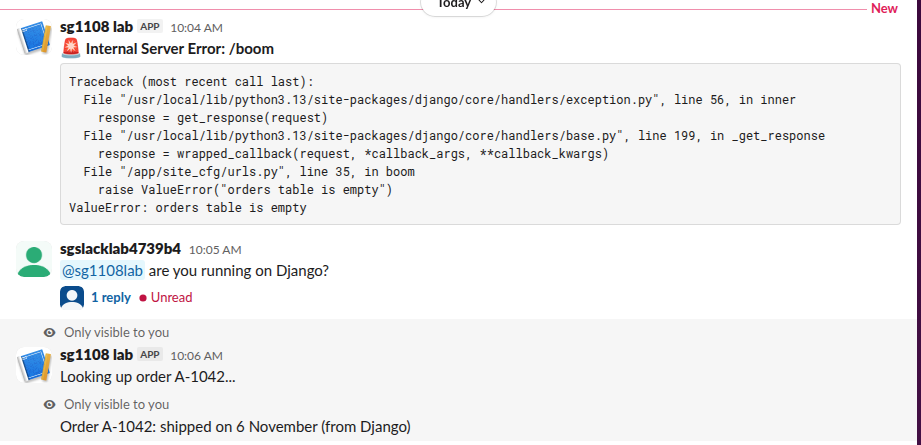
/sg1108-orders A-1042showed "Looking up order A-1042..." right away, fromack(), then "Order A-1042: shipped on 6 November (from Django)", fromrespond(). Both are visible only to the person who typed the command, which is the default for slash command replies. - • A mention of the bot got "Django got your mention" in a thread 0.49 seconds later.
Slack expects the acknowledgement within 3 seconds, so call ack() first and do slow work after it, with respond() or say(). To run the same app without a public URL, use Socket Mode; our ngrok, Cloudflare tunnel and Socket Mode test compares the three.
Never appear "away" on Slack again
Cloud-based. No downloads. Works 24/7 even when your laptop is off.
Send Django errors to Slack
For alerts, attach a handler to the django.request logger, which logs every unhandled exception in a view at ERROR. Our handler posts to an incoming webhook with the standard library only:
import json
import logging
import urllib.request


class SlackWebhookHandler(logging.Handler):
    def __init__(self, webhook_url):
        super().__init__()
        self.webhook_url = webhook_url

    def emit(self, record):
        try:
            text = ":rotating_light: *" + record.getMessage() + "*"
            if record.exc_info:
                tb = logging.Formatter().formatException(record.exc_info)
                text += "\n```" + tb[-2500:] + "```"
            body = json.dumps({"text": text}).encode()
            req = urllib.request.Request(self.webhook_url, data=body,
                                         headers={"Content-Type": "application/json"})
            urllib.request.urlopen(req, timeout=5)
        except Exception:
            self.handleError(record)
And in settings.py:
LOGGING = {
    "version": 1,
    "disable_existing_loggers": False,
    "handlers": {
        "console": {"class": "logging.StreamHandler"},
        "slack": {
            "level": "ERROR",
            "class": "site_cfg.slack_log.SlackWebhookHandler",
            "webhook_url": os.environ["SLACK_WEBHOOK_URL"],
        },
    },
    "loggers": {
        "django.request": {"handlers": ["console", "slack"], "level": "ERROR", "propagate": False},
    },
}
DEBUG was False, as in production. One request to /boom returned a 500 and posted the alert you see at the top of the screenshot: the message "Internal Server Error: /boom" and the traceback in a code block. The webhook URL is the one you get when you create a Slack webhook. Keep timeout=5 or similar, because the handler runs inside the failing request, and cap the traceback length, as ours does at 2,500 characters.
For heavier error traffic, the same handler can block requests while Slack answers. Our Python Slack logger test measured that and shows a QueueHandler version that does not.
The old django-slack packages
We installed each package next to Django 6.1.3 on Python 3.13 and ran django.setup() with it in INSTALLED_APPS:
| Package | Latest version (released) | Result on Django 6.1.3 |
|---|---|---|
django-slack | 5.19.0 (March 2023) | Installs, django.setup() OK |
django-slack-bot | 0.10.1 (January 2024) | Installs; the module is dsbot, not django_slack_bot; setup OK; pulls in Celery and aiohttp |
django-slack-oauth | 1.5.0 (December 2018) | Installs, then fails: ImportError: cannot import name 'python_2_unicode_compatible' from 'django.utils.encoding' |
django-slack-logger | 0.1 (December 2020) | Installs, then fails: ModuleNotFoundError: No module named 'requests' (not declared as a dependency) |
django-slack sends messages rendered from Django templates and was last released in March 2023. For new code, Bolt and slack-sdk are maintained by Slack and cover sending, commands, events and OAuth.
FAQ
Do I need Celery for a Django Slack bot?
No. Our bot answered commands and mentions with plain gunicorn sync workers. Use a task queue only for work that takes longer than you want a web worker busy, after ack().
Can I send a Slack message from a Django view without Bolt?
Yes. slack_sdk.WebClient(token=...).chat_postMessage(channel="C...", text="...") works in any view or signal, and a webhook needs only an HTTP POST. Bolt is only needed when Slack sends requests to you.
Why does my slash command say "dispatch_failed"?
Slack could not reach your Request URL. We got dispatch_failed when our tunnel URL had changed and the command still pointed at the old one.
Stop Jiggling Your Mouse.
Join hundreds of remote workers who never worry about their Slack status. Set it up once, stay green forever.
Related Articles
Python Logging to Slack: A Tested Handler (and Which Packages Still Work)
A 36-line logging module posts ERROR records to a Slack incoming webhook with only the standard library. We ran it on Python 3.12 on 7 November 2026, sent 50 errors in a burst with and without a queue, and tried four PyPI Slack logger packages; one of them failed with invalid_auth.
ngrok for a Slack Bot: What It Needs, and Two Free Alternatives Tested
A Slack bot on localhost needs a public HTTPS URL for events and slash commands, or Socket Mode. We tried ngrok 3.39.13 with no account (ERR_NGROK_4018), a Cloudflare quick tunnel and Socket Mode on 8 November 2026, timed the replies, and broke the tunnel URL on purpose.
Slack Java SDK: Post, Read History and Run a Bolt App (Tested 1.54.0)
The Slack Java SDK is com.slack.api:slack-api-client for Web API calls and com.slack.api:bolt for apps. We ran version 1.54.0 with Gradle on 8 November 2026: chat.postMessage, conversations.history with a cursor, a Socket Mode Bolt app and a Kotlin Block Kit post, plus the silent failure in ctx.say.