
ngrok for a Slack Bot: What It Needs, and Two Free Alternatives Tested
A Slack bot on localhost needs a public HTTPS URL for events and slash commands, or Socket Mode. We tried ngrok 3.39.13 with no account (ERR_NGROK_4018), a Cloudflare quick tunnel and Socket Mode on 8 November 2026, timed the replies, and broke the tunnel URL on purpose.
Slack can only send events and slash commands to a public HTTPS URL, so a bot running on localhost needs a tunnel such as ngrok, or it needs Socket Mode, where your app opens the connection to Slack and no URL is needed. ngrok now needs a free account and an authtoken before it will start. On 8 November 2026 we ran the same Bolt for Python bot behind a Cloudflare quick tunnel and over Socket Mode, timed five mentions each, ran ngrok 3.39.13 without an account to get its exact error, and changed the tunnel URL to see what Slack does with the old one.
The three options at a glance
| ngrok | Cloudflare quick tunnel | Socket Mode | |
|---|---|---|---|
| Account needed | Yes, free ngrok account and authtoken | No | No, only an xapp- app token |
| Public URL | Yes | Yes, random *.trycloudflare.com | None |
| URL after a restart | Depends on your ngrok plan (not tested) | New random URL every time | Nothing to change |
| Works for | Events API, slash commands, interactivity, OAuth redirects | Same | Events, slash commands, interactivity; not OAuth redirects |
| Mention reply time in our test (median of 5) | Not run (no account) | 0.62 s | 0.31 s |
If you only need your bot to work while you build it, Socket Mode is the least setup. Use a tunnel when you want to test the HTTP path you will run in production, or an OAuth install flow, which needs a real redirect URL; see Slack OAuth redirect URLs on localhost.
ngrok without an account
We ran the official ngrok/ngrok Docker image (agent 3.39.13) as ngrok http <app>:8000, with no config. It stopped at once:
ERROR:  authentication failed: This ngrok session is not authenticated. ngrok requires an account and a valid credential to start a session.
ERROR:
ERROR:  Sign up for an account: https://dashboard.ngrok.com/signup
ERROR:  Get your credential: https://dashboard.ngrok.com/get-started/your-authtoken
ERROR:
ERROR:  ERR_NGROK_4018
So the ngrok steps in older Slack tutorials ("download ngrok, run ngrok http 3000") are missing a step: sign up, copy the authtoken from the ngrok dashboard, and run ngrok config add-authtoken <token> once. We did not create an ngrok account for this test, so we have no ngrok timings. After that, the Slack side is the same as for any tunnel below: paste https://<your-ngrok-url>/slack/events into Slack.
Cloudflare quick tunnel
cloudflared makes a temporary public URL with no account:
cloudflared tunnel --url http://localhost:8000Ours printed https://refer-evaluate-petition-trail.trycloudflare.com within 25 seconds of the start. Behind it ran a Django app with Bolt for Python (the code is in our Django Slack bot guide). We set https://<tunnel>/slack/events as both the Event Subscriptions Request URL and the slash command URL.
When you enter a Request URL in the app settings, Slack sends a url_verification request with a challenge value, and your endpoint must send it back. Bolt does this for you. Signed with our app's signing secret, a test challenge got this reply from the Bolt endpoint:
HTTP 200, application/json
{"challenge": "3eZbrw1aBm2rZgRNFdxV2595E9CY3gmdALWMmHkvFXO7tYXAYM8P"}
The same request with a timestamp 10 minutes old got 401 {"error": "invalid request"}, because Bolt rejects stale signatures.
Five mentions of the bot, one every few seconds, got their threaded replies after 1.05, 0.34, 0.36, 0.70, 0.62 seconds.
Never appear "away" on Slack again
Cloud-based. No downloads. Works 24/7 even when your laptop is off.
Socket Mode
The same bot as a Socket Mode app is shorter, because there is no web server:
import os
from slack_bolt import App
from slack_bolt.adapter.socket_mode import SocketModeHandler

app = App(token=os.environ["SLACK_BOT_TOKEN"])

@app.event("app_mention")
def mention(event, say):
    say(text="Socket Mode got your mention", thread_ts=event["ts"])

SocketModeHandler(app, os.environ["SLACK_APP_TOKEN"]).start()
It needs Socket Mode turned on in the app settings and an app-level token with connections:write in SLACK_APP_TOKEN. Five mentions got replies after 0.99, 0.31, 0.26, 0.26, 0.66 seconds. Socket Mode was faster in this small sample, a median of 0.31 s against 0.62 s, but both stayed near or under a second, and the first reply in each set was the slowest at about 1 second. Our Python Socket Mode guide covers the token setup and errors.
What breaks when the tunnel URL changes
A quick tunnel gets a new random URL every time it restarts. We restarted ours and kept the old URL in Slack:
- • The old URL answered HTTP 530 from Cloudflare.
- • The slash command failed: sent the way the Slack client sends it (
chat.command), it came back{"ok": false, "error": "dispatch_failed"}, and nothing reached our app. - • A mention sent at that moment got no reply.
- The manifest update did not verify the URL. Slack accepted it, and our app got no
url_verificationrequest. Event delivery to the new URL worked anyway. - The missed mention was not lost. Slack retried the event, this time to the new URL, and the bot replied 62 seconds after the original mention.
Then we put the new URL in the app manifest with apps.manifest.update. Two things we did not expect:
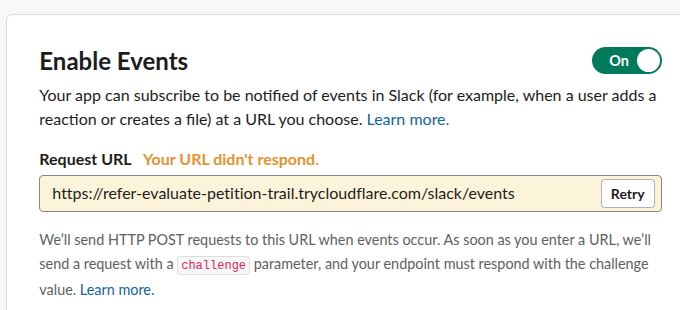
The app settings page is stricter. When we typed the old, dead URL into Event Subscriptions > Request URL, Slack showed "Your URL didn't respond":
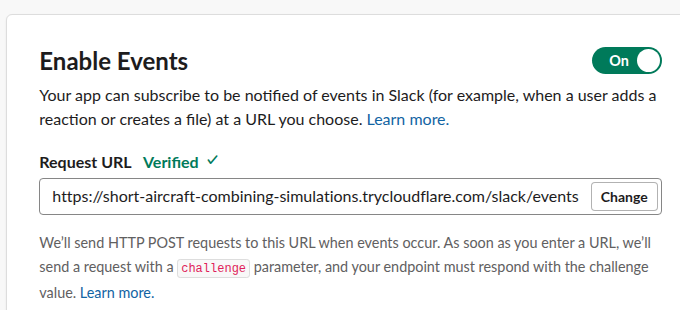
After we replaced it with the working URL, the warning stayed until we clicked Retry, which sent the challenge and turned it into "Verified". We typed into the field from a script, so a normal edit may re-check on its own:
The same page has a Delayed Events switch: "If this feature is enabled, we will retry any missed event deliveries slowly over 24 hours." It was off in our test, and the retry above still happened. Turn it on if your laptop sleeps with the tunnel down.
FAQ
Do I need ngrok for Slack Bolt?
No. Bolt apps can run in Socket Mode with no public URL, and any HTTPS tunnel works for the HTTP mode. ngrok is one option and needs a free account.
Why does Slack say "Your URL didn't respond"?
Slack could not get the challenge back from your URL. In our test that happened for a dead tunnel URL, and for a working one until we pressed Retry. Check that the tunnel is up, that the path ends in /slack/events for Bolt, and that the app answers within a few seconds.
Can I keep the same URL with a free tunnel?
A Cloudflare quick tunnel cannot; each start gives a new name. A named Cloudflare tunnel on your own domain, or a reserved ngrok domain, keeps it. Socket Mode avoids the problem entirely.
Stop Jiggling Your Mouse.
Join hundreds of remote workers who never worry about their Slack status. Set it up once, stay green forever.
Related Articles
Slack Java SDK: Post, Read History and Run a Bolt App (Tested 1.54.0)
The Slack Java SDK is com.slack.api:slack-api-client for Web API calls and com.slack.api:bolt for apps. We ran version 1.54.0 with Gradle on 8 November 2026: chat.postMessage, conversations.history with a cursor, a Socket Mode Bolt app and a Kotlin Block Kit post, plus the silent failure in ctx.say.
Home Assistant Slack Integration: Notifications, Files and Status, Tested
Home Assistant's Slack integration sends notifications with a bot token through the notify.slack action, including Block Kit and file uploads. We set it up on Home Assistant 2026.11.0 on 8 November 2026, hit the missing-scope errors that stop file uploads, and set a Slack status from an automation.
Slack File Block: Post Remote and Uploaded Files in Block Kit
A Slack file block shows a file card inside a message. It takes source "remote" plus an external_id or file_id, and the file must exist first. We added remote files with files.remote.add, posted them in file blocks, and tried the mistakes, on 7 November 2026.