
Python Logging to Slack: A Tested Handler (and Which Packages Still Work)
A 36-line logging module posts ERROR records to a Slack incoming webhook with only the standard library. We ran it on Python 3.12 on 7 November 2026, sent 50 errors in a burst with and without a queue, and tried four PyPI Slack logger packages; one of them failed with invalid_auth.
To send Python log messages to Slack, add a logging.Handler that posts each record to a Slack incoming webhook, set its level to ERROR, and run it behind a QueueHandler so your program never waits on Slack. You need no package: the standard library's urllib is enough. On 7 November 2026 we ran the handler below on Python 3.12.16 against a real webhook, sent a traceback, fired 50 errors in a row, broke the URL on purpose, and tried four Slack logger packages from PyPI. Here is the code and what we got.
The handler
Save this as slack_log_handler.py:
import json, logging, time, urllib.request, urllib.error

class SlackWebhookHandler(logging.Handler):
    """Post log records to a Slack incoming webhook. Waits out HTTP 429."""
    def __init__(self, url, level=logging.ERROR):
        super().__init__(level)
        self.url = url
        self.stats = {"sent": 0, "429": 0, "waited_s": 0.0, "failed": 0}

    def emit(self, record):
        body = json.dumps({"text": self.format(record)}).encode()
        for attempt in range(5):
            req = urllib.request.Request(self.url, body, {"Content-Type": "application/json"})
            try:
                with urllib.request.urlopen(req, timeout=10):
                    self.stats["sent"] += 1
                    return
            except urllib.error.HTTPError as e:
                if e.code != 429:
                    self.stats["failed"] += 1
                    self.handleError(record)
                    return
                wait = float(e.headers.get("Retry-After", "1"))
                self.stats["429"] += 1
                self.stats["waited_s"] += wait
                time.sleep(wait)
        self.stats["failed"] += 1


class SlackFormatter(logging.Formatter):
    """Put the traceback in a code block so Slack keeps its indentation."""
    def format(self, record):
        msg = ":rotating_light: *%s* %s: %s" % (record.levelname, record.name, record.getMessage())
        if record.exc_info:
            msg += "\n```" + self.formatException(record.exc_info) + "```"
        return msg[:3500]
SlackFormatter matters more than it looks. With a plain formatter, the traceback arrived as ordinary text and Slack dropped its indentation:
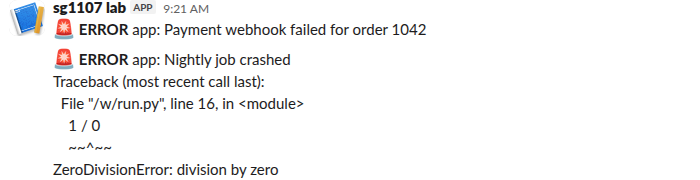
Inside triple backticks, the same kind of traceback kept its layout:

Slack treats a webhook's text as its own mrkdwn, so the triple backticks become a code block. The [:3500] cut keeps one huge traceback from making a giant message; our page on Slack's message length limit has the real limits.
Use it
import logging, logging.handlers, os, queue
from slack_log_handler import SlackWebhookHandler, SlackFormatter

handler = SlackWebhookHandler(os.environ["SLACK_WEBHOOK_URL"])
handler.setFormatter(SlackFormatter())

q = queue.Queue(-1)
listener = logging.handlers.QueueListener(q, handler)
logging.getLogger().addHandler(logging.handlers.QueueHandler(q))
listener.start()

log = logging.getLogger("app")
log.info("this INFO line stays out of Slack")
try:
    {"plan": "pro"}["seats"]
except KeyError:
    log.exception("Billing sync failed")

listener.stop()  # at shutdown: sends what is still queued
Get the webhook URL from a Slack app as in our webhook guide, and keep it in an environment variable, since anyone with the URL can post to your channel.
Never appear "away" on Slack again
Cloud-based. No downloads. Works 24/7 even when your laptop is off.
What happened in our runs
| Test | Result |
|---|---|
| One INFO and two ERROR records | INFO stayed out; 2 messages sent |
| 50 errors, handler called directly | 50 sent, 0 HTTP 429, the program was blocked for 7.7 s |
50 errors through QueueHandler | 50 sent, 0 HTTP 429, the program was blocked for 0.001 s; the queue drained in 7.6 s |
| Webhook URL with its last 4 characters changed | HTTP 403 invalid_token; nothing sent |
Without the queue, each error waits for Slack's reply, about 0.15 s each, so a crash that logs 50 errors stalls your app for seconds. With QueueHandler and QueueListener, the logging call only puts the record on a queue, and a background thread does the posting.
We never hit a rate limit. Even 50 webhook posts sent at the same moment, in our Node.js test, all got 200 ok. The retry loop is there for the day Slack does answer 429: it reads Retry-After and waits that long.
The bad URL is the case to watch. handleError printed "--- Logging error ---" with the stack to stderr and the program went on, which is right for a logger, but the error never reaches Slack. Two other answers you may see from a webhook: HTTP 400 invalid_payload when the body is not JSON, and HTTP 400 no_text when it has no text.
The PyPI packages, tried the same day
We installed each one with pip on Python 3.12 and sent one message:
| Package | Latest version (release date) | Result |
|---|---|---|
python-slack-logger | 0.10.1 (2025-02-18) | Posted a formatted card with Service and Host fields, using a bot token |
slacker-log-handler | 1.8.0 (2021-02-08) | Installed, but our test message failed with Error invalid_auth on a bot token that worked everywhere else |
slack-logger | 0.3.1 (2017-12-20) | Installed |
slack-logging | 1.1.8 (2020-05-04) | Installed |
slacker-log-handler is built on the retired slacker library and could not post with a current bot token. python-slack-logger works but is a sender with its own send() method, not a logging.Handler. python-slack-logger and slack-logger also install the same module name, slack_logger, so do not install both. For most projects the handler above is less code than learning a package.
If you need more than logging, such as replies, files or channel history, use the official slack_sdk with a bot token; our Python guide to sending Slack messages covers both routes.
FAQ
Should I log INFO to Slack?
We would not. A channel full of INFO lines gets muted, and then nobody sees the errors. Keep the handler at ERROR and let your normal log store keep the rest.
Does this work with Django or Flask?
Yes, it is a plain logging.Handler. In Django, add it under LOGGING["handlers"] with "class": "slack_log_handler.SlackWebhookHandler" and the URL in its arguments. We tested it with the standard logging module only.
Can I post to several channels?
A webhook posts to one channel. Make one webhook per channel and one handler per webhook, or use a bot token with chat.postMessage and a channel field.
Stop Jiggling Your Mouse.
Join hundreds of remote workers who never worry about their Slack status. Set it up once, stay green forever.
Related Articles
Django Slack Bot: Bolt Adapter, Slash Command and Error Alerts, Tested
To build a Slack bot in Django, mount Bolt for Python's Django adapter on one URL and let it handle slash commands and events; for error alerts, add a logging handler that posts to an incoming webhook. We ran both on Django 6.1.3 on 8 November 2026 and checked which django-slack packages still work.
Node-RED to Slack: Webhook, Bot Token and Socket Mode Flows, Tested
Node-RED can post to Slack with a plain http request node and an incoming webhook, call any Slack API method with node-red-contrib-slack, and receive mentions over Socket Mode with node-red-contrib-slack-modern. We ran all three on Node-RED 5.0.9 on 8 November 2026.
Winston to Slack: winston-slack-webhook-transport Tested (Plus Pino)
winston-slack-webhook-transport sends winston logs to a Slack incoming webhook: add it as a transport with webhookUrl and level error. We ran version 2.3.7 with winston 3.19 on Node 22 on 7 November 2026, sent 50 errors at once, and found two things the README does not say: the burst arrived out of order, and Error stacks need format.errors.