
Edit or Delete a Slack Webhook Message: What Works, Tested
An incoming webhook answers only "ok", and chat.update on its message fails with cant_update_message. We tested every route on 17 November 2026: buttons with a response_url edit and delete it, and a bot token post is the clean fix.
You cannot edit a plain incoming webhook message with chat.update. The webhook answers only ok, so you get no ts, and when we found the ts in the channel history anyway, chat.update answered cant_update_message and chat.delete answered cant_delete_message. Two routes do work. Put a button on the webhook message and answer the click through its response_url with replace_original or delete_original, or post with chat.postMessage and a bot token, which returns a ts you can edit. We tested each route in a test workspace on 17 November 2026 with one throwaway app.
What the webhook gives back
We posted a message to the app's incoming webhook:
curl -s -i -X POST -H 'Content-Type: application/json' \
  -d '{"text":"Build 412 started :hourglass_flowing_sand:"}' \
  https://hooks.slack.com/services/T.../B.../xxxx
The answer was HTTP 200, Content-Type: text/html, and a body of two letters: ok. It took 465 ms. Nothing in it names the message, so code that only holds the webhook URL has no handle to edit later.
Two more payloads showed what the webhook ignores and what it accepts:
| Payload | Result |
|---|---|
{"text": "...", "ts": "<ts of the first message>"} | ok, and a second, new message. The ts field is ignored |
{"text": "...", "thread_ts": "<ts of the first message>"} | ok, posted as a reply in that thread |
So you can thread replies under a webhook message if you know its ts, but you cannot overwrite it through the webhook.
Finding the ts and calling chat.update
The message is in conversations.history like any other. With the same app's bot token we read it back:
{
  "type": "message",
  "subtype": "bot_message",
  "text": "Build 412 started :hourglass_flowing_sand:",
  "ts": "1794878182.066549",
  "bot_id": "B0CJCEAGVJ5"
}
Then we tried to change and remove it with every token we had:
| Call | Token | Answer |
|---|---|---|
chat.update | Bot token of the same app | cant_update_message |
chat.delete | Bot token of the same app | cant_delete_message |
chat.update | Member who installed the app (web session) | cant_update_message |
chat.delete | Member who installed the app (web session) | cant_delete_message |
chat.update | User token from the install, without chat:write | missing_scope |
The reason shows in bots.info. The webhook message carries bot_id B0CJCEAGVJ5, and the bot user's own messages carry B0CJCEAJK9P. Both belong to the same app, but only the second has a bot user behind it, and chat.update lets a bot token edit only what its own bot user posted. In the channel the two look different too: the webhook posts under the app name with the app icon, and the bot user posts under its display name.
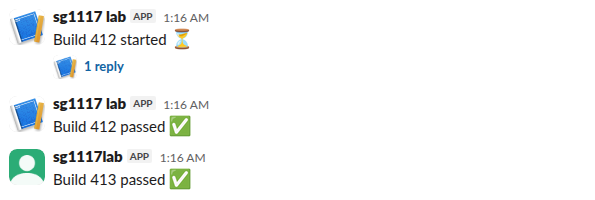
The top two messages came from the webhook. The third came from chat.postMessage with the bot token, and we changed its text with chat.update in 336 ms. Slack's chat.update page lists the other errors that call can return.
Route 1: a button on the webhook message
Interactive messages carry their own way back. A webhook can post Block Kit buttons, and when someone clicks one, Slack sends your Request URL a block_actions payload that holds a response_url for that exact message. That URL can replace or delete the message, webhook or not.
The webhook payload:
{
  "text": "Build 414 is waiting for approval",
  "blocks": [
    {"type": "section", "text": {"type": "mrkdwn", "text": "Build 414 is waiting for approval"}},
    {"type": "actions", "elements": [
      {"type": "button", "text": {"type": "plain_text", "text": "Approve"}, "action_id": "approve", "style": "primary"},
      {"type": "button", "text": {"type": "plain_text", "text": "Dismiss"}, "action_id": "dismiss"}
    ]}
  ]
}
The handler on our server, after the signature check:
if payload["type"] == "block_actions":
    action = payload["actions"][0]["action_id"]
    if action == "approve":
        post_json(payload["response_url"], {
            "replace_original": True,
            "text": "Build 414 approved by <@" + payload["user"]["id"] + "> :white_check_mark:",
        })
    else:
        post_json(payload["response_url"], {"delete_original": True})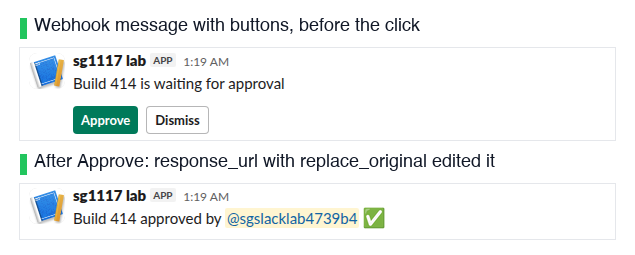
Approve replaced the text in place. The response_url answered 200 with a JSON body, {"ok":true}, and conversations.history then showed the message with an edited field whose user was the webhook's bot id. Dismiss on a second webhook message answered the same and removed the message from the channel. This is the one route we found that edits or deletes a message the webhook posted. It needs a person to click, and a response_url allows 5 calls; in an earlier test the sixth call answered 404 used_url.
Never appear "away" on Slack again
Cloud-based. No downloads. Works 24/7 even when your laptop is off.
Route 2: post with a bot token instead
If your code needs to update a status message on its own, such as a build that goes from started to passed, skip the webhook for that message. Post with chat.postMessage and keep the ts it returns:
from slack_sdk import WebClient

client = WebClient(token=os.environ["SLACK_BOT_TOKEN"])
posted = client.chat_postMessage(channel="C0CJ58T774M", text="Build 413 started :hourglass_flowing_sand:")
client.chat_update(channel=posted["channel"], ts=posted["ts"], text="Build 413 passed :white_check_mark:")
Both calls returned ok. The bot token needs chat:write, and the bot must be in the channel, or have chat:write.public for public channels. Our page on webhooks vs bot tokens compares the two for sending, editing, threads and files.
A slash command's response_url does not replace
A slash command also gets a response_url, so we tested whether replace_original works there. It does not. We posted "Deploy 88 started" with response_type: in_channel and then sent replace_original: true with new text to the same URL. Both calls answered 200 ok, and after a reload the channel still showed only "Deploy 88 started". With ephemeral replies the second call added a new ephemeral message under the first instead of replacing it:
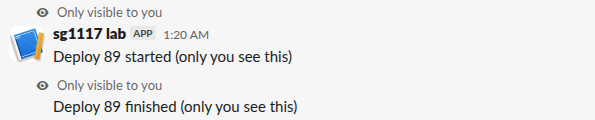
So replace_original and delete_original act only on the message that held the clicked button or menu.
FAQ
Can I get the ts back from an incoming webhook?
No. A successful post answers with the text ok and nothing else. Read the newest message from conversations.history right after you post if you must find it, but you still cannot edit it with the bot token.
Does the webhook URL count as the bot for chat.update?
No. The webhook posts under its own bot id with no bot user, so the app's bot token gets cant_update_message on those messages.
Can a webhook reply in a thread?
Yes. Add thread_ts with the parent's ts, as in the table above. See how to create a Slack webhook for the setup.
Stop Jiggling Your Mouse.
Join hundreds of remote workers who never worry about their Slack status. Set it up once, stay green forever.
Related Articles
Slack App Configuration Token: Generate, Rotate and Revoke
An app configuration token lets a script create Slack apps from manifests. We generated one, rotated it five times and tested it again 28 hours later.
Slack App Collaborators: Add, Remove and Transfer Ownership
Collaborators are the people who can edit a Slack app. We added and removed one on 20 November 2026 as a regular member of a test workspace, recorded who can be added and what Slack asks you to do after a removal, and wrote down the hand-over path Slack documents.
Slack Bolt Middleware: Global and Listener, Tested
Global middleware runs for every request and listener middleware for one listener. We ran both in Bolt for Python and Bolt for JavaScript on 20 November 2026 and logged what Slack did when next() was skipped: Python answered 404 and Slack sent the event again.