
Slack missing_scope Error: Read 'needed', Add It, Reinstall
Slack returns missing_scope when the token lacks a scope the method needs. The response names it in 'needed'. Add that scope, reinstall the app, and call again. Tested on a real app.
Slack returns missing_scope when your token does not have a permission that the method needs. The response tells you which one: the needed field lists the scope to add, and provided lists what the token has now. Add the scope under OAuth & Permissions in your app settings, then reinstall the app. Adding the scope alone does not change the token. We checked every step below on 29 September 2026 with a test app that started with only chat:write.
What the missing_scope response looks like
We gave the app one bot scope, chat:write, and called three methods that need more. These are the bodies Slack sent back. Each came with HTTP 200, so code that checks only the status code will miss them:
{"ok": false, "error": "missing_scope", "needed": "users:read", "provided": "chat:write"}
{"ok": false, "error": "missing_scope", "needed": "channels:history,groups:history,mpim:history,im:history", "provided": "chat:write"}
{"ok": false, "error": "missing_scope", "needed": "reactions:write", "provided": "chat:write"}
The first is users.list, the second conversations.history, the third reactions.add. When needed holds a list, as it does for conversations.history, you need only the scope that matches the conversation type: channels:history for public channels, groups:history for private ones, im:history for DMs and mpim:history for group DMs.
The same two facts come back as HTTP headers on every Web API call, including successful ones. x-oauth-scopes is what the token has, and x-accepted-oauth-scopes is what the method accepts:
curl -si https://slack.com/api/users.list \
  -H "Authorization: Bearer $SLACK_BOT_TOKEN" -d limit=1 \
  | grep -i -E '^(HTTP|x-oauth-scopes|x-accepted-oauth-scopes)'
HTTP/2 200
x-accepted-oauth-scopes: users:read
x-oauth-scopes: chat:write,users:read,channels:history,groups:history,channels:join,chat:write.public,reactions:write,files:write,incoming-webhookHow to fix missing_scope
- Open
api.slack.com/apps, pick the app, and open OAuth & Permissions. - Under Bot Token Scopes (or User Token Scopes if you call with an
xoxp-token), click Add an OAuth Scope and add the scope fromneeded. - Click reinstall your app in the yellow banner, or Reinstall to Slack, and approve.
- Call the method again.
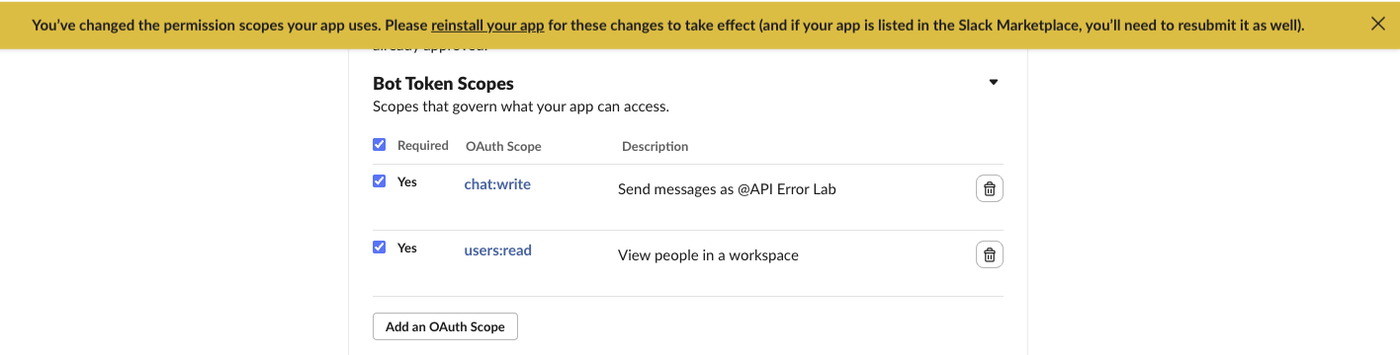
We called users.list between steps 2 and 3, with the scope listed on the page but the app not yet reinstalled. It still failed with "needed": "users:read", "provided": "chat:write". After the reinstall the same call returned ok: true and the three members of the workspace.
The token string did not change on reinstall. The xoxb- value on the page was the same before and after, and the old value now carried all nine scopes. So if you store the token in a secret, you do not need to paste it again after adding scopes; you only need the reinstall. (Apps with token rotation turned on get new tokens on their own schedule; ours had rotation off.)
Never appear "away" on Slack again
Cloud-based. No downloads. Works 24/7 even when your laptop is off.
The error you may see next
Fixing the scope often reveals a second error. With reactions:write and channels:history added, reactions.add and conversations.history on a public channel the bot had not joined both returned:
{"ok": false, "error": "not_in_channel"}Scopes say what kind of thing the app may do; channel membership says where. The bot needs to be in the channel to read its history or react there. Our not_in_channel guide has both fixes with their real responses. After conversations.join, both calls returned ok: true.
A wrong channel ID gives a different error, channel_not_found, even when every scope is present. The cases that produce it are in Slack channel_not_found.
Scopes for the calls people ask about most
| Method | Bot scope Slack asked for |
|---|---|
users.list, users.info | users:read |
users.lookupByEmail | users:read.email |
conversations.history | channels:history (public), groups:history (private) |
reactions.add | reactions:write |
files.upload, files.getUploadURLExternal | files:write |
conversations.join | channels:join |
chat.postMessage to a public channel the bot is not in | chat:write.public |
Every row except the last two is a needed value we got back from Slack in this test. The last two are the scopes we added to make those calls work. With files:write added, files.upload still fails, with method_deprecated; the replacement is in Slack files.upload deprecated.
"Notification failed: missing_scope" in tools such as monitoring and CI plugins is the same response passed through. The plugin's token needs the scope, so the fix happens in the Slack app the plugin uses. If you are wiring up a bot for the first time, how to get a Slack bot token covers the install step.
FAQ
Is missing_scope the same as not_allowed_token_type?
No. missing_scope means the right token type lacks a permission. not_allowed_token_type means the method does not accept that kind of token at all, Our bot token got it from search.messages and users.profile.set, which need a user token. Adding scopes does not fix it; call with an xoxp- token instead.
Do I need to reinstall for every workspace? Yes. A scope change reaches a workspace only when someone there approves the app again. Each workspace install has its own token.
Can I see which scopes a token has without calling a failing method?
Yes. Call auth.test and read the x-oauth-scopes response header.
Stop Jiggling Your Mouse.
Join hundreds of remote workers who never worry about their Slack status. Set it up once, stay green forever.
Related Articles
Slack Member ID: Where to Copy It, and What the U Means
A Slack member ID is the U... code that identifies a person. Copy it from their profile under the three-dot menu, or look it up with users.info and users.list. Tested in two workspaces, with the ID formats we found.
Slack API Rate Limits: What We Hit, and the 429 You Get Back
Slack answers too many calls with HTTP 429 and a Retry-After header. We burst chat.postMessage, conversations.history and an incoming webhook from an internal app and logged every response: where the 429s started, the bodies, and a retry loop that never hit one.
Slack files.upload Deprecated: The 3-Step Upload That Replaces It
files.upload now returns method_deprecated. Use files.getUploadURLExternal, POST the bytes, then files.completeUploadExternal, or files_upload_v2 in the SDK. Tested with curl and Python, including two silent failures.