
Slack App Home Tab: views.publish, Events and Errors, Tested
We built a Slack App Home tab with views.publish in a test workspace and recorded the app_home_opened payload, every error a bad view returned, and what users see when the Messages tab is off or read-only.
To show a Slack App Home tab, turn on the Home tab in your app settings, then call views.publish with a bot token, the user_id of the person, and a view whose type is home. Slack stores one Home view per user, and the user sees it the next time they open your app. We built one on 1 October 2026 in our own test workspace and recorded every response below.
Turn on the Home tab
In the app manifest the switch sits under features.app_home:
features:
  app_home:
    home_tab_enabled: true
    messages_tab_enabled: true
    messages_tab_read_only_enabled: false
  bot_user:
    display_name: sglabw1
settings:
  event_subscriptions:
    bot_events:
      - app_home_opened
The same switches are on the App Home page of your app settings. The app_home_opened event needs no extra scope. If you build the app from a manifest, our Slack app manifest guide has a full file that we installed.
Publish a view with views.publish
This is the script we ran, with slack_sdk:
import os
from slack_sdk import WebClient

client = WebClient(token=os.environ["SLACK_BOT_TOKEN"])

view = {
    "type": "home",
    "blocks": [
        {"type": "header", "text": {"type": "plain_text", "text": "Team dashboard"}},
        {"type": "section", "text": {"type": "mrkdwn", "text": "*Open tickets:* 4\n*On call:* <@U0B7L4YK420>"}},
        {"type": "divider"},
        {"type": "actions", "elements": [
            {"type": "button", "text": {"type": "plain_text", "text": "Refresh"},
             "action_id": "refresh_home", "style": "primary"}]},
        {"type": "context", "elements": [{"type": "mrkdwn", "text": "Published with views.publish"}]},
    ],
}

resp = client.views_publish(user_id="U0B7L4YK420", view=view)
print(resp["ok"], resp["view"]["id"], resp["view"]["hash"])
Output:
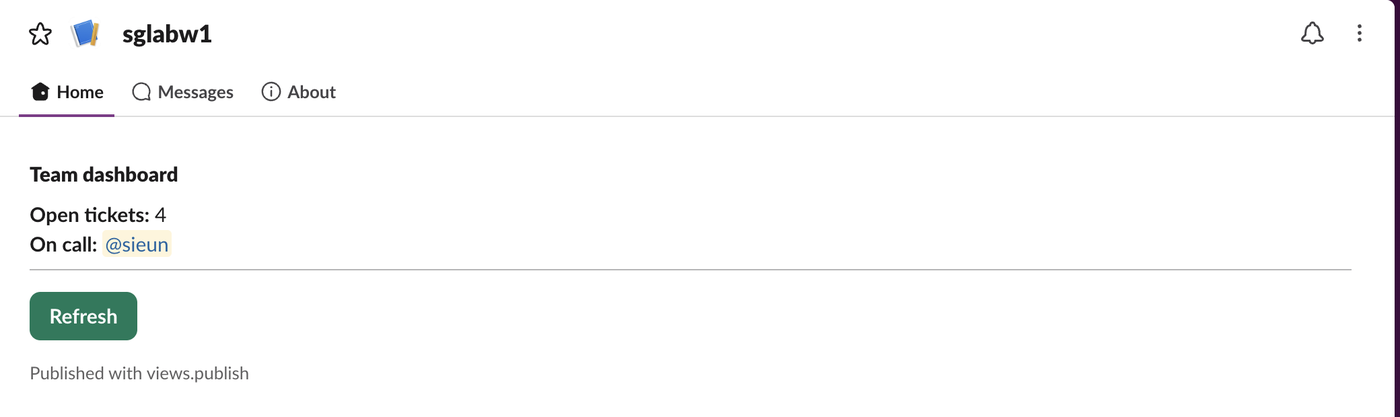
True V0C5YL86W9F 1790839317.uuOv5mY7The screenshot at the top is that view in Slack web. We published it before the user had ever opened the app, and it was there on the first open, so you do not have to wait for app_home_opened before the first publish.
Three details from the same run:
- • A user token (
xoxp-) returns{"ok": false, "error": "not_allowed_token_type"}. Only the bot token can publish a Home view. - • Sending JSON with a plain
Content-Type: application/jsonheader worked but added"warning": "missing_charset"to every response.application/json; charset=utf-8removed it.slack_sdksets the header for you. - • A form-encoded call with
viewas a JSON string also returnedok: true.
The app_home_opened event
Slack sent this to our Events API Request URL when we opened the app. We trimmed the view object to five of its fields; the full payload repeats the whole view we had published.
{
  "type": "event_callback",
  "event": {
    "type": "app_home_opened",
    "user": "U0B7L4YK420",
    "channel": "D0C5UMYKNKG",
    "tab": "home",
    "view": {
      "id": "V0C5YL86W9F",
      "type": "home",
      "hash": "1790838694.plCBUVng",
      "root_view_id": "V0C5YL86W9F",
      "app_id": "A0C5WFY5P7C"
    },
    "event_ts": "1790838702.833620"
  },
  "event_id": "Ev0C5YL9BAMP",
  "event_time": 1790838702
}
Opening the Messages tab sends the same event with "tab": "messages" and no view key:
{
  "type": "app_home_opened",
  "user": "U0B7L4YK420",
  "channel": "D0C5UMYKNKG",
  "tab": "messages",
  "event_ts": "1790838745.267589"
}
The view.hash field is useful. Pass it back as hash in your next views.publish, and Slack rejects the update if the view changed in between. We sent a stale hash and got {"ok": false, "error": "hash_conflict"}.
Never appear "away" on Slack again
Cloud-based. No downloads. Works 24/7 even when your laptop is off.
Errors from a bad view
Every one of these came back with "error": "invalid_arguments" and the detail in response_metadata.messages. Each list started with [ERROR] failed to match all allowed schemas [json-pointer:/view]; the table shows the line after it:
| What we sent | response_metadata.messages |
|---|---|
A view with "type": "modal" | [ERROR] unsupported type: modal [json-pointer:/view/type] |
A view with no type | [ERROR] missing required field: type [json-pointer:/view] |
| 101 blocks | [ERROR] no more than 100 items allowed [json-pointer:/view/blocks] |
| A header with 151 characters | [ERROR] must be less than 151 characters [json-pointer:/view/blocks/0/text/text] |
| A section with 3,001 characters | [ERROR] must be less than 3001 characters [json-pointer:/view/blocks/0/text/text] |
A wrong user ID gives the same error code. user_id=U00000000 and user_id=U0123456789 (well-formed, no such user) both returned:
{"ok": false, "error": "invalid_arguments", "response_metadata": {"messages": ["[ERROR] invalid `user_id`"], "warnings": ["missing_charset"]}}A view with exactly 100 blocks published fine. The json-pointer tells you which block broke the view; in a long view, count from zero. For the same limits in messages, see invalid_blocks and Block Kit limits.
Turn off the Messages tab
With messages_tab_enabled: false the Messages tab disappears and the app shows only Home and About:

While it was off, chat.postMessage from the bot to the user returned {"ok": false, "error": "messages_tab_disabled"}, whether we passed the user ID or the DM channel ID. So a Home-only app cannot DM its users.
With messages_tab_enabled: true and messages_tab_read_only_enabled: true, the bot can still post, but the user gets no composer:

The user token in the same read-only DM got {"ok": false, "error": "restricted_action_read_only_channel"}. Both changes took effect after a page reload, with no reinstall.
FAQ
Can I publish one Home view for every user at once?
No. views.publish takes one user_id per call. To change the tab for everyone, call it once per user, within the method's rate limit.
Does adding an AI assistant change the App Home?
Yes. When we added features.assistant_view to the manifest, the tabs became Home, Chat, History and About, and the app got an AGENT label.
Stop Jiggling Your Mouse.
Join hundreds of remote workers who never worry about their Slack status. Set it up once, stay green forever.
Related Articles
Slack Interactivity Payload: Real block_actions JSON and response_url Limits
We clicked a button, a static_select and a datepicker in Slack on 1 October 2026 and logged the block_actions payloads our app received. Then we measured response_url: 5 posts, then used_url; it worked at 29:50 and was dead at 30:10.
Slack unfurl_links and unfurl_media: What Each Flag Does, Tested
We posted a web page, a YouTube video and an image with every combination of unfurl_links and unfurl_media on 1 October 2026, then built a custom preview with link_shared and chat.unfurl. The flags do not split the way the names suggest.
Slack Scheduled Message Didn't Send? 5 Cases We Tested
We scheduled five messages for 4:40 PM on 1 October 2026, then archived, left and deleted their channels and deleted a thread parent before the send time. Two sent, three never did, and Slack gave no notice about the three.