
assistant.threads.setStatus vs agents.sessions.setStatus: Both Tested in Slack
We called assistant.threads.setStatus and agents.sessions.setStatus on a test app before and after turning on the agent feature, clicked the stop button, and timed how long the status line stays. Every response, the stop event, and what Slack showed.
assistant.threads.setStatus puts an "(app name) is working..." line under a thread in Slack while your bot prepares a reply. Slack now recommends agents.sessions.setStatus instead, which tracks a session with four states (active, processing, suspended, closed), shows a stop button, and gives the thread a title. On 2 October 2026 we tested both with a bot token in our own test workspace, on one app before and after we added the agent_view feature to its manifest. The old method worked on a plain app; the new one returned not_authorized until the feature was on.
On a plain app: only the old method works
Our app had a bot user, the messages tab and the chat:write and assistant:write scopes, but no agent feature. We sent it a DM, then called both methods on that message:
| Call | Response |
|---|---|
assistant.threads.setStatus with status: "is reading the notes..." | {"ok": true} |
agents.sessions.setStatus with status: "processing" | {"ok": false, "error": "not_authorized"} |
Slack showed the line under the user's message, but not with our text. It read "sglabw2 is working...":

Slack's reference says the status disappears after two minutes if the app sends no message. In our test it was still there at 290 seconds and gone at 305 seconds, checked every 15 seconds in an open Slack web tab. Do not count on the line clearing itself; clear it with an empty status or by replying.
Turn on the agent feature
We added this to the app manifest with apps.manifest.update and subscribed to the agent_session_stopped bot event:
"features": {
  "agent_view": {"agent_description": "Throwaway test agent for status tests"}
}
The app's DM header then labelled it AGENT instead of APP. A run on 1 October with assistant_view instead of agent_view got the same label, plus a banner on the app's settings page: "The agentic app experience is changing. You'll need to update your app to the new experience."
The agent session lifecycle
This is the script we ran with slack_sdk 3.x, against a new DM message from the user:
import os, time
from slack_sdk import WebClient
from slack_sdk.errors import SlackApiError

bot = WebClient(token=os.environ["SLACK_BOT_TOKEN"])
DM, THREAD = os.environ["DM_ID"], os.environ["THREAD_TS"]   # the user's message in the app DM

def call(label, method, **kw):
    try:
        r = bot.api_call(method, json=kw).data
        print(f"{label:30} ok  status={r.get('status')} title={r.get('title')!r} warning={r.get('warning')}")
    except SlackApiError as e:
        d = e.response.data
        print(f"{label:30} {d['error']} {d.get('response_metadata', {}).get('messages', '')}")

session = {"channel_id": DM, "thread_ts": THREAD}
call("processing + title", "agents.sessions.setStatus", **session, status="processing", title="Release notes")
time.sleep(5)
call("rename", "agents.sessions.rename", **session, title="Release notes, 4.53 changes")
call("processing, new title", "agents.sessions.setStatus", **session, status="processing", title="Ignored")
call("suspended", "agents.sessions.setStatus", **session, status="suspended")
call("active", "agents.sessions.setStatus", **session, status="active")
call("closed", "agents.sessions.setStatus", **session, status="closed")
call("status=thinking", "agents.sessions.setStatus", **session, status="thinking")
call("no thread_ts", "agents.sessions.setStatus", channel_id=DM, status="processing")
Output:
processing + title             ok  status=processing title='Release notes' warning=None
rename                         ok  status=None title='Release notes, 4.53 changes' warning=None
processing, new title          ok  status=processing title='Release notes, 4.53 changes' warning=None
suspended                      ok  status=suspended title='Release notes, 4.53 changes' warning=None
active                         ok  status=active title='Release notes, 4.53 changes' warning=None
closed                         ok  status=closed title='Release notes, 4.53 changes' warning=None
status=thinking                invalid_arguments ['[ERROR] must be a valid enum value [json-pointer:/status]']
no thread_ts                   thread_ts_required
title only counts when the session is created. Our second processing call passed a new title and the response kept the old one; agents.sessions.rename is the way to change it. Slack showed the title as the header of the thread panel, which it opened for the user on its own:
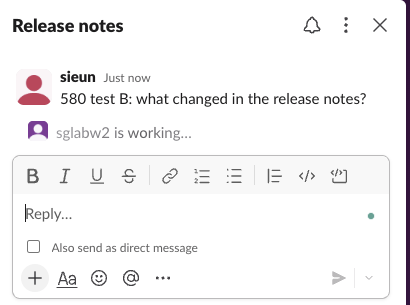
What each status looked like in Slack web:
status | Under the user's message |
|---|---|
processing | "sglabw2 is working...", plus a stop button on hover |
suspended | Nothing |
active | Nothing |
closed | Nothing |
A processing session showed its line for as long as we watched: 6 minutes 24 seconds with no reply from the app. It also survived a page reload. Unlike the old method, it does not clear itself, so set active or closed when your agent finishes or fails.
Never appear "away" on Slack again
Cloud-based. No downloads. Works 24/7 even when your laptop is off.
The stop button and agent_session_stopped
Because the app subscribed to agent_session_stopped, hovering over the status showed a stop button:
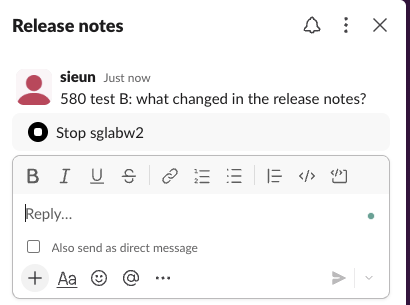
When we clicked it, our Socket Mode listener got this event:
{
  "type": "agent_session_stopped",
  "channel": "D0C673PTGJE",
  "user": "U0B7L4YK420",
  "streaming_message_ts": [],
  "thread_ts": "1790926995.881459",
  "event_ts": "1790927010.765847"
}
Slack then showed "Stopping sglabw2..." and left it there:
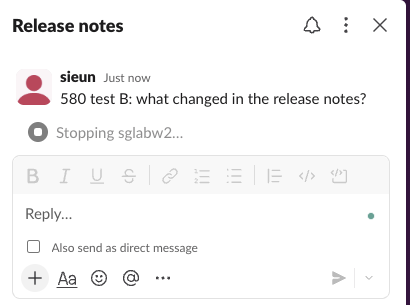
33 seconds later it still read "Stopping". Only when our app called agents.sessions.setStatus with active did the line go away. Clicking stop does not end the session; your handler has to stop the work and set the status. In the 1 October run, without the event subscription, the same processing call returned ok with the warning missing_agent_session_stopped_event_subscription and no stop button appeared.
The old method on an agent app
On the same app with agent_view, assistant.threads.setStatus still returned ok. It opened the thread panel (titled "Thread", since there was no session title) and showed "sglabw2 is working..." again, without our custom text. A call with loading_messages: ["Reading release notes", "Comparing versions"] also returned ok, but neither string appeared in 26 seconds of checks; the 1 October run on assistant_view showed its first loading message a few seconds after the call. There was no stop button, because no session existed.
Errors we got
| Call | Response |
|---|---|
status: "thinking" | invalid_arguments: must be a valid enum value [json-pointer:/status] |
No thread_ts, in a DM or a public channel | thread_ts_required |
| A user token, for either method | not_allowed_token_type |
agents.sessions.rename with title: "" | invalid_arguments: must be more than 0 characters |
agents.sessions.rename with 201 characters | invalid_arguments: must be less than 201 characters |
agents.sessions.rename on a thread that has no session | not_authorized |
agents.sessions.setStatus on a made-up thread_ts | ok, and a session was created |
The last row means the API does not check that the thread exists. Use the ts from the event that started the work.
Our listener setup is in the Socket Mode guide. For the Slackbot side of Slack's AI features, see Slackbot as an MCP client.
FAQ
Do I need the assistant:write scope? Not for the new method. Slack's reference lists chat:write for agents.sessions.setStatus, and assistant.threads.setStatus accepts either assistant:write or chat:write for now. Our app had both.
Can a user token set the status? No. Both methods returned not_allowed_token_type with our user token.
Stop Jiggling Your Mouse.
Join hundreds of remote workers who never worry about their Slack status. Set it up once, stay green forever.
Related Articles
Slack Slash Command Payload: Every Field, Responses, and response_url Limits
We caught the payload a slash command sends, answered it as ephemeral, in_channel, plain text and empty, posted to its response_url until it failed, and typed the command inside a thread. Every result is from a test app on 2 October 2026.
Slackbot MCP Client: We Connected a 17-Line MCP Server and Slackbot Called It
We wrote a one-tool MCP server, added it to a Slack app with the mcp_servers manifest field, switched it on in Slackbot and asked for the time. Every request Slackbot sent to the server, the permission prompt, and what Slackbot said when the server was down.
Slack Image Block: Formats, Size Limits and Errors We Measured
We posted image blocks pointing at our own server with PNG, JPG, GIF, WebP and SVG files, a 404, a redirect, slow responses and files from 2 MB to 42 MB, then used slack_file uploads. What rendered, what failed with downloading image failed, and where the 20 MB line sits.