
Slack Plan and Task Card Blocks: Every Status, Update and Limit Tested
We posted a plan block with tasks in all four statuses and standalone task cards from a bot, updated them with chat.update, and probed the limits. pending works only inside a plan, and titles have no length limit we could find.
The task_card block shows one step an app or agent is working on, with a status icon, optional details and output, and source links. The plan block groups up to 50 such tasks under one title. Slack added both in February 2026 and changed how they look on 20 August 2026. On 3 October 2026 we posted them from a test bot in our own workspace, in Slack web, and tried every status, an update, and bad values. A standalone task_card rejects pending, while a plan accepts it.
The blocks we posted
import json
from lab import raw   # our helper: POSTs JSON to https://slack.com/api/<method> with the bot token

DM = "D0C6CRJSZK8"
def rt(t): return {"type": "rich_text", "elements": [{"type": "rich_text_section", "elements": [{"type": "text", "text": t}]}]}
def task(i, status, title=None, **kw):
    d = {"task_id": f"t{i}", "title": title or f"Task {i}: {status}", "status": status}
    d.update(kw); return d

tasks = [task(1, "pending", "Read the 4.53 changelog"),
         task(2, "in_progress", "Group changes by area", details=rt("Sorting 38 entries")),
         task(3, "complete", "Find breaking changes", output=rt("2 breaking changes found"),
              sources=[{"type": "url", "text": "docs.slack.dev", "url": "https://docs.slack.dev/changelog"}]),
         task(4, "error", "Fetch the GitHub release", output=rt("HTTP 404 from the release URL"))]
r = raw("chat.postMessage", {"channel": DM, "text": "617 plan test",
        "blocks": [{"type": "plan", "title": "Release summary plan", "tasks": tasks}]})

cards = [{"type": "task_card", **task(i + 10, s)} for i, s in enumerate(["pending", "in_progress", "complete", "error"])]
r2 = raw("chat.postMessage", {"channel": DM, "text": "617 cards test", "blocks": cards})
cards3 = [c for c in cards if c["status"] != "pending"]
r3 = raw("chat.postMessage", {"channel": DM, "text": "617 cards test 3", "blocks": cards3})| Message | Response |
|---|---|
plan with tasks in pending, in_progress, complete, error | {"ok": true, "ts": "1790989727.294849"} |
Four task_card blocks including pending | invalid_blocks, [ERROR] must be a valid enum value [json-pointer:/blocks/0/status] |
Three task_card blocks without pending | {"ok": true, "ts": "1790989728.050639"} |
The task card reference lists only in_progress, complete and error. The plan reference's own example uses pending, and Slack accepted it there.
How each status looks in Slack
Slack showed the plan collapsed to one line, "Release summary plan", with a spinner because a task was still running. Clicking the title opened it:
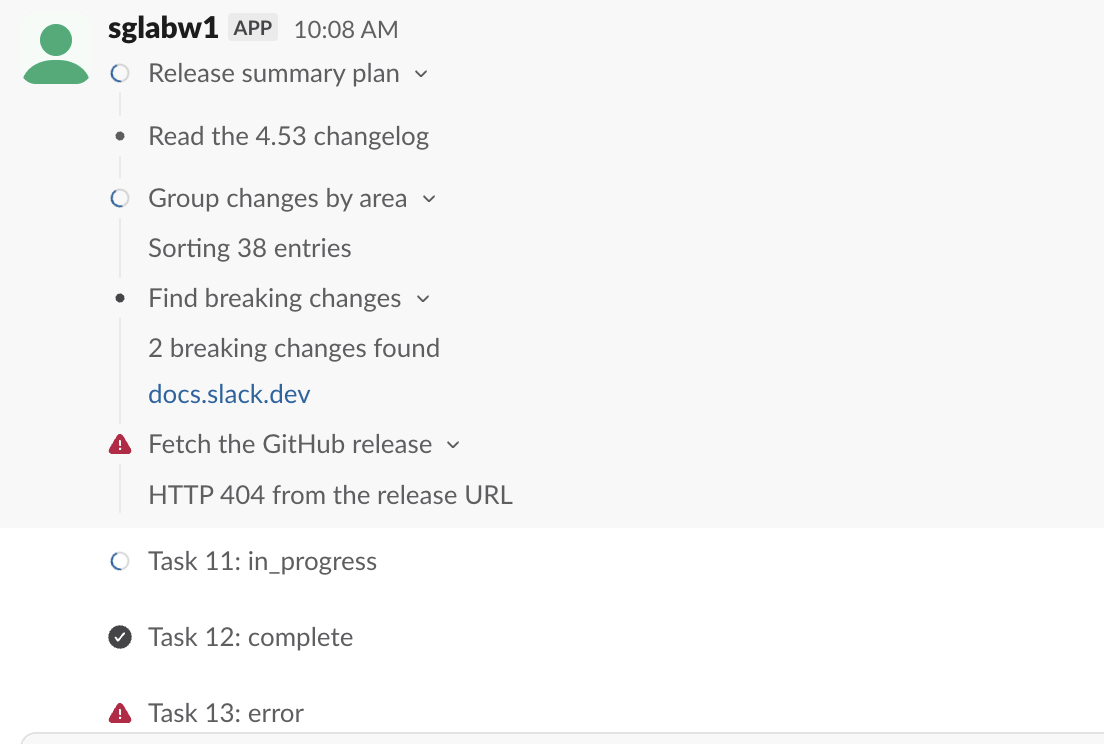
What each status got:
| Status | Inside a plan | As a standalone task_card |
|---|---|---|
pending | Grey dot | Rejected (invalid_blocks) |
in_progress | Spinner | Spinner |
complete | Grey dot, the same as pending | Check mark |
error | Red warning triangle | Red warning triangle |
Inside a plan, pending and complete look the same. The plan's header icon is what tells the reader the plan is done. details showed under the title, output under that, and sources as links. Tasks with details or output got an expand arrow.
Never appear "away" on Slack again
Cloud-based. No downloads. Works 24/7 even when your laptop is off.
Updating the plan with chat.update
We sent the same plan again with every task set to complete and a new output on the failed one:
for t in tasks:
    t["status"] = "complete"
tasks[3]["output"] = rt("Found it on the second try")
raw("chat.update", {"channel": DM, "ts": plan_ts, "text": "617 plan test",
     "blocks": [{"type": "plan", "title": "Release summary plan", "tasks": tasks}]})
The call returned {"ok": true}. The plan collapsed again, and its header spinner became a check mark. Opened, it read:
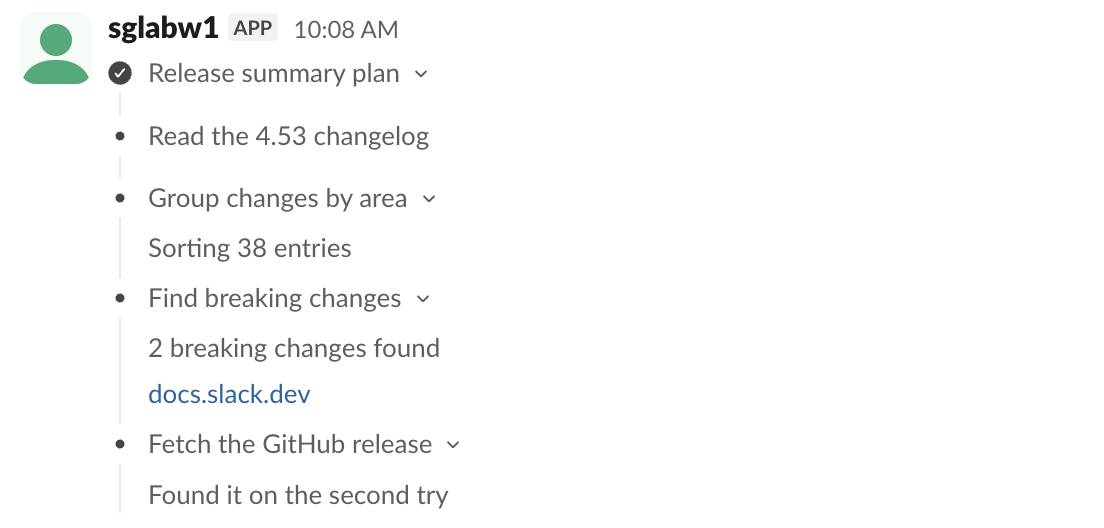
So to show progress, send the full plan each time. There is no call that changes one task; chat.update replaces the whole block. chat.startStream also accepts task_update chunks, which we did not test; our chat.startStream test covers the text side.
Limits and errors
Each row is one chat.postMessage with a bot token:
| What we sent | Response |
|---|---|
plan task with status: "done" | invalid_blocks, [ERROR] must be a valid enum value [json-pointer:/blocks/0/tasks/0/status] |
Two tasks with the same task_id | invalid_blocks, [ERROR] task_ids must be unique [json-pointer:/blocks/0] |
| plan with 0 tasks | ok |
| plan with 50 tasks | ok |
| plan with 51 tasks | invalid_blocks, [ERROR] Cannot have more than 50 tasks [json-pointer:/blocks/0] |
| Two plan blocks in one message | invalid_blocks, [ERROR] Cannot have more than 1 plan block |
task_card without title | invalid_blocks, [ERROR] missing required field: title [json-pointer:/blocks/0] |
details as a plain string | invalid_blocks, [ERROR] must provide an object [json-pointer:/blocks/0/details] |
A source with no url | invalid_blocks, [ERROR] missing required field: url [json-pointer:/blocks/0/sources/0] |
| task_card title of 3,001, 12,000, 50,000 and 200,000 characters | ok every time |
| plan title of 3,001 characters | ok |
We found no title limit. Slack accepted 200,000 characters and showed the long titles in full, wrapped across the screen, so cap titles in your own code. details and output must be a single rich_text object, the same structure as the rich_text block.
We did not check the mobile app. When a block fails, our invalid_blocks guide explains how to read the json-pointer.
Stop Jiggling Your Mouse.
Join hundreds of remote workers who never worry about their Slack status. Set it up once, stay green forever.
Related Articles
Slack chat.startStream: Streaming a Message, Timed and Tested
We streamed a bot reply into a Slack DM thread with chat.startStream, chat.appendStream and chat.stopStream, timed every call, screenshotted the thread mid-stream, and found how long an idle stream stays open.
Slack views.update and views.push: Stack Limit, hash_conflict and response_action, Tested
We opened a Slack modal, pushed views until Slack refused, updated the top view with a current and a stale hash, and answered view_submission with every response_action. Every response and what the user saw.
Slack Block Kit Select Menus: Static, Multi, Users and External, Tested
We posted all four common select menus from a Socket Mode app, picked a value in each, logged the block_actions payloads, and timed an external_select options handler from 0 to 5 seconds. Past 3 seconds Slack silently shows the old results.