
Slack Rich Text Block: Every Element Rendered, and What Fails
We posted rich_text blocks with every element type, lists nested 9 levels deep, quotes and code, then broke them on purpose. The JSON we sent, screenshots of how Slack web drew it, and the exact invalid_blocks errors.
A Slack rich_text block is the Block Kit block that holds formatted text the way the Slack message box stores it: a list of rich_text_section, rich_text_list, rich_text_quote and rich_text_preformatted elements, each made of text, link, user, channel, emoji, date and broadcast pieces with their own styles. Messages typed in Slack are stored the same way. On 2 October 2026 we posted rich text blocks with every element through chat.postMessage with a bot token in our own test workspace, took screenshots of how Slack web drew them, and logged the error for each payload Slack refused.
Every element, and how Slack drew it
This is how Slack web showed our three test messages, one per top-level element type:
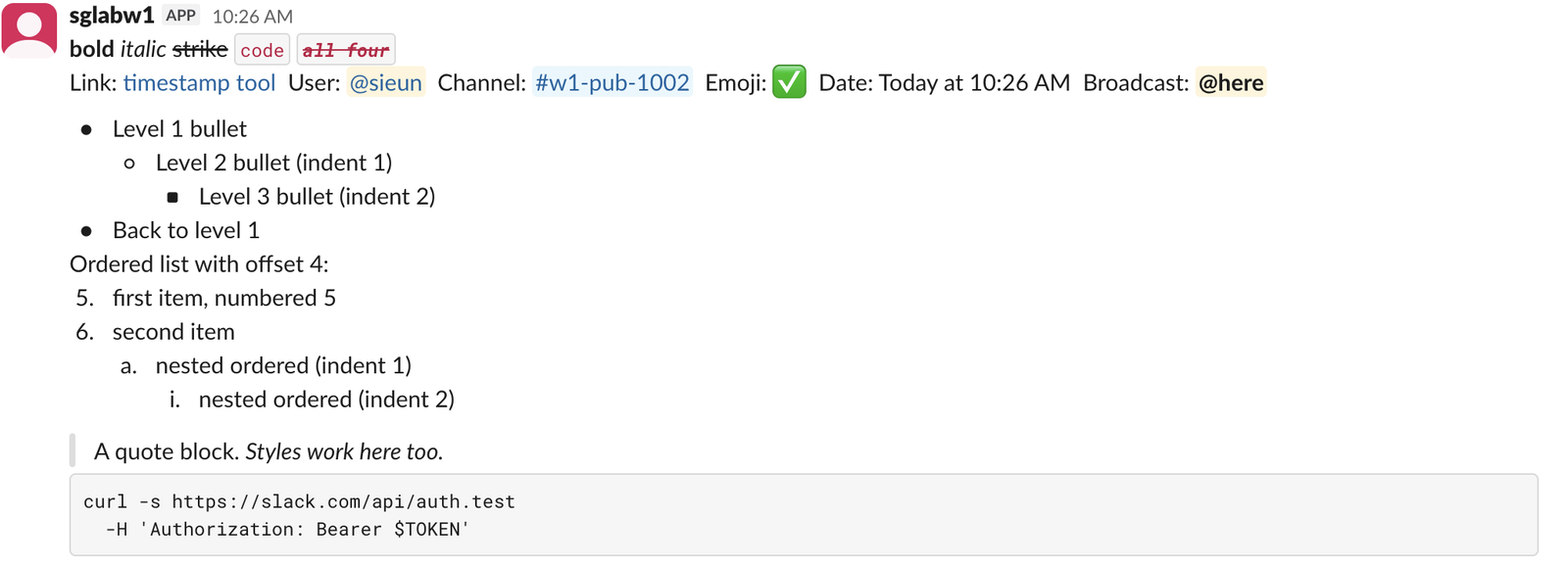
The first message is one rich_text_section. Styles are flags on each text element, and they combine:
{"type": "rich_text", "elements": [
    {"type": "rich_text_section", "elements": [
        {"type": "text", "text": "bold", "style": {"bold": true}},
        {"type": "text", "text": " "},
        {"type": "text", "text": "italic", "style": {"italic": true}},
        {"type": "text", "text": " "},
        {"type": "text", "text": "strike", "style": {"strike": true}},
        {"type": "text", "text": " "},
        {"type": "text", "text": "code", "style": {"code": true}},
        {"type": "text", "text": " "},
        {"type": "text", "text": "all four", "style": {"bold": true, "italic": true, "strike": true, "code": true}},
        {"type": "text", "text": "\nLink: "},
        {"type": "link", "url": "https://slack.green/en/tools/slack-timestamp", "text": "timestamp tool"},
        {"type": "text", "text": "  User: "},
        {"type": "user", "user_id": "U0B7L4YK420"},
        {"type": "text", "text": "  Channel: "},
        {"type": "channel", "channel_id": "C0C65BGESH0"},
        {"type": "text", "text": "  Emoji: "},
        {"type": "emoji", "name": "white_check_mark"},
        {"type": "text", "text": "  Date: "},
        {"type": "date", "timestamp": 1790904362, "format": "{date_short_pretty} at {time}", "fallback": "2 Oct 2026"},
        {"type": "text", "text": "  Broadcast: "},
        {"type": "broadcast", "range": "here"}
    ]}
]}
What we saw:
- •
"all four"with bold, italic, strike and code turned into red struck code text, as in the screenshot. - • The
dateelement showed "Today at 10:26 AM" in our time zone. Withoutfallbackit still posted, and showed "Oct 2" with the{date_short}format. Our Slack timestamp tool builds the same date tokens for mrkdwn. - •
broadcastwith"range": "here"drew a highlighted@here. - • A
userelement with a user ID that does not exist posted fine and showed an empty gray pill. Slack does not check user IDs, so check them yourself.
Lists, quotes and code
A list is a rich_text_list element with style bullet or ordered, indent for the level, and offset to start numbering later. You do not nest one list inside another: each level is its own rich_text_list with a higher indent, in order. This is the part of our second message that made the lists above:
{"type": "rich_text", "elements": [
    {"type": "rich_text_list", "style": "bullet", "indent": 0, "elements": [
        {"type": "rich_text_section", "elements": [
            {"type": "text", "text": "Level 1 bullet"}
        ]}
    ]},
    {"type": "rich_text_list", "style": "bullet", "indent": 1, "elements": [
        {"type": "rich_text_section", "elements": [
            {"type": "text", "text": "Level 2 bullet (indent 1)"}
        ]}
    ]},
    {"type": "rich_text_list", "style": "bullet", "indent": 2, "elements": [
        {"type": "rich_text_section", "elements": [
            {"type": "text", "text": "Level 3 bullet (indent 2)"}
        ]}
    ]},
    {"type": "rich_text_list", "style": "ordered", "indent": 0, "offset": 4, "elements": [
        {"type": "rich_text_section", "elements": [
            {"type": "text", "text": "first item, numbered 5"}
        ]},
        {"type": "rich_text_section", "elements": [
            {"type": "text", "text": "second item"}
        ]}
    ]}
]}
offset: 4 made the list start at 5. Nested ordered lists switched to letters at indent 1 and Roman numerals at indent 2. We posted one list element per level from indent 0 to 8; Slack web drew all 9 levels and cycled the bullet shapes:
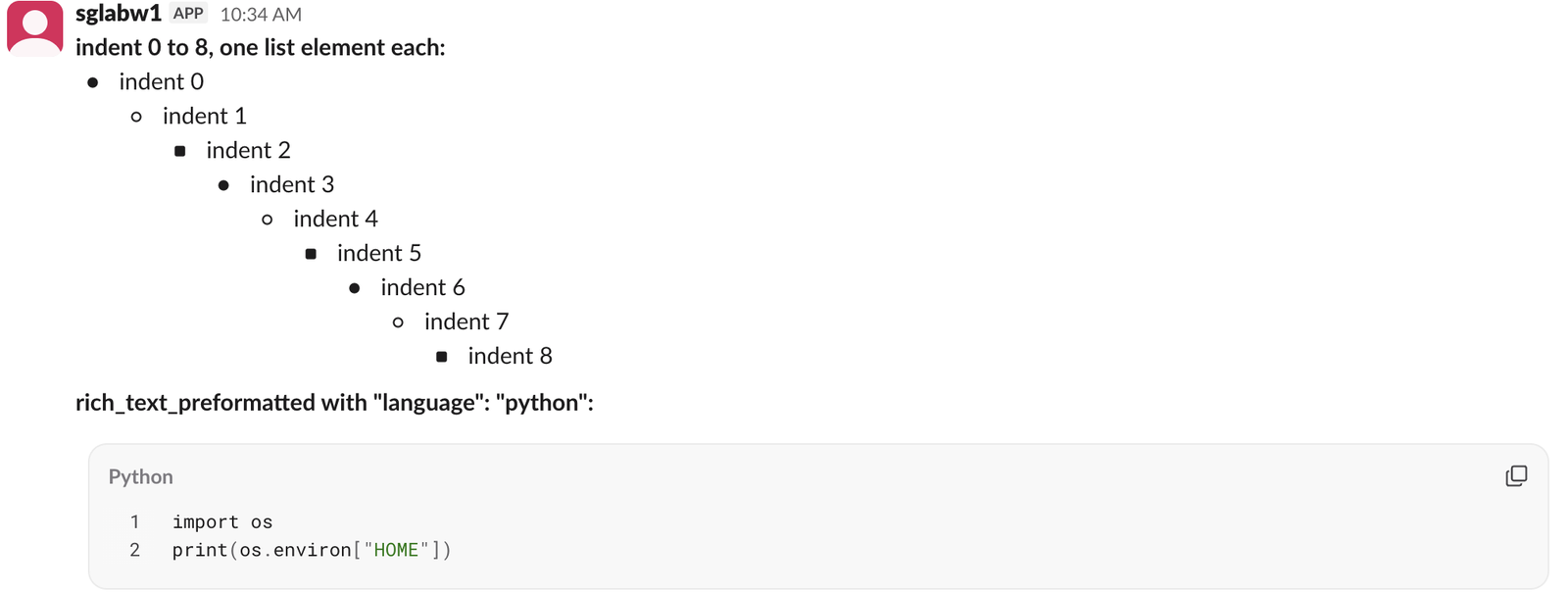
Two things in that screenshot are missing from the top guides:
indent above 8 fails, with an error message that is off by one: indent: 9 returned must be less than 8, but indent: 8 was accepted. A list that starts at indent 7 or 8 with no lower levels before it showed at the left edge, while one that starts at indent 6 showed indented.rich_text_preformatted takes a language field. With "language": "python", Slack web drew a labeled code block with line numbers, syntax colors and a copy button. Without it, the block is plain gray monospace.rich_text_quote and rich_text_preformatted hold text pieces directly, not sections. Styles work in a quote. Lists, quotes and preformatted blocks all accepted "border": 1, which drew an extra gray bar on the left. To write the same lists in mrkdwn or the newer markdown block instead, see Block Kit markdown.
Never appear "away" on Slack again
Cloud-based. No downloads. Works 24/7 even when your laptop is off.
Payloads Slack refused
Each of these went to chat.postMessage as the only block. Every refusal was {"ok": false, "error": "invalid_blocks"}, with the detail in errors:
| What we sent | Result | First line of errors |
|---|---|---|
A rich_text_list inside a list's elements | refused | must be a valid enum value [json-pointer:/blocks/0/elements/0/elements/0/type] |
| A section inside a section | refused | unsupported type: rich_text_section [...] |
| A list inside a quote | refused | unsupported type: rich_text_list [...] |
A text element directly in a list | refused | missing required field: elements [...] |
A text element at the top level of the block | refused | unsupported type: text [...] |
"text": "" | refused | must be more than 0 characters [...] |
A link without url | refused | missing required field: url [...] |
"style": {"color": true} | refused | invalid additional property: color [...] |
List "style": "dashed" | refused | must be a valid enum value [json-pointer:/blocks/0/elements/0/style] |
"offset": -1 | refused | must be greater than 0 [...] |
"indent": 9, 10 or 20 | refused | must be less than 8 [json-pointer:/blocks/0/elements/0/indent] |
Emoji ":white_check_mark:" with colons | refused | invalid emoji name :white_check_mark: |
A usergroup ID that does not exist | refused | usergroup [S0NOTREAL1] could not be found [...] |
A user ID that does not exist | posted | an empty gray pill |
| An emoji name that does not exist | posted | the text :not_a_real_emoji_xyz: |
A section with "elements": [] | posted | an empty line |
"style": {"underline": true} | posted | underlined text |
A color element, "value": "#22c55e" | posted | the hex code with a green square |
"offset": 0, "indent": 8 | posted | a normal list |
The json-pointer tells you which element failed: /blocks/0/elements/0/elements/0 is the first piece of the first element of the first block. A payload with several mistakes lists one line per mistake; our list-inside-a-list test returned four. Our invalid_blocks page covers the other causes of that error, and the Block Kit checker runs checks like these before you send.
What a typed message stores
We typed this in the Slack web message box, with asterisks, backticks and tildes around the words and a dash to start the list:

conversations.history returned this text:
Release *done*, see `v2.1` for ~old~ notes
• first item
• second item
and this block:
{"type": "rich_text", "elements": [
    {"type": "rich_text_section", "elements": [
        {"type": "text", "text": "Release "},
        {"type": "text", "text": "done", "style": {"bold": true}},
        {"type": "text", "text": ", see "},
        {"type": "text", "text": "v2.1", "style": {"code": true}},
        {"type": "text", "text": " for "},
        {"type": "text", "text": "old", "style": {"strike": true}},
        {"type": "text", "text": " notes\n"}
    ]},
    {"type": "rich_text_list", "style": "bullet", "indent": 0, "border": 0, "elements": [
        {"type": "rich_text_section", "elements": [
            {"type": "text", "text": "first item"}
        ]},
        {"type": "rich_text_section", "elements": [
            {"type": "text", "text": "second item"}
        ]}
    ]}
]}
Two details to copy if you build blocks the way Slack does. The line break before a list stays at the end of the last text piece (" notes\n"). And Slack's own list carries "indent": 0 and "border": 0, both defaults. The text field is a plain fallback with bullets as •, so read formatting from blocks.
FAQ
Do I need the top-level text field with a rich_text block?
Not for the post to work. Our bot sent a rich_text block with no text and got ok with no warning; Slack filled the message's text from the block ("no top-level text"). chat.update also replaced a rich text block with a new one.
Can I use rich text blocks in modals and App Home?
Slack's docs list rich_text for messages, modals and Home tabs, and a rich_text_input element for typing it in a modal. We tested messages only.
Stop Jiggling Your Mouse.
Join hundreds of remote workers who never worry about their Slack status. Set it up once, stay green forever.
Related Articles
Slack API Pagination: next_cursor, the Last Page and invalid_cursor, Tested
Slack paginates list methods with a cursor: pass response_metadata.next_cursor back as cursor until it is empty. We paged 27 real messages on 2 October 2026 and broke the cursor five ways to see which ones fail.
Slack RTM API Deprecated: What rtm.connect Returns for a New App, and the Socket Mode Fix
A Slack app created today cannot use the RTM API. We called rtm.connect and rtm.start with every token a new app gets on 2 October 2026, tried to request the rtm:stream scope, and ran the same bot over Socket Mode.
Slack Bot Icon and Name Per Message: icon_emoji, icon_url and username, Tested
icon_emoji, icon_url and username only work with the chat:write.customize scope, and Slack ignores them silently without it. We tested every case on 2 October 2026, plus webhooks and the app icon upload limits.