
Slack Datepicker, Timepicker and Datetimepicker: Payloads and Time Zones
We posted Slack's datepicker, timepicker and datetimepicker in a message and a modal, picked values and logged every payload. The datetimepicker returns a Unix timestamp; the timepicker returns a bare HH:mm with no zone unless you set one.
Slack has three Block Kit pickers. The datepicker sends a date as YYYY-MM-DD, the timepicker sends a time as HH:mm, and the datetimepicker sends a Unix timestamp in seconds. Only the timestamp is a fixed moment; the other two mean nothing until you know whose time zone they are in. We tested all three on 4 October 2026 with a throwaway app in a free-plan workspace, in a message and in a modal, from a Slack account set to Seoul time. A Socket Mode listener logged each payload.
The three pickers in a message
We posted one actions block with four elements: a datepicker, a timepicker, a timepicker with "timezone": "America/New_York" and a datetimepicker:
[
  {"type": "datepicker", "action_id": "p_date", "initial_date": "2026-10-05"},
  {"type": "timepicker", "action_id": "p_time", "initial_time": "09:30"},
  {"type": "timepicker", "action_id": "p_time_tz", "initial_time": "09:30", "timezone": "America/New_York"},
  {"type": "datetimepicker", "action_id": "p_dt", "initial_date_time": 1791190800}
]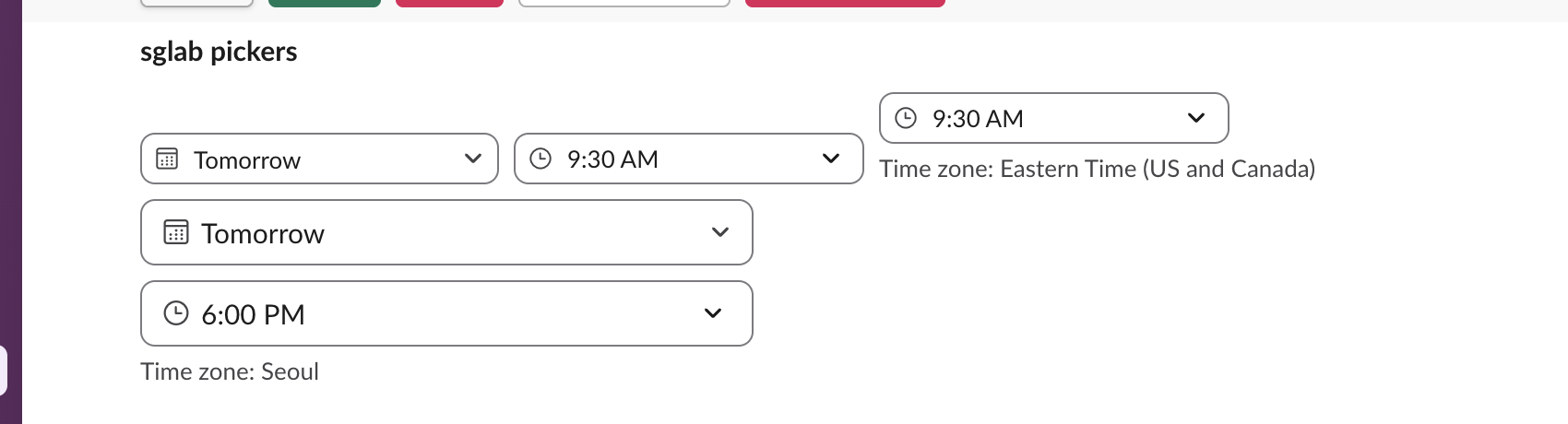
Slack wrote the initial date as "Tomorrow" because we posted on 4 October. The datetimepicker's 1791190800 is 09:00 UTC on 5 October, and Slack showed it as 6:00 PM with the label "Time zone: Seoul", the viewer's own zone. The timepicker with a timezone got a "Time zone: Eastern Time (US and Canada)" label; the plain timepicker got none.
What each pick sends
Each pick sent one block_actions payload. The actions entries we logged:
| Element | What we picked | Value in the payload |
|---|---|---|
| datepicker | October 12 in the calendar | "selected_date": "2026-10-12" |
| timepicker | 2:00 PM from the list | "selected_time": "14:00" |
timepicker with timezone | typed 4:17 PM | "selected_time": "16:17", "timezone": "America/New_York" |
| datetimepicker | typed 8:45 PM | "selected_date_time": 1791200700 |
Each entry also carried its initial_ value, so you can tell a changed field from an untouched one. The drop-down lists whole hours only, but typing any minute worked.
The datetimepicker value is 11:45 UTC, which is 8:45 PM in Seoul, so the timestamp already accounts for the person's zone. The plain timepicker's "14:00" has no zone in the payload at all. To turn it into a moment, look up the clicking user's tz with users.info (ours was Asia/Seoul, offset 32,400 seconds), or set timezone on the element so you decide the zone. Our Slack timezone converter shows the same hour across zones, and the Slack timestamp tool turns a datetimepicker value into Slack's date format.
Picks are not saved in the message. After we reloaded the page, every picker showed its initial value again. If the choice should stick, store it and chat.update the message with a new initial_ value, the same pattern our checkbox test needed.
Never appear "away" on Slack again
Cloud-based. No downloads. Works 24/7 even when your laptop is off.
Format errors, and two dates Slack accepted
These initial_ values failed with invalid_blocks:
| What we sent | Error |
|---|---|
"initial_date": "10/05/2026" | input must be a valid: date |
"initial_date": "2026-10-05T09:00:00Z" | input must be a valid: date |
"initial_time": "09:30:00", "9:30 AM" or "24:00" | input must match regex pattern (24-hour HH:mm, 00:00 to 23:59) |
"timezone": "UTC+9" | invalid IANA timezone |
"initial_date_time": "2026-10-05T09:00" | must provide an integer |
"initial_date_time": 1791190800000 (milliseconds) | value should be a unix timestamp in seconds |
Two values passed the API check and then rendered wrong:
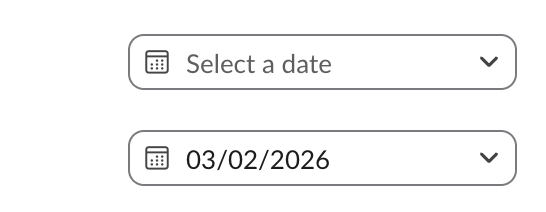
"2026-10-5", without the leading zero, posted fine and showed an empty picker. "2026-02-30" posted fine and showed March 2. Always zero-pad, and check the date is real before you post. "timezone": "EST" was also accepted and labelled Eastern Time.
Pickers in a modal
We opened a modal from an app shortcut with the three pickers in input blocks. Pressing Save with the date fields empty showed "Please complete this required field." under each one, and the app received nothing; the check runs in Slack's client. After we filled them in:
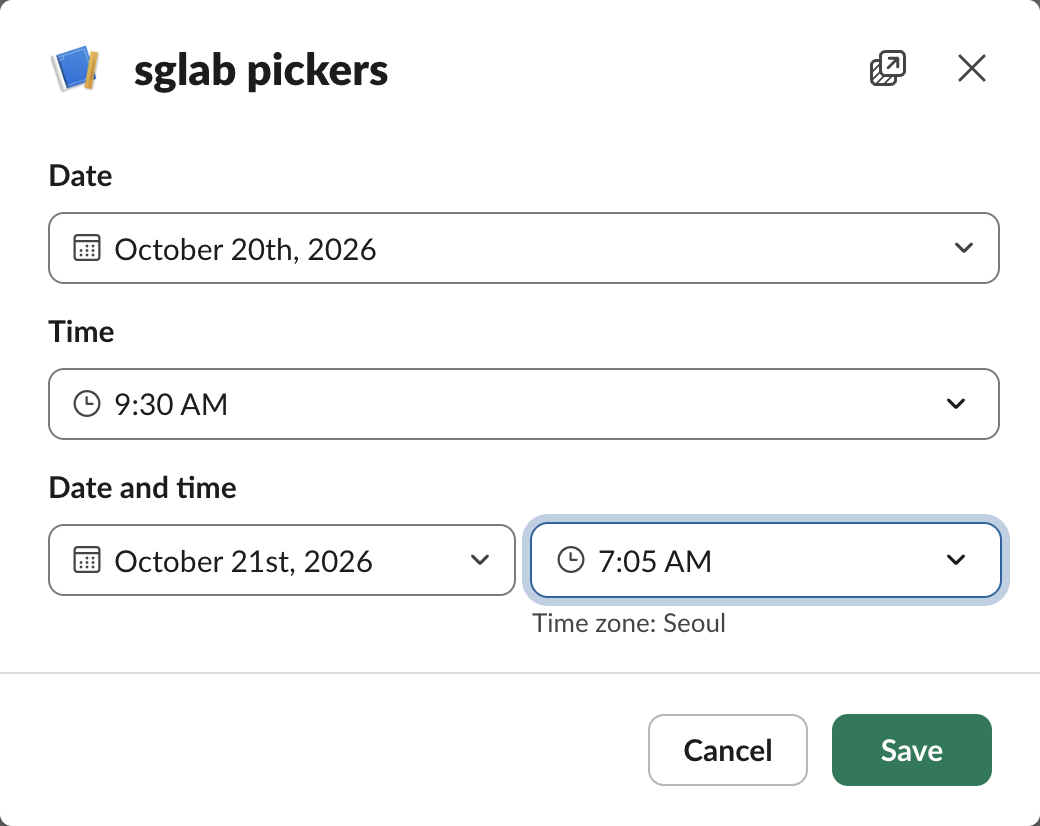
The view_submission payload held the values under view.state.values:
{
  "d":  {"date": {"type": "datepicker", "selected_date": "2026-10-20"}},
  "t":  {"time": {"type": "timepicker", "selected_time": "09:30"}},
  "dt": {"dt": {"type": "datetimepicker", "selected_date_time": 1792533900}}
}
1792533900 is 22:05 UTC on 20 October, the moment 7:05 AM on 21 October is in Seoul. Typed dates were accepted in MM/DD/YYYY form and shown as "October 20th, 2026". Opening the modal needs a fresh trigger_id; ours expired with expired_trigger_id 6.9 seconds after the click, as described on our expired trigger ID page.
Stop Jiggling Your Mouse.
Join hundreds of remote workers who never worry about their Slack status. Set it up once, stay green forever.
Related Articles
Slack App Shortcuts: Where Global and Message Shortcuts Appear, Tested
Slack apps can add two kinds of shortcut: global ones in the composer's shortcut list and message ones in a message's menu. We added one of each, found where Slack puts them, logged both payloads and recorded what users see when the app does not answer.
Slack Button Style: Primary, Danger, URL Buttons and Their Limits
A Slack Block Kit button has three looks: no style, primary (green) and danger (red). We posted every kind, clicked each one, logged the block_actions payloads and recorded the errors for colors, disabled buttons and long labels.
Slack API Tester: api.test and auth.test, With Real Responses
To test a Slack API connection, call api.test for the network and auth.test for the token. We ran both with no token, a bot token, a user token, an app-level token and a revoked token, and found that api.test echoes your token back.