
Slackbot MCP Client: We Connected a 17-Line MCP Server and Slackbot Called It
We wrote a one-tool MCP server, added it to a Slack app with the mcp_servers manifest field, switched it on in Slackbot and asked for the time. Every request Slackbot sent to the server, the permission prompt, and what Slackbot said when the server was down.
The Slackbot MCP client lets Slackbot call tools on your own MCP server. You add the server to a Slack app (the mcp:connect bot scope plus an mcp_servers entry in the manifest, or the MCP Servers page in app settings), install the app, and switch it on under the Apps button in a Slackbot conversation. On 2 October 2026 we did this in our own test workspace, which is on the free plan, with a 17-line Python MCP server behind a tunnel. Slackbot listed the tool, asked us for permission, called it, and answered with the time our server returned.
The server we connected
One tool, no auth. It uses the mcp Python SDK 1.30.0 (pip install "mcp<2"; in 2.x FastMCP was renamed):
import datetime, json, os, time
from mcp.server.fastmcp import FastMCP
from mcp.server.transport_security import TransportSecuritySettings

mcp = FastMCP("clock", host="127.0.0.1", port=int(os.environ["MCP_PORT"]), stateless_http=True,
             transport_security=TransportSecuritySettings(enable_dns_rebinding_protection=False))

@mcp.tool()
def utc_time() -> str:
    """Return the current UTC date and time from the clock server."""
    now = datetime.datetime.now(datetime.timezone.utc).isoformat(timespec="seconds")
    with open(os.environ["MCP_LOG"], "a") as f:
        f.write(json.dumps({"at": time.time(), "tool": "utc_time", "result": now}) + "\n")
    return now

if __name__ == "__main__":
    mcp.run(transport="streamable-http")
We ran it on a local port and exposed it with cloudflared tunnel --url, which gave an https://...trycloudflare.com address. Slack needs an HTTPS URL it can reach. With the SDK's default settings, every request through the tunnel failed with 421 Invalid Host header, because the DNS rebinding check only accepts localhost. The transport_security line turns that check off; on a real host, list your domain in allowed_hosts instead.
Add the server to a Slack app
We added it with apps.manifest.update. The two parts that matter:
{
  "oauth_config": {
    "scopes": {
      "bot": [
        "mcp:connect"
      ]
    }
  },
  "mcp_servers": {
    "clock": {
      "url": "https://<your-tunnel>.trycloudflare.com/mcp",
      "auth_type": "no_auth"
    }
  }
}
auth_type can be no_auth, slack_identity_auth, dynamic_client_registration or manual_auth. We then reinstalled the app so its token gained mcp:connect; the x-oauth-scopes header on the next call listed it. The app's settings now had an MCP Servers page with the server on it:
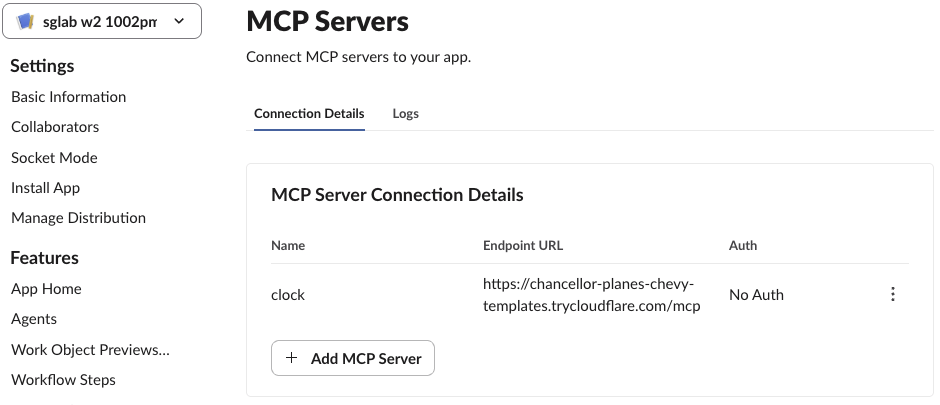
The Logs tab next to Connection Details still read "No Logs" 5 minutes after the successful call below, so do not rely on it while testing. Log on your own server instead.
Turn it on in Slackbot
The plan check first: our workspace shows Upgrade Plan in the sidebar, and Slackbot still opened as an AI assistant with a Preview label. In a full Slackbot conversation (the Slackbot tab in the left rail, not the side panel), the composer has an Apps button. It listed our app under Available apps, switched off:
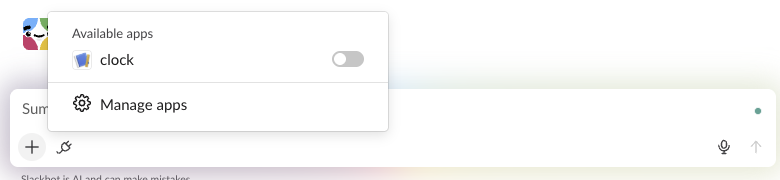
Turning the toggle on sent nothing to our server. The first request came when we asked a question.
Never appear "away" on Slack again
Cloud-based. No downloads. Works 24/7 even when your laptop is off.
What Slackbot sent, and the permission prompt
We asked "Use the clock app to tell me the exact current UTC time." Slackbot showed "Using Utc Time from clock" (it turned the function name utc_time into a title) and stopped to ask:
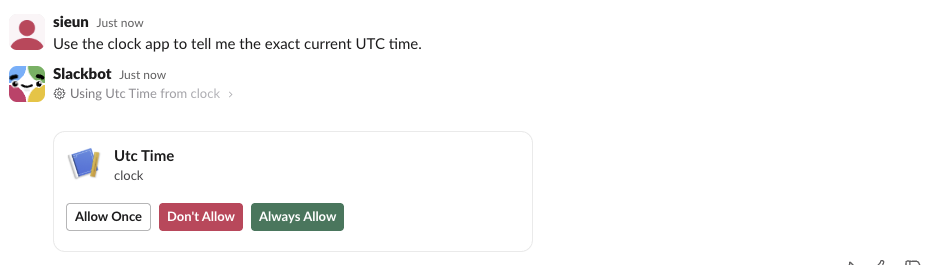
Our server log, from the question to the answer (client addresses removed):
"POST /mcp HTTP/1.1" 200 OK
"POST /mcp HTTP/1.1" 200 OK
Terminating session: None
Terminating session: None
"POST /mcp HTTP/1.1" 200 OK
Terminating session: None
"POST /mcp HTTP/1.1" 202 Accepted
Terminating session: None
"POST /mcp HTTP/1.1" 202 Accepted
Terminating session: None
"POST /mcp HTTP/1.1" 202 Accepted
Terminating session: None
"POST /mcp HTTP/1.1" 200 OK
Processing request of type ListToolsRequest
Terminating session: None
"POST /mcp HTTP/1.1" 200 OK
Terminating session: None
"POST /mcp HTTP/1.1" 202 Accepted
Terminating session: None
"POST /mcp HTTP/1.1" 200 OK
Processing request of type CallToolRequest
Terminating session: None
Before the prompt, Slackbot opened three sessions (200 for each initialize, 202 for each notifications/initialized) and listed the tools once. After we clicked Allow Once, it opened one more session and sent the tools/call. Each request came from a different Amazon address, so an IP allow list for Slack would be a long one. Our server wrote 2026-10-02T07:31:24+00:00 to its own log, and Slackbot answered with the same second:

When the server is down
We stopped the server and asked again. Slackbot still showed the tool and the Allow prompt, so it had kept the tool list. After we allowed it, it showed the prompt a second time, and after the second Allow it gave up with "Used 2 tools":
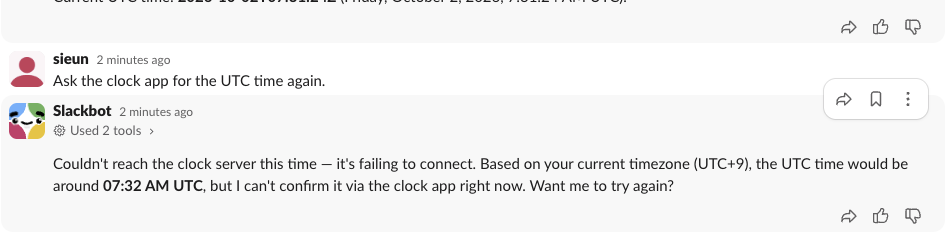
Slackbot said the server was unreachable, then offered its own guess of the time. A tool that returns data people act on should not depend on users spotting that sentence. The whole failed turn took about 3 minutes, most of it waiting on the two prompts.
The other direction, an AI agent outside Slack reading and posting through Slack's own MCP server, is a different product; our Slack MCP server page covers it.
FAQ
Does the Slackbot MCP client need a paid plan? Not in our test. The workspace was on the free plan, and Slackbot showed the app, asked for permission and called the tool.
Do I have to click Allow every time? Allow Once covered one call; the next question asked again. The prompt also offers Always Allow, which we did not click.
Why does my app not show under Apps in Slackbot? Ours appeared after the app had mcp:connect and an mcp_servers entry and had been reinstalled. Check both in the manifest and reinstall.
Stop Jiggling Your Mouse.
Join hundreds of remote workers who never worry about their Slack status. Set it up once, stay green forever.
Related Articles
assistant.threads.setStatus vs agents.sessions.setStatus: Both Tested in Slack
We called assistant.threads.setStatus and agents.sessions.setStatus on a test app before and after turning on the agent feature, clicked the stop button, and timed how long the status line stays. Every response, the stop event, and what Slack showed.
Slack Slash Command Payload: Every Field, Responses, and response_url Limits
We caught the payload a slash command sends, answered it as ephemeral, in_channel, plain text and empty, posted to its response_url until it failed, and typed the command inside a thread. Every result is from a test app on 2 October 2026.
Slack Image Block: Formats, Size Limits and Errors We Measured
We posted image blocks pointing at our own server with PNG, JPG, GIF, WebP and SVG files, a 404, a redirect, slow responses and files from 2 MB to 42 MB, then used slack_file uploads. What rendered, what failed with downloading image failed, and where the 20 MB line sits.