
Verify Slack Request Signatures: Signing Secret in Python, Tested
Slack signs every request with your app's signing secret: HMAC-SHA256 of v0:timestamp:raw body. We verified a real slash command and a real event on 1 October 2026, then broke it the four ways apps break it.
To verify a request from Slack, build the string v0:<X-Slack-Request-Timestamp>:<raw request body>, compute its HMAC-SHA256 with your app's signing secret, and compare v0=<hex digest> with the X-Slack-Signature header. Reject requests whose timestamp is more than 5 minutes old. On 1 October 2026 we pointed a throwaway app's slash command and Events API URL at a cloudflared tunnel, logged the real requests, and checked them with a 10-line function and with slack_sdk. Both matched Slack's signature on every request; the failures below are the ones we caused on purpose.
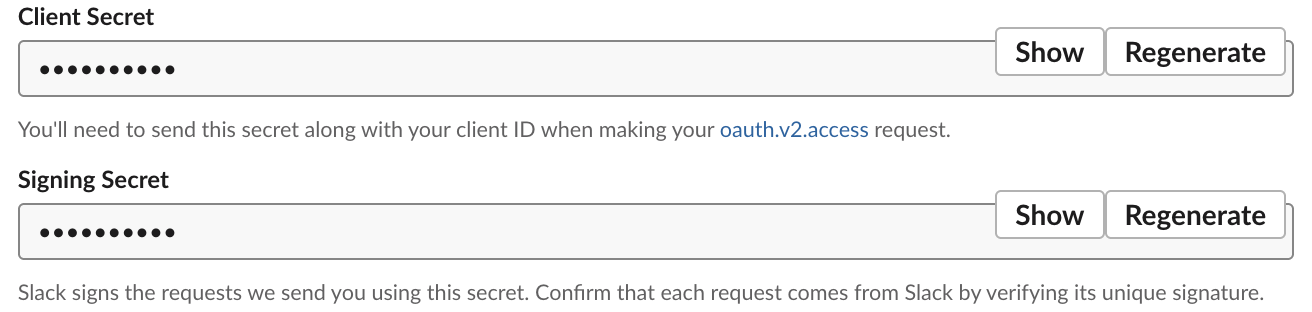
The signing secret is on your app's Basic Information page, under App Credentials. It sits right below the Client Secret, which is a different value used only for OAuth.
A real signed request
We typed /w2sig deploy api to staging & tell #ops 100% in Slack. The tunnel received this POST (Cloudflare headers dropped):
Content-Type: application/x-www-form-urlencoded
User-Agent: Slackbot 1.0 (+https://api.slack.com/robots)
X-Slack-Request-Timestamp: 1790839526
X-Slack-Signature: v0=0c1e114ee2d796e630814ec42c92acdf6d9f612de0891d523c746f22c0800e5f

token=<redacted>&team_id=T0B7JBCDKC1&team_domain=slack-0yr1948&channel_id=C0C5QDNUJ7M&channel_name=w2-lab-1001&user_id=U0B7L4YK420&user_name=sieun&command=%2Fw2sig&text=deploy+api+to+staging+%26+tell+%23ops+100%25&api_app_id=A0C6R6H4SJU&is_enterprise_install=false&response_url=<redacted>&trigger_id=<redacted>
We cut token, response_url and trigger_id from the body shown here. The signature covers the body exactly as it arrived, byte for byte: + for spaces, %26 for &, %23 for #.
The 10-line verification function
import hmac, hashlib, time

def verify_slack_request(signing_secret, headers, raw_body, max_age=300):
    ts = headers["X-Slack-Request-Timestamp"]
    if abs(time.time() - int(ts)) > max_age:
        return False, "timestamp too old"
    base = b"v0:" + ts.encode() + b":" + raw_body
    expected = "v0=" + hmac.new(signing_secret.encode(), base, hashlib.sha256).hexdigest()
    return hmac.compare_digest(expected, headers["X-Slack-Signature"]), expected
We ran it on the slash command above and on an app_mention event (a JSON body), next to slack_sdk's SignatureVerifier, while the requests were less than a minute old. Signatures are shortened in the output:
== slash_request.json  (age 37 s)
received           v0=0c1e114ee2d7...
raw body           True v0=0c1e114ee2d7...
form re-encoded    True v0=0c1e114ee2d7... same bytes: True
url-decoded body   False v0=fc9b9eba4dc9...
client_secret      False v0=13f7952c8847...
verification token False v0=6261dec17602...
our function, 300 s window: True
SignatureVerifier.is_valid_request: True
SignatureVerifier.is_valid (body, ts, sig): True
== event_request.json  (age 21 s)
received           v0=8a0dd8970753...
raw body           True v0=8a0dd8970753...
json re-dumped     False v0=43a697eb1222... same bytes: False
client_secret      False v0=62b5e23a5f7c...
verification token False v0=946fb1b4f718...
our function, 300 s window: True
SignatureVerifier.is_valid_request: True
SignatureVerifier.is_valid (body, ts, sig): True
raw body True means our digest matched the X-Slack-Signature header. Every other line is one way to get it wrong:
| What we changed | Result |
|---|---|
Re-encoded the form body with urlencode(parse_qsl(body)) | still matched: same bytes |
| Hashed the URL-decoded form body | no match |
Hashed json.dumps(json.loads(body)) for the event | no match: Slack sends compact JSON with \/ escapes; Python adds spaces after : and , and drops the escape (968 bytes became 1,034) |
| Used the Client Secret | no match |
| Used the Verification Token | no match |
Never appear "away" on Slack again
Cloud-based. No downloads. Works 24/7 even when your laptop is off.
Timestamps older than 5 minutes
Eight minutes later we ran the same check on the same two requests, unchanged:
== slash_request.json  (age 476 s)
received           v0=0c1e114ee2d7...
raw body           True v0=0c1e114ee2d7...
our function, 300 s window: timestamp too old
SignatureVerifier.is_valid_request: False
SignatureVerifier.is_valid (body, ts, sig): False
== event_request.json  (age 460 s)
received           v0=8a0dd8970753...
raw body           True v0=8a0dd8970753...
our function, 300 s window: timestamp too old
SignatureVerifier.is_valid_request: False
SignatureVerifier.is_valid (body, ts, sig): False
The HMAC still matched, yet SignatureVerifier returned False because the timestamp was over 300 seconds old. That is the replay check working. If valid requests fail only in production, check the server clock first.
Slack retries do not trip this check. Our endpoint answered one event too slowly, and Slack retried it at 3, 66 and 369 seconds. Each retry came with a new X-Slack-Request-Timestamp and a new signature, and all 10 signed requests we logged that day verified.
The framework bug: body read after the form
Most "signature always fails" bugs come from reading the parsed form before the raw body. This Flask app shows it. We replayed the real slash command request into both routes:
@app.post("/slash-wrong")
def slash_wrong():
    command = request.form["command"]          # form parsed first
    body = request.get_data()                  # now returns b""
    return {"len": len(body), "valid": verifier.is_valid_request(body, request.headers)}

@app.post("/slash-right")
def slash_right():
    body = request.get_data()                  # raw bytes first
    valid = verifier.is_valid_request(body, request.headers)
    command = request.form["command"]
    return {"len": len(body), "valid": valid}
/slash-wrong {'len': 0, 'valid': False}
/slash-right {'len': 464, 'valid': True}After request.form ran, get_data() returned 0 bytes, so the hash covered an empty body. Read the raw bytes first. In Express, use express.raw() or the verify callback of express.urlencoded() for the Slack route. Bolt for Python and Bolt for JS do this for you when you pass signing_secret.
Apps in Socket Mode receive no HTTP requests from Slack, so they have nothing to verify; see Slack Socket Mode in Python. Incoming webhooks are the other direction, your code calling Slack, so they are not signed either; how to create a Slack webhook covers those.
FAQ
Is the Verification Token still accepted?
Slack still sends it as token in every body we logged, and the settings page calls it deprecated. It is a fixed string that anyone who sees one request can copy, so check the signature instead.
Stop Jiggling Your Mouse.
Join hundreds of remote workers who never worry about their Slack status. Set it up once, stay green forever.
Related Articles
Slack Interactivity Payload: Real block_actions JSON and response_url Limits
We clicked a button, a static_select and a datepicker in Slack on 1 October 2026 and logged the block_actions payloads our app received. Then we measured response_url: 5 posts, then used_url; it worked at 29:50 and was dead at 30:10.
Slack unfurl_links and unfurl_media: What Each Flag Does, Tested
We posted a web page, a YouTube video and an image with every combination of unfurl_links and unfurl_media on 1 October 2026, then built a custom preview with link_shared and chat.unfurl. The flags do not split the way the names suggest.
Slack Scheduled Message Didn't Send? 5 Cases We Tested
We scheduled five messages for 4:40 PM on 1 October 2026, then archived, left and deleted their channels and deleted a thread parent before the send time. Two sent, three never did, and Slack gave no notice about the three.