
Slack Scheduled Message Didn't Send? 5 Cases We Tested
We scheduled five messages for 4:40 PM on 1 October 2026, then archived, left and deleted their channels and deleted a thread parent before the send time. Two sent, three never did, and Slack gave no notice about the three.
A scheduled Slack message does not send if its channel is archived or deleted before the send time, or if it is a thread reply and the thread's first message is deleted. Slack shows no error and sends no notice; the message just stays in Drafts & sent > Scheduled with its old time. Leaving the channel does not stop it: Slack puts you back in the channel and posts the message. We tested these cases on 1 October 2026 in Slack web, with five messages all scheduled from the composer for 4:40 PM.
What happened to each message
| Before 4:40 PM we... | Sent? | What Slack showed |
|---|---|---|
| changed nothing (control) | yes, at 4:40:00 | the message in the channel |
| left the channel | yes, at 4:40:01 | the message in the channel, and the channel back in our sidebar |
| archived the channel | no | "No destination" in the Scheduled list, right after archiving |
| deleted the channel | no | "No destination" in the Scheduled list, right after deleting |
| deleted the parent of the thread the reply was scheduled into | no | still listed as "Thread in #w2-sched-control" |
Nothing arrived in our Slackbot DM for the three that failed. The only place they show is the Scheduled tab.
Archived or deleted channel: "No destination"
Archiving or deleting the channel changed the scheduled item at once. Seconds later, the Scheduled tab looked like this:
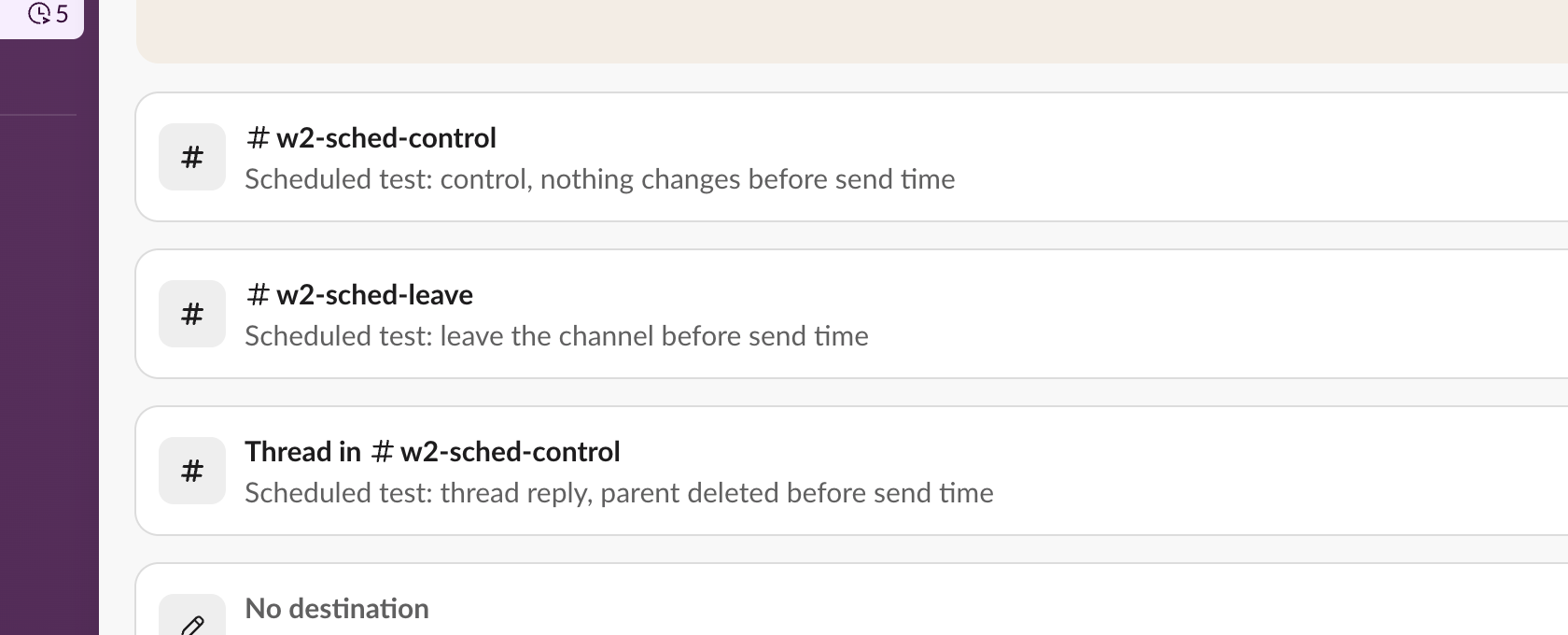
Slack's own data for those two items had lost their channel too: in the drafts list of the account, destinations changed from the channel ID to an empty list at the moment of the archive and the delete. We unarchived the channel afterwards: the item kept its empty destination and nothing was posted.
If you see "No destination" on a scheduled message, the channel it was meant for was archived or deleted. The text is still in the list, so you can copy it and send it to a channel that exists.
Deleted thread parent: listed, never sent
We scheduled a reply inside a thread, then deleted the thread's first message. The item kept its destination, so the list gave no hint. At 4:40 nothing was posted, and a minute later the item was still in Scheduled with "Send today at 4:40 PM", a time already in the past:
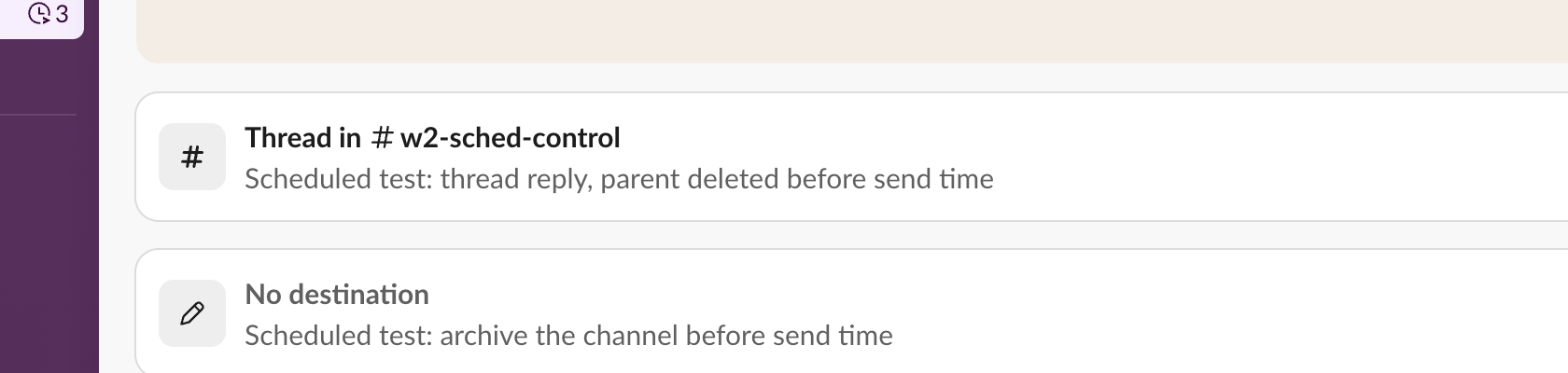
So a scheduled message that is still in the list after its time has passed did not send. Check whether its thread or channel still exists.
Never appear "away" on Slack again
Cloud-based. No downloads. Works 24/7 even when your laptop is off.
Left the channel: it still sent
Leaving a channel did not cancel the message. At 4:40 Slack added us back to the channel, logged a channel_join, and posted the scheduled message one second later:

If you leave a channel to get away from it, delete your scheduled messages there first, or you will be back in it at the send time.
Our test was a public channel in a workspace where we are the owner. A private channel you were removed from, or a workspace that restricts who can post in a channel, may behave differently; we did not test those.
Scheduling, editing and the API
Setting up a scheduled message, and editing or moving one before it goes, is in how to delay and schedule Slack messages. Messages that repeat are a different feature: see how to schedule a recurring message in Slack.
Messages scheduled by an app with chat.scheduleMessage do not appear in your Scheduled tab at all, and deleting one less than about 5 minutes before its time can return ok while the message still posts. Both are measured in Slack chat.scheduleMessage: limits and errors.
FAQ
What time zone does a scheduled message use?
The one named on the first line of the Custom time dialog, which follows your Slack profile's time zone. Ours read "Time zone: Seoul". The Slack timezone converter shows what that time is for the people in the channel.
Stop Jiggling Your Mouse.
Join hundreds of remote workers who never worry about their Slack status. Set it up once, stay green forever.
Related Articles
Slack Interactivity Payload: Real block_actions JSON and response_url Limits
We clicked a button, a static_select and a datepicker in Slack on 1 October 2026 and logged the block_actions payloads our app received. Then we measured response_url: 5 posts, then used_url; it worked at 29:50 and was dead at 30:10.
Slack unfurl_links and unfurl_media: What Each Flag Does, Tested
We posted a web page, a YouTube video and an image with every combination of unfurl_links and unfurl_media on 1 October 2026, then built a custom preview with link_shared and chat.unfurl. The flags do not split the way the names suggest.
Slack Bot Not Responding to @Mentions? 9 Causes We Reproduced
We broke a Slack bot nine ways on 1 October 2026, in Socket Mode and over HTTP, and wrote down what the person in Slack saw and what the app received each time. The table of causes, symptoms and fixes comes from those runs.