
How to Schedule a Recurring Message in Slack
Slack's schedule send only sends a message once. For a recurring message, use Workflow Builder's Send a scheduled message template and pick a frequency, or a channel reminder with /remind. How to set each up, see scheduled messages, and schedule on mobile.
Slack's built-in schedule send only sends a message once. To send the same message every day or every week, use Workflow Builder: open Agents & tools (or Tools) in the sidebar, go to Workflows, Templates, choose Send a scheduled message, set the start time and frequency, write the message, pick the channel, and publish. For a simple nudge, a channel reminder such as /remind #team "Post your update" every weekday at 9am also repeats. Messages you schedule yourself are listed under Drafts & sent, Scheduled.
A recurring message goes out whether you are at your desk or not. Your Slack dot does not: it turns grey 10 minutes after your last input in Slack. Slack Green keeps your dot on a schedule too, active during the working hours you set, from the cloud.
Ways to send a Slack message on a schedule
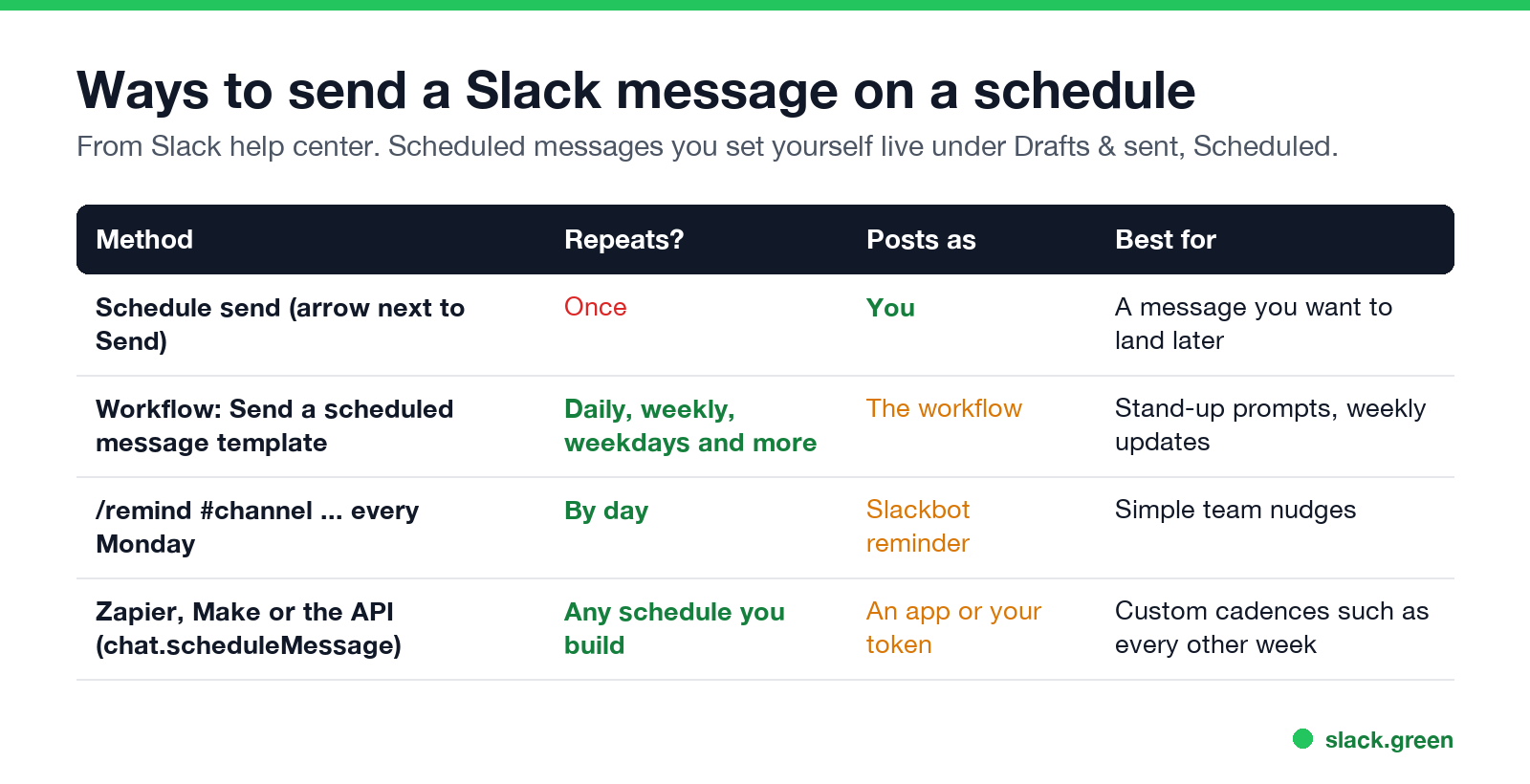
| Method | Repeats | Posts as | Best for |
|---|---|---|---|
| Schedule send | Once | You | A message that should land later |
| Workflow: Send a scheduled message | Daily, weekly, weekdays and more | The workflow | Stand-up prompts, weekly updates |
/remind #channel ... every Monday | By day | A Slackbot reminder | Simple team nudges |
| Zapier, Make, or the API | Any schedule you build | An app or your token | Custom cadences |
How to schedule a recurring message with Workflow Builder
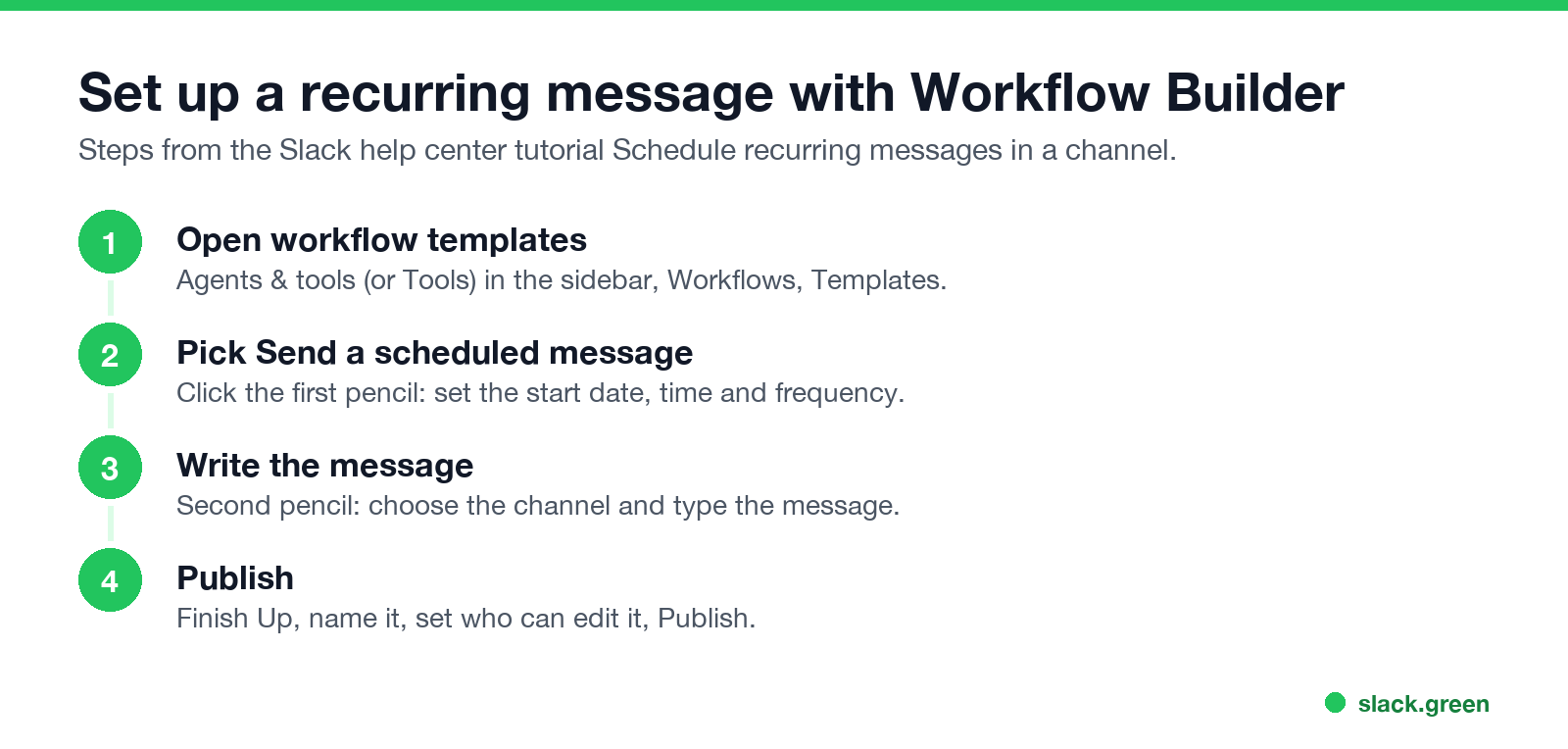
This is Slack's own recommended way, from its help center tutorial "Schedule recurring messages in a channel":
- On desktop, click Agents & tools in the sidebar (older versions show Tools).
- From Workflows, select Templates, then Send a scheduled message.
- Click the first pencil icon. Set the date and time to start and choose a frequency, then Save.
- Click the second pencil icon. Pick the channel and write the message, then Save.
- Click Finish Up, name the workflow, add managers if you like, and click Publish.
The message posts from the workflow, not from your account. Edit or pause it later from Workflows. If you do not see Workflow Builder, your plan or your admin may not allow it. Standups, approvals, welcome messages and other workflows beyond a scheduled post are in Slack Workflow Builder examples.
How to schedule a message every day with /remind
Never appear "away" on Slack again
Cloud-based. No downloads. Works 24/7 even when your laptop is off.
For a short, repeating nudge, a channel reminder is quicker:
/remind #team "Standup in 10 minutes, post blockers in the thread" every weekday at 9:20am
/remind #marketing "Weekly metrics are due" every Friday at 3pm
Reminders repeat by the day, not by the hour, and channel reminders cannot be edited, only deleted with /remind list. More examples in Slack /remind command examples.
How to schedule a single message
On mobile, tap and hold the send button to schedule. Full steps and time-zone tips are in how to delay and schedule Slack messages.
How to see scheduled messages in Slack
Recurring workflow messages are not in this list. Find them under Workflows.
Every other week and other custom schedules
Never appear "away" on Slack again
Cloud-based. No downloads. Works 24/7 even when your laptop is off.
The workflow's frequency list covers common repeats. For a cadence it does not offer, such as every other week or the last Friday of the month, use an automation tool (Zapier, Make, n8n) to trigger the workflow or post the message, or call Slack's chat.scheduleMessage API method from a script. Our Slack presence API guide shows how to call Slack's Web API from Python with slack_sdk; chat.scheduleMessage works the same way.
FAQ
Can you schedule recurring messages in Slack?
Yes, with Workflow Builder's Send a scheduled message template. Schedule send by itself sends only once.
How do I schedule a Slack message every day?
Create a workflow from Send a scheduled message and set the frequency to daily or weekdays. For a short nudge, use /remind #channel "..." every weekday at 9am.
Where are my scheduled messages in Slack?
Under Drafts & sent, in the Scheduled tab, on desktop and mobile.
Can I schedule a message on Slack mobile?
Yes. Tap and hold the send button, then choose a time.
Do scheduled messages send if my computer is off?
Yes. Slack's servers send them at the time you picked. See Slack offline mode for what else works without a connection.
Stop Jiggling Your Mouse.
Join hundreds of remote workers who never worry about their Slack status. Set it up once, stay green forever.
Related Articles
Slack Workflow Builder Examples: 12 Workflows to Copy, With Triggers and Steps
Twelve Slack Workflow Builder examples with the exact trigger and steps for each: daily standups, channel welcomes, time-off approvals, help desk requests, emoji escalations, keyword routing, incidents, list updates and webhooks from other tools. Plus where Workflow Builder lives, what it costs and how branches work.
Slack Timer: How to Set a Countdown, Pomodoro or Focus Timer in Slack
Slack has no built-in timer, but four built-in tools act like one: /remind me to ... in 25 minutes, a status that clears itself, /dnd for a focus block, and Workflow Builder for dated countdowns. For a live countdown in a channel, use a Marketplace app or a 15-line bot script.
Slack Red Dot Won't Go Away? What It Counts and How to Clear It
A red dot on the Slack icon means unread activity somewhere; a red number means DMs, mentions, keywords or followed thread replies. Press Shift+Esc to mark all read, check Threads, Activity, Later and other workspaces, then clear the cache or reset the OS badge.