
Slack URL Verification Challenge: What Passes and What Fails, Tested
Slack verifies an Events API Request URL by POSTing a url_verification challenge. We ran a 16-line Flask handler behind a tunnel and recorded the request, the Verified tick, and the exact error Slack shows for a wrong body, an HTTP error and a slow reply.
When you enter a Request URL under Event Subscriptions, Slack sends one POST with "type": "url_verification" and a random challenge string. Your endpoint passes if it answers with HTTP 200 and that same string, within about 3 seconds. We tested this on 1 October 2026 with a Flask handler behind a cloudflared tunnel, and broke it on purpose to record each error Slack shows.
The request Slack sends
Our handler logged this request when we typed the URL. We removed the value of the token field, which is the app's legacy verification token.
{
  "headers": {
    "User-Agent": "Slackbot 1.0 (+https://api.slack.com/robots)",
    "Content-Type": "application/json",
    "X-Slack-Request-Timestamp": "1790838390",
    "X-Slack-Signature": "v0=fef48515cc1868f141a0abb8c000fc2ec77bc559827e6dbac34750c1483c52b6"
  },
  "body": {
    "token": "(removed)",
    "challenge": "T83O7x5KH4DJE8aGMpULU3RfgqtrYvPE9Ax8O1f478WRk7lTnEFF",
    "type": "url_verification"
  }
}
The headers carry the request signature, so you can check that the request came from Slack before you answer it. Verification passes without that check, but your real event handler should have it.
A handler that passes
This is the whole app we ran with uv run --with flask python verify.py:
from flask import Flask, jsonify, request

app = Flask(__name__)


@app.post("/slack/events")
def slack_events():
    body = request.get_json()
    if body.get("type") == "url_verification":
        return jsonify(challenge=body["challenge"])
    print("event:", body["event"]["type"], flush=True)
    return "", 200


if __name__ == "__main__":
    app.run(port=8791)
Slack marked the URL as Verified, and the next message event reached the same handler. The Flask log:
127.0.0.1 - - [01/Oct/2026 16:23:59] "POST /slack/events?t=min HTTP/1.1" 200 -
event: message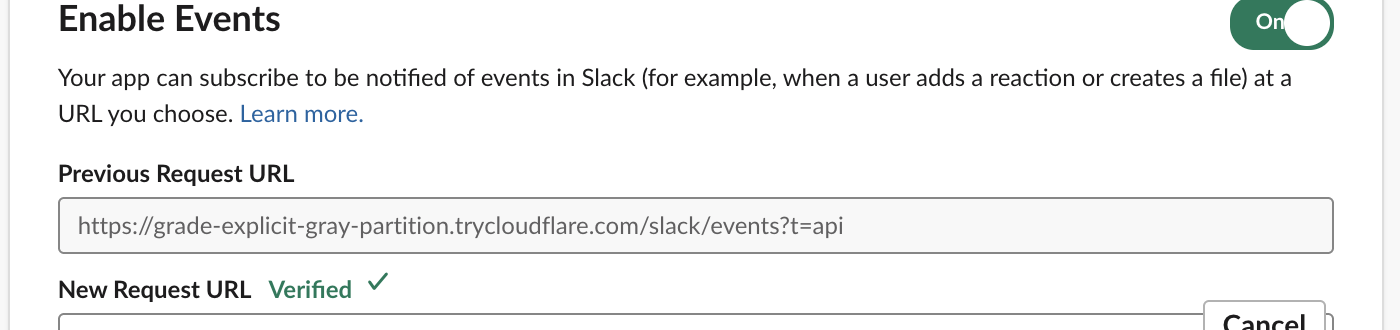
Answering with the bare challenge string as text/plain also passed. The JSON form is the one Slack documents, so use it unless your framework makes it awkward.
Each failure and the message Slack shows
We changed one thing at a time and typed a new URL each time. These are the red banner texts, copied from the page:
| What our endpoint did | Banner text in Slack |
|---|---|
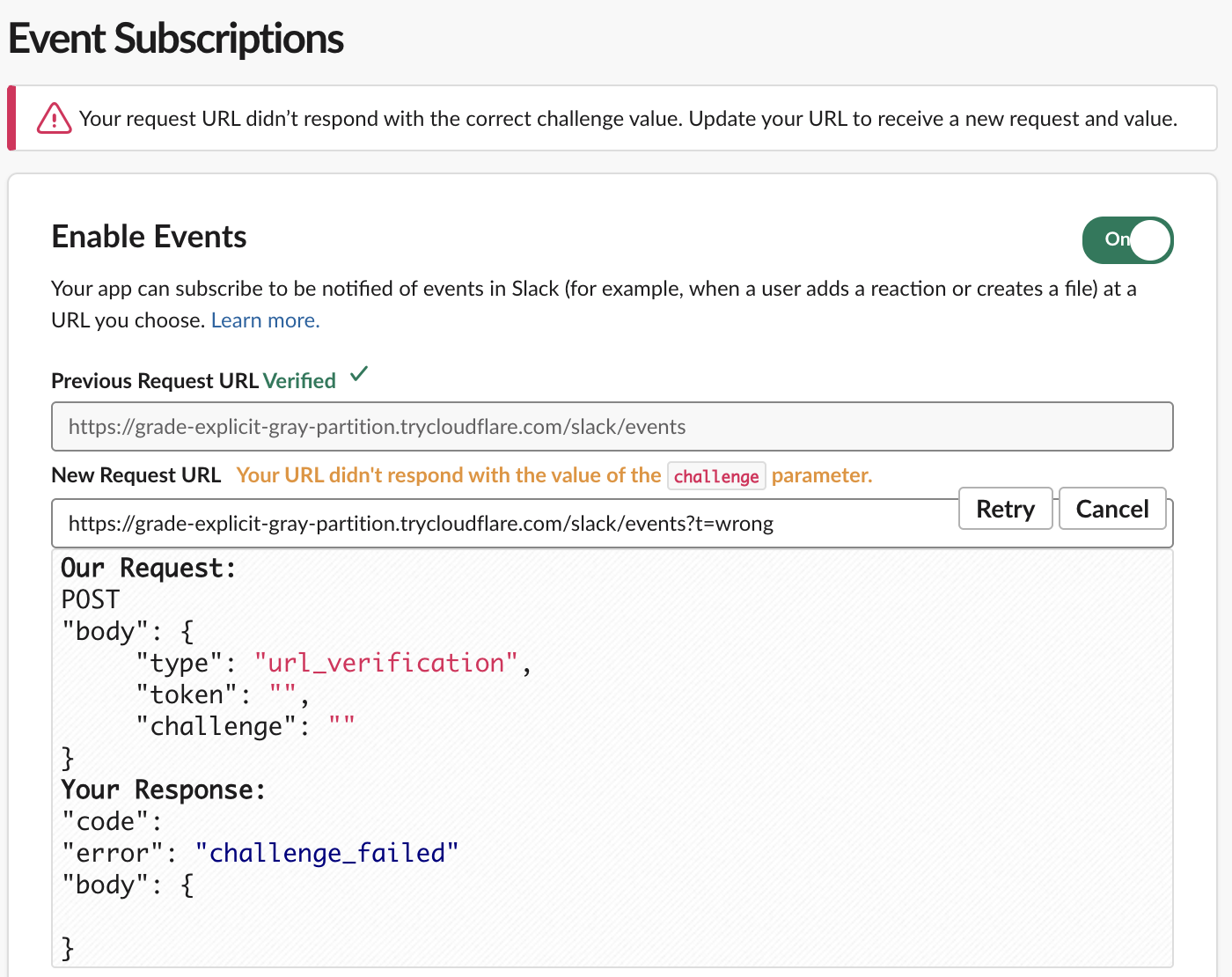
HTTP 200 with {"challenge": "not-the-challenge"} | Your request URL didn't respond with the correct challenge value. Update your URL to receive a new request and value. |
| HTTP 500 | Your request URL responded with an HTTP error. Update your URL to receive a new request and challenge value. |
HTTP 404 (wrong path, /events in place of /slack/events) | Your request URL responded with an HTTP error. Update your URL to receive a new request and challenge value. |
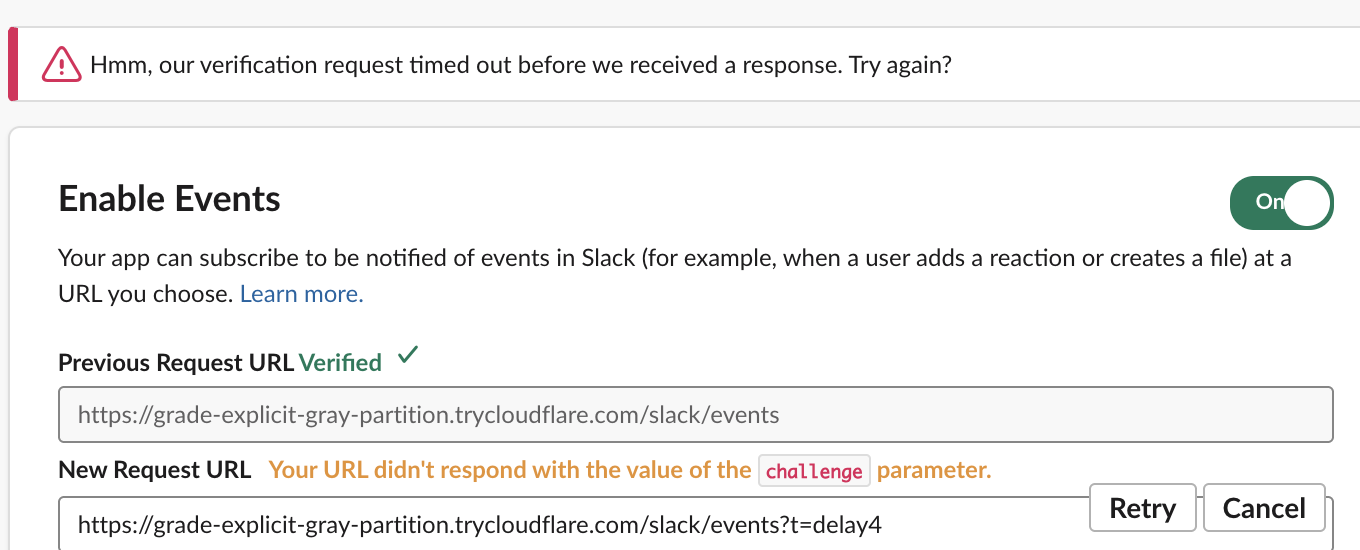
| Correct body after a 4 s sleep | Hmm, our verification request timed out before we received a response. Try again? |
Under the field, the label read "Your URL didn't respond with the value of the challenge parameter." in all four cases, so read the banner at the top to learn which failure you have. For a wrong body, Slack also opens a debug panel. It shows "error": "challenge_failed" and an empty body, even though our handler had sent a JSON body:
Never appear "away" on Slack again
Cloud-based. No downloads. Works 24/7 even when your laptop is off.
How long you have to answer
We added a sleep before the correct answer and typed a fresh URL for each value:
| Sleep before answering | Result |
|---|---|
| 2.5 s | Verified (twice) |
| 2.7 s | Verified |
| 2.9 s | Timed out (twice) |
| 3.2 s | Timed out |
| 4.0 s | Timed out |
The limit we measured sits between 2.7 and 2.9 seconds of handler time. Our requests went through a cloudflared quick tunnel to a laptop in Seoul, which adds its own delay, so give yourself less than 2 seconds in production. Do the challenge reply before any database call or slow import. Real events have the same time limit, and Slack resends them when you miss it; see Events API retries.
When Slack does not send the challenge
Two cases surprised us:
- • Retyping the URL that was already verified showed Verified at once, and our handler received no request. To force a new check, change the URL. We added a query string such as
?t=2. - • An app created with
apps.manifest.create, or changed withapps.manifest.update, accepts arequest_urlwith no challenge at all. The API returned{"ok": true, "app_id": "A0C5WFY5P7C", "permissions_updated": false}while our endpoint was set to return a wrong challenge. The settings page then showed this:
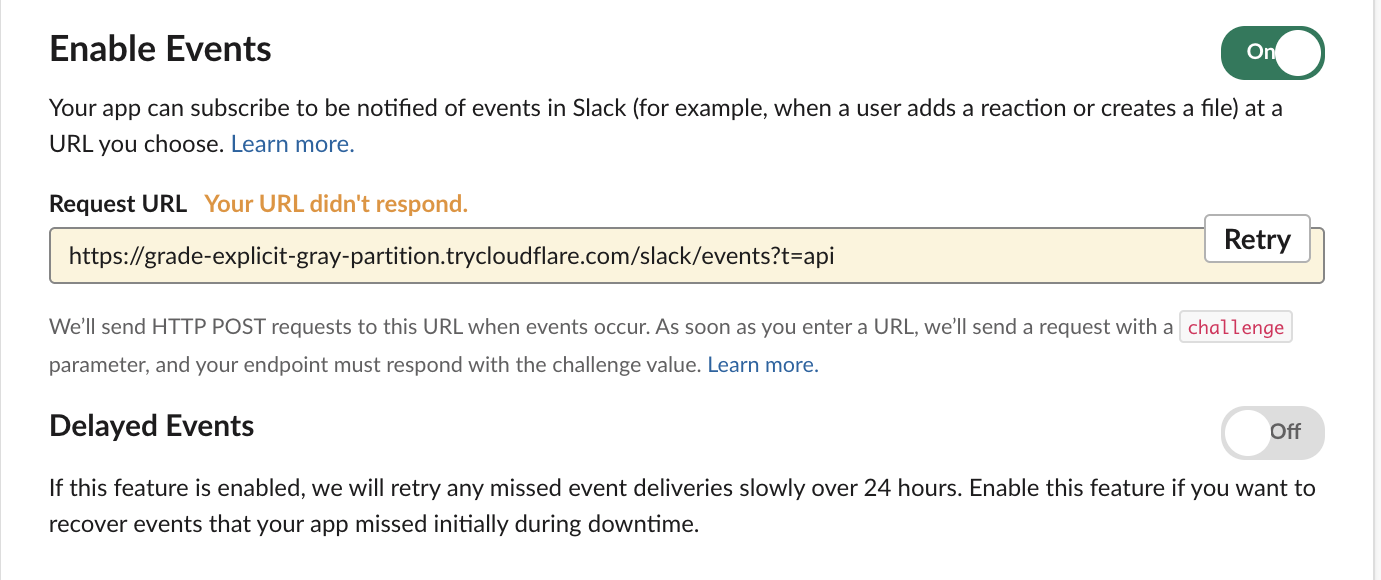
Events still arrived at that URL. A message posted right after the update reached our handler while the page said the URL did not respond. Pressing Retry sent a real challenge and turned the field to Verified. If you deploy apps from a manifest, press Retry once, or open the page and check the label, so you know the endpoint works.
If you do not want a public URL at all, Socket Mode in Python receives the same events over a WebSocket and has no verification step.
FAQ
Does Slack send url_verification again later?
In our session Slack sent it only when the URL changed or when we pressed Retry. Events after that came as normal event_callback requests.
Can I verify a URL on localhost?
No. Slack has to reach the URL from the internet. A tunnel such as cloudflared or ngrok gives your local port a public HTTPS address; we used cloudflared tunnel --url http://localhost:8791.
Stop Jiggling Your Mouse.
Join hundreds of remote workers who never worry about their Slack status. Set it up once, stay green forever.
Related Articles
Slack Interactivity Payload: Real block_actions JSON and response_url Limits
We clicked a button, a static_select and a datepicker in Slack on 1 October 2026 and logged the block_actions payloads our app received. Then we measured response_url: 5 posts, then used_url; it worked at 29:50 and was dead at 30:10.
Slack unfurl_links and unfurl_media: What Each Flag Does, Tested
We posted a web page, a YouTube video and an image with every combination of unfurl_links and unfurl_media on 1 October 2026, then built a custom preview with link_shared and chat.unfurl. The flags do not split the way the names suggest.
Slack Scheduled Message Didn't Send? 5 Cases We Tested
We scheduled five messages for 4:40 PM on 1 October 2026, then archived, left and deleted their channels and deleted a thread parent before the send time. Two sent, three never did, and Slack gave no notice about the three.