
Upgrading Slack Bolt for JS from v4 to v5: Every Break We Hit
We upgraded a Socket Mode Bolt for JS app from 4.6.0 to 5.1.0 and ran it on Node 18, 20, 22 and 26. Two changes failed silently, and a fresh install crashed on Node 20 until we pinned undici 7.
Bolt for JS v5 (5.0.0 shipped on 15 July 2026, 5.1.0 is current) needs Node 20 or later, drops the agent and clientTls options, and makes respond() return a fetch Response instead of an axios response. On 3 October 2026 we upgraded a small Socket Mode app from @slack/bolt 4.6.0 to 5.1.0 in our own test workspace. Nothing threw an error on Node 26. The proxy agent and the respond() result broke without a word, and a fresh install on Node 20 crashed at startup.
The v4 app we started from
A Socket Mode app with one slash command. It passes an https.Agent that logs every socket it opens, and it reads the respond() result the way v4 code often does:
// app.js: a Bolt for JS Socket Mode app, written for v4
const fs = require('node:fs');
const https = require('node:https');
const { App, LogLevel } = require('@slack/bolt');
const loggingAgent = new https.Agent({ keepAlive: true });
const origCreate = loggingAgent.createConnection.bind(loggingAgent);
loggingAgent.createConnection = (opts, cb) => { console.log('custom agent opened a socket to', opts.host); return origCreate(opts, cb); };
const t = JSON.parse(fs.readFileSync(process.env.LAB_SEC + '/tokens.json', 'utf8'));

const app = new App({
  token: t.access_token,
  appToken: t.xapp,
  socketMode: true,
  logLevel: LogLevel.INFO,
  agent: loggingAgent, // v4: custom HTTP agent for Web API calls
});

app.command('/sglab1003', async ({ ack, respond, command }) => {
  await ack();
  const res = await respond(`bolt ${require('@slack/bolt/package.json').version}: got "${command.text}"`);
  console.log('respond() returned status', res.status, 'data', JSON.stringify(res.data));
});

(async () => {
  await app.start();
  console.log(`node ${process.version}, @slack/bolt ${require('@slack/bolt/package.json').version} is running`);
})();
On 4.6.0, typing /sglab1003 v4 agent test in Slack printed:
custom agent opened a socket to slack.com
custom agent opened a socket to slack.com
custom agent opened a socket to wss-primary.slack.com
node v26.8.1, @slack/bolt 4.6.0 is running
custom agent opened a socket to hooks.slack.com
respond() returned status 200 data "ok"
The agent carried the Web API calls, the Socket Mode WebSocket and the respond() POST to hooks.slack.com.
What npm install @slack/bolt@5 changed
added 2 packages, removed 17 packages, changed 7 packages, and audited 113 packages in 2s| Package | Before | After |
|---|---|---|
@slack/bolt | 4.6.0 | 5.1.0 |
@slack/web-api | 7.19.0 | 8.2.0 |
@slack/socket-mode | 2.0.7 | 3.1.0 |
@slack/oauth | 3.0.5 | 4.0.0 |
undici | (none) | 8.11.2, pulled in as a peer of socket-mode |
Never appear "away" on Slack again
Cloud-based. No downloads. Works 24/7 even when your laptop is off.
Two breaks with no error
We started the same file on 5.1.0 and typed the command again:
node v26.8.1, @slack/bolt 5.1.0 is running
respond() returned status 200 data undefined
The app still connected and the reply still reached Slack. Both versions posted it:
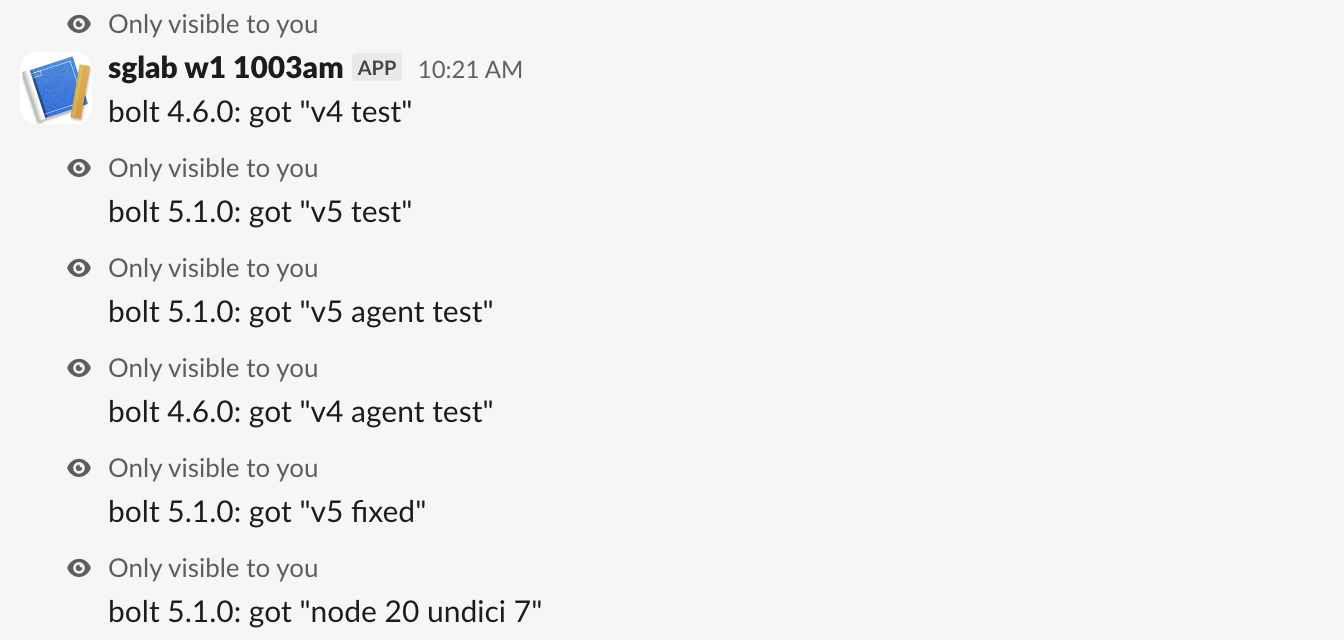
But two things changed silently:
- The custom agent never logged a socket. Bolt 5.1.0 accepts the
agentkey, ignores it, and prints no warning. If that agent was your corporate proxy, your traffic now goes direct, or fails at the firewall. res.dataisundefined.respond()now returns a fetchResponse, which hasstatusbut nodata. Read the body withawait res.text()orawait res.json().
The fix that worked
The v5 migration guide replaces the agent with an undici dispatcher, passed to SocketModeReceiver for the WebSocket and to clientOptions.fetch for Web API calls. Our diff:
--- app.js (v4)
+++ app.js (v5)
@@ -1,9 +1,13 @@
-// app.js: a Bolt for JS Socket Mode app, written for v4
+// app.js: the same app after the v5 fixes
 const fs = require('node:fs');
-const https = require('node:https');
-const { App, LogLevel } = require('@slack/bolt');
-const loggingAgent = new https.Agent({ keepAlive: true });
-const origCreate = loggingAgent.createConnection.bind(loggingAgent);
-loggingAgent.createConnection = (opts, cb) => { console.log('custom agent opened a socket to', opts.host); return origCreate(opts, cb); };
+const { App, SocketModeReceiver, LogLevel } = require('@slack/bolt');
+const { fetch, Agent } = require('undici');
 const t = JSON.parse(fs.readFileSync(process.env.LAB_SEC + '/tokens.json', 'utf8'));
+
+// v5: an undici dispatcher replaces the https.Agent
+const dispatcher = new Agent({
+  keepAliveTimeout: 10_000,
+  connect: { lookup: (host, opts, cb) => { console.log('dispatcher connecting to', host); require('node:dns').lookup(host, opts, cb); } },
+});
+const receiver = new SocketModeReceiver({ appToken: t.xapp, dispatcher });

@@ -11,6 +15,5 @@
   token: t.access_token,
-  appToken: t.xapp,
-  socketMode: true,
+  receiver,
   logLevel: LogLevel.INFO,
-  agent: loggingAgent, // v4: custom HTTP agent for Web API calls
+  clientOptions: { fetch: (url, init) => fetch(url, { ...init, dispatcher }) },
 });
@@ -20,3 +23,4 @@
   const res = await respond(`bolt ${require('@slack/bolt/package.json').version}: got "${command.text}"`);
-  console.log('respond() returned status', res.status, 'data', JSON.stringify(res.data));
+  // v5: respond() returns a fetch Response, so read the body with text()
+  console.log('respond() returned status', res.status, 'body', JSON.stringify(await res.text()));
 });
The fixed app logged the dispatcher on all three hosts again, including the respond() call:
dispatcher connecting to slack.com
dispatcher connecting to wss-primary.slack.com
node v26.8.1, @slack/bolt 5.1.0 is running
dispatcher connecting to hooks.slack.com
respond() returned status 200 body "ok"
For a plain proxy with no TLS settings, the guide's simpler route is NODE_USE_ENV_PROXY=1 HTTPS_PROXY=... node app.js or http.setGlobalProxyFromEnv(). We did not test those.
Node 20 crashed on a fresh install
Bolt v5 says Node 20 is enough. In a new folder we ran npm install @slack/bolt@5.1.0 and nothing else. npm installed the peer dependency undici at 8.11.2, whose own package.json says "node": ">=22.19.0". Starting a v5 app without the agent option on Node 20.20.2:
node_modules/undici/lib/web/cache/cachestorage.js:20
    webidl.util.markAsUncloneable(this)
                ^

TypeError: webidl.util.markAsUncloneable is not a function
    at new CacheStorage (node_modules/undici/lib/web/cache/cachestorage.js:20:17)
    at Object.<anonymous> (node_modules/undici/index.js:179:25)
    ...
    at Object.<anonymous> (node_modules/@slack/socket-mode/dist/src/SocketModeClient.js:42:18)

Node.js v20.20.2
@slack/socket-mode 3.1.0 accepts "undici": "^7.0.0 || ^8.0.0", so pin 7 on Node 20:
npm install undici@7That installed 7.30.0, and the same app started and answered the slash command:
node v20.20.2, @slack/bolt 5.1.0 is running
respond() returned status 200 data undefined
Every runtime we tried:
| Node | undici | Result |
|---|---|---|
| 18.20.8 | 7.30.0 or 8.11.2 | Crash: ReferenceError: File is not defined |
| 20.20.2 | 8.11.2 (npm default) | Crash: TypeError: webidl.util.markAsUncloneable is not a function |
| 20.20.2 | 7.30.0 | Runs, slash command answered |
| 22.23.3 | 8.11.2 | Runs |
| 26.8.1 | 8.11.2 | Runs, slash command answered |
On Node 18, npm install only warns (npm warn EBADENGINE Unsupported engine for @slack/logger, @slack/oauth, @slack/socket-mode and @slack/types) and installs anyway, so the first sign is the crash.
If you also run Bolt for Python, our Socket Mode in Python guide covers the token errors that apply to both. For the fields Slack sends with each command, see Slack slash command payload.
Stop Jiggling Your Mouse.
Join hundreds of remote workers who never worry about their Slack status. Set it up once, stay green forever.
Related Articles
Slack chat.startStream: Streaming a Message, Timed and Tested
We streamed a bot reply into a Slack DM thread with chat.startStream, chat.appendStream and chat.stopStream, timed every call, screenshotted the thread mid-stream, and found how long an idle stream stays open.
Slack Plan and Task Card Blocks: Every Status, Update and Limit Tested
We posted a plan block with tasks in all four statuses and standalone task cards from a bot, updated them with chat.update, and probed the limits. pending works only inside a plan, and titles have no length limit we could find.
Slack views.update and views.push: Stack Limit, hash_conflict and response_action, Tested
We opened a Slack modal, pushed views until Slack refused, updated the top view with a current and a stale hash, and answered view_submission with every response_action. Every response and what the user saw.