
Slack OAuth Redirect URL on localhost: What Slack Accepts, Tested
We added localhost, 127.0.0.1, https, custom-scheme and tunnel redirect URLs to a Slack app on 1 October 2026, then ran the OAuth flow against a local server. What was accepted, how Slack matches the URL, and the PKCE rules.
Slack accepts http://localhost redirect URLs. You do not need HTTPS or a tunnel to test OAuth on your own machine: we saved http://localhost:8765/callback in an app's settings, ran the OAuth flow, and Slack sent the browser back to a Python server on that port with a code. We ran every test below on 1 October 2026 with two throwaway apps in a test workspace.
What the Redirect URLs field accepts
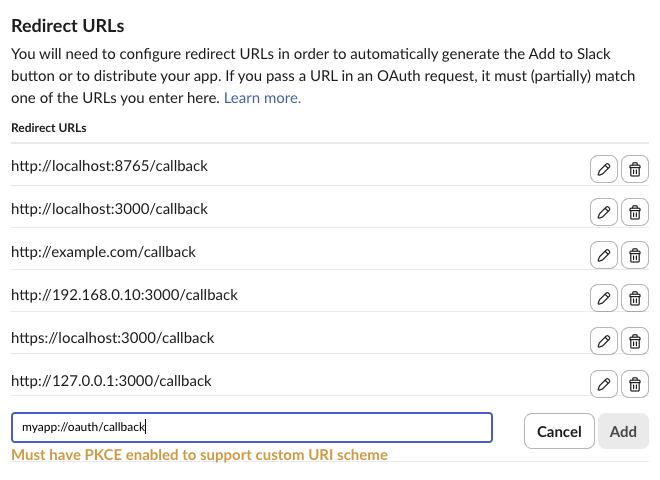
We typed each URL into OAuth & Permissions > Redirect URLs > Add New Redirect URL on an app without PKCE, then saved and reloaded the page.
| URL | Result |
|---|---|
http://localhost:3000/callback | saved |
https://localhost:3000/callback | saved |
http://localhost/callback (no port) | saved |
http://127.0.0.1:3000/callback | saved |
http://192.168.0.10:3000/callback | saved |
http://example.com/callback (plain http, public host) | saved |
https://abc-def-ghi.trycloudflare.com/slack/oauth_redirect | saved |
localhost:3000/callback (no scheme) | "Must enter a valid URL" |
http://[::1]:3000/callback | "Must enter a valid URL" |
myapp://oauth/callback | "Must have PKCE enabled to support custom URI scheme" |
ftp://example.com/cb | "Must have PKCE enabled to support custom URI scheme" |
How Slack matches redirect_uri
With http://localhost:8765/callback and http://localhost:3000/callback saved, we opened https://slack.com/oauth/v2/authorize with different redirect_uri values:
| redirect_uri in the authorize URL | Result |
|---|---|
http://localhost:3000/callback | consent screen, then redirect |
http://localhost:3000/callback/extra | consent screen, redirected to /callback/extra |
http://localhost:3000/callback?x=1 | consent screen |
http://localhost:3000/Callback | consent screen, redirected to /Callback |
https://localhost:3000/callback | consent screen |
http://localhost:3000/callbackx | error |
http://localhost:3000/other | error |
http://localhost:3000 | error |
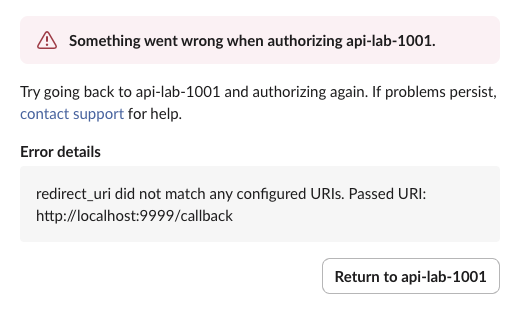
http://localhost:9999/callback (other port) | error |
http://127.0.0.1:3000/callback (same port, other host name) | error |
The path you send may add segments after the saved path, and case did not matter, but it may not change the path or add letters to its last segment. Host and port must match: 127.0.0.1 and localhost are different hosts to Slack.
A saved URL without a port matches every port. With only http://localhost/callback saved, http://localhost:9999/callback and http://localhost/callback/x both reached the consent screen. The reverse failed: with only http://localhost:8765/callback saved, http://localhost/callback got the error. If your dev server changes ports, save the port-less form.
The error is a Slack page, not a redirect to your app:
Never appear "away" on Slack again
Cloud-based. No downloads. Works 24/7 even when your laptop is off.
bad_redirect_uri comes from the token exchange
bad_redirect_uri is not the error on that page. It comes from oauth.v2.access, when the redirect_uri you send there differs from the one in the authorize URL:
| oauth.v2.access call | Result |
|---|---|
redirect_uri that differs from the authorize step | {"ok": false, "error": "bad_redirect_uri"} |
Same code again with the right redirect_uri | {"ok": false, "error": "invalid_code"} |
Fresh code, no redirect_uri at all | ok: true |
The failed exchange used up the code, so a retry with the right value got invalid_code. Send the same redirect_uri string in both steps, or leave it out of the exchange. A successful exchange for an app with bot and user scopes returned this, tokens replaced:
{
  "ok": true,
  "app_id": "A0C5PB7LM9T",
  "authed_user": {
    "id": "U0B7L4YK420",
    "scope": "chat:write",
    "access_token": "xoxp-...",
    "token_type": "user"
  },
  "scope": "chat:write,chat:write.public,channels:join,commands,channels:history,channels:read,incoming-webhook",
  "token_type": "bot",
  "access_token": "xoxb-...",
  "bot_user_id": "U0C5UH0S0E6",
  "team": {
    "id": "T0B7JBCDKC1",
    "name": "Slack"
  },
  "enterprise": null,
  "is_enterprise_install": false,
  "incoming_webhook": {
    "channel": "#api-lab-1001",
    "channel_id": "C0C5UGC0Q4A",
    "configuration_url": "https://slack-0yr1948.slack.com/services/B0C5NEYKK43",
    "url": "https://hooks.slack.com/services/T.../B.../XXXX"
  }
}
What the two token types are for is in Slack bot token, xoxb vs xoxp.
PKCE and localhost
Turning on PKCE changes the rules for localhost. Slack's docs say an app with PKCE treats localhost redirects as desktop redirects, and enabling PKCE cannot be undone without Slack support. We made a second app with "pkce_enabled": true in its manifest and tested it:
Authorize request to http://localhost:8765/callback | Result |
|---|---|
Bot scope chat:write plus user scope, with PKCE | "Bot scopes are not allowed when redirecting to a non-web URI." |
| User scope only, no PKCE parameters | "Must use PKCE to redirect to a non-web URI" |
User scope only, with code_challenge | consent screen, code returned |
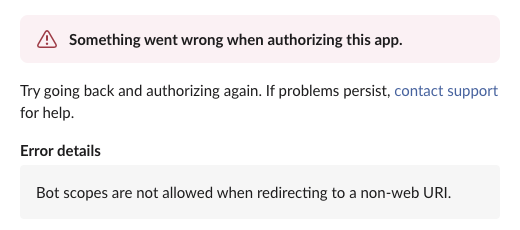
So keep PKCE off on an app that installs a bot from a localhost redirect. Use PKCE for a desktop or CLI tool that only needs a user token. This is the script we ran for that case, with no client secret anywhere:
import base64, hashlib, http.server, os, secrets, urllib.parse
import requests

CLIENT_ID = os.environ["SLACK_CLIENT_ID"]
REDIRECT = "http://localhost:8765/callback"

verifier = secrets.token_urlsafe(48)
challenge = base64.urlsafe_b64encode(hashlib.sha256(verifier.encode()).digest()).rstrip(b"=").decode()
state = secrets.token_urlsafe(16)

print("Open:", "https://slack.com/oauth/v2/authorize?" + urllib.parse.urlencode({
    "client_id": CLIENT_ID, "user_scope": "chat:write", "redirect_uri": REDIRECT,
    "state": state, "code_challenge": challenge, "code_challenge_method": "S256",
}), flush=True)

class Callback(http.server.BaseHTTPRequestHandler):
    def do_GET(self):
        q = dict(urllib.parse.parse_qsl(urllib.parse.urlparse(self.path).query))
        if q.get("state") != state:
            self.send_response(400); self.end_headers(); return
        r = requests.post("https://slack.com/api/oauth.v2.access", data={
            "client_id": CLIENT_ID, "code": q["code"],
            "code_verifier": verifier, "redirect_uri": REDIRECT,
        }, timeout=10).json()
        user = r.get("authed_user", {})
        print(r["ok"], user.get("token_type"), user.get("scope"), user.get("expires_in"),
              user.get("access_token", "")[:9] + "...")
        self.send_response(200); self.end_headers(); self.wfile.write(b"Done, you can close this tab.")
    def log_message(self, *args):
        pass

http.server.HTTPServer(("localhost", 8765), Callback).handle_request()
It printed:
True user chat:write 43200 xoxe.xoxp...The exchange response, tokens replaced:
{
  "ok": true,
  "app_id": "A0C6P5BLCSU",
  "authed_user": {
    "id": "U0B7L4YK420",
    "scope": "chat:write",
    "access_token": "xoxe.xoxp-...",
    "token_type": "user",
    "refresh_token": "xoxe-1-...",
    "expires_in": 43200
  },
  "team": {
    "id": "T0B7JBCDKC1",
    "name": "Slack"
  },
  "enterprise": null,
  "is_enterprise_install": false
}
The token expires in 43,200 seconds, 12 hours, and comes with a refresh token, although token rotation was off in the app settings. Other PKCE exchange errors we got: a wrong code_verifier returned invalid_code_verifier, and no verifier and no secret returned bad_client_secret.
FAQ
Do I need ngrok or a tunnel for Slack OAuth?
Not for the redirect. http://localhost works, as tested above. You need a public URL for things Slack calls on its own, such as Events API or interactivity requests, unless you use Socket Mode.
Can I set redirect URLs in the app manifest?
Yes, under oauth_config.redirect_urls. apps.manifest.validate rejected myapp://oauth/callback there with invalid_redirect_urls until we also set "pkce_enabled": true. Building apps from a manifest is covered in our app manifest example.
Stop Jiggling Your Mouse.
Join hundreds of remote workers who never worry about their Slack status. Set it up once, stay green forever.
Related Articles
Slack App Manifest Example: YAML and JSON That Worked, Tested
A Slack app manifest we used to create a working app on 1 October 2026, in YAML and JSON, plus the validation errors from broken versions and real output from apps.manifest.validate, export, create and update.
Slack chat.delete API: Who Can Delete What, Tested
chat.delete removes a message by channel and ts. We deleted bot messages, a person's messages, a thread parent and an already deleted message with bot and user tokens, and list every response, including cant_delete_message and the tombstone a thread parent leaves.
Slack expired_trigger_id: How Long a trigger_id Lasts, Measured
We opened a Slack modal with views.open after delays from 0 to 5 seconds, 28 times, on 1 October 2026. The success rate per delay, the exact errors, and the Bolt code that avoids expired_trigger_id.