
Slack message_changed Event: Real Payloads for Edits, Deletes and Threads
We subscribed a Socket Mode app to message.channels, then posted, edited, deleted, replied in a thread, sent a reply to the channel and pasted a link. The raw event for each, three message_changed events nobody typed, and the filter that stopped our bot answering them.
message_changed is the message event Slack sends with "subtype": "message_changed" when a message in a channel your app can see is modified. The new version sits in event.message, the old one in event.previous_message, and the top-level event has no user and no text. On 2 October 2026 we subscribed a Socket Mode test app to message.channels in our own workspace and logged every event. Edits sent message_changed, but so did three things nobody would call an edit: a link preview loading, a reply sent to the channel, and deleting a message that had replies. A bot that answers every message event answers all of them.
Every event we got, in order
We did each action in one channel and logged the raw event:
| What we did | subtype | hidden | Where the text is |
|---|---|---|---|
| Posted a message | none | none | event.text |
| Edited it | message_changed | true | event.message.text, old in event.previous_message.text |
| Replied in its thread | none (has thread_ts) | none | event.text |
| Replied with "Also send to channel" | thread_broadcast | none | event.text |
| (same moment, no action) | message_changed on that reply | true | message.text and previous_message.text identical |
Bot posted with chat.postMessage | none (has bot_id) | none | event.text |
Bot edited its message with chat.update | message_changed | true | event.message.text; bot_id only inside message |
| Posted a link, preview loaded | none, then message_changed | true | preview in event.message.attachments |
| Deleted a message | message_deleted | true | only event.previous_message.text |
| Deleted a message that had replies | message_changed, message.subtype tombstone | true | message.text "This message was deleted." |
| Bot joined the channel | channel_join | none | event.text |
Our bot's own posts came with bot_id and app_id and no subtype. We never got bot_message, the old subtype for bot posts, from a bot token's chat.postMessage.
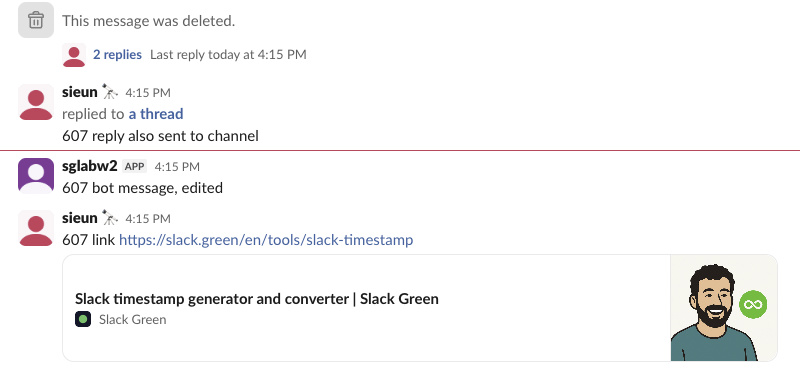
This is the channel after the test. The parent message was deleted, so Slack kept a placeholder with its 2 replies, and the bot's edited message shows no "(edited)" label:
An edit: the raw message_changed payload
This is the event for the edit, with the blocks arrays cut. event.ts is the time of the change; the edited message's own timestamp is event.message.ts, which matches previous_message.ts:
{
  "type": "message",
  "subtype": "message_changed",
  "message": {
    "user": "U0B7L4YK420",
    "type": "message",
    "edited": {"user": "U0B7L4YK420", "ts": "1790925314.000000"},
    "text": "607 edited text",
    "ts": "1790925312.438049"
  },
  "previous_message": {
    "user": "U0B7L4YK420",
    "type": "message",
    "ts": "1790925312.438049",
    "text": "607 original text"
  },
  "channel": "C0C71KAJ87J",
  "hidden": true,
  "ts": "1790925314.000500",
  "event_ts": "1790925314.000500",
  "channel_type": "channel"
}
So to find the message in your database, key on event.message.ts and event.channel, not event.ts.
A delete: the message_deleted payload
{
  "type": "message",
  "subtype": "message_deleted",
  "previous_message": {
    "user": "U0B7L4YK420",
    "type": "message",
    "ts": "1790925326.615359",
    "text": "607 message to delete"
  },
  "channel": "C0C71KAJ87J",
  "hidden": true,
  "deleted_ts": "1790925326.615359",
  "event_ts": "1790925328.001000",
  "ts": "1790925328.001000",
  "channel_type": "channel"
}
There is no message key. deleted_ts is the deleted message's timestamp. A message with thread replies does not send this event when deleted: we got message_changed instead, with "subtype": "tombstone" inside message and the text "This message was deleted.". Code that only listens for message_deleted misses those.
Never appear "away" on Slack again
Cloud-based. No downloads. Works 24/7 even when your laptop is off.
The three edits nobody made
Link previews. We posted a message with a URL. Slack sent the normal message event, then, in the same second, a message_changed with the preview in message.attachments. The text did not change.
Also send to channel. A thread reply with "Also send to channel" came as a thread_broadcast event. Within the same second Slack sent a message_changed for that same reply, with message.text and previous_message.text identical. Only the block_id values differed.
Deleting a thread parent. The tombstone above.
If your bot replies to message_changed, each of these makes it reply again to a message it already answered.
The filter that stopped repeat replies
We ran this bot twice, once answering every event and once with should_answer. It replies "pong" to any message that contains "ping":
import json, os, time
from slack_sdk import WebClient
from slack_sdk.socket_mode import SocketModeClient
from slack_sdk.socket_mode.response import SocketModeResponse

web = WebClient(token=os.environ["SLACK_BOT_TOKEN"])
FILTER = os.environ.get("MODE") == "filtered"

def should_answer(event):
    if event.get("bot_id"):                                       # our own posts and other bots
        return False
    return event.get("subtype") in (None, "thread_broadcast")     # skip edits, deletes, joins

def handle(client, req):
    client.send_socket_mode_response(SocketModeResponse(envelope_id=req.envelope_id))
    event = req.payload.get("event", {})
    if event.get("type") != "message":
        return
    text = event.get("text") or event.get("message", {}).get("text", "")
    if "ping" not in text:
        return
    answer = should_answer(event) if FILTER else True
    print(f"subtype={event.get('subtype')!s:16} bot_id={event.get('bot_id')!s:12} answered={answer}", flush=True)
    if answer:
        web.chat_postMessage(channel=event["channel"], text="pong")

sm = SocketModeClient(app_token=os.environ["SLACK_APP_TOKEN"])
sm.socket_mode_request_listeners.append(handle)
sm.connect()
time.sleep(float(os.environ.get("RUN_SECONDS", "60")))
In each run we posted "ping one", edited it, posted a "ping" message with a link, had the bot post a message containing "ping" itself, then deleted "ping one". Answering everything:
subtype=None             bot_id=None         answered=True
subtype=message_changed  bot_id=None         answered=True
subtype=None             bot_id=None         answered=True
subtype=message_changed  bot_id=None         answered=True
subtype=None             bot_id=B0C673PQSRY  answered=True
With the filter:
subtype=None             bot_id=None         answered=True
subtype=message_changed  bot_id=None         answered=False
subtype=None             bot_id=None         answered=True
subtype=message_changed  bot_id=None         answered=False
subtype=None             bot_id=B0C673PQSRY  answered=False
The unfiltered bot replied 5 times to 2 human messages: once for the edit, once for the link preview, and once to its own post. The filtered one replied twice. In Slack the difference was easy to see:
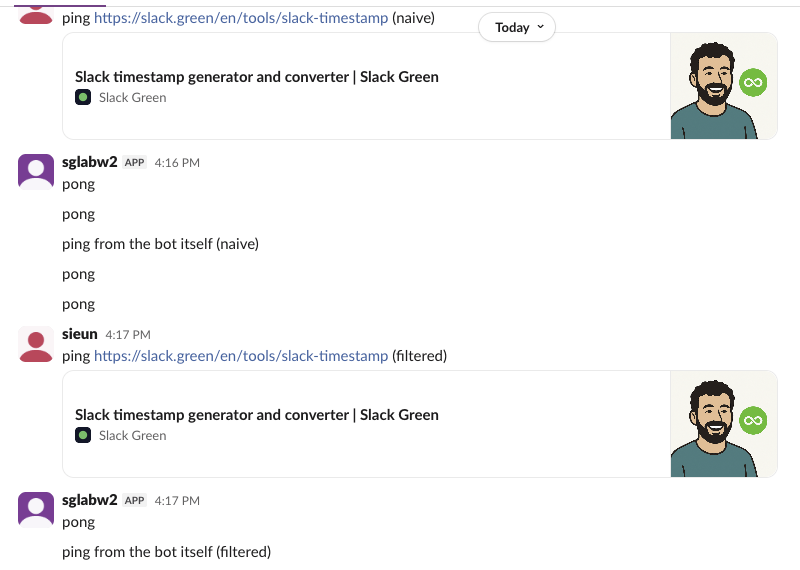
The bot_id check alone was not enough: on the bot's own edit, the top-level event had no bot_id; it was inside event.message. The subtype check caught it. If your bot should react to real edits, handle message_changed in its own branch and compare message.text with previous_message.text first, which drops link previews and the broadcast echo.
For a bot that gets each event twice instead, the cause is a slow ack and Slack's retries, covered in Slack Events API retries. Our Socket Mode guide shows the listener setup. To read the same messages later instead of as events, see getting messages from a channel.
FAQ
Which scope do I need for message_changed? The same one as for new messages. Our app subscribed to the message.channels bot event with the channels:history scope and got every row in the table above. Private channels use message.groups and DMs message.im.
Does a thread reply change the parent message? Not as an event. Our first plain thread reply sent only its own message event, with thread_ts set to the parent. The parent's reply_count showed up later inside the broadcast's message.root.
Stop Jiggling Your Mouse.
Join hundreds of remote workers who never worry about their Slack status. Set it up once, stay green forever.
Related Articles
assistant.threads.setStatus vs agents.sessions.setStatus: Both Tested in Slack
We called assistant.threads.setStatus and agents.sessions.setStatus on a test app before and after turning on the agent feature, clicked the stop button, and timed how long the status line stays. Every response, the stop event, and what Slack showed.
Slack Slash Command Payload: Every Field, Responses, and response_url Limits
We caught the payload a slash command sends, answered it as ephemeral, in_channel, plain text and empty, posted to its response_url until it failed, and typed the command inside a thread. Every result is from a test app on 2 October 2026.
Slackbot MCP Client: We Connected a 17-Line MCP Server and Slackbot Called It
We wrote a one-tool MCP server, added it to a Slack app with the mcp_servers manifest field, switched it on in Slackbot and asked for the time. Every request Slackbot sent to the server, the permission prompt, and what Slackbot said when the server was down.