
Slack Message Permalink: Format, chat.getPermalink and ts, Tested
A Slack message link is /archives/<channel>/p<ts without the dot>. We copied links in Slack web and called chat.getPermalink on 1 October 2026 to compare the formats for channel messages and thread replies, then turned links back into a channel and ts.
A Slack message link has the form https://<workspace>.slack.com/archives/<channel ID>/p<ts>, where the part after p is the message's ts with the dot removed. A link to a thread reply adds ?thread_ts=<parent ts>&cid=<channel ID>. You get one from the message menu (More actions > Copy link) or from the API with chat.getPermalink. We did both on 1 October 2026 in a test workspace, for a channel message, a thread parent and a thread reply, and the two ways do not always return the same string.
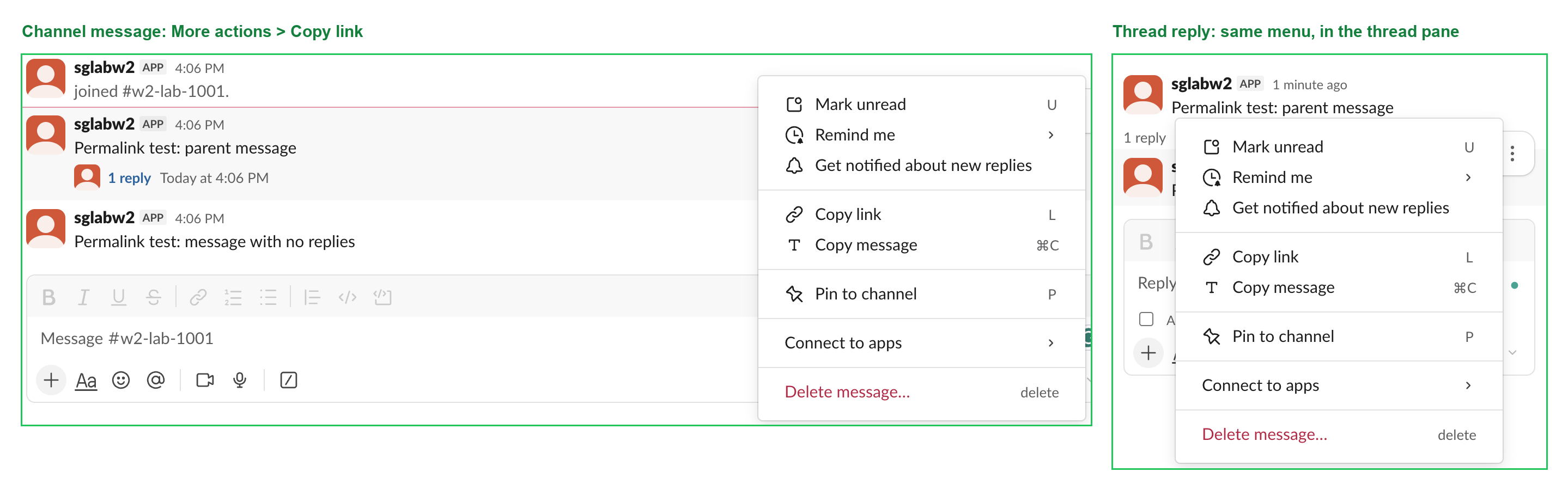
The link format, decoded
These are the links Slack gave us for three messages in one channel, C0C5QDNUJ7M:
| Message | Copy link in Slack web | chat.getPermalink |
|---|---|---|
| Message with no replies | /archives/C0C5QDNUJ7M/p1790838379966019 | same |
| Thread parent (1 reply) | /archives/C0C5QDNUJ7M/p1790838372599559 | same, plus ?thread_ts=1790838372.599559&cid=C0C5QDNUJ7M |
| Reply in that thread | /archives/C0C5QDNUJ7M/p1790838372960849?thread_ts=1790838372.599559&cid=C0C5QDNUJ7M | same |
To read a link:
- •
C0C5QDNUJ7Mis the channel ID. How to find a Slack channel ID covers the other places it shows up. - •
p1790838372960849is the messagets1790838372.960849. Put the dot back after the 10th digit. The first 10 digits are a Unix time in seconds; paste them into the Slack timestamp tool to see the date. - •
thread_tsis thetsof the thread's first message, andcidrepeats the channel ID.
The one difference we saw: on a thread parent, chat.getPermalink added thread_ts (equal to the parent's own ts) while Copy link did not. Both links open the same message, so do not compare permalinks as strings to decide whether two links point at the same message. Compare channel and ts.
Get a permalink with chat.getPermalink
chat.getPermalink takes channel and message_ts. Our bot token had chat:write and channels:history; Slack's method reference lists no required scope. Real responses:
{"ok": true, "permalink": "https://slack-0yr1948.slack.com/archives/C0C5QDNUJ7M/p1790838379966019", "channel": "C0C5QDNUJ7M"}
{"ok": true, "permalink": "https://slack-0yr1948.slack.com/archives/C0C5QDNUJ7M/p1790838372960849?thread_ts=1790838372.599559&cid=C0C5QDNUJ7M", "channel": "C0C5QDNUJ7M"}
The errors we got for wrong input:
message_ts or channel we sent | Response |
|---|---|
The p-number from the link, p1790838379966019 | message_not_found |
The ts without its dot, 1790838379966019 | message_not_found |
| A ts with the right seconds but wrong decimals | message_not_found |
| A channel ID that does not exist | channel_not_found |
So message_not_found usually means the ts is not the exact string with its dot and six decimals. If you store ts as a float, you lose digits and get this error.
Never appear "away" on Slack again
Cloud-based. No downloads. Works 24/7 even when your laptop is off.
Turn a permalink back into channel and ts
This is the parser, then the script we ran against the three API links:
import re
from urllib.parse import urlparse, parse_qs

def parse_permalink(url):
    u = urlparse(url)
    m = re.search(r"/archives/([A-Z0-9]+)/p(\d{16})", u.path)
    channel, digits = m.group(1), m.group(2)
    ts = digits[:10] + "." + digits[10:]
    thread_ts = parse_qs(u.query).get("thread_ts", [None])[0]
    return channel, ts, thread_ts
Fetching the message needs two different calls. A top-level message comes from conversations.history with latest set to its ts. A thread reply only comes from conversations.replies:
def fetch_message(url):
    channel, ts, thread_ts = parse_permalink(url)
    if thread_ts and thread_ts != ts:
        r = client.conversations_replies(channel=channel, ts=thread_ts, latest=ts, inclusive=True, limit=1)
        return [m for m in r["messages"] if m["ts"] == ts][0]
    r = client.conversations_history(channel=channel, latest=ts, inclusive=True, limit=1)
    return r["messages"][0]
Output with a slack_sdk bot client:
('C0C5QDNUJ7M', '1790838372.599559', '1790838372.599559')
 -> 1790838372.599559 'Permalink test: parent message'
('C0C5QDNUJ7M', '1790838372.960849', '1790838372.599559')
 -> 1790838372.960849 'Permalink test: reply in the thread'
('C0C5QDNUJ7M', '1790838379.966019', None)
 -> 1790838379.966019 'Permalink test: message with no replies'
history with the reply ts -> 1790838372.599559 'Permalink test: parent message'
The last line is the trap. We called conversations.history with the reply's ts and it returned the thread parent, with ok: true and no warning, because the channel history holds only top-level messages. If your code "fetches the wrong message" from a reply link, this is why. A reply link copied without its ?thread_ts= part has the same problem: the parser cannot tell it is a reply. Reading whole channels and threads is covered in Slack API: get messages from a channel, and posting into a thread in Slack thread_ts, tested.
FAQ
Does editing a message change its permalink?
No. The ts stays the same after an edit, so the link stays the same.
Can I get a permalink with a webhook?
No. An incoming webhook returns only ok, with no ts, so you cannot build the link. Post with chat.postMessage instead, which returns channel and ts, then call chat.getPermalink.
Stop Jiggling Your Mouse.
Join hundreds of remote workers who never worry about their Slack status. Set it up once, stay green forever.
Related Articles
Slack Interactivity Payload: Real block_actions JSON and response_url Limits
We clicked a button, a static_select and a datepicker in Slack on 1 October 2026 and logged the block_actions payloads our app received. Then we measured response_url: 5 posts, then used_url; it worked at 29:50 and was dead at 30:10.
Slack unfurl_links and unfurl_media: What Each Flag Does, Tested
We posted a web page, a YouTube video and an image with every combination of unfurl_links and unfurl_media on 1 October 2026, then built a custom preview with link_shared and chat.unfurl. The flags do not split the way the names suggest.
Slack Scheduled Message Didn't Send? 5 Cases We Tested
We scheduled five messages for 4:40 PM on 1 October 2026, then archived, left and deleted their channels and deleted a thread parent before the send time. Two sent, three never did, and Slack gave no notice about the three.