
How to Find a Slack Channel ID (and Your Workspace ID)
Click the channel name and read the last line of the About tab: Channel ID, with a copy button. We also ran the API calls that fail when you pass a channel name instead of the ID, and the fix.
To find a Slack channel ID, open the channel, click its name at the top, and look at the last line of the About tab. It reads "Channel ID: C0B7GGE8Q1Y" with a copy button next to it. Click the button and Slack shows "Copied!". The ID is also the last part of the channel's address in Slack in a browser: app.slack.com/client/T0B7JBCDKC1/C0B7GGE8Q1Y.
We checked every step below in the Slack web app on 29 September 2026, in a one-person test workspace, and ran the API calls with a real token. The IDs on this page are real ones from that workspace.
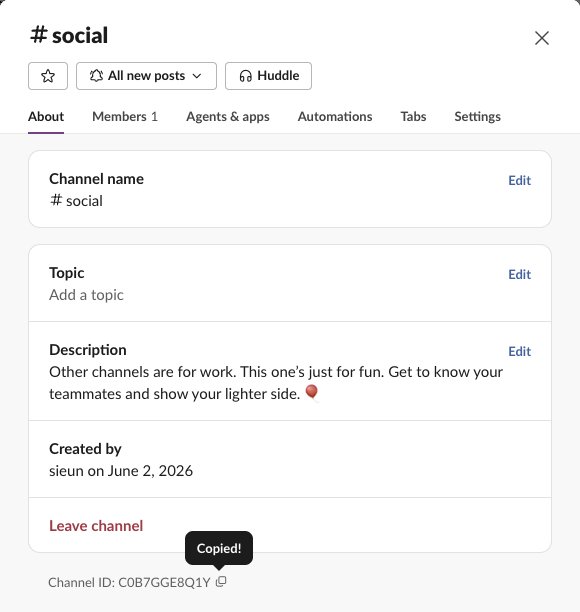
Find the channel ID in the Slack app
- Open the channel.
- Click the channel name in the header, next to the # or the lock.
- Stay on the About tab and scroll to the bottom.
- Click the copy icon after "Channel ID".
Private channels show the ID in the same place. Our private test channel had the ID C0C5ARWS936.
The browser address is the second place to look. In Slack on the web, every channel URL has the form https://app.slack.com/client/<workspace ID>/<channel ID>. The part after the last slash is the channel ID, and the part before it is the workspace ID.
What a Slack channel ID looks like
Every ID we read in two workspaces had 11 characters: one capital letter that names the type, then 10 capital letters and digits.
| Kind | Example from our test | First letter | Length |
|---|---|---|---|
| Public channel | C0B7GGE8Q1Y | C | 11 |
| Private channel, created 29 September | C0C5ARWS936 | C | 11 |
| Direct message | D0B7D4VDCUD | D | 11 |
| Workspace (team) | T0B7JBCDKC1 | T | 11 |
| Member (user) | U0B7L4YK420 | U | 11 |
We also listed every conversation in our company workspace with conversations.list, counting prefixes only. It held 14 public channels, all C and 11 characters, and 12 direct messages, all D and 11 characters.
Older guides say private channels start with G. Our new private channel started with C, and the API marked it "is_private": true. Slack's docs say older private channels and group DMs can still carry a G ID; we had none to check. To tell public from private, read is_private, not the first letter.
Never appear "away" on Slack again
Cloud-based. No downloads. Works 24/7 even when your laptop is off.
Find your Slack workspace ID (team ID)
The workspace ID starts with T. You can read it in two places:
/client/: app.slack.com/client/T0B7JBCDKC1/....auth.test returns it as team_id. This is the response we got:{
"ok": true,
"url": "https://slack-0yr1948.slack.com/",
"team": "Slack",
"user": "sieun",
"team_id": "T0B7JBCDKC1",
"user_id": "U0B7L4YK420",
"is_enterprise_install": false
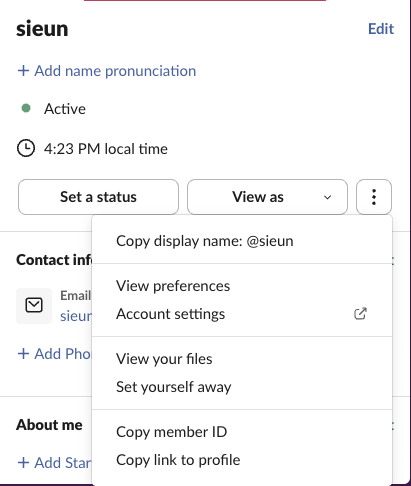
}A member ID starts with U. Open someone's profile, click the three dots, and choose Copy member ID. You need it for mentions in bot messages, as in how to mention a user in a Slack webhook.
The API error you get with a channel name
Most read methods want the ID and refuse a name. We sent the same channel four ways to conversations.info. The name, the name with #, the ID in lowercase and the full browser URL all got the same answer:
{
  "ok": false,
  "error": "channel_not_found"
}
conversations.history with #social and conversations.join with social returned the same channel_not_found. Only the exact ID, C0B7GGE8Q1Y, worked.
chat.postMessage is the exception. It accepted both #social and social, posted the message, and returned "channel": "C0B7GGE8Q1Y" in the response. So a script that posts by name works, and the same script breaks the moment it reads history or adds a reaction. The ID in the chat.postMessage response is a free way to learn it.
Get a channel ID from its name in code
To go from name to ID, list the channels and match the name. This is the function we ran, using Slack's Node SDK (@slack/web-api):
async function channelId(client, name) {
  name = name.replace(/^#/, "");
  let cursor;
  do {
    const res = await client.conversations.list({
      types: "public_channel,private_channel",
      exclude_archived: true,
      limit: 1000,
      cursor,
    });
    const hit = res.channels.find((c) => c.name === name);
    if (hit) return hit.id;
    cursor = res.response_metadata?.next_cursor;
  } while (cursor);
  return null;
}
Output in our workspace:
channelId(client, "#social")             -> C0B7GGE8Q1Y
channelId(client, "sg-huddle-test-0929") -> C0C5ARWS936
channelId(client, "no-such-channel")     -> null
Slack's docs say conversations.list returns a private channel only when the token's user or bot is a member. The reverse, ID to name, is one call: conversations.info with the ID returned "name": "social". Store the ID, not the name. We renamed our private test channel to sg-renamed-0929 with conversations.rename, and the response still carried C0C5ARWS936. Workflows that need the ID include sending a Slack message from GitHub Actions and reacting to a message with the API.
Stop Jiggling Your Mouse.
Join hundreds of remote workers who never worry about their Slack status. Set it up once, stay green forever.
Related Articles
Slack Member ID: Where to Copy It, and What the U Means
A Slack member ID is the U... code that identifies a person. Copy it from their profile under the three-dot menu, or look it up with users.info and users.list. Tested in two workspaces, with the ID formats we found.
Slack API Rate Limits: What We Hit, and the 429 You Get Back
Slack answers too many calls with HTTP 429 and a Retry-After header. We burst chat.postMessage, conversations.history and an incoming webhook from an internal app and logged every response: where the 429s started, the bodies, and a retry loop that never hit one.
Slack files.upload Deprecated: The 3-Step Upload That Replaces It
files.upload now returns method_deprecated. Use files.getUploadURLExternal, POST the bytes, then files.completeUploadExternal, or files_upload_v2 in the SDK. Tested with curl and Python, including two silent failures.