
Slack API: List Channels With conversations.list, and Why Private Ones Go Missing
conversations.list returns every public channel but only the private channels your bot is in. We ran it with a bot token and a user token on 2 October 2026 and pasted what each one returned.
To list channels with the Slack API, call conversations.list with types=public_channel,private_channel and follow response_metadata.next_cursor until it is empty (how Slack cursors behave). The bot token needs channels:read for public channels and groups:read for private ones. A bot token returns every public channel in the workspace but only the private channels the bot has been added to. A user token returns the private channels that user is in.
We tested this on 2 October 2026 in a test workspace. We made two public and two private channels, added a test app's bot to one private channel only, and called the method with the bot token and then with the user token from the same install.
What a bot token and a user token returned
The call:
curl -s https://slack.com/api/conversations.list \
  -H "Authorization: Bearer $SLACK_BOT_TOKEN" \
  -d types=public_channel,private_channel \
  -d exclude_archived=true \
  -d limit=200
The bot token returned 5 channels and the user token returned 6:
| Channel | Type | Bot token | User token |
|---|---|---|---|
| all-slack | public | listed, is_member: false | listed, is_member: true |
| social | public | listed, is_member: false | listed, is_member: true |
| w2-pub-a-1002 | public | listed, is_member: false | listed, is_member: true |
| w2-pub-b-1002 | public | listed, is_member: false | listed, is_member: true |
| w2-priv-a-1002 | private, bot added | listed, is_member: true | listed, is_member: true |
| w2-priv-b-1002 | private, bot not added | not returned | listed, is_member: true |
The bot does not have to be in a public channel to see it. It is not in any of the four public channels, and all four came back. For private channels, membership is the only thing that counts. The bot has groups:read and still did not get w2-priv-b-1002, because nobody added it. The method returned no error and no hint that a channel was left out.
Here is the private channel the bot could see, as the bot token returned it (some empty fields cut):
{
  "id": "C0C67CY2AV7",
  "name": "w2-priv-a-1002",
  "is_channel": true,
  "is_group": false,
  "is_private": true,
  "is_archived": false,
  "is_general": false,
  "creator": "U0B7L4YK420",
  "created": 1790903728,
  "is_member": true,
  "num_members": 2
}
num_members is 2 because it counts the bot. The channel's Members tab in Slack showed 1, and the bot was listed under Agents & apps instead:
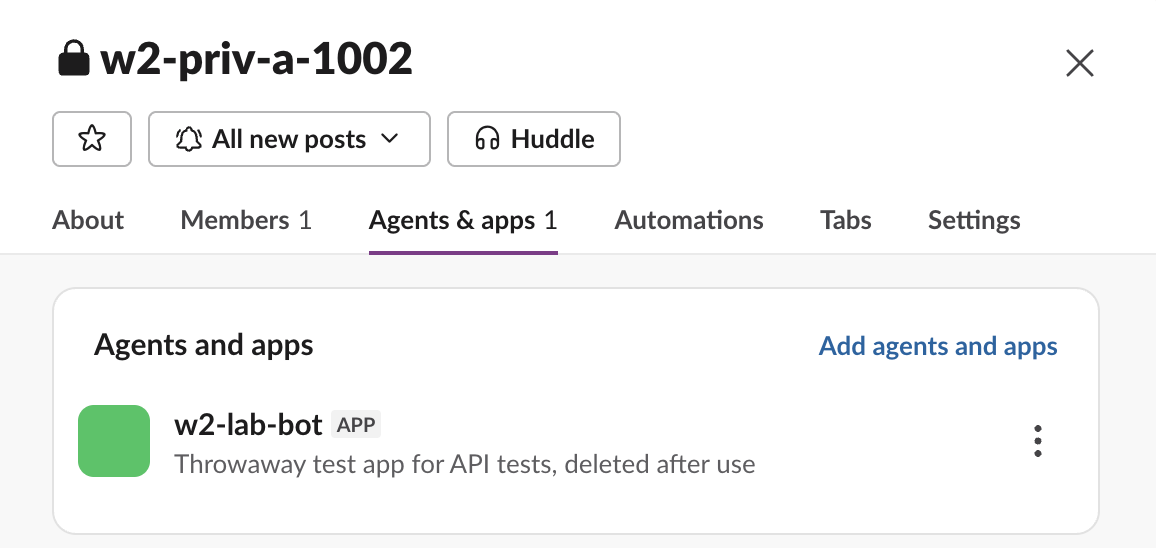
To make a private channel show up for your bot, add the bot to it: type /invite @your-bot in the channel, or open the channel details and use Add agents and apps. The bot cannot add itself. If you then call another method on a channel the bot is not in, you get not_in_channel or channel_not_found; the not_in_channel page covers the fixes.
Without types you only get public channels
types defaults to public_channel. With the same bot token and no types parameter, the call returned 4 public channels and left out w2-priv-a-1002, even though the bot is in it:
all-slack, social, w2-pub-b-1002, w2-pub-a-1002If private channels are missing from your list, check this parameter first.
The errors we got
Asking for a type the token has no scope for fails the whole call. We used a second test app whose bot only had channels:read and chat:write:
{
  "ok": false,
  "error": "missing_scope",
  "needed": "groups:read",
  "provided": "channels:read,chat:write"
}
The main test bot had groups:read but not im:read, so types=im,mpim failed the same way:
{
  "ok": false,
  "error": "missing_scope",
  "needed": "im:read",
  "provided": "channels:read,groups:read,channels:history,groups:history,users:read,chat:write,channels:join,app_mentions:read,incoming-webhook"
}
The fix is to add the scope named in needed and reinstall the app; missing_scope has the steps. Asking conversations.info about the private channel the bot is not in returned {"ok": false, "error": "channel_not_found"}. For a bot, a private channel it was never added to does not exist.
Never appear "away" on Slack again
Cloud-based. No downloads. Works 24/7 even when your laptop is off.
Archived channels
We archived w2-pub-b-1002 and listed again. With exclude_archived=false, which is the default, it came back with "is_archived": true. With exclude_archived=true it was gone. Filter on the flag in your own code if you need both lists.
Get a channel ID from its name in Python
There is no method that takes a channel name and returns its ID, so list and match. This uses slack_sdk, whose response object pages through next_cursor for you when you loop over it:
import os, sys
from slack_sdk import WebClient

client = WebClient(token=os.environ["SLACK_BOT_TOKEN"])

def channel_id(name):
    for page in client.conversations_list(types="public_channel,private_channel", limit=200):
        for ch in page["channels"]:
            if ch["name"] == name.lstrip("#"):
                return ch["id"], ch["is_private"], ch["is_member"]
    return None

for name in sys.argv[1:]:
    print(name, "->", channel_id(name))
Output with the bot token:
w2-pub-b-1002 -> ('C0C65A6CJSE', False, False)
#w2-priv-a-1002 -> ('C0C67CY2AV7', True, True)
w2-priv-b-1002 -> None
general -> None
w2-priv-b-1002 exists but the bot is not in it, so the bot gets None, the same answer as for a channel that does not exist. Cache the result: on a big workspace each lookup costs one call per page of channels, and Slack rates conversations.list as Tier 2, about 20 calls a minute (see Slack API rate limits). If you only need one ID by hand, find it in the channel details instead.
FAQ
Does conversations.list return DMs?
Not by default. You have to ask for types=im or types=mpim, and the token needs im:read or mpim:read. Without the scope the whole call fails with missing_scope, as shown above.
Stop Jiggling Your Mouse.
Join hundreds of remote workers who never worry about their Slack status. Set it up once, stay green forever.
Related Articles
Slack API Pagination: next_cursor, the Last Page and invalid_cursor, Tested
Slack paginates list methods with a cursor: pass response_metadata.next_cursor back as cursor until it is empty. We paged 27 real messages on 2 October 2026 and broke the cursor five ways to see which ones fail.
Slack RTM API Deprecated: What rtm.connect Returns for a New App, and the Socket Mode Fix
A Slack app created today cannot use the RTM API. We called rtm.connect and rtm.start with every token a new app gets on 2 October 2026, tried to request the rtm:stream scope, and ran the same bot over Socket Mode.
Slack Bot Icon and Name Per Message: icon_emoji, icon_url and username, Tested
icon_emoji, icon_url and username only work with the chat:write.customize scope, and Slack ignores them silently without it. We tested every case on 2 October 2026, plus webhooks and the app icon upload limits.