
Argo CD Slack Notifications: Setup and Fixes (Tested)
Argo CD posts sync results to Slack through its notifications controller. We set it up on v3.6.2 and show the messages and three errors we hit.
Argo CD sends Slack notifications through its built-in notifications controller: you store a Slack bot token in argocd-notifications-secret, point service.slack at it in argocd-notifications-cm, load the trigger catalog, and annotate each Application with the channel to post to. We set this up on 21 November 2026 with Argo CD v3.6.2 in a kind cluster, synced a working app and a broken one, and hit three errors along the way, all shown below.
What the messages look like
These are the real posts from the default catalog templates, a failed sync in red and two successful syncs in green:
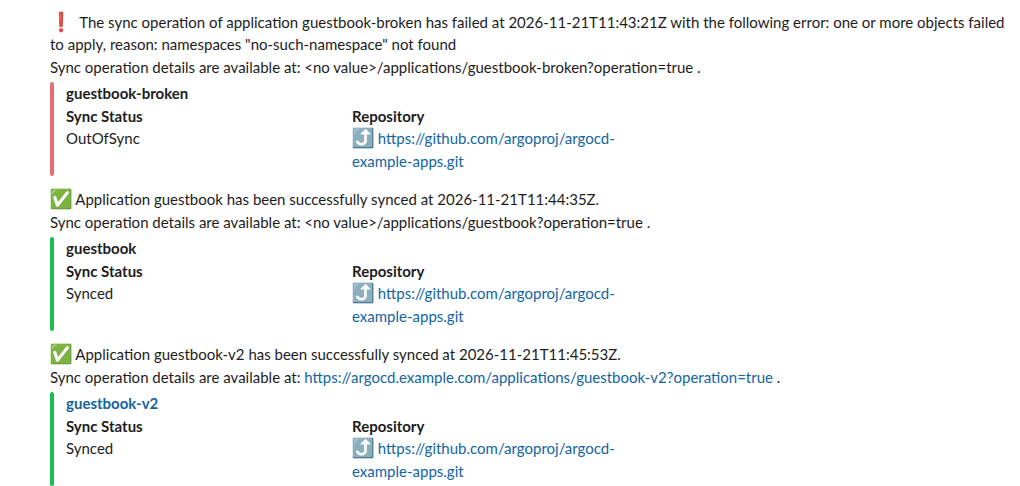
Each one arrived within a second of the sync finishing: the failed sync ended at 11:43:21Z and Slack stamped the message 11:43:21.76. Notice the first two posts say <no value> where a link should be. That is the first fix below.
Setup, step by step
1. Create a Slack app with a bot token. It needs the chat:write bot scope. Install it and copy the xoxb- token. Our Slack bot token guide walks through it.
2. Load the trigger and template catalog. A fresh install has an empty argocd-notifications-cm, so nothing fires until you add triggers:
kubectl apply -n argocd -f \
  https://raw.githubusercontent.com/argoproj/argo-cd/stable/notifications_catalog/install.yaml
3. Store the token and register the Slack service.
kubectl -n argocd create secret generic argocd-notifications-secret \
  --from-literal=slack-token="$SLACK_BOT_TOKEN" --dry-run=client -o yaml | kubectl apply -f -

kubectl -n argocd patch cm argocd-notifications-cm --type merge \
  -p '{"data":{"service.slack":"token: $slack-token\n","context":"argocdUrl: https://argocd.example.com\n"}}'
Set context.argocdUrl to your real Argo CD address now; we left it out on the first run and paid for it.
4. Subscribe an Application. Add one annotation per trigger. The value is the channel name or ID:
apiVersion: argoproj.io/v1alpha1
kind: Application
metadata:
  name: guestbook
  namespace: argocd
  annotations:
    notifications.argoproj.io/subscribe.on-sync-succeeded.slack: deploys
    notifications.argoproj.io/subscribe.on-sync-failed.slack: deploys
5. Invite the bot to the channel with /invite @your-bot. Skip this and you get the second error below.
Never appear "away" on Slack again
Cloud-based. No downloads. Works 24/7 even when your laptop is off.
Three errors we hit
| Symptom | Cause | Fix |
|---|---|---|
Message says <no value>/applications/guestbook?operation=true | context.argocdUrl not set; the template reads {{.context.argocdUrl}} | Add context: argocdUrl: https://... to the ConfigMap |
Nothing posted; controller logs not_in_channel | The bot is not a member of that channel | /invite the bot, or give the app the chat:write.public scope for public channels |
Sync failed with namespaces "guestbook" not found although the app sets CreateNamespace=true | We started the sync by patching .operation without syncOptions, so the app's own options did not apply | Pass "syncOptions":["CreateNamespace=true"] in the operation, or sync from the UI or CLI |
The not_in_channel case is silent on the Slack side. This is the only trace, in the notifications controller log:
Failed to notify recipient {slack sg1120b-argocd-nobot} defined in resource argocd/guestbook-nobot: not_in_channelRead it with kubectl -n argocd logs deploy/argocd-notifications-controller. The same log also showed a harmless error on every new app, 'cannot fetch operationState from
Which triggers fire, and how often
The catalog's on-sync-succeeded trigger has oncePer: app.status.operationState?.syncResult?.revision, so it posts once per Git revision. That is why we needed a new Application to see the fixed link: re-syncing the same commit would not post again. on-sync-failed fired for both broken syncs. The catalog also ships on-created, on-deleted, on-deployed, on-health-degraded, on-sync-running and on-sync-status-unknown; subscribe to them the same way.
For the color bar, the template sets color: "#E96D76" for failures and #18be52 for success; our Slack attachment color test shows how Slack draws those values. If you also send build results from CI, compare Jenkins Slack notifications.
FAQ
Can I use a webhook URL instead of a bot token?
Argo CD's slack service takes a bot token, which is what we tested. Argo CD also has a separate generic webhook service, which we did not try with Slack.
Can one app post to several channels?
Yes. Argo CD's subscription docs give the value as a semicolon-separated list, such as deploys;alerts.
Does it work with a private channel?
Only if the bot is invited, since chat:write.public covers public channels only.
Stop Jiggling Your Mouse.
Join hundreds of remote workers who never worry about their Slack status. Set it up once, stay green forever.
Related Articles
Slack App Configuration Token: Generate, Rotate and Revoke
An app configuration token lets a script create Slack apps from manifests. We generated one, rotated it five times and tested it again 28 hours later.
Slack App Collaborators: Add, Remove and Transfer Ownership
Collaborators are the people who can edit a Slack app. We added and removed one on 20 November 2026 as a regular member of a test workspace, recorded who can be added and what Slack asks you to do after a removal, and wrote down the hand-over path Slack documents.
Slack Bolt Middleware: Global and Listener, Tested
Global middleware runs for every request and listener middleware for one listener. We ran both in Bolt for Python and Bolt for JavaScript on 20 November 2026 and logged what Slack did when next() was skipped: Python answered 404 and Slack sent the event again.