
How to See All Your DMs in Slack, Including the Hidden Ones
To show all direct messages in Slack, open the DMs tab. App DMs, Slackbot, empty DMs and DMs with deleted accounts sit elsewhere. We compared the tab and the sidebar with the full list from the Slack API.
To show all direct messages in Slack, click DMs in the rail on the far left of the desktop or web app, or click the three dots next to Direct messages in the sidebar and choose Recent direct messages. Both open the same list of your one-to-one and group DMs with people, with a Find a DM search box and an Unreads switch. That list leaves out chats with apps, Slackbot, chats with deleted accounts, and DMs that have no messages yet. On 29 November 2026 a second account in our test workspace had 6 conversations in the DMs tab, 1 in the sidebar's Direct messages section, and 26 in the Slack API.
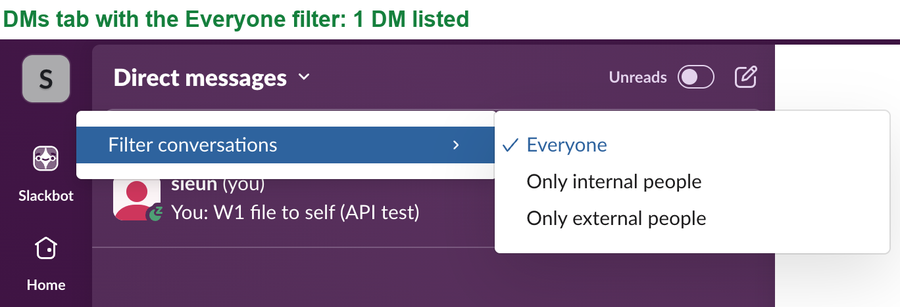
The DMs tab
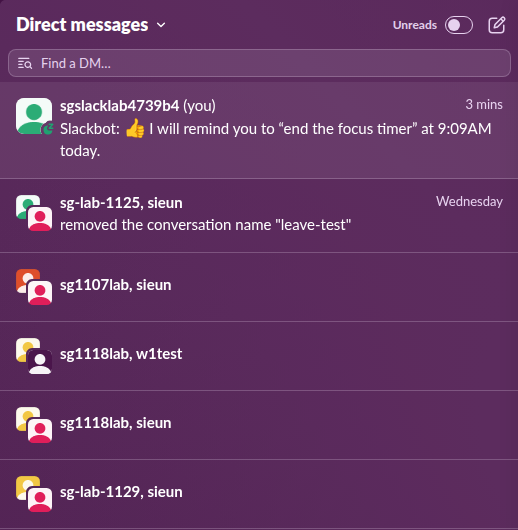
The tab has three controls:
- • The Find a DM box searches the list by name.
- • The Unreads switch hides every DM you have already read.
- • The Direct messages title opens a menu with Filter conversations: Everyone, Only internal people or Only external people.
If a DM you expect is missing, set the filter back to Everyone and turn Unreads off first. Those two are the only filters on the tab.
The Activity tab also has a DMs view. It lists new DM messages, not conversations, so it is the place for "what did people send me today".
Why the sidebar shows fewer DMs than the tab
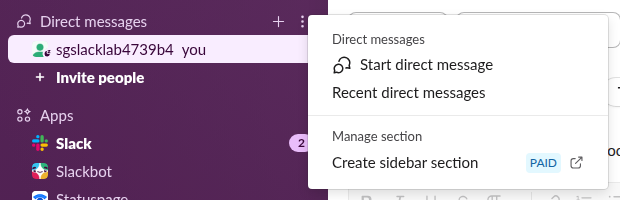
The Direct messages section of the sidebar is not the full list. On our second account it showed only the self-DM, while the DMs tab showed that plus five group DMs. The section's three-dot menu on 29 November had Start direct message, Recent direct messages and, under Manage section, Create sidebar section marked PAID. There was no "show all" choice; Recent direct messages simply opens the DMs tab.
A DM that has no messages yet is missing from the tab. Our second account had a DM with the workspace owner that the API listed but that held no messages, and the DMs tab did not show it.
Where app and Slackbot DMs are
A DM with an app is not in the DMs tab. Our test app sent us a DM, and it showed under Apps in the sidebar, next to Slack's own system app.
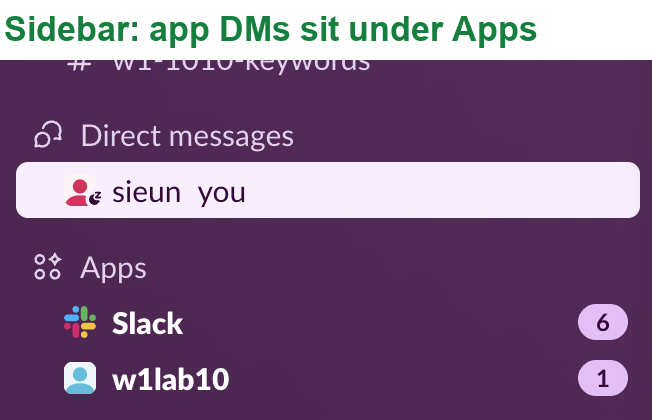
Slackbot has its own button at the top of the left rail. So a complete check of your DMs means three places: the DMs tab, the Apps section of the sidebar, and Slackbot.
Never appear "away" on Slack again
Cloud-based. No downloads. Works 24/7 even when your laptop is off.
The full list from the Slack API
The API returns every one-to-one DM your account has, including those the app hides. We ran this with a user token that had the im:read and users:read scopes:
import requests
H = {"Authorization": "Bearer " + USER_TOKEN}   # user token with im:read and users:read
def call(method, **params):
    return requests.get("https://slack.com/api/" + method, headers=H, params=params).json()

dms = call("conversations.list", types="im", limit=200)["channels"]
rows = []
for dm in dms:
    u = call("users.info", user=dm["user"]).get("user", {})
    rows.append((dm["id"], u.get("name", dm["user"]), u.get("deleted"), u.get("is_bot")))
print(len(rows), "DMs")
print("with deleted accounts:", sum(1 for r in rows if r[2]))
for r in rows[-4:]:
    print(r)
Output:
36 DMs
with deleted accounts: 32
('D0C557Z5D8E', 'api_error_lab', True, True)
('D0BAU7V1AKB', 'slack', False, False)
('D0B7EEAMNH4', 'slackbot', False, False)
('D0B7D4VDCUD', 'sieun', False, False)
32 of the 36 DMs were with accounts that no longer exist, here old test apps. None of them shows in the DMs tab. The 4 live ones were our test app, Slack's system user, Slackbot and our own self-DM.
We ran the same calls on 29 November with types=im,mpim for the second account. The API listed 26 conversations: 21 one-to-one DMs and 5 group DMs. Of the 21, 15 were with deleted test apps, and the rest were Slackbot, Slack's system user, a Statuspage app, the self-DM and the empty DM with the owner. The DMs tab showed the self-DM and the 5 group DMs, and nothing else.
Group DMs need one more scope. Asking for types=im,mpim with only im:read returned missing_scope; add mpim:read to include them. For reading the messages inside each DM, see get messages from a channel with the API, which works the same way with a DM's ID.
Finding an old DM
To find your own notes, open the DM with yourself; how to message yourself on Slack shows where it is.
Questions
Can a workspace admin see a list of my DMs?
Not from the DMs tab, which shows only your own. What admins can reach depends on the plan and its export tools; can Slack admins see your DMs explains each case.
Why is a DM with a deleted account missing?
Slack keeps the conversation, as the API list shows, but the DMs tab left all 32 such DMs out in our test. Our deleted accounts were apps; search for a word from the chat to reach the messages.
Stop Jiggling Your Mouse.
Join hundreds of remote workers who never worry about their Slack status. Set it up once, stay green forever.
Related Articles
Slack MSI Installer: Gone After 4.48.102, Use MSIX
Slack's last MSI is 4.48.102 from March 2026; every later version 404s. We read both old MSIs and the current MSIX package to show what each installs and how to move a deployment to MSIX.
Slack LaTeX and Math: What Renders, What Doesn't, What Works
Slack shows LaTeX as raw text in messages and canvases, even though its web client ships KaTeX. We tested every route and give the two that work: Unicode math and a formula rendered to an image with 15 lines of Python.
Slack Canvas Images: Add, Size and Insert Them by API
We inserted a PNG, an animated GIF and a 6000 px image into a Slack canvas with canvases.edit. Slack files rendered; an outside image URL became a link card even though the API said ok.