
Slack LaTeX and Math: What Renders, What Doesn't, What Works
Slack shows LaTeX as raw text in messages and canvases, even though its web client ships KaTeX. We tested every route and give the two that work: Unicode math and a formula rendered to an image with 15 lines of Python.
Slack does not render LaTeX or math anywhere a person types: not in messages, not in canvases, and not in code blocks. $E = mc^2$ stays as those characters. The two things that work are Unicode math symbols, which are plain text and display everywhere, and a formula rendered to an image and uploaded, which shows inline like any picture.
We checked this on 29 November 2026 in a Free workspace, as a member in the Slack web app, and in a canvas edited through the API. We also read the Slack web client's code to see whether a math renderer hides anywhere.
What we typed and what Slack showed
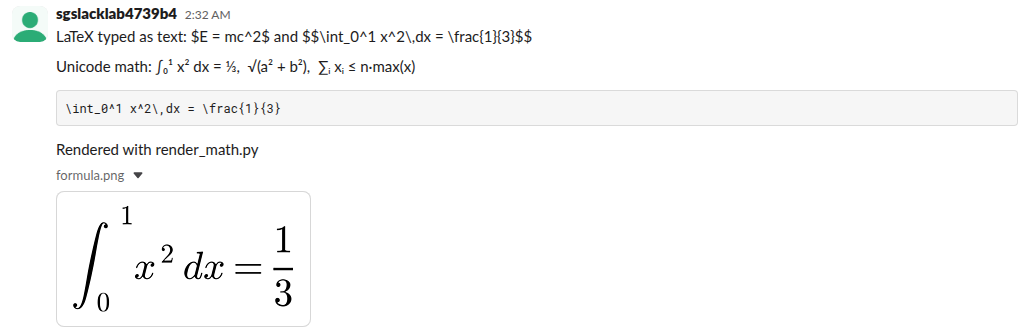
| What we sent | Where | Result |
|---|---|---|
$E = mc^2$ and $$\int_0^1 x^2\,dx = \frac{1}{3}$$ | Message | Shown as typed, dollar signs and backslashes included |
∫₀¹ x² dx = ⅓, √(a² + b²), ∑ᵢ xᵢ ≤ n·max(x) | Message | Shown as typed; reads as math because the characters are math |
| LaTeX inside a code fence | Message | A grey code block, monospaced, not rendered |
| A PNG made by the script below | Message (file upload) | The rendered formula, inline |
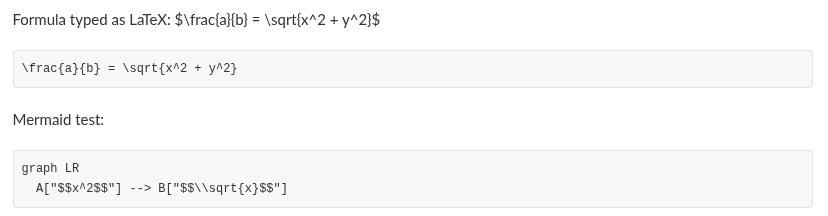
$\frac{a}{b} = \sqrt{x^2 + y^2}$ | Canvas | Shown as typed |
A mermaid code fence with $$x^2$$ labels | Canvas | A code block, no diagram |
Is there a hidden math renderer?
Partly, and you cannot reach it. The Slack web client that Slack's desktop app had cached on our Mac contains KaTeX, the math library, in two places:
- • A
canvas-mermaidchunk that bundles Mermaid with KaTeX. Its code looks for$$...$$inside diagram text (hasKatex) and renders it as MathML. So Slack has code for Mermaid diagrams in canvases, with math in their labels. - • The Quill rich-text editor's Formula module, which throws "Formula module requires KaTeX." unless KaTeX is loaded.
Neither showed up for us. A mermaid fence inserted into a Free canvas through canvases.edit stayed a code block, as did a Mermaid fence in an uploaded .md file in our markdown file preview test. The Mermaid canvas code may be switched on for some workspaces or plans; we could not trigger it, so treat "Slack renders LaTeX" as no.
Never appear "away" on Slack again
Cloud-based. No downloads. Works 24/7 even when your laptop is off.
Render a formula to an image (15 lines)
Matplotlib has a built-in TeX subset (mathtext), so you do not need a LaTeX install:
import sys
import matplotlib
matplotlib.use("Agg")
import matplotlib.pyplot as plt

formula = sys.argv[1]          # LaTeX without the outer $ signs
out = sys.argv[2]
plt.rcParams["mathtext.fontset"] = "cm"   # Computer Modern, the LaTeX look
fig = plt.figure(figsize=(0.01, 0.01))
fig.text(0, 0, "$" + formula + "$", fontsize=28)
fig.savefig(out, dpi=200, bbox_inches="tight", pad_inches=0.15,
            facecolor="white")
print(out)
python render_math.py "\int_0^1 x^2\,dx = \dfrac{1}{3}" formula.pngThat wrote a 497 x 271 px PNG, and uploading it gave the inline image in the screenshot above. bbox_inches="tight" crops the empty figure to the formula, and the white background keeps it readable in dark mode. Mathtext covers fractions, roots, sums, integrals, Greek letters, sub- and superscripts and most symbols; it does not do align environments or matrices, so for those, render with a full LaTeX install or an online editor and upload the image the same way.
A bot can do the same on demand: render the formula from a slash command's text, then files_upload_v2 it to the channel. Uploads count toward the Free plan's 5 GB of file storage.
Unicode: math without images
For short expressions, Unicode is quicker than an image and stays searchable and copyable. The characters are ordinary text, so they show wherever Slack shows text; the second message in our screenshot used them:
| Want | Type | Want | Type |
|---|---|---|---|
| Superscript | x² x³ xⁿ | Subscript | x₀ x₁ xᵢ |
| Fractions | ½ ⅓ ¼ ¾ | Roots | √ ∛ |
| Sums, integrals | ∑ ∏ ∫ ∮ | Relations | ≤ ≥ ≠ ≈ ≡ |
| Arrows | → ⇒ ↔ | Greek | α β γ δ π σ Σ Ω |
| Sets | ∈ ∉ ⊂ ∪ ∩ ∅ | Other | ∞ ± × ÷ · ∂ ∇ |
On a Mac, the Character Viewer (Control-Command-Space) finds them by name; on Windows, Win+. opens the emoji and symbol panel. For long formulas, put the LaTeX source in a code block under the image, so readers can copy it; code blocks in Slack shows the shortcuts.
FAQ
Can a bot render LaTeX automatically? Yes, with the script above behind a slash command: the bot reads the command text, renders the PNG and uploads it with files_upload_v2. It needs the commands and files:write scopes.
Why does my pasted formula lose its formatting? Slack's paste turns standard markdown into formatting, but LaTeX is not markdown, so it arrives as plain text; markdown not working in Slack covers what paste does convert.
Does Slack AI render math? We did not test it; Slack AI needs a paid plan, and our workspace is Free.
Stop Jiggling Your Mouse.
Join hundreds of remote workers who never worry about their Slack status. Set it up once, stay green forever.
Related Articles
Slack MSI Installer: Gone After 4.48.102, Use MSIX
Slack's last MSI is 4.48.102 from March 2026; every later version 404s. We read both old MSIs and the current MSIX package to show what each installs and how to move a deployment to MSIX.
Slack Canvas Images: Add, Size and Insert Them by API
We inserted a PNG, an animated GIF and a 6000 px image into a Slack canvas with canvases.edit. Slack files rendered; an outside image URL became a link card even though the API said ok.
Slack Emoji Usage Statistics: Count Reactions With the API
Slack has no emoji report, and the Free plan's analytics page shows none. We counted 89 reactions on 43 test messages with a 40-line script and found that thread replies hide reactions from conversations.history.