
Slack MSI Installer: Gone After 4.48.102, Use MSIX
Slack's last MSI is 4.48.102 from March 2026; every later version 404s. We read both old MSIs and the current MSIX package to show what each installs and how to move a deployment to MSIX.
Slack no longer publishes an MSI installer for Windows. The last version with MSI files is 4.48.102 (released 17 March 2026); from 4.49.81 (2 April 2026) on, each release ships only SlackSetup.exe and an MSIX package, and Slack's deployment help now covers MSIX alone. Old MSIs up to 4.48.102 still download, which is useful for an existing GPO or Intune package, but they will not get newer versions.
We checked this on 29 November 2026 by requesting every installer URL for 11 Slack versions from Slack's download server, and by downloading the last two MSIs and the current MSIX on a Linux machine and reading their tables and manifest. We did not install them on Windows, so the install behaviour below is what the packages declare, not something we timed.
Which versions still have an MSI
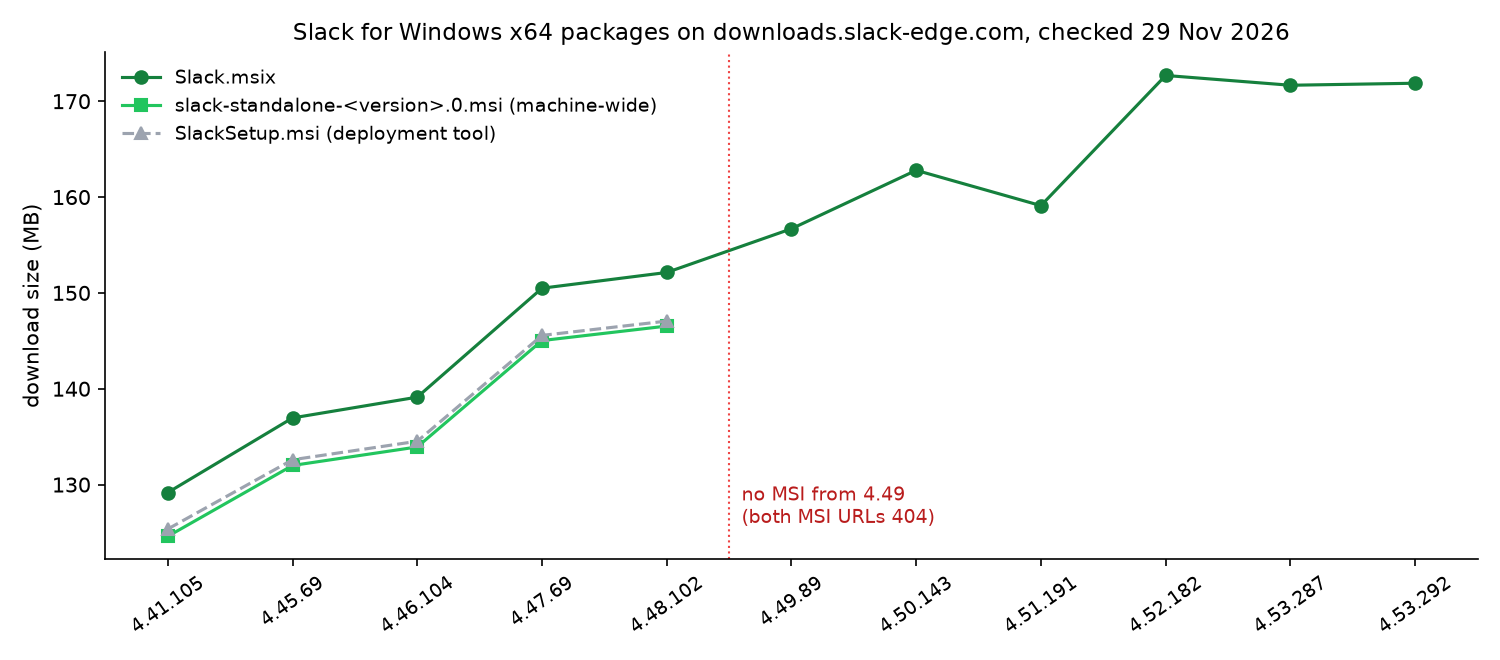
| Version | slack-standalone-<v>.0.msi | SlackSetup.msi | Slack.msix |
|---|---|---|---|
| 4.41.105 | 200, 124.6 MB | 200, 125.4 MB | 200, 129.2 MB |
| 4.47.69 | 200, 145.0 MB | 200, 145.6 MB | 200, 150.5 MB |
| 4.48.102 | 200, 146.5 MB | 200, 147.1 MB | 200, 152.1 MB |
| 4.49.81 | 404 | (not checked) | 200 |
| 4.49.89 to 4.53.292 | 404 | 404 | 200, 156.7 to 172.7 MB |
All URLs have the form https://downloads.slack-edge.com/desktop-releases/windows/x64/<version>/<file>. One odd leftover: Slack's own API still names an MSI for the newest version. slack.com/api/desktop.latestRelease?arch=x64&variant=msi returned
{"ok": true, "version": "4.53.292", "download_url": "https://downloads.slack-edge.com/desktop-releases/windows/x64/4.53.292/slack-standalone-4.53.292.0.msi", "platform": "win32", "arch": "x64"}and that URL answered 404. The same call with variant=msix gave a working Slack.msix. A script that builds MSI links from this API will break silently, so check the HTTP status before you push a package.
The two MSIs were different products
Slack shipped two MSIs, and their tables show what each one did:
slack-standalone-4.48.102.0.msi | SlackSetup.msi (4.48.102) | |
|---|---|---|
| Product name | Slack (Machine - MSI) | Slack Deployment Tool |
| Package subject | Slack (Machine - MSI) | "This package installs a deployment tool for Slack. Not Slack itself. Slack is only installed if a user logs into the machine." |
ALLUSERS | 2, with MSIINSTALLPERUSER 0 (per machine) | 1 (per machine) |
| Installs | Slack itself, 187 files, to Program Files\Slack\app-4.48.102\ | One file, Program Files\Slack Deployment\slack.exe |
| Starts at login | Run value com.squirrel.slack.slack: slack.exe --process-start-args --startup | Run value slackMachineInstaller: slack.exe --checkInstall |
| Shortcuts | Desktop and Start menu | None |
| Update properties | AUTOUPDATEENABLED 1, UPDATERUSERGROUP Users | None |
| Package created | 13 March 2026, WiX Toolset 3.14.1 | 13 March 2026 |
The standalone MSI was the true machine-wide install. SlackSetup.msi, despite the name people search for ("Slack machine-wide installer"), only placed a stub that installs per-user Slack into each user's profile the first time that user signs in to Windows.
Never appear "away" on Slack again
Cloud-based. No downloads. Works 24/7 even when your laptop is off.
The replacement: MSIX
The current package is Slack.msix (4.53.292, 171.9 MB). Its AppxManifest.xml declares:
- • Identity
com.tinyspeck.slackdesktop, publisher "Slack Technologies, LLC", version 4.53.292.0, x64. - • Minimum Windows version 10.0.17763.0, which is Windows 10 version 1809.
- • A startup task (
SlackStartup, enabled), theslack:link protocol, aSlack.execommand alias, toast notification activation and inbound and outbound TCP firewall rules forapp\Slack.exe. - • The
runFullTrustcapability, so it runs as a normal desktop app, not a sandboxed store app.
Slack's help article "Deploy Slack for Windows" (the page that used to be "Deploy Slack via Microsoft Installer") gives the two install commands:
# current user only
Add-AppxPackage -Path "C:\deploy\Slack.msix"

# every existing and future user on the machine
Add-AppxProvisionedPackage -Online -PackagePath "C:\deploy\Slack.msix" -SkipLicense -Regions "all"
and says the MSIX installs to C:\Program Files\WindowsApps\com.tinyspeck.slackdesktop_<version>_x64__8yrtsj140pw4g and keeps user data under %LOCALAPPDATA%\Packages\com.tinyspeck.slackdesktop_8yrtsj140pw4g\LocalCache\Roaming\Slack. Intune, Configuration Manager and DISM all take MSIX directly. Two notes from the same article are worth knowing before you switch: AppLocker blocks packaged apps by default, and auto-update can be turned off through Slack's desktop app configuration (AutoUpdate).
Moving a deployment from MSI to MSIX
Slack.msix from the desktop.latestRelease API with variant=msix (or from the "64-bit installer" link on Slack's deployment page), and keep the version number with it.MsiExec.exe /X {D0275306-75E4-4E2E-ABF1-32C784A90E32} (from its Registry table). The deployment tool is removed with msiexec /x SlackSetup.msi.Add-AppxProvisionedPackage, or per user with Add-AppxPackage in a logon script.%APPDATA%\slack into the MSIX location and keeps the original folder.If you also manage Macs, Slack for Mac: DMG vs App Store compares the two Mac packages the same way, and Slack desktop is Electron covers the Electron app that every one of these packages contains.
FAQ
Where can I still download the Slack MSI? Versions up to 4.48.102 are still on Slack's download server at the URL pattern above (for example .../x64/4.48.102/slack-standalone-4.48.102.0.msi). There is no MSI for any newer version.
Is there an ARM64 MSI? We checked x64 only. Slack's deployment page offers an ARM MSIX.
Can I still install Slack with the EXE? Yes. SlackSetup.exe (166.9 MB for 4.53.292) is what slack.com's Windows download link served on 29 November 2026; it installs Slack for one user.
Stop Jiggling Your Mouse.
Join hundreds of remote workers who never worry about their Slack status. Set it up once, stay green forever.
Related Articles
Slack LaTeX and Math: What Renders, What Doesn't, What Works
Slack shows LaTeX as raw text in messages and canvases, even though its web client ships KaTeX. We tested every route and give the two that work: Unicode math and a formula rendered to an image with 15 lines of Python.
Slack Canvas Images: Add, Size and Insert Them by API
We inserted a PNG, an animated GIF and a 6000 px image into a Slack canvas with canvases.edit. Slack files rendered; an outside image URL became a link card even though the API said ok.
Slack Emoji Usage Statistics: Count Reactions With the API
Slack has no emoji report, and the Free plan's analytics page shows none. We counted 89 reactions on 43 test messages with a 40-line script and found that thread replies hide reactions from conversations.history.