
Slack Emoji Usage Statistics: Count Reactions With the API
Slack has no emoji report, and the Free plan's analytics page shows none. We counted 89 reactions on 43 test messages with a 40-line script and found that thread replies hide reactions from conversations.history.
Slack has no built-in report of which emoji or reactions people use most. On the Free plan, the workspace analytics page shows message counts, storage and active people, and nothing about emoji. To get emoji usage statistics you count them yourself: page through conversations.history (and conversations.replies for threads), add up the reactions array on each message, and sort.
We tested this on 29 November 2026 in a Free test workspace. A member and a bot posted 40 messages in a test channel and added 83 reactions to them, plus 6 more reactions on 3 thread replies. Then a 40-line Python script counted them.
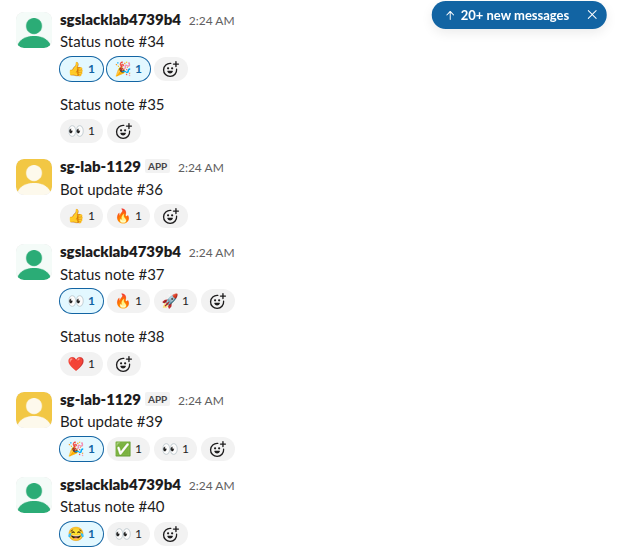
The script
It uses slack_sdk and a bot token with channels:history (add groups:history for private channels) and users:read for the names:
import os, sys
from collections import Counter
from slack_sdk import WebClient

client = WebClient(token=os.environ["SLACK_BOT_TOKEN"])
channel = sys.argv[1]
with_threads = "--threads" in sys.argv

emoji, reactors, messages = Counter(), Counter(), 0

def count(msg):
    global messages
    messages += 1
    for r in msg.get("reactions", []):
        emoji[r["name"]] += r["count"]
        for user in r["users"]:
            reactors[user] += 1

cursor = None
while True:
    page = client.conversations_history(channel=channel, limit=200, cursor=cursor)
    for msg in page["messages"]:
        count(msg)
        if with_threads and msg.get("reply_count"):
            replies = client.conversations_replies(channel=channel, ts=msg["ts"], limit=200)
            for reply in replies["messages"][1:]:   # [0] is the parent again
                count(reply)
    cursor = page.get("response_metadata", {}).get("next_cursor")
    if not cursor:
        break

print(f"{messages} messages, {sum(emoji.values())} reactions")
for name, n in emoji.most_common(5):
    print(f"  :{name}: {n}")
names = {u["id"]: u["name"] for u in client.users_list()["members"]}
for user, n in reactors.most_common(3):
    print(f"  {names.get(user, user)} reacted {n} times")
The bot has to be a member of the channel. Invite it with /invite @yourbot, or conversations.history returns not_in_channel.
The output, with and without threads
Run on the channel without --threads:
42 messages, 83 reactions
  :+1: 24
  :tada: 15
  :white_check_mark: 11
  :eyes: 8
  :rocket: 7
  sglab1129 reacted 44 times
  sgslacklab4739b4 reacted 39 times
And with --threads:
45 messages, 89 reactions
  :+1: 24
  :tada: 15
  :white_check_mark: 11
  :eyes: 8
  :rocket: 7
  sgslacklab4739b4 reacted 45 times
  sglab1129 reacted 44 times
The 42 messages are our 40 plus the two "joined the channel" messages. The difference between the runs is the trap: reactions on thread replies are not in conversations.history. The 6 reactions we put on 3 replies (:saluting_face: and :100:) only showed up once the script also called conversations.replies for each parent with a reply_count. They were not in the top 5 here, but they changed the reactor ranking: without threads the bot looked like the top reactor (44 vs 39), with threads the member was (45 vs 44). In a busy workspace where people react inside threads, skipping replies can drop a large share of reactions.
The two counts in each reaction also mean different things. count is how many people added that emoji to that message, and users lists them, so a reactor leaderboard comes from users and an emoji ranking from count. Typed emoji inside message text (:tada: in the words) are not reactions; to count those, search the text field with a regex such as :([a-z0-9_+-]+):. Our emoji API guide covers listing a workspace's custom emoji, so you can tell custom ones apart in the results.
Never appear "away" on Slack again
Cloud-based. No downloads. Works 24/7 even when your laptop is off.
What Slack's own analytics shows
As a regular member of the Free workspace, we opened <workspace>.slack.com/stats, which redirected to the workspace analytics page at app.slack.com/manage/<team>/analytics:
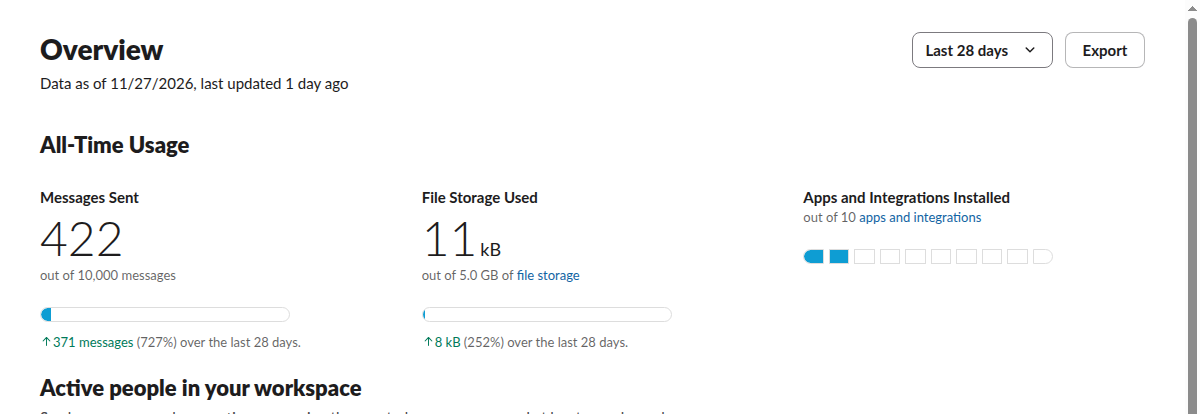
The Overview shows all-time messages sent against the 10,000 limit, file storage, apps installed, active people and where conversations happen, and a banner says "Upgrade to unlock more insights about your workspace. Workspaces on a paid plan can view message and file data." There is no emoji or reaction count on it, and the Analytics menu has only Overview and Channels. So on Free, a "most used emoji" ranking needs a script like this one.
Your own most-used emoji are the one exception: Slack keeps them per person for the emoji picker's Frequently used row. Our frequently used emoji page shows where that list comes from.
Scale it to a whole workspace
- • Loop over channels. List them with
conversations.list(types=public_channel,private_channel, plusexclude_archived=trueif you want only live ones) and run the same loop per channel the bot is in. - • Limit the time range. Pass
oldestandlatest(Unix seconds) toconversations_historyfor "this month" or "this quarter" leaderboards. - • Mind the rate limit.
conversations.historyandconversations.repliesare rate-limited per app, so a workspace-wide run with many threads takes a while; slack_sdk'sRateLimitErrorRetryHandlerretries 429s for you. - • Mind the Free plan's history window. Slack hides messages older than 90 days on Free, so a script cannot count their reactions either.
To find the messages with one particular reaction instead of counting all of them, Slack's search does it without code: search by emoji reaction shows the has::emoji: filter, and reacting to messages covers how reactions are added in the first place.
FAQ
Does it count custom emoji? Yes. A custom emoji reaction comes back by its name, the same way as +1 or tada. Our test used standard emoji only.
Can I count reactions with a user token instead? Yes, and then you see every channel you are in without inviting a bot. reactions.list with a user token lists only the items that one user reacted to, which is handy for "my own top emoji".
Do removed reactions count? No. The API returns the current state, so a reaction added and then removed is not in reactions.
Stop Jiggling Your Mouse.
Join hundreds of remote workers who never worry about their Slack status. Set it up once, stay green forever.
Related Articles
Slack MSI Installer: Gone After 4.48.102, Use MSIX
Slack's last MSI is 4.48.102 from March 2026; every later version 404s. We read both old MSIs and the current MSIX package to show what each installs and how to move a deployment to MSIX.
Slack LaTeX and Math: What Renders, What Doesn't, What Works
Slack shows LaTeX as raw text in messages and canvases, even though its web client ships KaTeX. We tested every route and give the two that work: Unicode math and a formula rendered to an image with 15 lines of Python.
Slack Canvas Images: Add, Size and Insert Them by API
We inserted a PNG, an animated GIF and a 6000 px image into a Slack canvas with canvases.edit. Slack files rendered; an outside image URL became a link card even though the API said ok.