
Can Slack Admins See Your DMs? What Each Plan Allows
Slack admins cannot open your DMs in the app. Workspace Owners can export them on Business+ and Enterprise plans, and on Free and Pro only with Slack's approval. The plan-by-plan rules, deleted messages, and what admins see without an export.
No Slack admin can open your direct messages in the Slack app and read them. There is no button for that on any plan. Your DMs can still reach your company through a data export: Workspace Owners on Business+ and Org Owners on Enterprise can export DMs after they apply for the export tool. On Free and Pro, an Owner has to apply to Slack each time, and Slack approves only for valid legal process, member consent, or a legal requirement.
So the real answer depends on your plan, your company's retention settings, and whether an Owner has export access. Admins, as a role, cannot export DMs on any plan. Owners can.
We build Slack Green, a service that keeps your Slack presence green during your working hours. It only sets presence and never reads messages, files, or DMs. We get asked what employers can see in Slack almost every week, so this page lists what Slack's own help center says, plan by plan.
Who can read your DMs, plan by plan
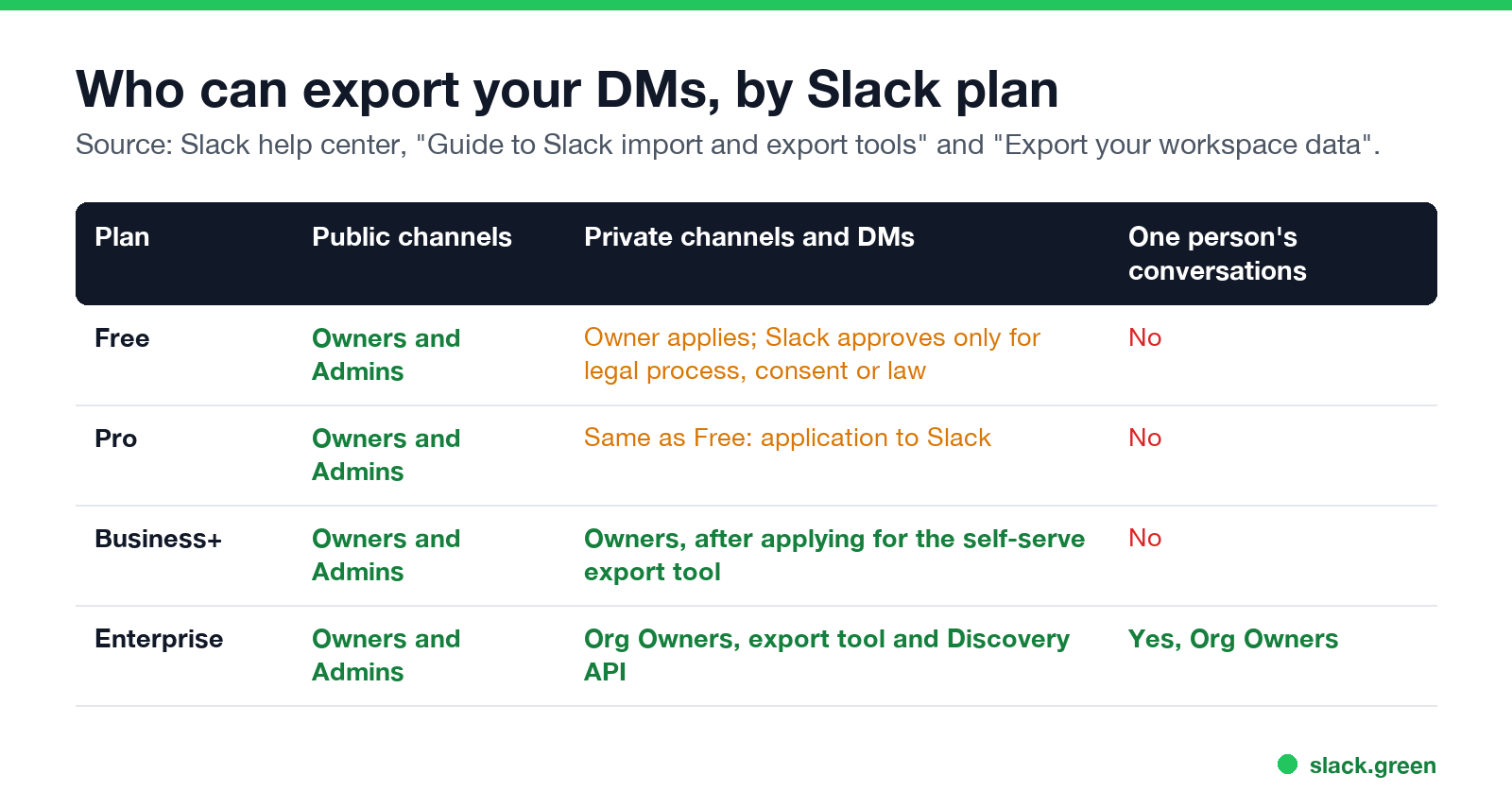
| Plan | Public channels | Private channels and DMs | All of one person's conversations |
|---|---|---|---|
| Free | Owners and Admins can export | Owner must apply to Slack each time | No |
| Pro | Owners and Admins can export | Owner must apply to Slack each time | No |
| Business+ | Owners and Admins can export | Owners, after applying for the self-serve export tool | No |
| Enterprise | Owners and Admins can export | Org Owners, with the export tool or the Discovery API | Yes, Org Owners |
Sources: Slack's "Guide to Slack import and export tools" and "Export your workspace data".
Free and Pro. Slack's guide says Owners "may contact Slack and apply to export content from all channels and conversations, including private channels and direct messages". Slack rejects the application unless the Owner shows valid legal process, consent of members, or a requirement or right under applicable law, "in each instance". This is the case a top r/Slack reply describes: "On the Pro or free plan, it's not possible" for an Owner to do on their own.
Business+. Owners can apply once for a self-serve export tool. After approval, an Owner can export public channels, private channels, and DMs "as needed and permitted by law", and can schedule weekly or monthly exports. Slack puts the legal duty on the Owner: they must have the right employment agreements and policies in place.
Enterprise. Org Owners can export by conversation type, by member, or everything one person was part of. They can also turn on the Discovery API, which connects Slack to eDiscovery and data loss prevention (DLP) tools such as Global Relay, Smarsh, Proofpoint, and Nightfall. A DLP tool scans messages, DMs included, for things like card numbers.
How a DM actually gets read
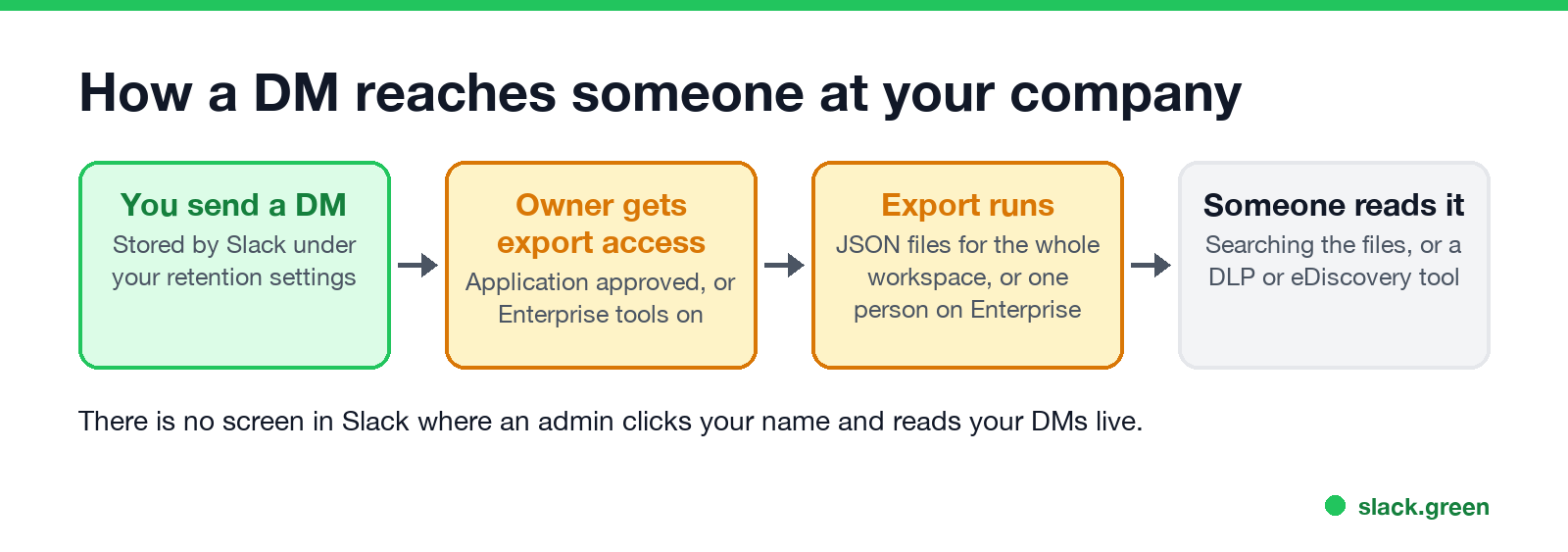
An export is a ZIP of JSON files, one folder per conversation. To read your DMs from it, someone has to download the export and search the files. On Business+ it covers the whole workspace. The r/Slack answer above puts it this way: an Owner would need to "run an export of the entire workspace, and sift through the JSON file". On Enterprise, an Org Owner can export only your conversations, and an eDiscovery tool makes them searchable.
Two limits apply to every export:
- • Retention. An export only has what Slack still stores. On paid plans Slack keeps messages for the life of the workspace by default, unless the Owner sets a shorter retention period.
- • Files. Most exports carry links to files, not the files themselves.
Can admins see deleted or edited DMs?
Never appear "away" on Slack again
Cloud-based. No downloads. Works 24/7 even when your laptop is off.
Sometimes. It depends on the retention setting:
On Enterprise, Slack says the Discovery API includes "content that has been edited and deleted (if preserved by retention policies or legal holds)". So deleting a DM helps only if your workspace does not save edits and no legal hold is on. More on deleted messages in channels and DMs, and whether anyone can recover them, is in can Slack see deleted messages. On the Free plan, Slack keeps a year of history, and the Owner can choose 90 days instead.
What admins can see without any export
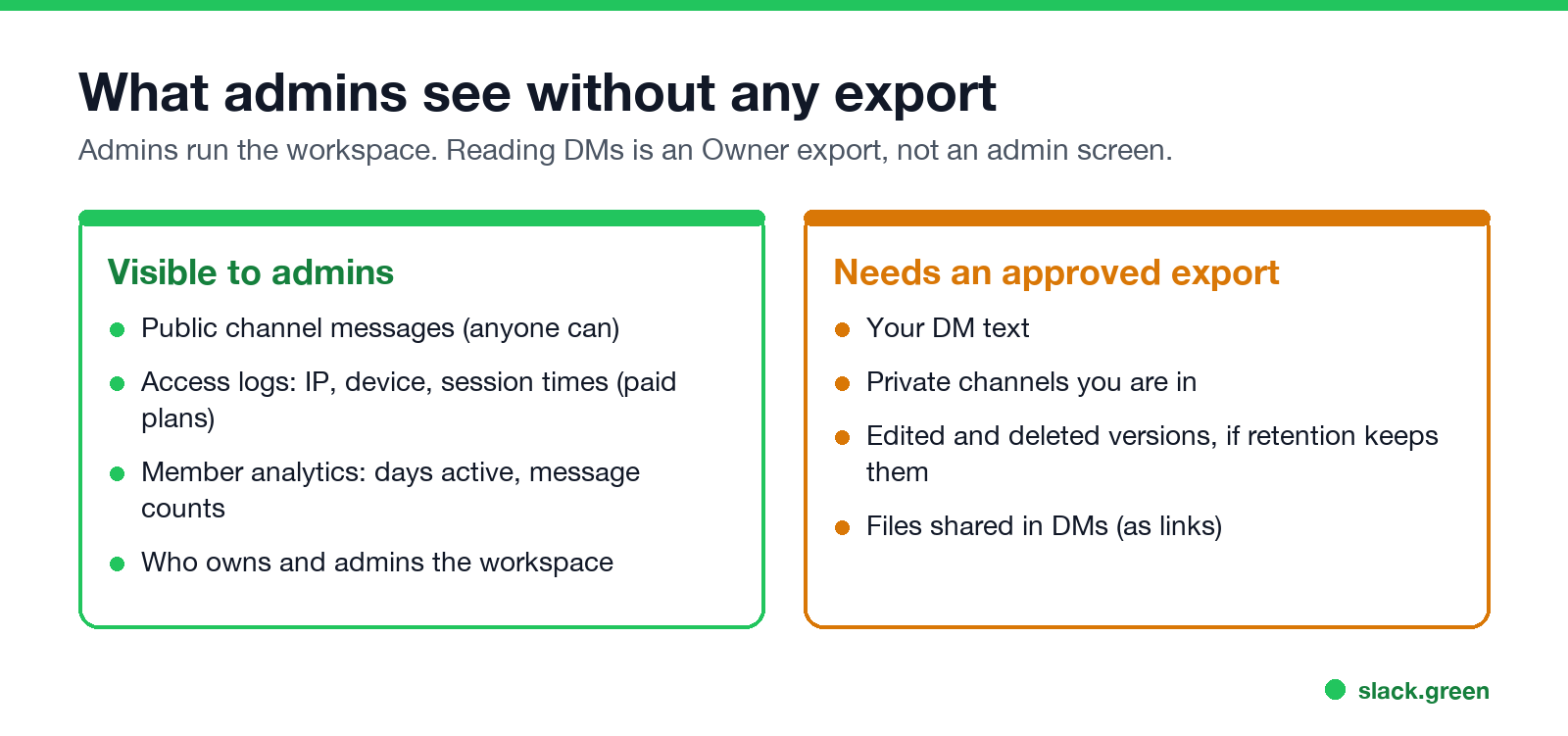
Admins run the workspace, so some data about you is visible to them without touching your DMs:
What Slack itself does not record for anyone: your mouse outside the Slack window, your keystrokes in other apps, or your screen. The details are in does Slack track mouse movement. Monitoring software that your company installs on a work laptop is a different matter, and Slack settings do not limit it.
For private channels, the export rules above apply. On Enterprise, admins can also hold a role with permission to manage private channels at the org level, so ask your IT team what your org has set.
Are Slack DMs private?
From your coworkers, yes. Nobody else in the workspace can see a DM they are not part of. From your employer, no. Slack's guide says customers may need, or be legally compelled, to export content, for example after a harassment report or under a court order. Laws and company policies also limit how an employer may use exports, and some laws require employers to tell employees about them.
A practical rule from the r/Slack threads on this: treat a work Slack DM like a work email. Your company owns the workspace. If a message would be a problem in an investigation, do not send it on the work Slack.
FAQ
Never appear "away" on Slack again
Cloud-based. No downloads. Works 24/7 even when your laptop is off.
Can my boss see my Slack messages?
Your manager sees what any coworker sees: public channels and conversations they are in. They cannot read your DMs unless they are a Workspace or Org Owner with export access, or they get the data from someone who has it.
Can Slack admins read DMs?
Not as admins. On every plan, Admins can export only public channels. DM exports are for Owners, on Business+ and Enterprise after they apply, or on Free and Pro only with Slack's approval.
Can Slack workspace owners see private messages?
Yes, on Business+ and Enterprise, after they are approved for the export tool. They read them from an export file, not live in the app.
Does Slack notify you when an admin exports your DMs?
Slack's help center does not describe a notice to members when an export runs. It says laws and policies may require employers to tell employees about export tools. Check your company's IT or acceptable use policy.
Can someone see if you read their DM on Slack?
No. Slack has no read receipts. The sender can see whether your dot is green, and Slack does not show last seen.
Can my boss hear my Slack huddles?
Not live, unless they are in the huddle. Messages and files shared in a huddle thread are stored like other messages and follow the same export rules.
Can my employer tell if I use a tool to stay active?
This is a separate question from reading DMs. We cover what shows up in admin logs in will I get caught using Slack Green.
Stop Jiggling Your Mouse.
Join hundreds of remote workers who never worry about their Slack status. Set it up once, stay green forever.
Related Articles
Can Slack See Deleted Messages? What Your Company Can Recover
Nobody can see a deleted Slack message in the app, including admins. Your company can still have it if the workspace retention setting saves edits and deletions, or if a legal hold is on, and read it through an export or eDiscovery tool. What each plan keeps, and whether you can recover a deleted message.
Does Slack Track Your Location? What Admins and Coworkers See
Slack does not track your GPS location or show anyone a map. It records the IP address and device of each sign-in in access logs, which owners and admins can see on paid plans, and your profile shows your local time. What each person can learn about where you are.
caffeinate on Mac: Keep Your Mac Awake From Terminal
caffeinate is the built-in macOS command that keeps a Mac awake. Run caffeinate -d to stop the display sleeping, -i to stop idle sleep, add -t for a time limit, and press Ctrl+C to stop. Every flag with examples, and why it does not keep Slack active.