
Can My Employer Read My Teams Chats? Yes, Through Admin Tools
Yes. Every Teams chat on a work account, private one-to-one chats included, is stored in company mailboxes, and admins with the right Microsoft Purview roles can search, export and scan it. Your manager cannot open your chats from Teams itself. Who can read what, how they do it, and what stays private.
Yes. Your employer can read your Microsoft Teams chats if it uses a work account, and that includes private one-to-one chats and group chats. Teams stores a copy of every chat message in the Exchange Online mailboxes of the people in the chat, and admins with Microsoft Purview roles can search those mailboxes with eDiscovery, export the results, and run policies that scan messages for set words. What your employer cannot do is open your chats from Teams itself. Your manager, without an admin role, sees only the chats they are in. Reading yours is a separate, logged step, usually taken by IT, legal or HR compliance for an investigation or a legal request.
Slack works the same way on paid plans: the workspace owns the messages, and owners can export them. Slack Green keeps your Slack status green from a server during the hours you set; it does not read or store your messages.
Who can read your Teams chats
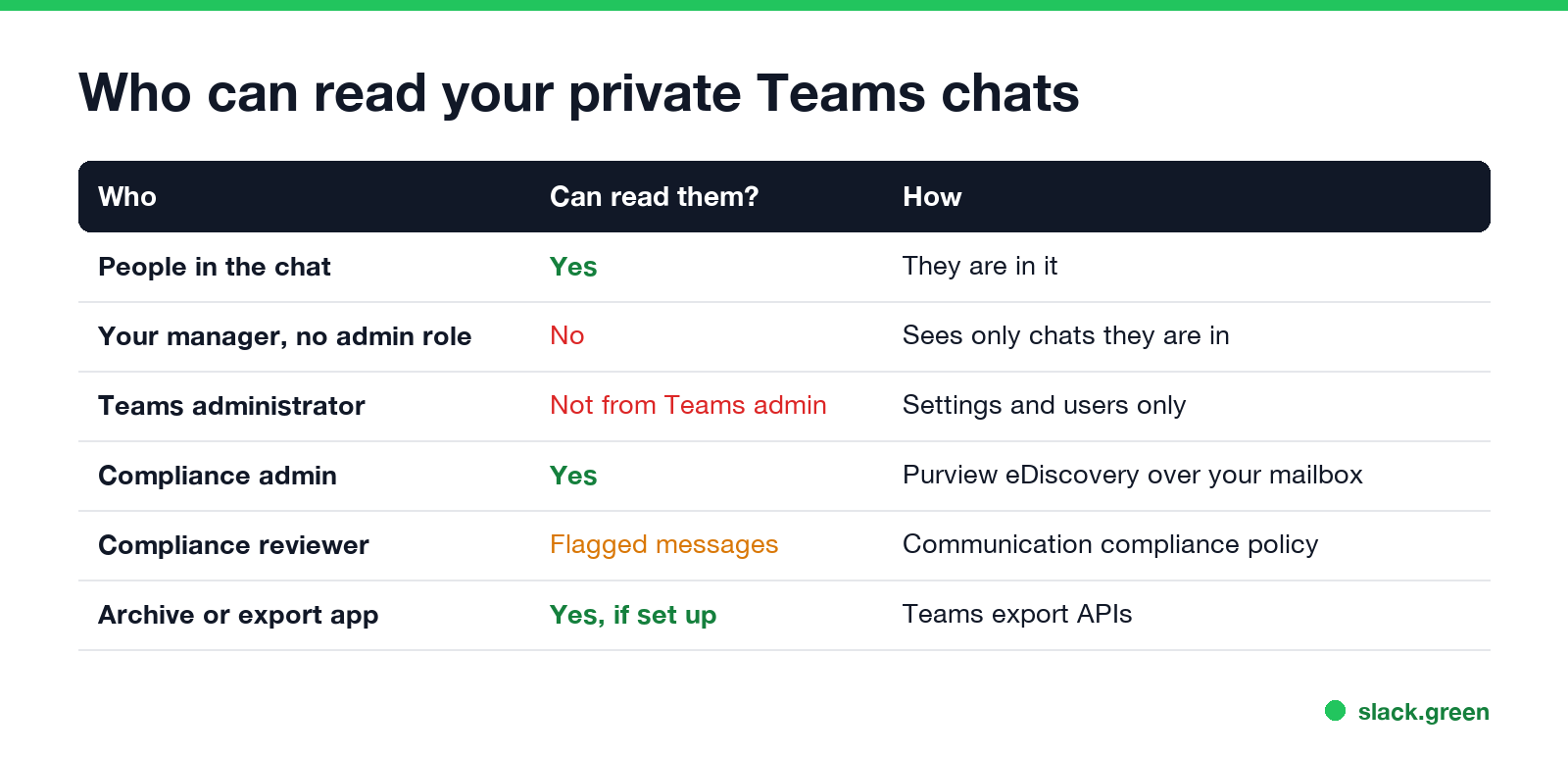
| Who | Can read your private chats? | How |
|---|---|---|
| People in the chat | Yes | They are in it |
| Your manager (no admin role) | No, only chats they are in | Teams shows each person only their own chats |
| Teams administrator | Not from the Teams admin center | It manages settings and users, not message content |
| Compliance admin or eDiscovery manager | Yes | Purview eDiscovery or Content search over your mailbox |
| Communication compliance reviewer | Messages a policy flags | Purview communication compliance |
| An app approved for the Teams export API | Yes, if the company sets one up | Microsoft Graph export of all chat messages |
| Microsoft | Not for your company's use | Encrypted at rest; Microsoft processes it as your company's data |
A Teams administrator and a compliance admin are often the same person in a small company, which is why "IT can read my chats" is usually true in practice.
How an employer reads Teams chats
eDiscovery and Content search. In the Microsoft Purview portal, an admin with an eDiscovery role picks your mailbox as a location, searches for Teams content, and reviews or exports what it finds. A chat with three people is stored three times, once in each mailbox, so leaving a chat or deleting your copy does not remove anyone else's. Can my employer see deleted Teams messages shows the PowerShell for this and what happens to deleted and edited messages.
Communication compliance. A policy scans chat messages for words, phrases or types of content, such as harassment, sharing of customer data or insider trading terms, and sends matches to named reviewers. Reviewers see the flagged message and the messages around it. It is common in banks, brokerages and healthcare, where regulators require message supervision.
Data loss prevention. DLP policies scan messages as you send them and block ones that contain things like card numbers or passport numbers. Your message may show a "blocked" notice. DLP checks content; it does not collect chats for someone to read later.
Export and archiving tools. Regulated companies often copy every message to an archive (Smarsh, Global Relay and others) through the Teams export APIs. Everything in the archive can be searched.
What stays private, and what does not
Never appear "away" on Slack again
Cloud-based. No downloads. Works 24/7 even when your laptop is off.
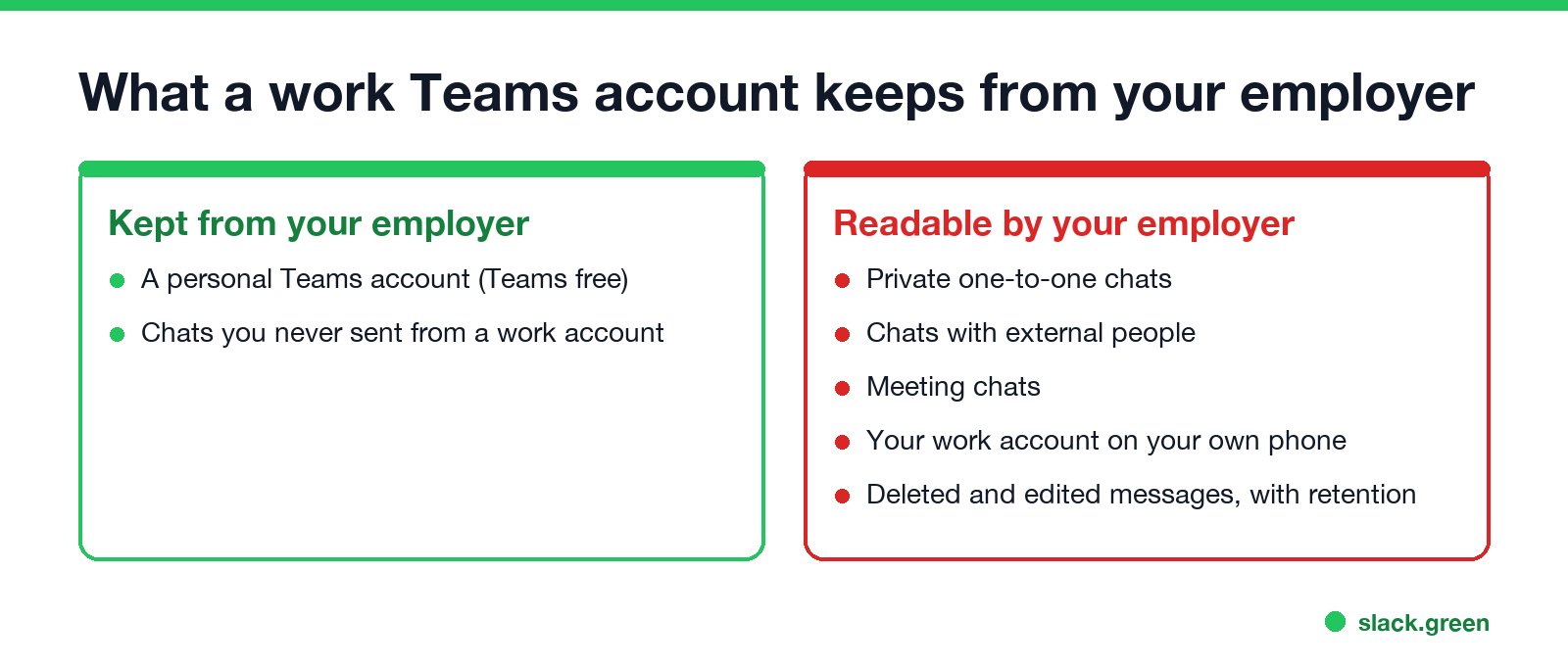
- • Private one-to-one chats: not private from the company. "Private" means private from coworkers, not from the account owner.
- • Chats with people outside the company. Stored in your mailbox like any other chat.
- • Meeting chats. Stored like group chats, in the mailboxes of the people in the meeting.
- • Teams on your own phone. Still your work account; the chats live in the company tenant, not on the phone.
- • Personal Teams (Teams free, with a personal Microsoft account). Your employer has no access to that account, even on the same computer. The computer itself is another matter.
- • Calls. Separate rules; see can my employer listen to my Teams calls.
Teams encrypts messages in transit and at rest. It does not end-to-end encrypt chats, which is what lets these admin tools read them. End-to-end encryption in Teams applies to some one-to-one calls, not to chat.
Does anyone read your Teams chats day to day?
Usually not. A search takes a deliberate action by someone with a Purview role, and Purview records it in the audit log. Most companies search chats for specific reasons: a legal hold or lawsuit, an HR complaint, a security incident, or a regulator. Companies with communication compliance policies are the exception, because matching messages go to reviewers automatically.
Your employer can also see a lot without reading a single message: sign-ins, message counts per day, meetings and calls from the Teams usage reports, and your presence. That side is in does Teams track your activity, and the full list of ways employers watch remote staff is in how do employers monitor remote workers.
Teams vs Slack on reading your chats
| Microsoft Teams (work account) | Slack (paid workspace) | |
|---|---|---|
| Where messages live | Company Exchange mailboxes and Teams storage | The workspace |
| Who can search private chats | Compliance admins with eDiscovery | Owners with exports or the Discovery API, by plan |
| Automatic scanning | Communication compliance, DLP | DLP and third-party tools on Enterprise plans |
| Manager in the app | Only chats they are in | Only conversations they are in |
The Slack side is in can Slack admins see your DMs.
FAQ
Never appear "away" on Slack again
Cloud-based. No downloads. Works 24/7 even when your laptop is off.
Can my boss see my Teams messages? Not in Teams. They see only chats they are in. Someone with a compliance admin role can search your messages and share them with your boss.
Are Teams chats private? From coworkers, yes. From your employer, no. The company owns the account and can search it.
Can my employer see my Teams chats if I use my own phone? Yes, if you use your work account. The chats are stored in the company's Microsoft 365, not on the phone.
Stop Jiggling Your Mouse.
Join hundreds of remote workers who never worry about their Slack status. Set it up once, stay green forever.
Related Articles
Slack: Get Notified When Someone Comes Online (No Built-In Alert)
Slack has no alert for when a coworker becomes active. No preference, Workflow Builder trigger or profile button does it. You can watch their green dot, send a message they will see when they return, or run a short script that checks users.getPresence every minute and DMs you.
What Does Tentative Mean in Outlook? A Maybe, on Invites and Calendars
Tentative in Outlook means maybe: you might attend the meeting, or the time might be booked. Where Tentative shows up, why unanswered invites land on your calendar as Tentative, how it differs from Busy, and why it does not turn your Teams or Outlook status red.
Does Outlook Show Away When You Are Idle? Yes, After About 5 Minutes
Outlook shows your Microsoft Teams status, so it turns to Away, a yellow clock, after about 5 minutes without keyboard or mouse input, or at once when you lock the computer. Outlook has no idle timer of its own. Why it can show Away while you work, and what changes it.